Cross-Browser Unified Select Styling: A CSS Approach and AI-Assisted Practice
Generate a style test page with AI, then unify select appearance across browsers with appearance:none.
Starting from the noticeable default rendering differences of HTML `<select>` in Chrome, Safari, and Firefox, the article describes how Simon Willison used Claude to generate a test page covering all styleable options, then compared desktop and mobile screenshots to choose an approach. The final CSS uses `appearance: none` to remove the browser's default appearance, plus an inline SVG background arrow and unified padding, border, and radius. Screenshot verification shows select appearance is now consistent across the three desktop browsers. The article argues this workflow shows AI's value as a rapid prototype generator and notes that "reset first, then customize" is a general starting point for cross-browser select styling.
Why select boxes look different across browsers
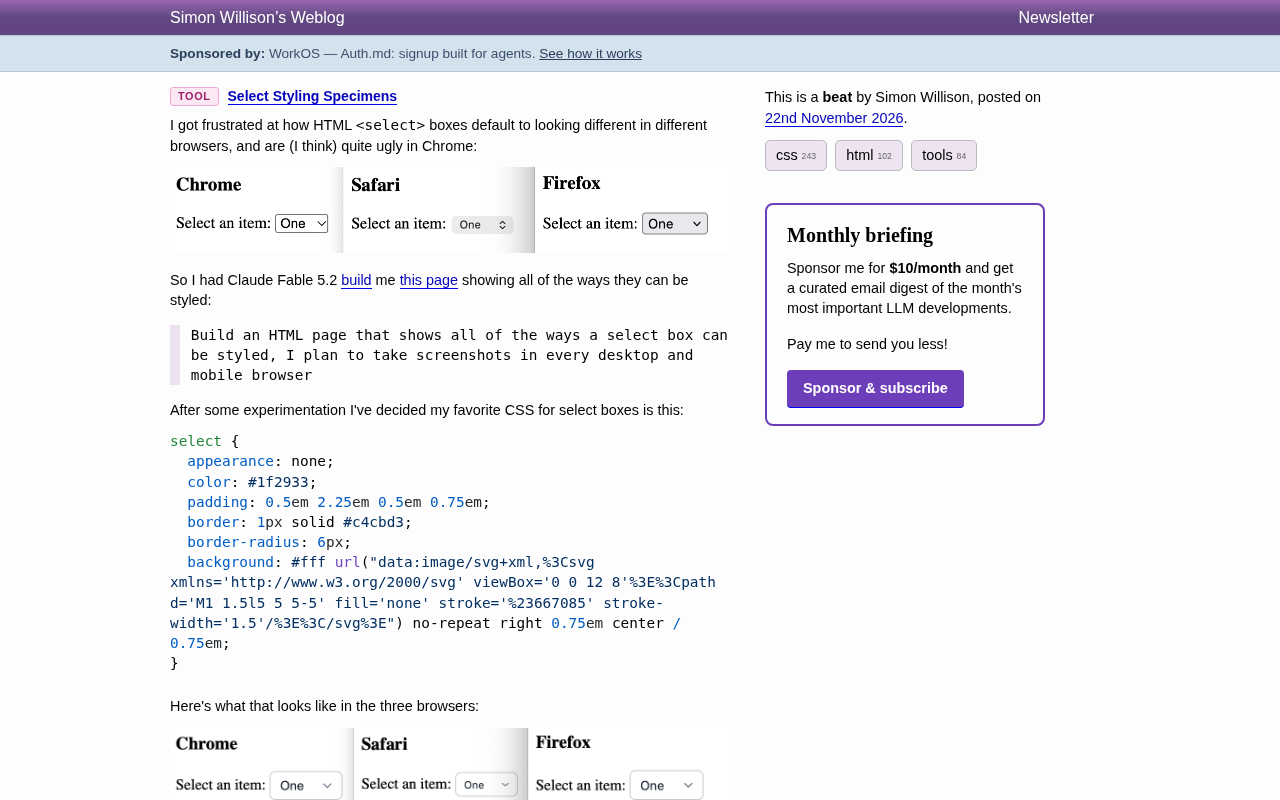
The HTML <select> element renders very differently across browsers with default styling. According to Simon Willison's test screenshots, Chrome shows a white background with a black border, Safari shows a gray background with no border, and Firefox shows a gray background with a black border—and all three differ slightly in size. This inconsistency troubles front-end developers, especially in projects that require a consistent visual experience across platforms.
In his blog, Willison admits he finds these default differences frustrating and considers the Chrome styling "quite ugly." So he decided to tackle the problem—not by adjusting things manually, but by using AI tools to generate a page showcasing all the styleable options.
Generating a style test page with AI
Willison used Claude Fable 5.2 to build an HTML page with a clear goal: list every way a select box can be styled with CSS, so he could later take screenshots for comparison across desktop and mobile browsers. His prompt to Claude was: "Build an HTML page that shows all of the ways a select box can be styled, I plan to take screenshots in every desktop and mobile browser".
This approach reflects a typical pattern in AI-assisted development: rather than exhaustively enumerating every style combination himself, the developer has the model quickly generate a comprehensive test page, then verifies the results through actual screenshots. Willison didn't disclose how many style variants the page included, but he ultimately filtered out the option he liked best.
The final chosen CSS approach
After experimenting, Willison settled on a set of CSS rules whose core is using appearance: none to remove the browser's default appearance, then fully customizing the styling. The code is as follows:
select {
  appearance: none;
  color: #1f2933;
  padding: 0.5em 2.25em 0.5em 0.75em;
  border: 1px solid #c4cbd3;
  border-radius: 6px;
  background: #fff url("data:image/svg+xml,%3Csvg xmlns='http://www.w3.org/2000/svg' viewBox='0 0 12 8'%3E%3Cpath d='M1 1.5l5 5 5-5' fill='none' stroke='%23667085' stroke-width='1.5'/%3E%3C/svg%3E") no-repeat right 0.75em center / 0.75em;
}
The key points of this rule set include: appearance: none eliminates the browser's default styling; an inline SVG is used as a background image to draw the dropdown arrow, avoiding extra HTTP requests; and unified padding and borders are set. Willison used screenshots to show the result: the select boxes now look completely identical across the three browsers, all with a rounded gray border and a gray downward arrow.
appearance is the CSS appearance property, which controls whether an element retains the default native appearance provided by the operating system or browser. For form controls such as <select>, <button>, and <input type="checkbox">, browsers render them using native platform controls, so their appearance varies noticeably across systems and browsers. Setting it to none removes this native appearance, bringing the element close to a regular block-level box and allowing developers to fully custom-draw it with properties like background, border, and padding. Note that appearance: none only affects appearance and does not change the control's interaction behavior. In some mobile browsers, removing the default appearance may affect touch feedback or how the native dropdown popup is displayed, so it's still advisable to verify on target devices.
An inline SVG used as a background url() value typically takes the form of a data:image/svg+xml Data URL, encoding the SVG markup directly into the CSS rather than referencing an external file. The benefit is no extra HTTP request—the icon loads together with the stylesheet—and it won't go missing due to path or cross-origin issues. In the syntax, characters such as #, <, and > need percent-encoding, or you can use base64 encoding. Combined with no-repeat, right 0.75em center, and / 0.75em in the background shorthand, you can precisely control the arrow's position and size. This approach suits simple icons; for complex graphics or dynamic multi-color changes, you should still consider standalone SVG files or CSS mask solutions.
Multi-browser consistency verification
Willison's verification method is worth learning from: he took screenshots in Firefox, Safari, and Chrome for comparison. The results show that the custom styling indeed eliminated the browser differences. He didn't mention specific mobile browser screenshot results, but since the original goal covered both desktop and mobile, the approach should in theory provide cross-device consistency.
This workflow of "first generate a test page, then take actual screenshots" is more reliable than guessing from code alone. For projects that need fine control over form styling, this is a reusable verification approach.
Takeaways for front-end development
This case demonstrates the practical value of AI tools in style exploration. Developers can treat AI as a rapid prototype generator, handing repetitive style enumeration work to the model while focusing on filtering and decision-making themselves. Willison's final solution isn't complex in itself, but the process of finding it relied on AI's ability to cover a broad range.
Additionally, using an inline SVG as a background image is a neat trick: it keeps the code concise while avoiding dependencies on icon fonts or external images. For projects pursuing lightweight solutions, this approach is worth referencing.
That said, Willison's solution targets his personal aesthetic preferences and project requirements and may not suit every scenario. But the idea of "first reset with appearance: none, then customize background and border" is a general starting point for unifying select styling across browsers.
One-line Summary
Use AI to generate a style test page, then unify select appearance across browsers with appearance:none.
Paragraph Summary
The article starts from the noticeable differences in default rendering of HTML <select> across Chrome, Safari, and Firefox, and describes how Simon Willison used Claude to generate a test page covering all styleable options, then compared screenshots across desktop and mobile to select an approach. The final CSS uses appearance: none to remove the browser's default appearance, combined with an inline SVG background for the dropdown arrow and unified padding, border, and border-radius. Screenshot verification shows the select appearance is now completely consistent across the three desktop browsers. The article argues this workflow demonstrates AI's value as a rapid prototype generator and notes that "reset first, then customize" is a general starting point for unifying select styling across browsers.
Related articles

AI Penetration Testing Agents in Practice: From Skill Configuration to Fully Automated Vulnerability Discovery
Starting from the six core capabilities of agents, this article breaks down how to build an AI penetration testing agent: why chat tools can't find vulnerabilities, how Skill configuration encapsulates pentesting skills, and how SRC automated vulnerability discovery impacts the way security engineers work.
Understanding AI Usage Through Unix Permissions: The 0rwx Model
Introducing the 0rwx model from Hacker News: using Unix read, write, and execute permissions to break down AI usage into information input, content generation, and action triggering—plus its insights and limitations for product design and security boundaries.
Scientific Evidence vs. Regulatory Rol…
Scientific Evidence vs. Regulatory Rollback: Europe's Chemical Rules Debate
A Le Monde opinion piece argues that science increasingly links chemical exposure to "lifestyle diseases" while Europe weakens regulation. This article examines the evidence, policy drivers, and HN debate.