DeepSeek Harness Enterprise Practice: Three Modes and Plugin-Based Agent Design

DeepSeek Harness reveals through its plugin philosophy and three work modes that Agent engineering is about environment fit, not model strength.
This article analyzes the shortcomings of most Agent tutorials and argues that onboarding should prioritize logic over quick results. Through DeepSeek Harness, a local Agent tool, it showcases its core design of "everything is a plugin" and the differences among Standard, PTC, and Assembly modes: Assembly mode streamlines tools to stress-test model limits, Standard mode offers high fault tolerance for complex tasks, and PTC mode pre-orchestrates code for fast execution but higher error-correction cost. Creation mode lets users customize Agents. Measured token consumption shows Standard mode at about 41K, PTC at about 62K, and Safe Review at only 28K. The ultimate conclusion is that an Agent's strength depends more on working environment assignment—there is no strongest mode, only the most suitable one.
Why Do Most Agent Tutorials Still Leave You Unable to Use Them After Learning?
Agent tutorials on the market generally share two fatal weaknesses: first, they put the cart before the horse, opening with a pile of jargon like tool calling, task planning, and the ReAct framework—beginners get dizzy from the concepts before they've even started. Second, they tout quick results, claiming things like "learn Agent in ten minutes" or "build it with one piece of code"—following along and getting the code to run is just replicating a finished product. You don't understand the principles, can't tune it, can't adapt it to your business, and it falls apart the moment you switch scenarios.
According to the sharing by Bilibili creator Roland, real Agent onboarding should start with understanding the logic before doing projects. His tutorial series abandons dull jargon, explaining from underlying principles first and then progressively taking on real projects, with the goal of enabling learners to independently complete the full workflow from requirements analysis and solution design to deployment and launch. Understanding DeepSeekAd Harness, this new framework, is an excellent entry point for understanding how Agent engineering lands in practice.
What Is DeepSeek Harness: The "Plugin Philosophy" of Local Agents
In one sentence, DeepSeek Harness is a local Agent tool, similar to tools like Codex and WorkerBuddy. Everything a local Agent fundamentally does comes down to two things: first, it's installed on your local machine and naturally can schedule local resources—reading and writing files and running local applications are all easy; second, it orchestrates tasks—you give it a task, and rather than going straight to the large model, it decomposes the task into smaller tasks, calls the large model in sequence, and finally integrates the results.
The essential difference between tools lies in "how tasks are decomposed." DeepSeek Harness's core logic is summed up officially in one sentence: everything is a plugin. What's a plugin? Grab it when you want to use it, toss it when you don't. Models, tools, and orchestration are all composed of plugins, freely replaceable and flexibly recombinable. This means using Harness is more like using a free-form tool—you can choose different modes based on task characteristics, or even combine them.
Getting started is extremely simple: no installation, no download—just use the NPX command. NPX is a Node.js command, so you need to install the Node.js environment first (the latest LTS long-term support version is recommended). If you frequently switch versions, you can manage them with NVM—one command downloads or switches between different Node versions.
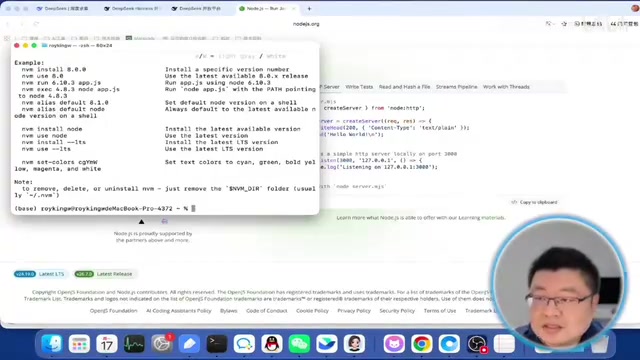
Once the environment is ready, execute the NPX command. The first time will be a bit slower as components are downloaded, after which it exposes a local service address that you can open in your browser to use. On first entry you need to fill in the API Key created on the DeepSeek official API open platform, and then you can enter the workspace interface.
NPX and the Node.js Environment: NPX is a command bundled with npm, Node.js's package manager, used to run remote packages directly without global installation. It temporarily downloads packages to cache during execution, so the first run is slower and subsequent runs load from cache. To use NPX, you must first install the Node.js environment. Node.js is a JavaScript runtime based on the Chrome V8 engine that lets JavaScript run outside the browser. LTS (Long Term Support) is the long-term support version with high stability and a long maintenance cycle, suitable for production environments. NVM (Node Version Manager) is a Node.js version management tool that allows users to install and switch between multiple Node versions on the same machine, making it convenient to test different environments.
Workspace and Model Configuration: Tasks Organized Like Files
Harness's core functionality organizes conversations in the form of workspaces, essentially categorizing tasks like files. It's recommended to create one workspace per task type and specify a local working directory around which all subsequent work revolves—when you ask it to list the files in the current directory, it refers to the local directory corresponding to the workspace.
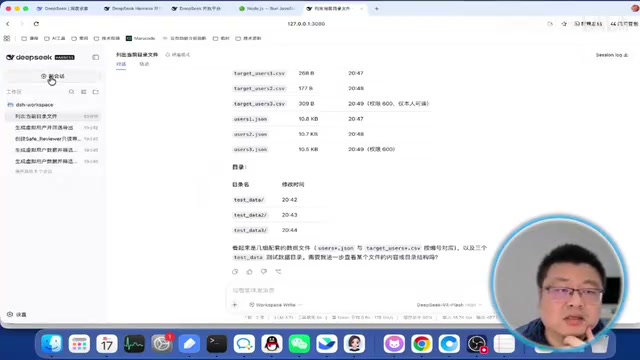
Configuration is also simple. The model options come with the DeepSeek configuration by default, and the API Key you filled in earlier will show as "configured." Two DeepSeek models are provided by default: Flash is relatively faster, while Pro handles complex tasks better but is slower and consumes more tokens. To switch to another model, you can add a new model provider—for example, choosing Anthropic to use Claude models directly, again just filling in the API Key; you can also customize a provider to find models not built into DeepSeek. Domestic users can also consider comprehensive platforms that run many models, including DeepSeek, Tongyi Qianwen, MiniMax, and others.
Three Core Work Modes: Standard, PTC, and Assembly
Harness's most core innovation is the work mode, similar to Agent Preset—combining different functional components for different tasks. Three are commonly used by default: Standard mode, PTC mode, and Assembly mode, plus a Creation mode for creating new modes.
Assembly Mode: Keep Only the Core, Stress-Test the Model's Limits
Assembly mode provides only a persistent Bash and file-editing dual-tool coding Agent, essentially stripping away most tools and keeping only the most core parts to complete common tasks. Its original design intent was for developers to test the extreme stress-bearing capacity of large models—just as when testing an off-road vehicle's limits on extreme terrain you remove non-core features like cameras and radio, keeping only the core essentials to draw out the model's peak performance.
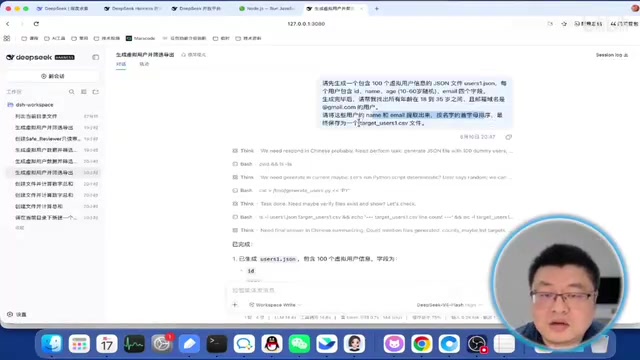
When tested with the same comprehensive task (generate virtual user information, sort by the first letter of names, write to a file), Assembly mode directly writes a Python script to execute, with no reporting in between—it works head-down and delivers the result. Its token input is lower because it doesn't need to retrieve a large number of tools.
Standard Mode: Take One Step and Look, Fault Tolerance First
Standard mode is similar to other Agents: it calls the large model to decide which tools to use, executes the tools to obtain information, then hands it back to the large model to integrate. Its advantage is high fault tolerance—if it goes wrong it can backtrack on its own, and the error-handling process is relatively flexible. It's suitable for complex tasks, such as compiling complete reports or searching online for materials to write complex documents—scenarios with many steps and lots of variation.
For the same task, Standard mode's input tokens are noticeably higher, because it has to retrieve the many locally installed plugins—search plugins, file-writing plugins, and so on—so at the outset it must retrieve more tools and combine them. But Harness does token optimization well, with a high cache hit rate, so the actual cost is relatively low. During execution it gives feedback step by step: the large model first checks the environment, discovers Python is available locally, then writes a script to execute—the whole process is driven by the large model.
PTC Mode: Orchestrate the Flow into Code First
PTC stands for Program to Call, and its core is orchestrating the task into a TypeScript program on the backend, using code to drive the entire large model to solve the problem. It orchestrates the whole flow upfront, like holding a meeting to form all the processes into a battle guide and then following the guide—execution is faster and the logic more precise, but its error-handling capability is somewhat lower than Standard mode. Once an execution error occurs, you need to go back and adjust the entire script and rerun it, and the back-and-forth consumes more resources. It's suitable for tasks with precise logic, few surprises, and the need for repeated execution (such as running once per hour).
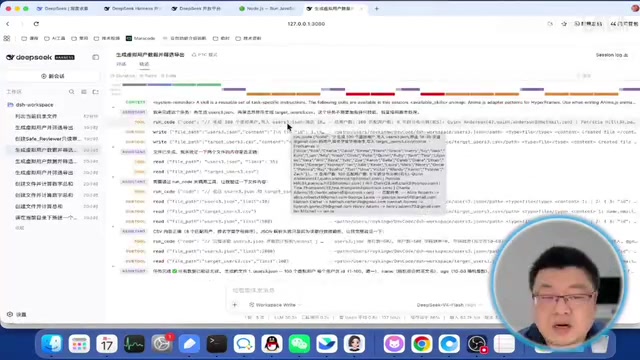
In actual testing, PTC mode's execution process was more complex, with errors appearing along the way: it first wrote Code to orchestrate all tasks, found problems when calling tools like Write, then rewrote the instructions, adjusted, and executed again. The whole process required no human intervention, but there was obvious internal back-and-forth.
Agent Preset: Agent Preset is a pre-configured agent operating scheme that defines the toolset, model parameters, execution flow, and so on available to the agent. By selecting different presets, users can quickly switch the agent's behavior mode without manually adjusting every detail. DeepSeek Harness's work modes are essentially a kind of Agent Preset, combining different plugins and strategies for different task types (such as fast execution, high fault tolerance, precise orchestration) to balance efficiency, accuracy, and resource consumption.
TypeScript: TypeScript is a superset of JavaScript that adds a static type system, catching type errors at compile time and improving code maintainability and reliability. Developed by Microsoft, it ultimately compiles to pure JavaScript to run. In PTC mode, Harness uses TypeScript to orchestrate task flows because its type system helps reduce errors in complex logic, and the code structure is clear, making it easy to debug and modify.
Creation Mode: Letting Users Participate in Defining Agents
Creation mode is used to create new modes—you just describe the requirements, and the internal logic organizes itself. The Bilibili creator demonstrated creating a "Safe Review" mode, with the requirement being to only review local code and not modify files or execute scripts, making it safer. The creation process is long and consumes many tokens (the tutorial recorded about 19.5M), and when complete the new mode appears in the mode options.
When running the same task with Safe Review mode, it first examines the local tools and determines it needs file read/write permissions, but those tools aren't available in the current mode, so it presents several options for the user to decide—providing a Python script, merely explaining the restrictions without further elaboration, and so on. After the user chooses, it outputs the script for the user to execute themselves.
The token consumption comparison is telling: Standard mode about 41K, PTC mode about 62K due to repeated script adjustments, and Safe Review mode only about 28K.
Token Consumption and Cost: A token is the basic unit of text processed by a language model, with one token roughly equal to 0.75 English words or half a Chinese character. API calls are billed by token count, including input (prompts) and output (generated content). The differences in token consumption across modes reflect their internal complexity: Standard mode needs to retrieve many tools so input tokens are high; PTC mode repeatedly adjusts scripts so total consumption is high; while Safe Review mode has few tools and a simple flow, so consumption is lowest. Optimizing token usage is key to reducing Agent operating costs.
An Agent's Strength Isn't Just About the Model
From DeepSeek Harness we can draw a key insight: an Agent's strength depends not only on how smart the large model is, but even more on what kind of working environment you assign it. There is no strongest mode, only the most suitable mode. Basic application scenarios have been largely explored; what comes next is who lands it better—and this is precisely Harness's greatest lesson for Agent engineering.
Related articles

FastAPI Learning Path: From Beginner to AI Project Practice
A Bilibili creator recommends *FastAPI Web Development: From Beginner to Advanced with Practical Projects*. This article outlines the FastAPI learning path: target audience, the 15-chapter six-part structure, project-driven learning, and practical directions from web backend to AI Agents, helping beginners avoid detours.

Reverse-Engineering Taobao's sign Signature Parameter with AI in 10 Minutes: A Practical Walkthrough
Based on a Bilibili hands-on demo, this article explains how to combine DeepSeek with vision models to automatically reverse-engineer Taobao's sign signature parameter, track dynamic titter and token values, and successfully scrape product data within ten minutes—while analyzing the capability boundaries and compliance risks of AI Agents in crawler reverse engineering.

LangChain+MCP from Beginner to Practice: A Deep Dive into the Bilibili Tutorial
A deep dive into a Bilibili LangChain+MCP tutorial: framework positioning, agent abstraction, and MCP protocol basics. Why not hand-build frameworks, and how beginners can follow the code-practice path.