DeepSeek Harness Penetration Mode: A Practical Guide to Automated Vulnerability Discovery with AI Agents

A breakdown of how to mount penetration mode in DeepSeek Harness and build an AI-driven automated vulnerability discovery workflow from scratch.
Based on a hands-on Bilibili demo, this article explains how to build an automated vulnerability discovery pipeline with DeepSeek Harness (DSH): the Agent analyzes and decides, the Trigger executes, and a local Skill library supplies attack techniques. DeepSeek wins on tool selection for its lower security content restrictions. It covers three installation paths for penetration mode (NPM, Release URL, local file), notes desktop and Web commands aren't interchangeable and a restart is required, and shows the main Agent dispatching two sub-Agents for parallel port scanning and Web enumeration. It concludes with three hurdles newcomers must clear: environment matching, authorization boundaries, and report quality.
Why AI Agents Are Reshaping SRC Vulnerability Hunting
AI vulnerability hunting has moved past the "can it be learned" stage — what matters now is who gets the workflow running first. The core logic of this automation solution is simple: the Agent acts as the brain, responsible for reading skills, analyzing tasks, and producing plans; the Trigger acts as the hands, actually executing commands and collecting data; and a local vulnerability Skill library provides the AI with a "playbook" of attack techniques. Once this pipeline is up and running, you can spend an hour a day letting the AI scan and analyze automatically in the background while you focus on final verification — and bounties and rankings will gradually accumulate.
In reality, many newcomers get stuck at step one — vague tutorials that only give tools but not methods, plus reports that get repeatedly rejected for duplicating submissions. Based on a complete hands-on demo from a Bilibili creator, this article breaks down how to build your own automated vulnerability factory from scratch, covering environment deployment, skill library mounting, penetration mode configuration, and real-world verification.
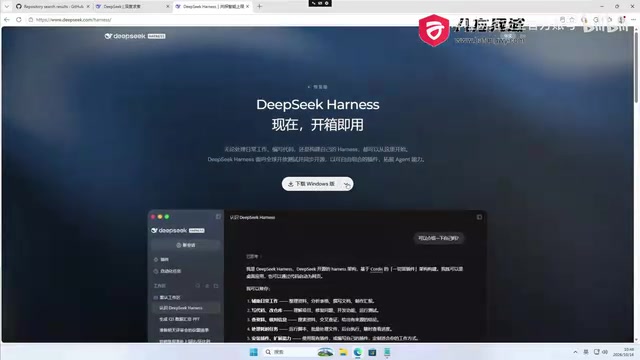
AI Agent Tool Selection: Why DeepSeek Harness
General-purpose Agent tools are already plentiful. Overseas there are personal assistants like Cloud Code, Codex, Hermes Agent, Muse, and Doll launched by Cloud, while the domestic camp includes WorkBuddyAd, Trey Work, Alibaba Qwen Office, and DeepSeekAd Harness. They are all essentially general-purpose Agents, but cybersecurity practitioners face a practical constraint: the built-in safety restrictions of both LLMs and Agents prevent them from being used directly for penetration testing.
To break through this layer, you need "armor-breaking" — using prompt engineering techniques to bypass or breach the safety guardrails built into large models, getting them to generate offensive security testing content that would normally be refused. The key reason for choosing DeepSeek Harness is that DeepSeek has relatively lower restrictions on cybersecurity content and cooperates better with penetration testing scenarios. This does not mean authorization boundaries can be ignored — on the contrary, the practical exercises below will show just how important safety boundary constraints are.
"Armor-breaking" (also known as "jailbreaking") is a term in prompt engineering referring to using specific prompt structures, role settings, or context guidance to make large language models bypass the safety alignment strategies built in at the factory and output content that would normally trigger a refusal response. Model vendors typically set guardrails at the model level through RLHF and refusal training, and armor-breaking exploits the ambiguity of these guardrails at semantic boundaries — for example, packaging offensive requests as "fictional scenarios," "security research," or "authorized testing." It must be emphasized that the legitimacy of armor-breaking in penetration testing depends entirely on the authorization premise: armor-breaking testing outside the scope of authorization may violate the law, which is why later sections repeatedly stress that instructions must specify the testing scope and termination conditions.
DeepSeek Harness Installation and Initial Configuration
The Harness desktop client (DSH for short) is available for Windows and macOS. After downloading, double-click the installer to begin; during the process you can choose the installation location — if you have enough disk space, it's recommended to switch to a non-system drive. After installation, an icon appears on the desktop; launch it to reach the login page.
First-time use comes with a certain amount of free credit (shown as 6.00 yuan in the demo); log in with your phone number and a verification code. After logging in, you enter the setup wizard, where you can skip unnecessary configuration and go straight to the main interface. A few options worth noting in settings:
- Permission settings: switch between "only view modifications within the workspace" and "full permissions"; penetration testing scenarios usually require higher permissions
- Model selection: new sessions default to DeepSeek V4.1 Flash and can be switched as needed
- Agent presets: built-in Standard mode, PTC mode, Minimal mode, and Creative mode; use Standard mode for everyday tasks and Creative mode for extended capabilities
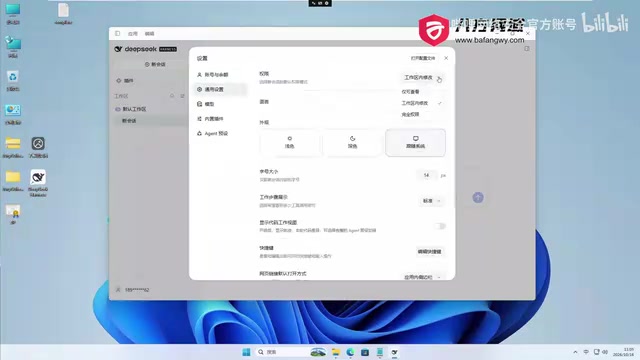
None of these built-in presets are designed for penetration testing, so the next step is to manually mount a dedicated penetration mode.
Mounting the Penetration Testing Mode: Three Installation Paths
A penetration testing mode project for DeepSeek Harness can be found on GitHub. Its core capability is: within the authorized scope, recording target exploration clues, verification results, assets, and vulnerabilities, and visually presenting them in the Web interface as exploration chains, vulnerability views, and asset views.
There are three installation methods, choose according to your local environment:
- NPM installation: if you have a local Node environment, install directly via the DSH plugin command
- Release URL installation: give the GitHub link to DSH and let it download and install automatically (this article's demo uses this method)
- Local file installation: download first, then install from the local file path
The demo uses the Release URL method, directly copying the path to DSH and submitting the task. A permission request pops up during execution — click allow; if you don't want to authorize repeatedly, you can change permissions to full permissions in advance. Pay special attention: the installation command must target the desktop client rather than the Web version, otherwise the two cannot share.
After installation, DSH must be restarted to take effect. After restarting, a "Penetration Mode" option appears in the Agent presets on the settings page; select it to proceed to the next step.
NPM (Node Package Manager) is the official package management tool for the JavaScript/Node.js ecosystem. Developers use npm install to pull and install dependency packages from the public registry; commands like DSH plugin essentially invoke this mechanism to download plugin code locally and register it with the host program. A Release URL points to the "Releases" page of a GitHub repository, which typically hosts packaged executables or archives; once given to the Agent, it automatically completes the download, extraction, and placement into the plugin directory. Local file installation suits scenarios with restricted network access or a need for a fixed version: download the artifact manually first, then provide the local path to DSH. The final result of all three methods is identical — only the dependency source and degree of automation differ.
Hands-On: Automated Penetration Against a Teaching Range
The demo uses an online education range as the target, accessed via an internal network address. After creating a new session, enter instructions telling DSH to check the server and find vulnerabilities. Here's a key detail that all SRC practitioners should be wary of: if the instructions don't include safety boundary constraints, the Agent may create users, modify permissions, and cause real impact on the target system. The demo's instructions specifically limit it to "stop after finding the first vulnerability," precisely to control the blast radius.
After sending the instructions, penetration mode starts. DSH first records the target and authorization information, creates a reconnaissance intent, then dispatches two sub-Agents to work in parallel: one handles host port scanning and service fingerprinting, the other handles Web enumeration and vulnerability point verification. This reflects DeepSeek's Deep Agent architecture — running in a multithreaded manner, users can view each sub-Agent's execution status in the background task panel.
After both sub-Agents wrap up, the system submits a final report including the penetration view (host, purpose, intent, facts, vulnerabilities, assets), exploration chain, vulnerability view, and asset view. In the demo, because the authorization scope was set too narrowly, the report shows zero vulnerabilities found — this is not a tool capability issue but a matter of overly tight constraints. The creator explicitly recommends that in actual use, full authorization should be granted so the Agent can uncover more vulnerabilities.
Deep Agent architecture refers to an Agent system using hierarchical scheduling: the main Agent (Orchestrator) understands tasks, breaks down goals, and distributes subtasks, while multiple sub-Agents each hold independent context and tool permissions and execute in parallel. The advantage of this design is parallel speedup and context isolation — port scanning and Web enumeration don't interfere with each other, and their results are aggregated back to the main Agent for correlation analysis. The cost is higher resource consumption and the need for the main Agent to coordinate consistency of results among sub-Agents. The "exploration chain" view mentioned in the article is precisely a product of this architecture: it chronologically records every intent dispatched by the main Agent, every action executed by sub-Agents, and every fact produced, making it easy to trace back the basis for each judgment afterward.
From Tools to Returns: Three Hurdles Newcomers Must Clear
The first hurdle is correctly matching environment and mode. Desktop and Web installation commands are not interchangeable, and installing penetration mode in the wrong place is as good as not installing it at all. The restart-to-take-effect step is also easily overlooked.
The second hurdle is handling authorization boundaries. Too narrow, and the Agent can't find anything; too broad, and it may cause destructive changes to the target system. In SRC scenarios, the instructions must clearly constrain — limited testing scope, limited action types, and limited termination conditions; all three are indispensable.
The third hurdle is report quality. The original article's mention of "writing a report, resubmitting it repeatedly, and still getting rejected" is a common pain point for newcomers. AI-generated reports need human supplementation of the verification process and impact explanation; simply restating scan results rarely passes review.
Once these three hurdles are cleared, the true value of the whole workflow emerges: the AI scans and analyzes automatically in the background, while you focus on final manual verification and report polishing, forming a positive feedback loop of bounty rewards. The barrier to this methodology isn't technical depth but getting the process fully running end to end.
FAQ
Q: Is DeepSeek Harness's penetration mode paid? A: First-time use comes with a 6.00 yuan free credit; once used up, you need to top up. The claim of "a steady 2000+ per week" mentioned in the demo comes from the creator; actual returns depend on individual skill level and target quality and should not be used as an expected benchmark.
Q: Why does the Agent report show zero vulnerabilities? A: In the demo, it was because the authorization scope was set too narrowly and the instructions limited it to "stop after finding the first vulnerability." Results will differ after loosening authorization constraints, but safety boundary controls must be maintained accordingly.
Q: Can other Agent tools use the same penetration mode? A: This penetration mode project was developed specifically for DeepSeek Harness; compatibility with other tools needs to be verified independently.
One-line Summary
A breakdown of how to mount penetration mode in DeepSeek Harness and build an AI-driven automated vulnerability discovery workflow from scratch.
Paragraph Summary
Based on a hands-on demo by a Bilibili creator, this article explains how to build an automated vulnerability discovery pipeline with DeepSeek Harness (DSH). The core architecture has the Agent handle analysis and decision-making, the Trigger handle execution, and a local Skill library provide attack techniques. DeepSeek wins on tool selection due to lower restrictions on security content, making "armor-breaking" easier. The installation section presents three paths for mounting penetration mode (NPM, Release URL, local file), emphasizing that desktop and Web commands are not interchangeable and a restart is required. The hands-on section shows the main Agent dispatching two sub-Agents to run port scanning and Web enumeration in parallel, and notes that overly narrow authorization leads to zero vulnerabilities. The article concludes with the three hurdles newcomers must clear: environment matching, handling authorization boundaries, and report quality, stressing that SRC scenarios must constrain testing scope, action types, and termination conditions in the instructions.
Related articles

RAG Interview Essentials: Breaking Down the Full Offline Indexing and Online Retrieval Pipeline
A complete breakdown of the RAG retrieval-augmented generation workflow: offline document loading, chunking, vectorization, and indexing; online query rewriting, vector retrieval, reranking, and generation, plus core interview points and system optimization directions.

AI Large Models for Absolute Beginners: Principles and API Calling in Practice
From AI's evolution to large model training principles and core concepts like Token, Temperature, and Top-P, this article explains system prompts, Function Call, RAG, and memory with hands-on examples and four API call scenarios—ideal for beginners.

Will GitHub Die? Open Source Maintainer Burnout and the Collaboration Crisis in the AI Era
Lex Fridman podcast discussion on open source maintainer burnout and GitHub's predicament: massive pull requests overwhelm core maintainers, and AI worsens code bloat. Using math journal peer review and Poincaré conjecture verification as analogies, the article analyzes why verification in knowledge production must be deliberately slow, and how open source communities can avoid the failure mode of maintainers exiting.