Dify × RAG in Practice: Building a Delta Force Game Assistant with Private Deployment

A full walkthrough of Dify private deployment, highlighting data sovereignty advantages over Coze.
Based on a Bilibili hands-on tutorial, this article systematically covers the complete path of the open-source large model application platform Dify, from deployment to application. It first explains why to choose Dify over Coze: Dify supports private deployment and fully local data, which is crucial for compliance scenarios in finance and healthcare, while Coze primarily relies on cloud hosting and has divided community sentiment. It then compares three deployment methods—Windows local deployment (WSL + Docker Desktop, most recommended), virtual machine deployment (15-20 GB, heavy), and the official cloud service (data stored on US servers, not recommended). Detailed Windows steps follow, including WSL version updates, Ubuntu installation, Docker Desktop configuration, and container startup. Finally, it advises beginners to focus on getting the main application workflow running, not to obsess over low-level tools, and to further build a RAG game Q&A assistant based on the knowledge base.
In the field of AI application development, Dify, as an open-source large model application platform, is attracting increasing attention. Based on a Bilibili hands-on tutorial, this article provides a complete walkthrough from Dify private deployment to building a RAG game assistant, and compares it with hosted solutions like Coze.
Why Choose Dify Over Coze?
For developers new to large model applications, drag-and-drop workflow orchestration offers an intuitive way to understand core concepts such as agents and knowledge bases. Dify is positioned as an open-source large model application development platform that supports rapid construction of production-grade AI applications and allows non-technical staff to participate in application definition and data operations.
The comparison with Coze is unavoidable. According to the analysis by the Bilibili creator, Coze's recent version iterations have significantly changed its design philosophy, and community sentiment has become divided. More critically, there is a difference in deployment models: Coze primarily relies on cloud hosting, with data stored on third-party platforms, whereas Dify supports private deployment, allowing data to remain entirely on-premises. For industries with compliance requirements such as finance and healthcare, this distinction is crucial.
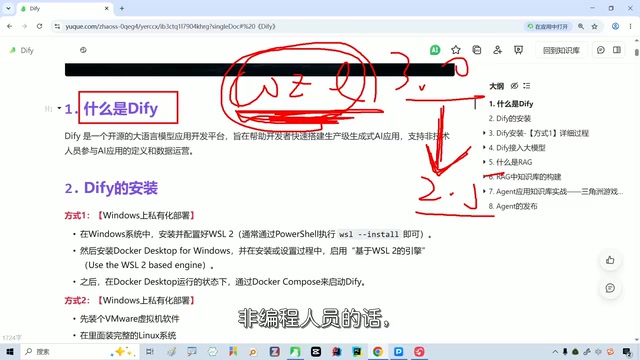
RAG (Retrieval-Augmented Generation) is the key concept for understanding Dify's knowledge base functionality. Its basic approach is: when a user asks a question, the system first retrieves the most relevant fragments from an external knowledge base (such as documents or databases), then feeds these fragments together as context to the large model to generate an answer. Compared to letting the model answer "from memory," RAG can significantly reduce hallucinations, make answers verifiable, and update knowledge without retraining the model. Dify's knowledge base module is designed around this process—after documents are imported, they are split, vectorized, and stored in a vector database, and retrieved by semantic similarity during Q&A. The "importing Delta Force game documents to build a Q&A assistant" mentioned at the end of this article is essentially a typical RAG application.
Agent refers to a form of large model application that can autonomously plan steps and invoke tools (such as search, code execution, and knowledge base retrieval) to complete complex tasks. Dify's workflow orchestration allows developers to connect these capabilities with visual nodes, thereby upgrading one-off Q&A into an agent capable of executing multi-step tasks.
How to Choose Among the Three Deployment Methods
Dify offers three installation paths:
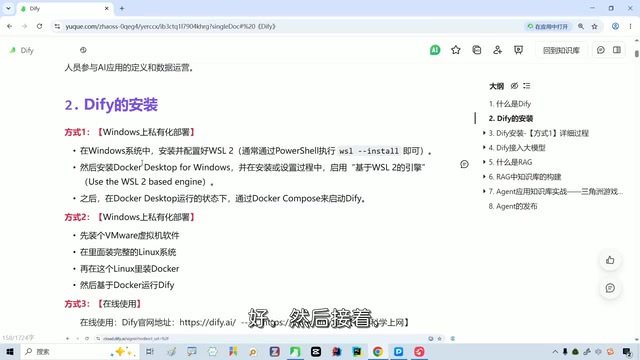
Windows local private deployment: Requires installing WSL and Docker Desktop to run Dify on a personal machine. This method is lightweight and gives full data control, and is the tutorial author's most recommended option.
Virtual machine deployment: Runs in a virtual machine, also achieving privatization, but takes up considerable space (the tutorial mentions at least 15 to 20 GB is needed). This approach is heavy, and the author personally does not recommend it.
Online cloud service: Uses the official hosting directly, but data is stored on servers in the US East region. The author explicitly states that this is not recommended, because most users value data localization more.
Private deployment means installing software on servers or local machines that you control, rather than using a vendor's cloud service. Its core difference from the SaaS hosting model lies in the data flow: with private deployment, user data, conversation records, and knowledge base files all remain in the local environment, and enterprises can control access permissions, backups, and auditing themselves; with the hosting model, data is stored in the service provider's data center, and users rely on the provider's compliance commitments. This is why the article repeatedly emphasizes "data sovereignty"—for regulated industries such as finance and healthcare, data leaving the country or being stored with third parties often crosses compliance red lines, making private deployment almost a hard prerequisite. It should be noted that private deployment also means operational responsibility shifts to the user, including version upgrades, backups, and troubleshooting.
Windows Deployment in Practice: WSL and Docker Configuration
When choosing local deployment, the first step is to install Docker Desktop. The tutorial recommends completing private deployment on Windows via WSL, which requires enabling the relevant options in Windows Features.
After installation, verify the WSL version via the command line. If it reports an invalid version, this indicates the current default version, and an update command must be executed. The update process will guide you through installing Ubuntu and setting an account password, after which you verify the version again. The author emphasizes in the tutorial that the invalid version prompt may appear multiple times during the initial installation, and repeatedly executing the update will resolve it.
Once WSL is ready, install Docker Desktop by following the wizard, then restart the machine. On first launch, you can skip the welcome screen and login directly; when "running" is displayed in the lower left corner, the engine is working properly.
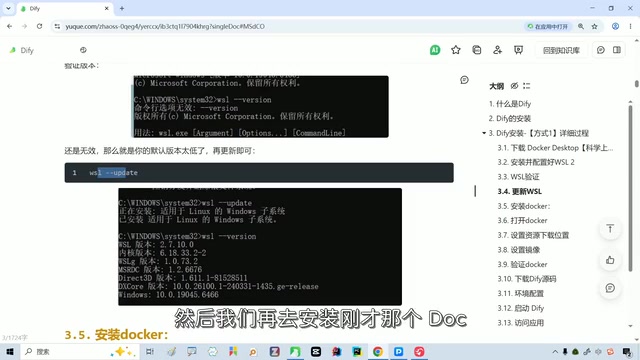
WSL (Windows Subsystem for Linux) is a lightweight Linux compatibility layer built into Windows by Microsoft, allowing users to run Linux distributions such as Ubuntu directly without dual-booting or opening a virtual machine. For Dify deployment, the significance of WSL is that Dify's official Docker Compose solution is written for Linux environments; running it directly in a native Windows environment easily encounters path and permission issues, whereas WSL provides a near-native Linux runtime environment with better compatibility and far lower resource overhead than a full virtual machine. The "invalid version" prompt that appears repeatedly in the tutorial is usually because the system defaults to WSL 1, and an update command must be executed to upgrade to WSL 2 (the latter is based on lightweight virtual machine technology and supports a full Linux kernel and Docker).
Docker Desktop, on the other hand, is a Windows desktop application that packages the Docker engine, command line, and graphical interface together; once installed, you can pull and start Dify's various service components with one click using containers.
Starting Dify and Data Sovereignty
Pull the image in Docker's container settings, configure environment variables according to the tutorial notes, and start the Dify container. When the square icon in Docker Desktop turns green, Dify is running; overall resource usage is light, far better than the virtual machine approach.
On first use of Dify, you need to set a username, password, and email. After logging in, you can see modules such as the homepage, Studio, Knowledge Base, Integrations, and Marketplace. The tutorial author cleared all configurations before class to demonstrate from scratch.
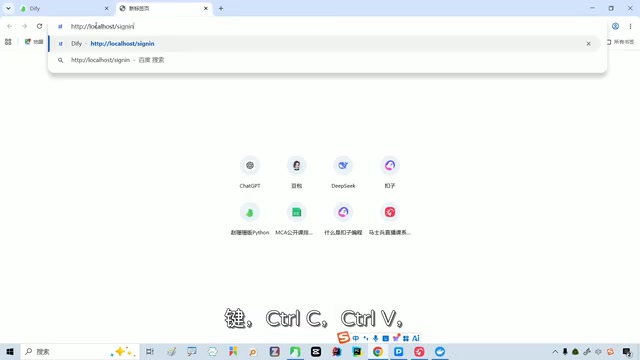
Interestingly, all application data created in Studio is stored on the local machine rather than in the cloud. This is precisely the core value of private deployment—data sovereignty belongs entirely to the user.
Suggested Learning Path
The tutorial author specifically reminds beginners: do not overthink low-level technologies like Docker and WSL. The main learning thread should be to get through the entire Dify application development workflow and understand the core logic of large model applications; details of low-level tools can be filled in as needed after class. This "get it running first, dig deeper later" strategy avoids consuming too much energy on non-core aspects.
For readers who want to further practice RAG, they can create a knowledge base based on the deployed Dify, import Delta Force game-related documents, and then build a dedicated Q&A assistant through workflow orchestration. This path covers the complete chain from environment setup to application delivery.
Related articles
 Tech Frontiers
Sherlock: An Open-Source Tool for Tracking Usernames Across Social Networks
Sherlock is an open-source Python tool that tracks social accounts across networks by username. This article covers its core features, why developers love it, typical use cases, and privacy compliance considerations.
 Tech Frontiers
GitHub Daily·Nov 07: Agent-Ready and Context Compression
GitHub Trending Nov 07: meta's agent-ready design system astryx, billion-context's 5x context compression, sherlock nearing 100k stars, plus local-first localthings and bare-metal GPU orchestration nvke.
 Tech Frontiers
Buoyant Open-Sources Kinference: An Inference Control Plane for vLLM on K8s
Buoyant open-sources Kinference, an inference control plane for vLLM on Kubernetes, with declarative routing, KV-cache-aware load balancing, and per-tenant metrics—claiming 95% lower median TTFT in official benchmarks.