Docker + Jenkins CI/CD in Practice: The Full Pipeline from Code Commit to Production Release

Breaking down the five stages and key implementation details of an enterprise self-hosted GitLab + Jenkins Docker CI/CD pipeline.
Based on a Bilibili tech creator's presentation, this article introduces the enterprise self-hosted Docker + Jenkins CI/CD pipeline. For code security, enterprises typically use a private GitLab for code and Jenkins as an internal platform; the pipeline runs five stages: pulling code, Maven/npm packaging, writing the Dockerfile, building and pushing images to a private registry, the production server pulling and starting containers, and browser access. The backend SpringBoot project is packaged into a jar via Maven and started with FROM, WORKDIR, COPY, and java -jar; two frontend projects share a single Nginx image with separate dist directories and unified reverse proxy. Complex scenarios use K8S; simple ones use Docker Compose for one-command startup. Standardized pipelines greatly reduce human error.
Beyond manual deployment and platform-based automation, the more common approach in enterprises is a self-hosted Docker + Jenkins pipeline. It standardizes every step from "committing code" to "releasing the application"—what we usually call CI/CD (Continuous Integration and Continuous Deployment). Based on a technical video from a Bilibili creator, this article breaks down the complete chain of this pipeline and covers the key implementation details for the backend, frontend, and container orchestration.
Why Enterprises Prefer Self-Hosted CI/CD Platforms
Enterprises typically don't expose their code repositories directly to the public internet. Instead, they use a self-hosted private GitLab repository so code only flows within the internal network, reducing the risk of leaks. Jenkins is likewise pre-deployed on a Linux server and used as an internal company platform. The advantage of this combination is controllable process: the repository can be configured to trigger the Pipeline automatically, or a manual trigger entry can be retained, balancing efficiency with approval requirements.
The entire process executes from top to bottom as a Pipeline. After a programmer commits code to the repository, Jenkins triggers the pipeline, which sequentially pulls the code, packages it, builds the image, pushes the image, and has the production server pull and start the container. End users can then access the latest version of the frontend and backend applications right in their browsers.
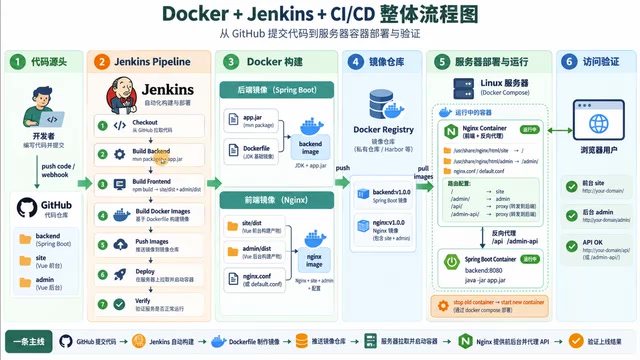
The Five Core Stages of the Pipeline
Stage 1: Pull the Code
The first step of the pipeline is to pull the latest code from the code repository. This repository can be GitHub or a self-hosted GitLab. For backend projects, Maven is later used to package the code into a jar; for frontend projects, npm run build is executed to generate a dist directory—both are packaged artifacts.
Maven and npm packaging: Maven is the build tool for the Java ecosystem. Dependencies and plugins are declared in pom.xml; running mvn package compiles the source, runs tests, and packages the project into an executable jar. SpringBoot projects produce a fat jar by default, with an embedded Tomcat, that can be run directly with java -jar. npm is the package manager for Node.js; npm run build invokes the build script (such as Webpack/Vite), compiling and minifying source code, styles, and static assets into a browser-loadable dist directory. What both have in common is converting "source code" into a "deployable artifact," which is also the input for the subsequent Docker image build.
Stage 2: Write the Dockerfile
Before moving on to image building, a Dockerfile must be written for each project. Since each project has a different directory structure, the Dockerfile needs to be customized to the project's actual situation. Combined with the jar or dist directory generated earlier, it is what makes it possible to build a runnable Docker image.
Stage 3: Build and Push the Image
With the Dockerfile plus the packaged artifact, a Docker image can be built. The image is then pushed to an image registry. Enterprises generally use a private registry (such as Harbor), for the same reason they use a private code repository: to ensure images are not publicly exposed.
Harbor and image registries: Image registries fall into two categories—public (such as Docker Hub) and private (such as Harbor). Harbor is a CNCF open-source private image registry that provides role-based access control, image replication, vulnerability scanning, and image signing. In CI/CD, after Jenkins builds the image, it runs docker push to push it to Harbor, and the production server then runs docker pull to fetch it. A private registry ensures images only flow within the enterprise's internal network—just like a private GitLab, it is a critical part of code and artifact security.
Stage 4: Production Server Pulls the Image
The build server and production server are usually separate. The production server pulls the latest image from the image registry and then starts the container. Once started, the image becomes a container and the application begins running.
Stage 5: Access the Application
Once both the frontend and backend containers are running, users access the frontend page through the browser, and the frontend reverse-proxies to the backend service—completing the entire application chain.
Backend: The Complete Path from Source Code to Container
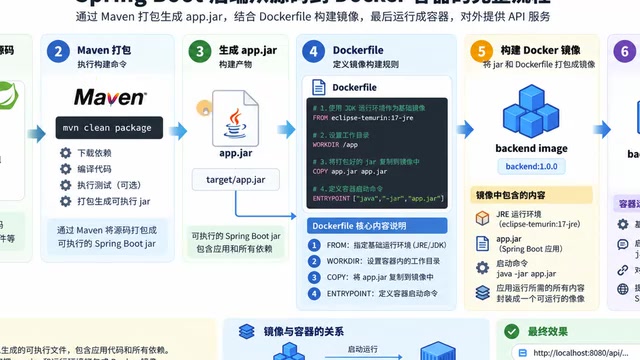
A backend project is usually SpringBoot source code that is packaged into a jar via Maven and then built into an image together with a Dockerfile. Several core commands in the Dockerfile are worth noting.
FROM specifies the base image. The creator chose an Eclipse image that includes the JDK, so there's no need to install the JDK manually; if based on an ordinary distribution like CentOS or Ubuntu, the JDK dependency would need to be installed additionally. WORKDIR specifies the working directory, and subsequent COPY and commands execute within it. COPY copies the jar on the server into the working directory inside the image. The final command makes the image run java -jar when started as a container, bringing the program to life.
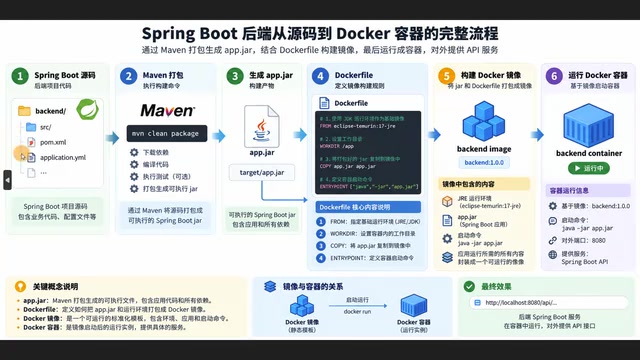
Frontend: Multiple Projects Sharing a Single Nginx Image
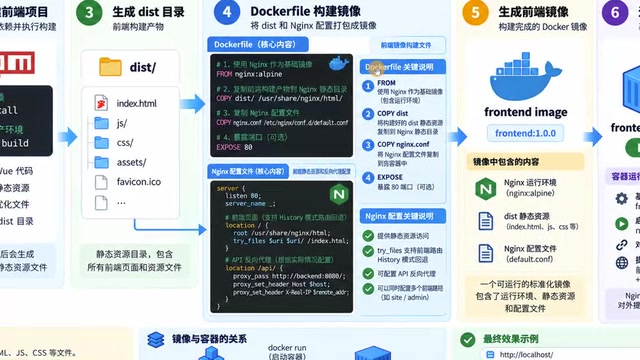
Frontend projects likewise go from source code to a packaged dist directory, which is then copied into the image. The creator's approach is to have two frontend projects share a single Nginx image: based on the Nginx base image, the dist directories of the two frontend projects are placed in different directories, and the Nginx configuration file is written in advance and copied into the image. This way, both frontend contents are managed by the same Nginx and accessible once the container starts, and Nginx reverse-proxies to the backend image.
Container Orchestration: K8S or Docker Compose
When multiple frontend and backend containers need to be managed simultaneously, a container orchestration tool is generally used. Complex scenarios call for K8S; if the requirements aren't that complex, Docker's built-in Docker Compose is sufficient. Compose requires writing a YAML configuration file that declares the frontend image name, container name, exposed ports, and the corresponding configuration for the backend service—a single command then automatically starts both containers.
From Manual to Automated: The Value of Standardization
From manual deployment to automated deployment and then to the Jenkins pipeline, the approach becomes increasingly standardized and platform-based. After team members modify code, they simply click to trigger on the platform, and Jenkins automatically completes the entire process of packaging, building, pushing, and deploying. The production server always runs the latest code, and the room for human error is greatly reduced.
For developers who want to deeply understand Docker commands and image principles, the creator suggests revisiting the Docker series of content; combined with the pipeline perspective in this article, you can connect every link of CI/CD.
Pipeline as Code: Jenkins pipelines are usually stored in the code repository as a Jenkinsfile, known as "Pipeline as Code." It uses declarative or scripted syntax to describe the stages of pulling code, packaging, building images, pushing, and deploying, making the pipeline configuration versioned, reviewable, and reusable alongside the code. With GitLab Webhooks, a code push can automatically trigger the pipeline; a manual trigger entry can also be retained in the Jenkins UI for scenarios like production releases that require approval.
FAQ
Q: Must the Dockerfile use a base image containing the JDK? A: Not necessarily. You can also base it on an ordinary Linux distribution, but you'll need to install the JDK dependency manually. Using a JDK image is more convenient.
Q: Why can the frontend projects share a single Nginx image? A: The dist directories of the two frontend projects can be placed at different paths inside the image, managed by the same Nginx configuration file and reverse-proxied to the backend.
Q: Can this process run without a K8S environment? A: Yes. Docker Compose is sufficient to orchestrate the frontend and backend containers—write the YAML configuration file and start them with one command.
One-line Summary
Breaking down the five stages and key implementation details of an enterprise self-hosted GitLab + Jenkins Docker CI/CD pipeline.
Paragraph Summary
Based on a Bilibili technical creator's presentation, this article introduces the enterprise self-hosted Docker + Jenkins CI/CD pipeline. For code security, enterprises typically use a private GitLab to store code and Jenkins as an internal platform; the pipeline executes five stages in sequence: pulling code, Maven/npm packaging, writing the Dockerfile, building and pushing the image to a private registry, the production server pulling and starting the container, and browser access to the application. The backend SpringBoot project is packaged into a jar via Maven, and the Dockerfile uses FROM, WORKDIR, COPY, and java -jar to start it; the two frontend projects share a single Nginx image, with their dist directories placed separately and reverse proxy configured uniformly. Complex orchestration scenarios use K8S, while simple ones use Docker Compose with a YAML file for one-command startup. A standardized pipeline greatly reduces room for human error.
Related articles

Microsoft Fabric Database Agent in Action: From Reactive Firefighting to Intelligent Detective
A deep dive into the Microsoft Fabric Database Agent: how to enable it, supported monitoring scenarios, a blocking-issue demo, and the roadmap from reactive to autonomous operations.

Zendesk Uses ChatGPT Enterprise to Build a Sales Agent with 1,000 Daily Active Users
Zendesk opened ChatGPT Enterprise to all employees, who built about 600 apps themselves, including a sales expansion agent with about 1,000 daily active users. This article analyzes how it turns internal data into sales opportunities and its "don't wait" implementation strategy.

Google Releases Gemini 4 Carbon: Its Strongest Model Yet, Debuting with a Cybersecurity Focus
Google releases Gemini 4 Carbon, calling it its strongest model, with a cybersecurity focus. It tops the third-party composite ranking at 59 points but leads by only one or two. This article analyzes its security test results, staged rollout, token pricing, and the divergence between self-reported and third-party tests on hallucinations.