Doubao Agent in Action: A Complete Guide to Sales Office Automation

Doubao Agent turns 1,400 sales records into reports, charts, and interactive dashboards using plain-language commands.
Using 1,400 sales records as a practical example, this article walks through Doubao Work's (Doubao Agent's) four-step automation workflow: data organization and analysis, auto-generated Word reports, one-click chart creation, and a shareable interactive dashboard. Its key strengths are natural language interaction, cross-step context retention, and a minimal 'describe → generate → confirm' paradigm — no complex setup or multi-tool switching required.
As AI tools become increasingly mainstream, many users report that while overseas AI tools are powerful, they often come with complex configurations and steep learning curves. Doubao Work (Doubao Agent), developed by ByteDance, addresses exactly this pain point — offering everyday users an out-of-the-box AI office solution. This article uses a sales workflow as a hands-on example, walking you through the entire automation process from raw data organization to an interactive dashboard.
Doubao Work's Core Strengths: Low Barrier to Entry and High Stability
Douao Work stands out for two key qualities: ease of use and reliability. Unlike overseas AI tools that require complex setup, Doubao Work uses natural language interaction — users simply describe what they need in plain language and get results. Whether you're organizing spreadsheets, building data dashboards, or creating collaborative apps, one tool covers the entire workflow.
This design dramatically lowers the barrier to AI-powered office work. Even first-time users can complete complex data analysis tasks just by communicating their needs naturally, as if talking to a colleague. Crucially, Doubao Work also delivers consistent, professional-grade output quality across a wide range of task types.
Hands-On Demo: Intelligent End-to-End Processing of 1,400 Sales Records
Step 1: Data Organization and Automated Analysis
Sales professionals frequently deal with large volumes of raw data. Take 1,400 sales records as an example — manually sorting them by product and region, then comparing this week's numbers against last week's, is both time-consuming and error-prone.

Using Doubao Work's spreadsheet capability, simply upload your Excel file and enter the instruction "organize by product and region." The system automatically identifies fields like date, product, and region, then summarizes this week's and last week's data separately. The entire process runs on the original data and generates analysis results in sync — no repeated imports needed.
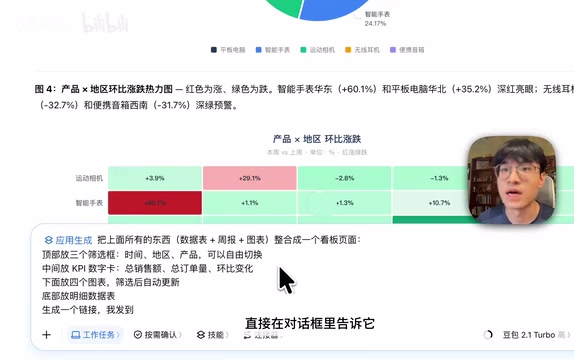
The resulting report clearly highlights key changes: smart watches rose 60.1% in East China, while wireless earphones dropped 32.7% in South China. The system also automatically generates an eight-week trend chart, making data fluctuations immediately visible. Compared to manual processing, this automated approach delivers a tenfold or greater improvement in efficiency.
Step 2: Auto-Generate a Professional Weekly Sales Report
With a clean, organized data table in hand, the next step is writing the weekly report. The traditional approach requires manually analyzing the reasons behind the data, extracting key points, and formulating recommendations — a tedious process that often overlooks critical information.
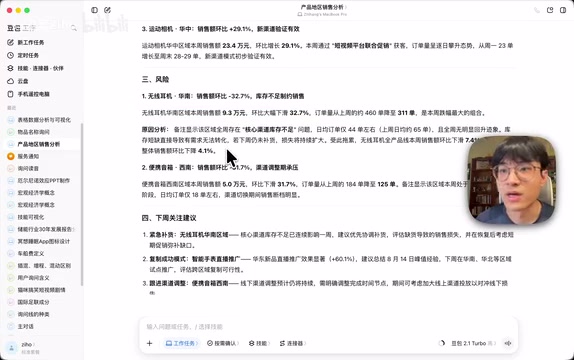
Douao Work supports continuous task processing within the same conversation. Just tell the system what the weekly report should cover, and it will combine the previous analysis results with any business notes to automatically extract an overall summary, highlights, risks, and recommendations. It also cross-checks figures like total sales and order volume changes for accuracy, ensuring the content is both comprehensive and reliable.
Once the content is confirmed, simply issue the command "convert to Word" and download the file for immediate use. The generated report doesn't just include data analysis — it also flags the products and regions with the most significant changes and explains the reasons behind them. For instance, smart watch growth in East China was driven by a new product livestream campaign, while wireless earphone declines in South China stemmed from channel inventory shortages. This depth of analysis significantly reduces the burden on sales teams.
Douao Work also supports background task execution and remote control from mobile. You can kick off a task on your desktop, step away to handle other work, and check progress or adjust instructions from your phone at any time — making parallel multitasking far more efficient.
Step 3: One-Click Chart Generation
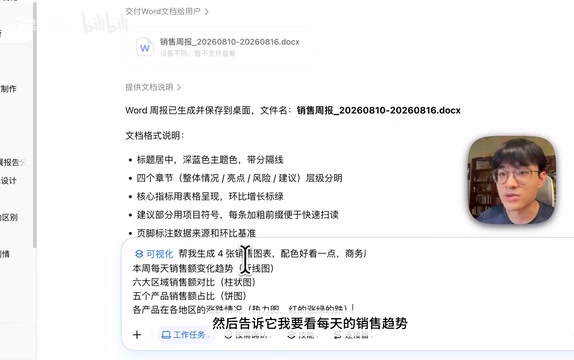
Text-only reports lack visual impact in presentation contexts, and trend comparisons or key changes can be difficult to convey quickly. Doubao Work's visualization capability automatically converts data into professional charts.
Simply describe what you want (e.g., "show me daily sales trends, product share breakdown, and the gains and losses by product and region"), and the system ties together all previous analysis results, automatically matching the most appropriate chart type for each dimension — line charts for trends, pie charts for proportions, and heatmaps for comparing gains and losses.
The system also applies a unified color scheme and annotates key data points. The resulting charts clearly surface insights such as: Friday had the highest sales volume, East China led all regions, and tablets accounted for the largest product share. This automated chart generation eliminates the tedious manual steps of selecting chart types, adjusting colors, and adding annotations — delivering a meaningful boost to office productivity.
Step 4: Consolidate Everything into an Interactive Sales Dashboard
When analysis tables, weekly reports, and charts are scattered across separate files, sharing and collaboration become cumbersome. Doubao Work's app generation capability lets you consolidate all content into a single interactive sales dashboard.
Just describe what you need (e.g., "combine everything from before into a sales dashboard — time, region, and product filters at the top; sales figures, order volume, and week-over-week changes in the middle; charts and detailed data at the bottom"), and the system reorganizes all the data and establishes dynamic links between filters and data.
The resulting dashboard supports live interaction: switching time periods, regions, or product selections instantly updates all figures, charts, and detailed records. The dashboard can be shared directly via a link — recipients can view and filter data without downloading any files, dramatically improving team collaboration efficiency.
Full Workflow Comparison: Traditional Approach vs. Doubao Work Automation
The traditional sales reporting workflow requires constant switching between Excel, Word, and charting tools, with manual effort and repeated adjustments at every step. With Doubao Work, going from a raw sales spreadsheet to a fully interactive dashboard requires nothing more than issuing a series of instructions within a single session:
- Data organization and analysis: Automatically identifies fields, aggregates and compares data, generates trend charts
- Weekly report writing: Extracts key points, analyzes root causes, provides actionable recommendations
- Visualization: Automatically selects chart types, applies unified color schemes, annotates key data
- Interactive dashboard: Consolidates all content, supports dynamic filtering and link-based sharing
The entire process requires no advanced data analysis skills and no prior experience with multiple tools. For AI newcomers, as long as you can clearly express what you need, you'll get professional-grade output.
Who It's For and Other Use Cases
Douao Work is particularly well-suited for the following types of users:
- AI tool newcomers: No complex configuration required — just natural language interaction to get started quickly
- Sales and operations professionals: Frequently handle data organization, weekly report writing, and dashboard creation
- Small team collaborators: Share interactive dashboards via link without transferring multiple files
- Efficiency-focused office workers: Looking to use AI tools to replace repetitive, manual office tasks
Beyond sales, Doubao Work is equally applicable to project management, market analysis, customer service, and any other scenario that involves data processing and report generation. Its all-in-one handling capability and low barrier to entry make it a compelling option among domestic AI office tools.
Conclusion
Through natural language interaction and continuous task processing, Doubao Work simplifies complex data workflows into three steps: describe your need → auto-generate → confirm and adjust. For users who are put off by the complexity of other AI tools, Doubao Work offers a ready-to-use solution that maintains professional output quality while significantly lowering the barrier to entry.
If you're looking for a capable domestic AI office assistant, or want to explore using AI to boost your everyday work efficiency, Doubao Work is well worth trying firsthand.
Related articles

PC Memory Wasted? Hacker News Debates Centralized Data Centers
Hacker News users argue that personal computer memory is wasted and should be centralized in data centers, sparking debate on centralized vs. distributed computing resource allocation. This article analyzes the logic behind the claim, the costs of centralization, and new tensions in memory resource allocation in the AI era.

Why Fair Use Benefits Everyone: OpenAI Publishes Multi-Party Case Brief Analysis
OpenAI publishes excerpts from multiple court briefs featuring creators, scholars, accessibility advocates, and legal experts, explaining how fair use supports AI training and innovation, and analyzing its practical impact on developers and content professionals.
AI Companies' Joint Statement: 'Some Thing is Happening' Hints at Industry Shakeup
A Hacker News post 'Some Thing is Happening: A note from the AI companies' sparks speculation. This article analyzes the potential meaning of the joint AI company statement, industry context, and impact on developers.