Doubao Work in Practice: Three Modes That Let AI Actually Get Work Done

Doubao Work's three modes correspond to different AI employee working postures, and choosing by task complexity is key.
The article introduces a 28-knowledge-point Doubao Work tutorial from Bilibili, whose core idea is to turn it from a chat tool into an AI employee that can operate local files. The tutorial distinguishes three modes: chat mode only offers ideas and cannot read local files; Lite mode suits clear, bounded tasks and executes quickly while saving quota; Pro mode first asks clarifying questions and plans before executing complex tasks, demonstrated with personal website development. It gives task-to-mode matching logic and points out two common pitfalls: using Lite for everything easily goes off track, while avoiding Pro's questions leads to rework. The methodology's value is building the habit of choosing a mode by task complexity and lowering the barrier for beginners.
Many people open Doubao Work and still instinctively treat it as a chat tool, ask a few questions, and then close it. The tool is clearly powerful, yet it gets used like ordinary chat software. The goal of this course is to help you turn Doubao Work from a "chat companion" into something that "gets work done"—and the crucial first step is to understand exactly how many working postures it has.
What Is Doubao Work? Why Is It Worth Learning First
According to the definition in this Bilibili tutorial, Doubao Work is an agent interface that is more suitable for domestic users than Codex. Its layout and operation logic are basically the same as Codex, but it requires no special network configuration and works out of the box. It adapts to various mainstream domestic office software. Work that previously required switching back and forth between several applications—organizing materials, generating documents, analyzing spreadsheets, and executing repetitive tasks—can now be handled by it in a unified way.
The course author emphasizes that this is not a chatbot that can only answer questions, but an AI employee that can truly operate local files and call tools to complete tasks. The entire course is divided into an introductory section, a case studies section, an advanced section, and an industry section, with a total of 28 knowledge points, from basic operations to real office cases and then to advanced workflows. Even complete beginners can follow along.

Agent is the key concept here. Unlike ordinary chatbots that only generate text, an agent has a closed-loop capability of "perception—decision—action": it can read local files, call external tools, execute multi-step operations, and adjust subsequent actions based on execution results. Codex is an early OpenAI agent product form aimed at code generation, and Doubao Work follows a similar interaction framework but has been adapted for the domestic network and office ecosystem. Understanding the difference between an agent and a chatbot helps explain why "switching to work mode" is not just changing the skin, but upgrading from "only being able to talk" to "being able to take action."
Three Working Modes: Different Postures for an AI Employee
The core viewpoint of the course is this: a reliable employee does not just bury their head and start working. The mature approach is to first confirm the requirements and then take action. The three ways of using Doubao Work correspond exactly to different postures of an AI employee.
Chat Mode: Only Gives Advice, Does Not Take Action
This is the chat window everyone is most familiar with: you ask a question and it answers. The key limitation is that it cannot read any files on your computer. It is only suitable for tasks that are purely about answering questions or offering ideas. If you want AI to actually operate files, you must switch to work mode.
Work Mode (Lite): Act Fast When the Goal Is Clear
After switching to work mode, you will see options for Lite, Pro, and a version that is about to be discontinued. According to the author, Lite is suitable for tasks whose goals can be explained clearly at a glance, with no twists and turns, and it saves quota. For example, for clearly bounded work such as organizing folders, it can directly call tools and finish the job in just a few steps. When it encounters sensitive operations such as deleting files, it will still ask you for confirmation as needed.
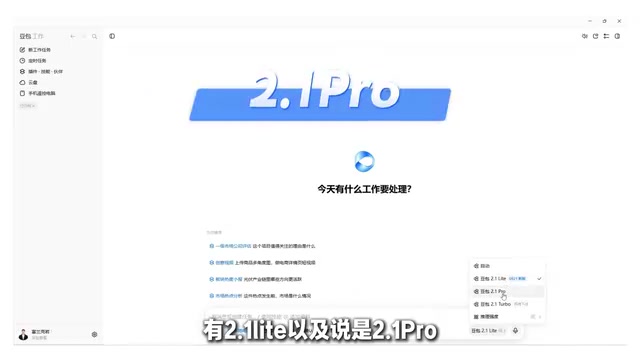
Pro Mode: Plan First, Then Execute for Complex Tasks
For complex reasoning, long-form content, and professional tasks, it is recommended to switch to Pro. The characteristic of this mode is that when it receives a complex task, it does not just plunge ahead; it first goes over the plan with you. The course demonstrates this with a case: "Help me make a personal website." After switching to Pro, it asks a series of follow-up questions: Is the website for a personal brand card, a course, or a portfolio project? What tone do you want (geeky minimalist, professional, humorous, down-to-earth)? Should the content use known information or be supplemented later? Do you want to include contact information or social links?
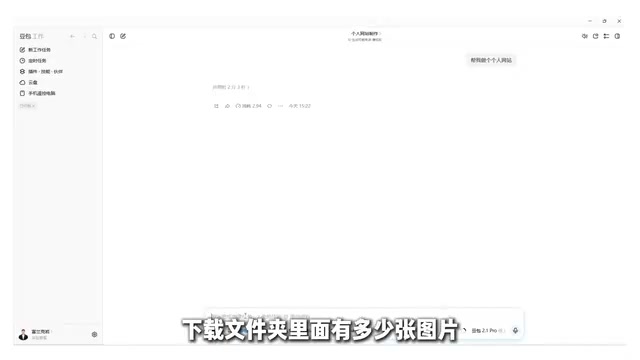
After the user confirms each point, it begins writing HTML and clearly defines the design direction, visual positioning, and page structure. The author specifically reminds us that in chat mode, AI can only give suggestions and cannot modify files on your computer, whereas work mode can truly open local files for statistics and summaries—for example, if you ask "How many images are in the Downloads folder?" it will go look through them itself.
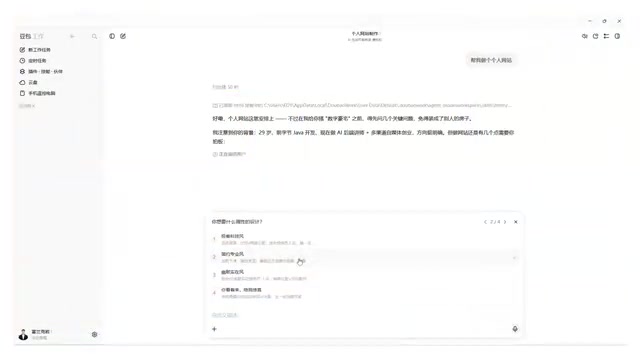
Task planning is one of the core capabilities in the agent field. When Pro mode receives a complex task, it first clarifies requirements and breaks down the plan, then executes step by step. This is similar to "design first, then code" in software engineering. This mechanism of "align first, then act" essentially reduces task uncertainty: places the user has not thought through are exposed through follow-up questions, and places where the AI is unsure are locked down through confirmation. For open-ended tasks such as long-form writing, website development, and data analysis, the quality of the planning stage often directly determines the usability of the final output.
Practical Comparison: Which Mode Should Be Used for Which Task
The course provides a set of matching logic between tasks and modes:
- Asking about the number of local files or organizing folders: The goal is simple and the boundaries are clear, so Lite is enough.
- Developing a personal website: Chat mode can only talk and give suggestions, while Lite is prone to going off track—because you have not thought it through and the AI is not confident either, so it can only guess blindly. This type of task is suitable for Pro, aligning on the plan first and then taking action.
The author points out the two most common pitfalls. The first pitfall is "throwing every task at Lite and going all in"—Lite is only suitable for work with simple goals and clear boundaries, and it is more likely to go off track on complex tasks. The second pitfall is "thinking Pro wastes time by asking questions back and forth"—sharpening the axe does not delay the chopping. Spending a few minutes aligning requirements and getting it right the first time actually saves time.
Task complexity assessment is the prerequisite for choosing a mode. A practical set of judgment dimensions is: whether the goal is unique and clearly bounded, whether the execution steps can be enumerated in advance, and whether the cost of failure is acceptable. If the answer to all three questions is yes, Lite can handle it; if there are ambiguous requirements, multi-step dependencies, or high rework costs, the task should be handed to Pro for planning first. This idea of "routing by complexity" is called task-tier scheduling in agent engineering, and its purpose is to strike a balance between efficiency and quality.
The Methodological Value of This Course
From the perspective of content design, the value of this course lies not in listing features, but in establishing the decision-making habit of "choosing a mode based on task complexity." Chat mode is responsible for offering ideas, Lite is responsible for quickly executing clear tasks, and Pro is responsible for planning and confirming complex tasks—three postures correspond to three types of scenarios, avoiding the most common inefficient usage of "ordering an agent around as if it were a chat tool."
For complete beginners, another layer of significance in this course is that it lowers the psychological threshold: no programming background and no environment configuration are required. As long as you follow along, you can gradually hand repetitive work over to AI. As for whether the complete system of 28 knowledge points can cover the complexity of real office scenarios, that still needs to be verified against the actual content of the case studies and industry sections. But at least from the framework of the introductory section, the main line of "confirm requirements first, then take action" is clear and actionable.
One-line Summary
Doubao Work's three modes correspond to different working postures for an AI employee, and choosing the mode based on task complexity is key.
Paragraph Summary
The article introduces a 28-knowledge-point Doubao Work tutorial from Bilibili. Its core idea is to transform it from a chat tool into an AI employee capable of operating local files. The tutorial distinguishes three modes: chat mode only offers ideas and cannot read local files; Lite mode is suitable for tasks with clear goals and boundaries, executing quickly while saving quota; Pro mode first asks follow-up questions to confirm requirements and plan a solution before executing complex tasks, demonstrated with personal website development as an example. The article provides matching logic between tasks and modes, and points out two common misunderstandings: using Lite for all tasks easily goes off track, and disliking Pro's follow-up questions as a waste of time actually leads to rework. The methodological value of the tutorial lies in establishing the decision-making habit of "choosing a mode based on task complexity" and lowering the psychological threshold for complete beginners.
Related articles

Salesforce Acquires Rune for $375M: AI Logistics Tech Bolsters Defense Business
Salesforce reportedly acquires defense tech startup Rune for $375M. Rune's AI logistics tech will strengthen Salesforce's Missionforce defense platform, continuing its M&A spree.

Why Fair Use Benefits Everyone in the AI Era
Starting from a Hacker News discussion, this article analyzes the legal logic and controversies of the fair use principle in AI training and content creation, and its dual impact on creators and the tech ecosystem.

Mistral Large 4 Open-Sources a Trillion Parameters, Microsoft Offers Voluntary Severance to 60,000 Employees
Mistral Large 4 open-sources a trillion-parameter multimodal model with a coding agent score of 48; SanDisk earnings show AI inference reshaping NAND demand; Google Gemini adds in-app file editing, OpenAI raises Codex quotas, and Microsoft offers voluntary severance to 60,000 employees.