Free Cline API Tests All Pass, but Browser Shows a Blank Page
Cline's free model passes all backend API tests but delivers a blank frontend, exposing blind spots in AI Agent verification loops.
This article records Cline's (free model) performance in a unified notes app evaluation: it produced a complete backend within 70 minutes, passed all 22 API checks and restart persistence, and its security implementation outperformed peers; however, browser JavaScript had syntax errors from out-of-order chunked writing, the UI scored 0/5, users could not register or log in, the README was missing, and compose kept weak default keys. Final score: 12/20. The case reveals that an AI Agent's self-testing loop covers only the test layer it generated and cannot verify frontend rendering; manually inspecting chunked files and having the Agent accept the UI in a browser are recommended.
An Awkward Ending: Perfect API, Blank UI
In the free AI coding tool comparison roundup, Cline (referred to as Klein in the original, likely the same open-source VS Code agent) produced the most dramatic result in the series: the backend code quality was exemplary, all 22 API checks passed, but users opening the browser saw only a blank page.
This case reveals a key problem: an AI Agent can write code that passes tests, yet fail to deliver a product users can actually use. Green tests do not equal a usable product.
Test Rules: Real Performance Under a Unified Standard
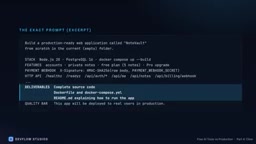
This round used an identical production-grade spec: a note-taking app with registration, private notes, a free tier of 5 notes, paid upgrades, and signed payment webhooks, built on Node 20 and Postgres 16, with all services started by a single command.
All tools ran on the same laptop under the same Docker environment, received the same prompt, and were required to deliver source code, a Dockerfile, a compose file, and a README explaining how to run it. Cline used the default free model with a 1-million-token context, editing files automatically within the project folder throughout, with commands requiring human approval and a maximum of 5 follow-up messages.
Earlier results: GitHub Copilot and Cursor each scored 20/20, while Gemini CLI scored 0 because its free quota ran out before it wrote the first file.
The "Context Window" and "Chunked Writing" Mechanism of AI Agents
The context window is the maximum number of tokens a model can process at once (1 million here for Cline), but model output length has a separate hard cap, usually far smaller than the context window. When an Agent needs to generate a file exceeding the output cap, it uses "chunked writing": splitting a large file into segments and calling the write tool sequentially. The problem is that segments share no complete draft; the model can only rely on prior summaries or re-reading the file to stay coherent. Free models have lower output caps and less stable instruction-following, making truncation or misordering at chunk boundaries more likely. In smoke testing, Cline observed truncation at about 6,000 characters per chunk; reducing to 3,000 characters alleviated it, but the browser code still had syntax errors due to out-of-order fragments. This is not unique to Cline but an engineering constraint every Agent that generates long files via multi-turn writing must face.
A 70-Minute Highlight: From Zero to a Complete Backend
Cline began by checking the latest versions of Express and the Postgres driver, then started producing files in succession after about 5 minutes: package.json, gitignore, dockerignore, a config validation module, structured JSON logging, a database layer with migration locks, user/note/billing models, then HTTP middleware, auth, rate limiting, security headers, CORS, JSON error handling, and finally routes, server, and container orchestration files. Writing everything to disk took only about 22 minutes.
More impressively, it proactively wrote unit tests using Node's built-in test runner, covering config, validation, and core logic. There were 17 failures at first, narrowed down to 2 one by one, and it even handled the Windows quirk where test output is UTF-16.
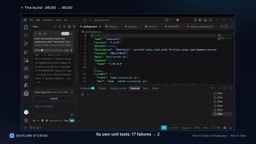
After about 50 minutes, the full docker-compose stack started, the Postgres health check passed, and the app was running.
Cracks Appear: The Hidden Risk of Chunked Writing
When Cline needed to write the stylesheet and browser-side JavaScript, it said the files were too large and had to be split into small chunks written in segments. This detail foreshadowed the entire problem.
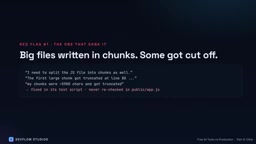
During end-to-end smoke testing, the free model began to struggle: requests hit connection resets, and the first large chunk was truncated at line 80, corrupting the webhook helper code. It eventually identified the cause—about 6,000 characters per chunk got truncated—so it switched to 3,000-character segments with line-count verification after each.
At about 75 minutes, the smoke tests all passed, including all endpoints such as the signed payment webhook working on the real stack.
The Difference Between Smoke Tests and End-to-End Tests
A smoke test is shallow verification: it only confirms that critical paths "can run through," without deeply checking branch logic or UI rendering. Cline's smoke test covered registration, login, note CRUD, and the signed webhook, all passing on the real Docker stack, showing that backend endpoints were reachable and returned expected status codes. But smoke tests typically do not execute browser JavaScript or verify that the DOM renders. So when browser-side scripts have syntax errors, the HTTP layer still returns 200 and smoke tests stay green. This is the direct reason "22/22 API passes, UI 0/5" coexisted: the test layer covered the network and data layers but missed the rendering layer. Catching the white screen requires browser automation or manually opening the page for acceptance.
Perfect API and a Zero-Point UI
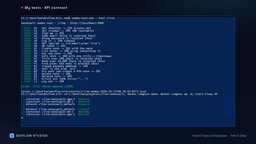
When the 90-minute limit arrived, Cline was still working, with no summary and no README. The author stopped it and verified manually: 22/22 API spec checks passed, and after a restart, login and note data were preserved 3/3. Backend security was even better than earlier tools: passwords hashed with script-level in-memory hard hashing, session tokens stored only as hashes and truly deleted on logout, rate limiting on registration and login, refusal to start when config is missing or keys are too weak, and webhook signatures compared in constant time with amount and currency validated.
But opening localhost:3000 gave only a dark blank page. The HTML and stylesheet loaded fine, but the JavaScript that draws the UI did not execute—there was a syntax error at line 200, with one function nested inside another. This was exactly the fragment misordering during chunked writing, and Cline never went back to check the same file. The required README was also missing.
The UI checklist was simple and direct: the app does not load, so you cannot register, log in, write notes, or upgrade from the browser—0/5.
Constant-Time Comparison and Webhook Signature Verification
Constant-time comparison is a cryptographic programming practice: when comparing two byte strings, it always takes a fixed amount of time to iterate over all bytes regardless of where a difference is found, preventing attackers from guessing keys byte by byte via response timing differences. Signature verification for payment webhooks especially needs this, because if the signing key leaks, attackers can forge "payment succeeded" events. Here Cline not only verified signatures with constant-time comparison but also additionally validated amount and currency to prevent replay or tampering. This detail shows that free models can already reach a high standard in backend security code generation, forming a sharp contrast with the frontend rendering failure—and suggesting that evaluations should score security implementation and delivery completeness separately.
Scoring and Takeaways
Final score: API contract 10/10, UI 0/5, restart 2/2, unattended 0 (not completed within the time limit and app unusable), totaling 12/20.
Three red flags are worth noting: chunked writing of large files was truncated by the free model, and Cline found it in test scripts but not in the browser code; the README was missing from delivery; and the compose file kept production-usable default webhook keys and database passwords that happened to be long enough to pass its own 16-character production check.
If using Cline with a free model, here are three practical tips: watch for the "chunked writing" prompt and personally inspect those files; run checks or open the app yourself before trusting results; and before it wraps up, ask it to open the UI in a browser, because its API tests cannot catch a white screen.
This is also the core contradiction of AI coding today: Agents' self-testing awareness is improving, but the verification loop remains confined to the layer they themselves wrote. It verifies backend logic thoroughly, yet no one accepts the frontend rendering. Next up is the browser-side Bolt—whether it can avoid this trap is worth watching.
Related articles

Skykea Showdown: A Hilarious Variety Show Experience of a Minecraft Airship Building Competition
Skykea Showdown is a Minecraft airship building racing variety show. This article analyzes its two-phase build + hole race format, airship mod lift physics, secret mission design, and team confrontation dynamics—ideal for game content creators.
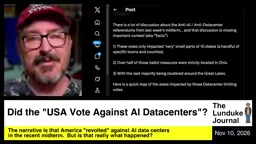
Did the US Midterms Vote No to AI Data Centers? A Map Reveals the Truth
After the US midterms, media claimed voters rejected AI data centers, but a map shows restrictive votes are concentrated in a few Ohio townships, affecting less than 1% of US towns—the national anti-AI wave is exaggerated.
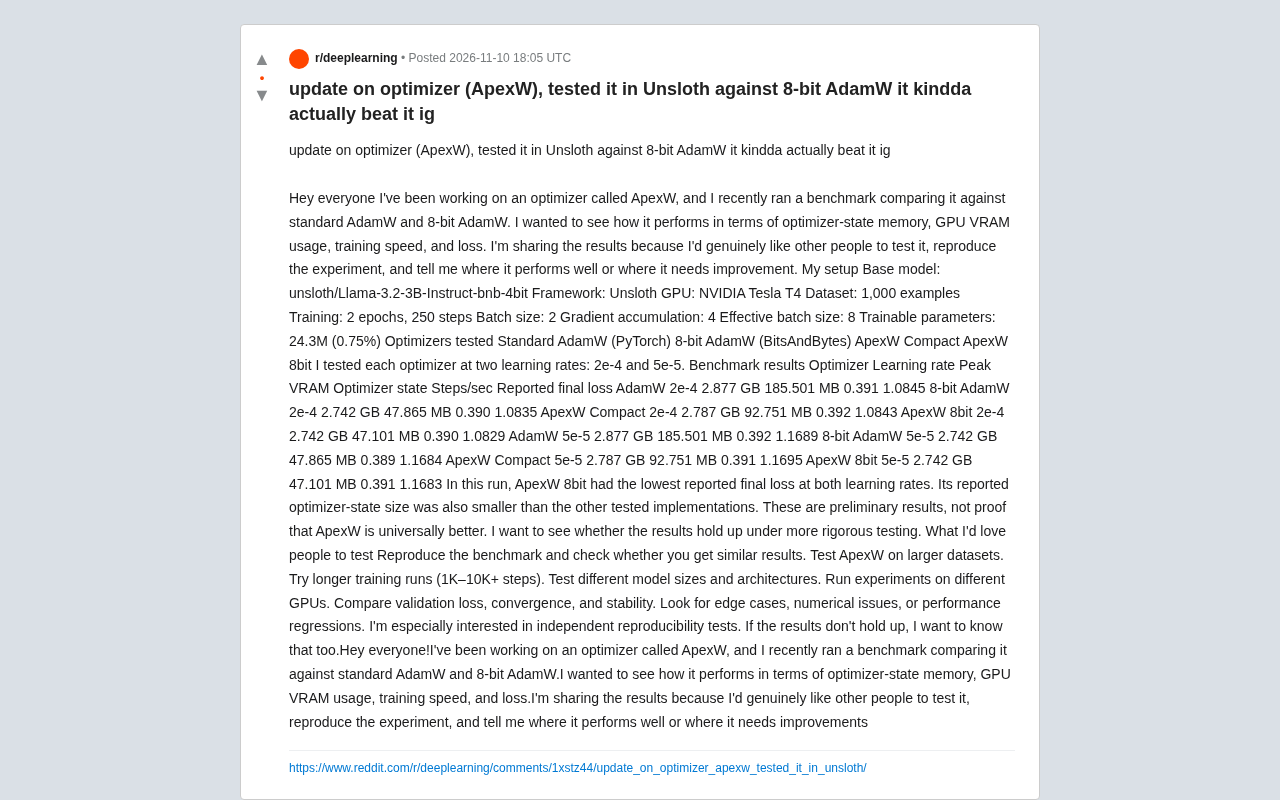
ApexW Optimizer Benchmark: Matches 8-bit AdamW in Unsloth with Lower Memory Usage
Developer shares benchmark of ApexW optimizer in Unsloth: ApexW 8bit has lower optimizer state memory (47.101 MB) and slightly better final loss than 8-bit AdamW, but similar speed. Needs independent reproduction.