GPT-6.1 Terra Hands-On Test: Can a Low-Cost Model Be Your Daily Driver?

GPT-6.1 Terra focuses on low cost and speed—good enough for daily use, but computer use suffers from network lag.
Based on a Bilibili creator's hands-on video, this article covers the positioning and performance of OpenAI's new model GPT-6.1 Terra. It emphasizes low cost and fast response, with API pricing roughly half the previous Terra version, sharing a lower price tier with GPT-5.6 Luna and offering friendlier quota consumption—suggesting users switch from the old 5.6 Terra for daily tasks. Availability covers Pro/Plus subscribers and launches in ChatGPT Worker and Codex simultaneously; free users have only three models. In capability, it handles everyday development tasks and shows clearly improved frontend page aesthetics over the 5.6 series; however, computer use testing resulted in disconnections, mainly attributed to proxy network latency and negative optimization in the Windows Codex APP. Selection advice: match by task—start with 6.1 Terra for daily work, upgrade to 6.1 Luna or GPT-6 Extra for complex tasks.
OpenAI has released its new model GPT-6.1 Terra, focused on low cost and fast response times, positioned to deliver sufficiently strong everyday capability at a lower price. A Bilibili creator ran hands-on tests right away, with particular focus on breaking down the pricing logic and model selection strategy. This article consolidates the video's content to help you decide whether it deserves to be your daily driver model.
Pricing Logic: Why Your Quota Is Never Enough
Many people complain that their Plus quota isn't enough, and the reason is often not heavy usage but choosing the wrong model tier. In the video, the creator laid out an API price ratio table, pointing out that consumption varies significantly across models.
- The highest tier is GPT-6 Extra, priced the highest;
- Next is GPT-5.6 Terra, at a relatively high price level;
- GPT-6.1 Terra and GPT-5.6 Luna sit in the same lower price tier;
- GPT-6.1 Terra's price drops further, roughly half that of the previous Terra version.
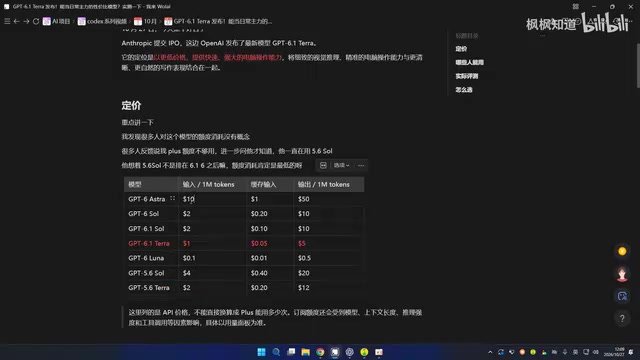
What's shown here is only API pricing, which cannot be directly equated to subscription quota consumption, but the ratio relationships are still a useful reference. The creator specifically warns: stop using the old 5.6 Terra for everyday tasks—if you can, switch to 6.1 Terra or Luna first, and quota consumption will be much friendlier.
The "quota consumption" repeatedly mentioned in the article is related to but not the same concept as API pricing. ChatGPT subscription (Plus/Pro) usage limits are typically expressed as message counts or compute quotas, and different models are assigned different "weights" in the backend: calling a stronger model deducts quota at a higher multiplier, while lightweight models have lower multipliers. Therefore, the per-million-token API pricing ratio can roughly reflect the consumption multiplier of each model on the subscription side, but the two are not strictly equivalent—actual quota is also affected by context length, reasoning mode, whether tools are enabled, and other factors. This also explains why choosing the wrong model makes people feel their quota is "mysteriously insufficient"—for the same number of conversation turns, a high-multiplier model may consume several times more than a low-multiplier one.
Who Can Use GPT-6.1 Terra
GPT-6.1 Terra's availability covers ChatGPT subscribers, including Pro and Plus plans. In addition, it launched simultaneously in ChatGPT Worker and Codex, so developers can call it directly within their coding environment.
Free users currently only have access to three models: 6.1 Luna, 5.6 Terra, and 5.6 Luna. If you find only these three in your model list, that basically confirms your subscription has expired.
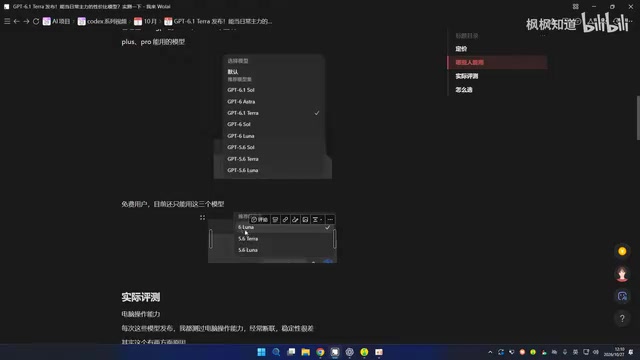
Codex and ChatGPT Worker, as mentioned in the article, are different product forms. Codex is a coding agent environment for developers that can read codebases, execute commands, and submit changes locally or in the cloud, with the model playing the role of planning and writing code; ChatGPT Worker leans more toward task-based/agentic workflows, letting the model execute multi-step operations continuously in the background. Both share the same model family as web-based ChatGPT, but their invocation methods, context windows, and tool permissions differ, so the same model may perform differently at different entry points. For developers, this means they can directly evaluate new models in a familiar coding environment without first switching back to the chat interface.
Computer Use Capability: Connection Stability Is the Weak Spot
The creator tests computer use capability with every new model release, and previous models often exhibited misclicks and poor stability. This time, testing 6.1 Terra resulted in a disconnection.
The disconnection was attributed to two factors: first, connecting to ChatGPT via a proxy from mainland China inherently has high latency, which is the key factor; second, the Windows version of the Codex APP has negative optimization—it performs better on Mac and noticeably worse on Windows. This can't be entirely blamed on the model itself, but it does affect real-world usability.
"Computer use capability" refers to the model recognizing interfaces via screenshots, moving the mouse, clicking buttons, and typing text to complete software operations on the user's behalf—this is GUI agent (computer use) capability. Such tasks are extremely latency-sensitive: each step requires uploading a screenshot, waiting for model inference, then sending back action instructions, forming one round trip. If a single round trip has high latency, the entire task chain is significantly lengthened, and any timeout or packet loss in the middle can interrupt the session, manifesting as a "disconnection." Therefore, the real-world usability of GUI agents depends not only on the model's own recognition and planning abilities but also heavily on network quality, client implementation, and the stability of the local execution environment.
Development and Frontend Capabilities: Good Enough for Everyday Tasks, Aesthetics Improved
On the development side, the creator had the model familiarize itself with a previous project; the model was able to map out the project structure and complete basic everyday development tasks.
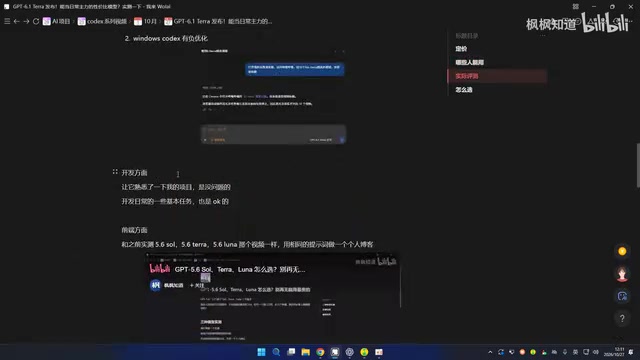
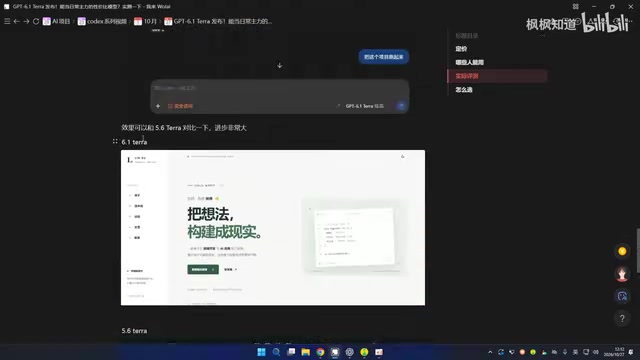
Frontend capability was compared using the same prompt. When 5.6 Terra and 5.6 Luna previously generated a personal blog page, the aesthetics were mediocre; after switching to 6.1 Terra, the page result improved noticeably and was overall more pleasing to look at. The creator acknowledges this part is subjective, but the difference is visible to the naked eye.
How to Choose: Match Tasks, Don't Chase Newness
With more and more models, the selection strategy actually becomes simpler: choose by task. For everyday code edits, page building, and writing, try 6.1 Terra first and keep using it if it gets the job done; if it can't handle it, upgrade to 6.1 Luna or GPT-6 Extra. There's no absolute standard—flexibly matching tasks is the key.
Overall, GPT-6.1 Terra strikes a good balance between price and everyday capability, making it suitable as a primary model for most routine work. However, computer use tasks are clearly hampered by the network environment, so don't set your expectations too high there.
Related articles

AI Weekly: Claude Code Backdoor Incident and AI Giants' Capital Game
AI security this week: Cursor marketplace seeded with a Claude Code backdoor affecting Mac and Windows developers. Meanwhile, Amazon AI capex hits $75.9B, Google AI search revenue lags traditional search, Anthropic launches Ultra subscription, and OpenAI commits to robots.txt training signals while publicly defending fair use.

Malicious Claude Code Extension Infiltrates Cursor: Version 2.1.313 Self-Check and Cleanup Guide
A malicious Claude Code build 2.1.313 appeared in the Cursor extension marketplace for about 11 hours, affecting up to 5,000 users. StepSecurity disclosed that it stole system information, git email, and environment variable names, and attempted to implant SSH keys and reverse tunnels. This article covers the incident, malicious behavior, and complete self-check and cleanup steps.

15 Essential Prompts for Vibe Coding: Keep AI from Wrecking Your Code
Vibe Coding often tempts AI to break your code. These 15 prompts—from PRD, architecture, and database to testing and debugging—chain each output as the source of truth, turning AI coding from casual chat into a controllable engineering process.