How AI Agents Work: The Model Only Sends Requests, the Code Does the Executing
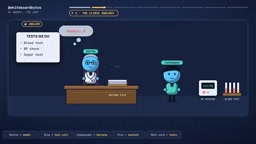
The model only sends tool requests; the harness executes and records, looping until the model stops requesting.
Using a clinic analogy, the article breaks down how AI agents work: the model is like a doctor with zero memory who can only write test orders (tool-call requests), while the harness is the assistant that executes them and pins results into the chart (history). Every call resends the system prompt, tool list, and full history, so token costs grow with each step—prompt caching only lowers the price, not the window. The loop ends when the model stops requesting tools. The article also clarifies common misconceptions via four edge-case tests and proposes three essential guardrails: turn or budget caps, human approval before high-risk tools, and strict schemas with clear error messages—plus advice to use a simple workflow when steps never change.
How AI Agents Work: The Model Only Sends Requests, the Code Does the Executing
You type "fix the failing test," the coding agent thinks for a moment, a few lines scroll by, and then the test passes. But the model never touched your terminal—so who ran the test? And who decided the task was done? This technical explainer from YouTube breaks down the complete mechanics of the Agent Loop using a clinic analogy.
The Clinic Analogy: A Doctor With Zero Memory
Imagine a neighborhood clinic. The doctor sits at a desk and can only write out test orders—blood work, blood pressure readings. The clinic assistant takes the slip, operates the machine, and brings back the report. Every slip and every report gets pinned into a chart folder. On the wall hangs a card listing the only tests this clinic can perform.
The critical twist: this doctor has no memory. Before every decision, she has to reread the entire chart from page one. When she feels she has enough information, she writes a prescription instead of a new test order—and the visit is over.
Real doctors have memory, of course, but language models don't. This picture is the foundation for understanding agents.
The Two Components of an Agent
An agent consists of two parts: the model, which reads and decides, and the harness—the code you wrap around the model. On every call, the harness sends the model three things: the system prompt, the tool list, and the full message history.
Each tool has a name, a short description, and a schema (the shape that its input parameters must satisfy). This is like the test menu card on the clinic wall. The example agent gets four tools: run tests, read file, edit file, git push.
When the model wants to use a tool, it doesn't write code. It just fills out a small form: tool name plus parameters, simple key-value pairs. For example, read_file with path: discount.py. The division of labor here is essential—the model only makes requests; the harness executes and records.
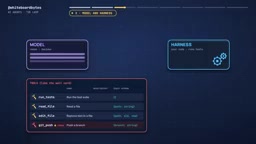
The tool-call schema is the contract between the model and the harness. It's typically described using JSON Schema, defining parameter names, types, whether they're required, and sometimes enum ranges and description text. The harness attaches the schema when it sends the tool list to the model, and the model uses it to generate structured, valid call requests. When the harness receives a request, it should first validate the parameter shapes against the schema before executing the actual logic; if the shape doesn't match, it returns a structured error to give the model a chance to correct itself. It's important to emphasize that a schema only constrains "what it looks like," not "whether the values are correct"—a path can be a valid string but the file may not exist, and this kind of semantic validation must be done by the harness's code.
Walking Through the Full Loop
Step one: the harness sends a request. Step two: the model replies with a tool call, like "run tests," with no parameters—it doesn't run anything itself. Step three: the harness actually runs the tests on your machine. Step four: the harness pins the result into the history as a new message—one test fails, the discount calculation is wrong. Step five: the model is called again with a longer history—the same doctor rereading a thicker chart.
Then it speeds up: the model requests to read the file, spots the bug (an extra zero in the discount calculation), requests an edit, then requests running the tests again—which now pass. At this point the model stops requesting tools and writes out the answer directly: "Fixed."
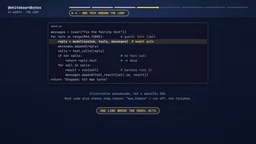
Who decides the task is over? The model—by no longer requesting tools. The harness sees there's no tool call and stops the loop. In the clinic it's five visits, four test orders, and one prescription; in code it's a single loop: call the model, run any requested tools and append their results, otherwise finish.
The Agent Loop is essentially a while loop of "call—execute—append—call again," not a self-directed process running inside the model. Control flow always stays with the harness: it builds requests, parses model replies, checks whether tool calls are present, executes tools, appends results into the history as tool-role messages, and moves to the next round. What we call "the model decides the task is done" really means the model's output no longer contains a tool call, and the harness uses that to break out of the loop and treats the last text as the final answer. This is also why turn caps, approvals, and error handling must all live in the harness—the model cannot break out of its own loop; only external code can press stop.
The Overlooked Cost: Resending the Entire History on Every Call
Because the model has no memory, every call has to resend the system prompt, the tool list, every test order, and every result. The input grows with each round trip. In the example, the first call sends about 1,500 tokens, and five calls total nearly 10,000 tokens—each new call carries all the old steps. Double the steps, and the recent history grows roughly fourfold.
One careless read of a large file means it gets resent on every subsequent call. This carries three costs: money, added latency (round trips execute serially), and context-window pressure (the model's limited workspace—the more crowded it gets, the more accuracy can degrade).
A common mitigation is prompt caching: the provider pre-prepares the repeated prefix so resending is cheaper and faster.
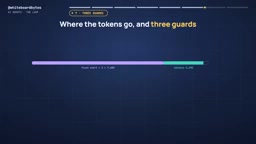
But caching only lowers the price tag—it doesn't change the height of the context window. Cached tokens still count toward the window.
Prompt Caching is a provider-side optimization: if the beginning of multiple requests (system prompt, tool definitions, early history) is exactly the same, the provider can reuse already-computed intermediate state to avoid recomputation, lowering unit cost and shortening time-to-first-token. It usually requires an exact prefix match—once new content is inserted in the middle, the cache is invalidated from the point of change onward. So the practical trick is to put stable content first and volatile content later. But caching doesn't change the hard limit on how many tokens the model can see at once—cached tokens still occupy the context window, and when the window fills up, truncation is still truncation.
Four Edge-Case Tests
When the test passes, did the model run the test? No. The model only wrote the request; the harness ran the test in your application.
If the test runner crashes on the fourth call, does the whole agent crash? Not necessarily. A well-designed harness sends the error back as a tool result marked as an error; when the model reads it, it typically tries another approach or gives an explanation.
With prompt caching enabled, does the context window fill up more slowly? No. Caching makes the repeated prefix cheaper and faster, but cached tokens still count toward the window.
In the Claude Agent SDK, if Max turns is set to 3, what happens to a run with five calls? By its counting rules, turns 1, 2, and 3 run the tests, read the file, and edit the file respectively, then it stops and errors out—the fix was made but never tested, and there's no final answer. Guardrails are a safety net, not a finish line.
Three Guardrails Every Agent Needs
The first: a turn or budget cap. Prevents the agent from requesting tools forever.
The second: human approval before high-risk tools. Like git push. When the model requests a push, the harness pauses and shows the exact command and waits. You say no; the rejection is returned as a tool result and the loop continues—the model usually tries another angle or stops to explain.
The third: strict schemas plus clear error messages. A schema guarantees parameter shape, not correctness of values. A path is a valid string, but the file doesn't exist—your code needs to check that and return a clear error.
Two more practical recommendations: keep tool output lean, and compress history into short summaries as it grows.
Human-in-the-loop is implemented by inserting an interruption point before the harness executes a high-risk tool: pause the loop, show the user the complete command the model requested, and wait for approval or rejection. Approval means execute as usual; rejection means not throwing an exception to terminate the whole agent, but appending "user rejected" as a tool-result message into the history so the model can read it and adjust its strategy on its own. This design preserves the continuity of the loop and hands control of irreversible operations back to the human. Approval points should sit on tools that have side effects and are hard to undo—pushing code, deleting files, calling paid external APIs—not on every read-only operation.
When Not to Build an Agent
If the steps never change, a simple fixed workflow is cheaper and easier to trust. Start small on your first build: write two or three clearly named tools, add a turn cap on day one, log every call and result so you can read the trace, and then add approval for any high-risk operation.
In one sentence: the model only makes requests; the harness runs tools, pins results, and asks again until the model stops requesting tools. Add the three guardrails, and you have an agent.
Related articles

Open-Source AI Desktop Robot: Built with a Laptop + Android + Pico
Open-source AI desktop robot PAL9000: a MacBook runs MediaPipe vision and llama-cpp dialogue, an Android phone is the animated face, and a Raspberry Pi Pico W drives a 2-DOF pan-tilt head. Modular design, reproducible piece by piece, with a discussion of anthropomorphic design.

Why Did Your Backtest 'Beat' SOTA? The Weather Covariate Leakage Trap
A backtest showed Timestral's MASE dropping from 0.71 to 0.49, seemingly beating SOTA—but it was caused by weather covariate leakage. After correction, it was only 0.66. This article analyzes the leakage, the archived forecast dilemma, and provides a checklist for time series backtesting.
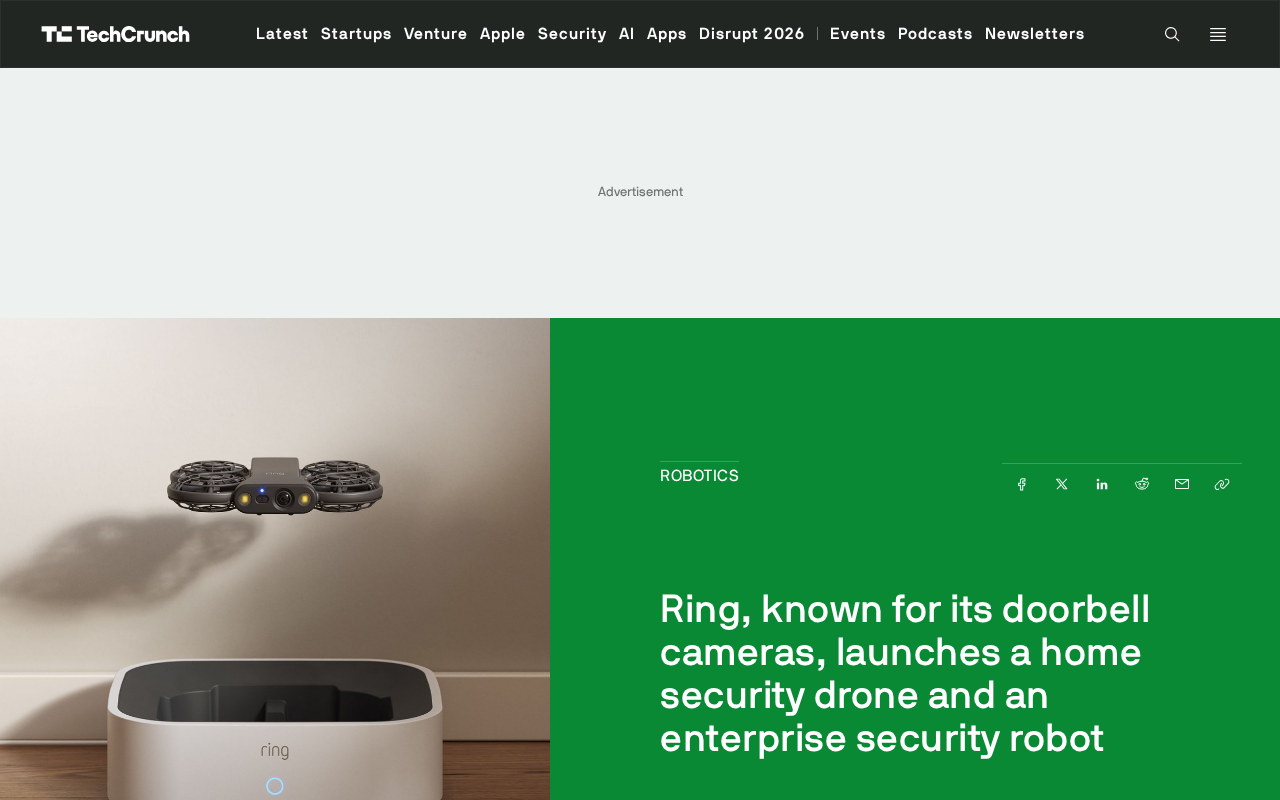
Ring Enters Robotics: Launching Home Security Drones and Enterprise Patrol Robots
Ring enters robotics with a home security drone and an enterprise rolling patrol robot. This article analyzes its product expansion logic, use cases, and practical challenges.