How Does LLM Trace Data Flow Across Tools? Comparing Three Integration Approaches
Comparing pros, cons, and security trade-offs of read-only API, webhook, and CLI for trace integration.
The article addresses a Reddit developer's question: when importing traces from Langfuse, LangSmith, Braintrust, or OTel into another tool, should you use a read-only API, webhook/exporter, or local CLI? It analyzes each approach's scenarios: API is flexible but risks data egress; webhook offers real-time performance but coarse control and complex reliability; CLI is controllable but not automatable. Security and privacy should be a preliminary filter—first determine if data can leave your infrastructure, then compare convenience. It also discusses self-built solutions for custom filtering/redaction and the immaturity of OTel standards.
When Your Tracing Stack Meets a New Tool: How to Choose Among Three Connection Methods
If you're already using Langfuse, LangSmith, Braintrust, or OpenTelemetry (OTel) to manage tracing data for your LLM applications, and now you want to import those traces into another debugging or analysis tool, which integration approach feels most reliable? A developer on Reddit raised this practical question and laid out three options: pulling via a read-only API, automatic push via webhook/exporter, or manual export via a local CLI. He assumed all three take roughly the same time to set up, and what he really wanted to know was—in production environments, which one do people prefer, and how do security and privacy considerations influence that choice?
The value of this question lies in the fact that it touches on a part of the LLM observability space that hasn't yet been standardized: the flow of trace data between different tools. Mainstream platforms like Langfuse, LangSmith, and Braintrust all provide their own APIs and export mechanisms, while OTel attempts to unify the data model with an open standard. But when you need cross-tool collaboration, there's no "officially recommended" way to connect them—teams often have to piece it together themselves.
Applicable Scenarios and Trade-offs of the Three Approaches
Read-only API: On-demand Flexibility and Data Egress Risk
A read-only API allows another tool to query and pull specific run records when needed. The advantages are straightforward: the target tool can decide which data to pull and when, and the source system only needs to expose a controlled read interface. For analytical tools—for example, scenarios that need to periodically scan all traces for aggregate statistics—API pulling is more natural than real-time push.
But security teams usually raise a red flag here. A read-only API means another service can programmatically access your tracing data, and traces often contain user inputs, model outputs, and even internal prompts. The original Reddit post specifically asked, "Would you let another service read your traces, or would you rather keep everything within your own infrastructure"—this reflects a common concern about data residency in production environments. If the target tool is a SaaS service, data leaving your VPC is almost unavoidable; even with self-hosting, cross-service access control requires additional design.
Webhook/Exporter: Best Real-time Performance, but Weakest Control
The webhook or exporter pattern lets the source system automatically push to a target endpoint when a specific run completes. This approach offers the strongest real-time capability and suits debugging workflows that need immediate feedback—for example, triggering downstream analysis as soon as a trace shows an anomaly. It's also the most "hands-off" of the three options: once configured, data flows automatically without manual intervention.
The cost is coarser control granularity. It's hard to do fine-grained filtering or redaction before pushing unless you write custom logic in the source system. Moreover, webhook reliability depends on the stability of both systems, and you have to handle retry mechanisms and idempotency yourself. For security-sensitive scenarios, automatic push means continuous data egress, increasing audit and compliance complexity. The original post's mention of "sending specific runs" hints at the possibility of selective pushing, but implementation usually requires extra development.
Webhook reliability engineering deserves separate mention. A production-grade webhook pipeline must handle at least four issues: first, retries and backoff—when the target endpoint is temporarily unavailable, the source system needs an exponential backoff retry strategy, otherwise data is lost; second, idempotency—retries may cause the same run to be pushed multiple times, and the receiver must be able to deduplicate based on trace ID or run ID; third, delivery guarantees—most webhooks use "at-least-once" semantics rather than "exactly-once," which differs from the batch mode of exporters; fourth, endpoint security—the webhook URL itself is a probeable entry point, typically requiring signature verification (such as HMAC) to validate the request source and restricting access on the receiving end. In contrast, OTel's exporter pattern is more mature in reliability: the Collector has built-in batching, retry queues, and backpressure mechanisms, which is why self-built solutions often use OTel Collector as a foundation rather than writing raw webhooks. The article's mention that "retry mechanisms and idempotency handling must be considered" refers to these engineering details.
Local CLI: Manual but Controllable, Suitable for Low-frequency and Sensitive Data
A local CLI lets developers manually select which traces to export and move data locally. This approach is the most "primitive," but also the most reassuring: data doesn't pass through third-party services, the export action is human-triggered, and the scope is controllable. For low-frequency debugging needs—such as exporting a batch of failure cases to another tool for root cause analysis once a week—the CLI is perfectly adequate.
Its shortcomings are also obvious: it can't be automated, isn't suitable for continuous integration pipelines, and can become a bottleneck during team collaboration. The original post assumed all three take the same setup time, but the long-term maintenance cost of the CLI (version compatibility, script updates) is often underestimated. If a team already has its own trace-transfer scripts, that's likely an extension of the CLI approach—the original post also asked, "If you've built your own way, what does that setup look like, and what capabilities wouldn't you want to give up," hinting that manual solutions are not uncommon in practice.
OpenTelemetry (OTel) is an open-source observability framework under the CNCF that attempts to define unified APIs, SDKs, and data models (the OTLP protocol) for three types of telemetry data: traces, metrics, and logs. In the LLM observability context, OTel's significance lies in this: if platforms like Langfuse, LangSmith, and Braintrust all support OTLP export, then trace data can be routed to any backend through OTel Collector like standard telemetry, without writing dedicated adapters for each tool. But LLM traces have their particularities—they contain nested span trees (a single conversation may be split into retrieval, reasoning, and tool-calling spans), unstructured prompt/completion text, and custom attributes like token usage, which are not yet fully standardized in general OTel semantic conventions. As a result, OTel compatibility varies across platforms: some only export basic spans, while others stuff LLM-specific fields into custom attributes, requiring field mapping during cross-tool migration. Understanding this is necessary to see why the article says OTel "theoretically offers a unified possibility," but in practice still requires pragmatic choices.
How Security and Privacy Shape the Decision
The original post singled out security and privacy, indicating that this is not a secondary factor in production environments. The three approaches differ significantly in data exposure surface: a read-only API exposes a continuously queryable interface, a webhook exposes a continuous data stream, and a CLI exposes one-off manual exports. From an attack surface perspective, CLI is smallest, API is next, and webhook is largest—because the webhook endpoint itself can become an entry point.
Another dimension is data residency. If the target tool is an external SaaS, then regardless of the method, trace data will leave your infrastructure. At that point, teams must trade off tool convenience against data control. Some teams choose to export only redacted trace metadata (such as latency, token counts, status codes) without raw inputs and outputs. The original post didn't provide a definitive answer, but the question itself highlights the existence of this trade-off.
Data residency and PII redaction are two key compliance concepts here. Data residency refers to the jurisdiction or network boundary within which data is physically stored; GDPR and some industry regulations (such as finance and healthcare) require that certain data must not cross borders or leave controlled environments. When the target tool is SaaS, traces leaving the VPC means the data residency boundary is broken, and teams often need to sign data processing agreements (DPAs) or choose regional deployments. PII redaction involves identifying and replacing personally identifiable information in traces before export—user inputs may contain names, emails, or ID numbers, and model outputs may repeat them. Common methods include regex matching, named entity recognition, or field-whitelist-based filtering. The article's suggestion to "export only redacted trace metadata (such as latency, token counts, status codes)" essentially excludes PII from the transmission path, letting analysis tools see only aggregate metrics rather than raw content. Together, these two points constitute hard constraints for security teams evaluating integration options.
The Value of Self-built Solutions: Why Some Don't Choose Off-the-shelf Options
The original post finally asked, "If you've built your own way, what does that setup look like, and what does it handle that you wouldn't want to give up?" This question points to a reality: the three off-the-shelf options may not cover all needs. Common forms of self-built solutions include custom exporters based on OTel Collector, scheduled scripts that pull from APIs and write to a data warehouse, or push pipelines buffered by message queues.
The core value of self-building usually lies in customized filtering, redaction, and routing logic. For example, forwarding only traces with specific tags to analysis tools, or replacing PII fields before export. These capabilities often require paid versions or additional development in off-the-shelf solutions. The cost is maintenance burden—self-built pipelines require someone responsible for monitoring, upgrades, and troubleshooting.
Practical Advice: Choose Based on Requirements
Overall, no single approach suits all scenarios. If the goal is real-time debugging and data sensitivity is low, webhook is the most hassle-free; if the analysis tool needs on-demand queries and the team can accept controlled external access, read-only API is more flexible; if data is highly sensitive or export frequency is very low, CLI is a solid starting point. Security and privacy aren't the only criteria for "which to choose," but they should be a preliminary filter—first determine whether data can leave your infrastructure, then compare convenience among the remaining options.
Cross-tool flow of LLM trace data is still in a stage where everyone minds their own business. OTel's open standard theoretically offers a unified possibility, but in practice, the maturity of exporters and the level of OTel compatibility across platforms vary. Before standards mature, teams making pragmatic choices based on their own security boundaries and automation needs may be more practical than waiting for "best practices."
One-line Summary
Comparing the pros, cons, and security trade-offs of read-only API, Webhook, and local CLI for cross-tool trace integration.
Paragraph Summary
The article centers on a Reddit developer's question: when you already have a Langfuse, LangSmith, Braintrust, or OTel tracing stack and want to import traces into another tool, should you choose a read-only API, a webhook/exporter, or a local CLI? The author analyzes the applicable scenarios of each: API is flexible for on-demand pulling but carries data egress risk; webhook offers the best real-time performance but has coarse control granularity and complex reliability engineering; CLI is the most controllable but unsuitable for automation. The article emphasizes that security and privacy should be a preliminary filter—first determine whether data can leave your own infrastructure, then compare convenience—and discusses the value of self-built solutions for customized filtering and redaction, as well as the reality that OTel standards are not yet mature.
Related articles
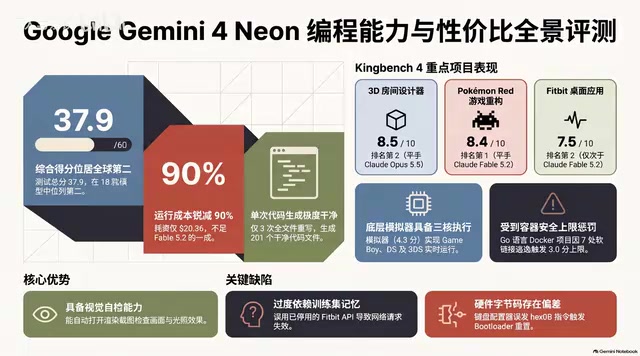
Gemini 4 Neon Hands-On: Value King or Confident Catastrophe?
Gemini 4 Neon review: 1M-token context, four thinking levels, 201 files in one KingBench4 pass at one-tenth Fable 5.2's cost—but it hallucinates fake data, leaves 7 symlink escapes, and bricks keyboards.

Google Gemini 4 Neon Hands-On: 6 3D Works That Impress and Fail
Hands-on with Google Gemini 4 Neon on a 3060 laptop: 6 3D works tested. Sunshower Fishing Harbor and mechanical keyboard impress; soft-body physics and faces fall short.
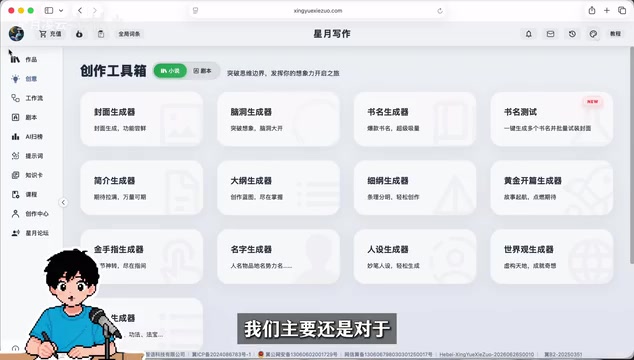
Gemini 4 Neo Web Novel Writing Test: Faint AI Flavor, Textured Dialogue
Bilibili creator's first-look review of Gemini 4 Neo for Chinese web novel writing: testing a Three Kingdoms transmigration opening with faint AI flavor, emotionally textured dialogue, and strong crisis building, plus comparison of 4A/4H/4C models and full workflow demos.