How One Content Studio Can Handle All Your Diagrams, Videos, and PowerPoints

Teams are consolidating diagrams, videos, and slides into one content studio to unify style and cut revision costs.
Inspired by a tweet, the article discusses the trend of teams handing diagrams, videos, and slides to a single content studio. Traditionally these belong to different roles, causing fragmented output, inconsistent styles, and multi-place rework. The studio's core value is cross-format asset reuse and single-source synchronization. AI mainly handles first drafts and structured conversion, while final quality depends on templates and human review. Given limited source info, no product is recommended; instead, evaluate solutions by data source reuse, video editing depth, and collaboration permissions.
When One Content Studio Handles It All
I recently came across a short post on Twitter: "Content studio makes all our diagrams. And videos. And PowerPoint's." No flashy demo, no lengthy review—but the statement carries a surprising amount of signal. It describes a team collaboration pattern that's taking shape: handing off diagrams, videos, and slides—all visual content—to a single content studio for production.
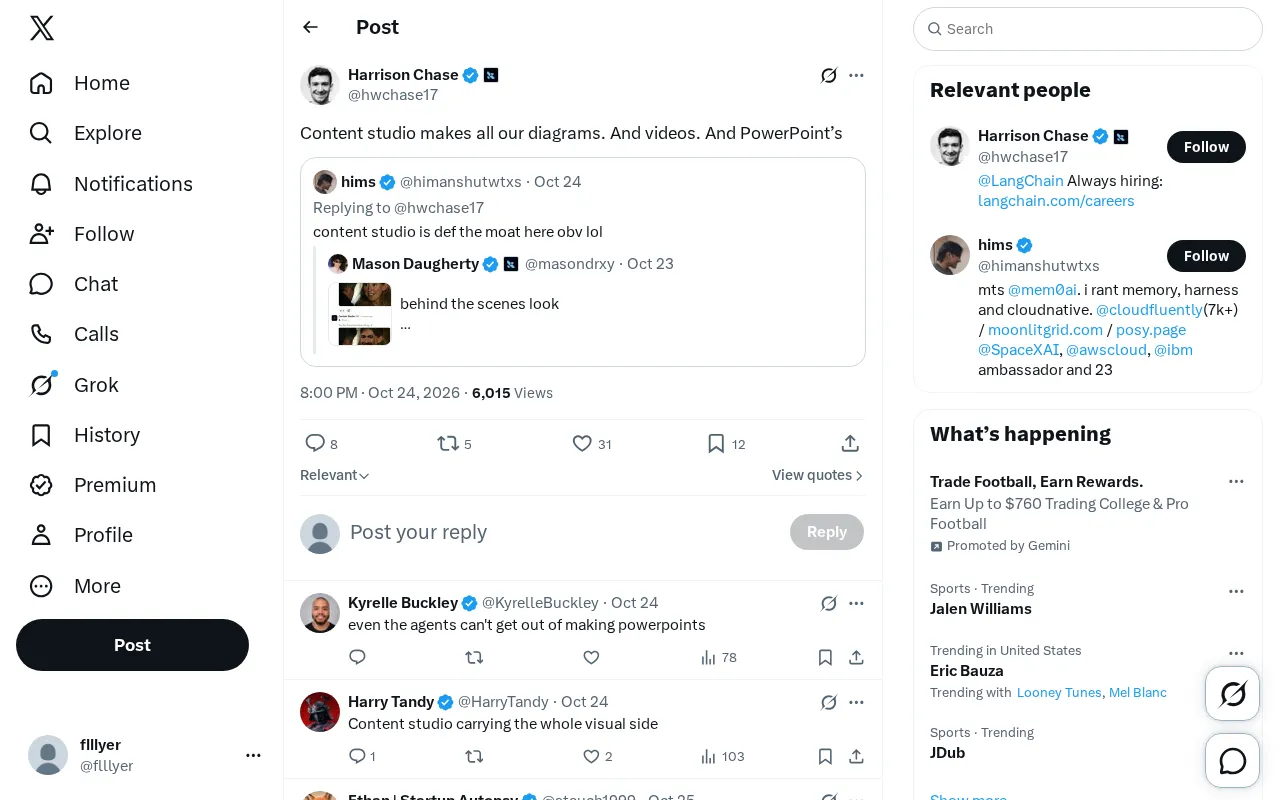
This tweet is worth unpacking not because it lists the features of a specific tool, but because it points to a real question: when a team's content needs span infographics, motion videos, and presentations, should they keep procuring different tools for each step and stitching them together across different roles—or should they consolidate visual expression into a single unified workbench?
Three Visual Content Production Lines Are Merging
Traditionally, diagrams, videos, and PowerPoints belong to three different job functions. Diagrams might be exported by data analysts from BI tools, videos handed to editors or motion designers, and PPTs painstakingly formatted by the presenter late at night. The outputs are fragmented, styles are inconsistent, and a single data change means reworking all three places separately.
The key phrase in the tweet is "all our." It implies not "it can also do" but "it does all of it." This means the team has unified the default production path for visual content into one studio. For content teams, the immediate change from this consolidation is that the same assets can be reused across diagrams, videos, and slides—rather than starting from scratch each time.
Of course, a single tweet doesn't clarify whether this studio is an in-house tool, a commercial SaaS, or an internal service team. Judging from the wording, it reads more like a description of a workflow that's already running smoothly rather than a product advertisement. This also reminds us: when we see shares like this, first distinguish between "tool capability" and "team practice."
The Real Needs Behind a Unified Workbench
Why would teams prefer to produce these three types of content together? From a content operations perspective, there are at least three practical reasons.
Style Consistency
Diagrams using one color scheme, videos another, and PPTs a third is the norm for many teams. A unified studio means unified templates, fonts, and visual language—resulting in a stronger brand feel in external output.
Revision Cost
Data-driven content is the most vulnerable to repeated changes. If the data in diagrams, video data shots, and PPT charts all come from the same source, one update syncs everywhere, saving enormous redundant effort.
Collaboration Barrier
Enabling non-design team members to produce usable diagrams and slides is a real pain point for many teams. A centralized content studio often means a lower learning curve and less tool switching.
Asset reuse and single source of truth are the key prerequisites here. A single source of truth means maintaining one authoritative version of the same data, from which diagrams, video data shots, and slides all read; asset reuse means visual assets like color schemes, icons, templates, and chart components are shared across different output formats. Only when both are in place can you achieve "update once, sync everywhere." If a team's data is scattered across multiple spreadsheets and visual assets are stored in separate places, revision costs remain high even with the same tool. Therefore, when evaluating a content studio, beyond checking which output types it supports, pay closer attention to whether it enforces or encourages a single-source-of-truth workflow.
AI's Role: Acceleration, Not Replacement
The frequent emergence of these content studios over the past two years is directly tied to embedded AI capabilities. Text-to-diagram, script-to-video, outline-to-slide—these capabilities make "one person producing multiple types of visual content" a reality.
But we should keep a cool head: AI excels at rapidly converting structured information into first drafts, while style consistency and final quality still depend on template systems and human review. The tweet mentions no AI details, so the more reasonable interpretation is that this studio may leverage AI for efficiency, but its core value remains in integrating fragmented production steps into a coherent workflow.
For content creators, what's worth borrowing is not a specific tool but the mindset of "integrate the workflow first, then discuss tool selection." First figure out which types of visual content your team actually needs and how assets can be reused across them—then evaluate whether to use an all-in-one platform or combine existing tools.
Structured information refers to data already organized by fields, hierarchy, or logical relationships—such as tables, database records, outlines, or JSON. The reason AI can quickly convert such information into diagrams or slides is that the conversion process is essentially mapping rather than creation: the model identifies "this is a category field, this is a numeric field" and then applies preset chart types and layouts. Conversely, when facing unstructured long text or vague requirements, AI-generated visual content often requires more manual adjustment. Understanding this distinction helps determine which steps are suitable for AI automation and which still require humans to define structure and goals.
What This Tweet Doesn't Tell Us
To be transparent: the original material is just one sentence and one screenshot, with no disclosure of the studio's name, specific features, cost, or actual results. Therefore, this article does not constitute a recommendation for any product, nor can it verify output quality.
If you're evaluating a similar solution, I suggest trying it out with three questions in mind: Can it generate both diagrams and slides from the same data source? Is video output template-based assembly, or does it support fine-grained editing? Are permissions and version management clear for multi-person collaboration? The answers to these three questions often reveal more about whether a content studio fits your team than any feature list.
Template-based assembly and fine-grained editing are two typical paths for video output. Template-based assembly means preset layouts, transitions, and subtitle positions—users fill in assets and copy to generate a video. It's fast but offers limited flexibility. Fine-grained editing provides timeline, keyframe, and layer controls, suitable for scenarios with specific requirements for pacing and visuals. Most all-in-one content studios lean toward template-based approaches for video to lower the barrier to entry. When trialing, teams should clarify whether their videos are for quick internal communication or external brand publishing—the former is well-served by templates, while the latter often requires exporting to professional editing tools for post-production.
FAQ
What's the difference between a content studio and an ordinary design tool?
Design tools typically focus on a single output type, while content studios emphasize multi-format output across diagrams, videos, and slides with asset reuse—closer to a small production line.
Is a unified content studio necessary for small teams?
If the team frequently needs to produce data charts and presentation materials simultaneously, a unified workbench can significantly reduce redundant work; if content needs are simple, combining existing tools may be more cost-effective.
Does AI-generated content still need human review?
Yes. AI is good for generating first drafts and structured conversion, but factual accuracy, brand style, and final publishing still require human oversight.
One-line Summary
Teams are consolidating diagrams, videos, and slides into a single content studio to unify style and reduce revision costs.
Paragraph Summary
Inspired by a tweet, this article discusses the trend of teams handing off diagrams, videos, and slides—all visual content—to a single content studio. Traditionally these three content types belong to different job functions, resulting in fragmented output, inconsistent styles, and multi-place rework for revisions; the core value of a unified workbench lies in cross-format asset reuse and single-source-of-truth synchronization. The article analyzes the underlying needs as style consistency, reduced revision costs, and lower collaboration barriers, and notes that AI primarily handles first-draft generation and structured conversion, while final quality still depends on template systems and human review. Given limited source material, the article recommends no specific product but suggests evaluating solutions across three dimensions: data source reuse, video editing depth, and collaboration permissions.
Related articles

LLM Application Development: A High-Paying Career Guide for Ordinary People
LLM application development offers fresh graduates up to 35K/month, with SP offers reaching 600K. This article explains the core skills, how to break in, and how ordinary people can seize AI opportunities through learning by doing.

Say Goodbye to AI Influencer Faces: A Complete Guide to Creating Visual Assets for AI Comic Dramas from Scratch
Bilibili creator shares a full workflow for zero-basics AI comic drama visual assets: use Doubao Work skills with script-first, visual references, and real-person texture to escape AI influencer faces, then lock character and scene consistency with asset sheet layouts, weapon detail images, scene nine-grids, and cinematic color palettes.

The AI Production Pipeline Behind Great Videos: From Research to Agent Validation
AI video production isn't just a model race. This article breaks down a transferable four-step pipeline: researching professional workflows, organizing a skill checklist, configuring agents, and experimental validation—and explains how general-purpose LLMs like DeepSeek can replace paid tools to run the entire process.