If You Read This: A Daily Check-In App That Works Like a Dead Man's Switch

A daily check-in app built on a dead man's switch that texts important people when you go silent.
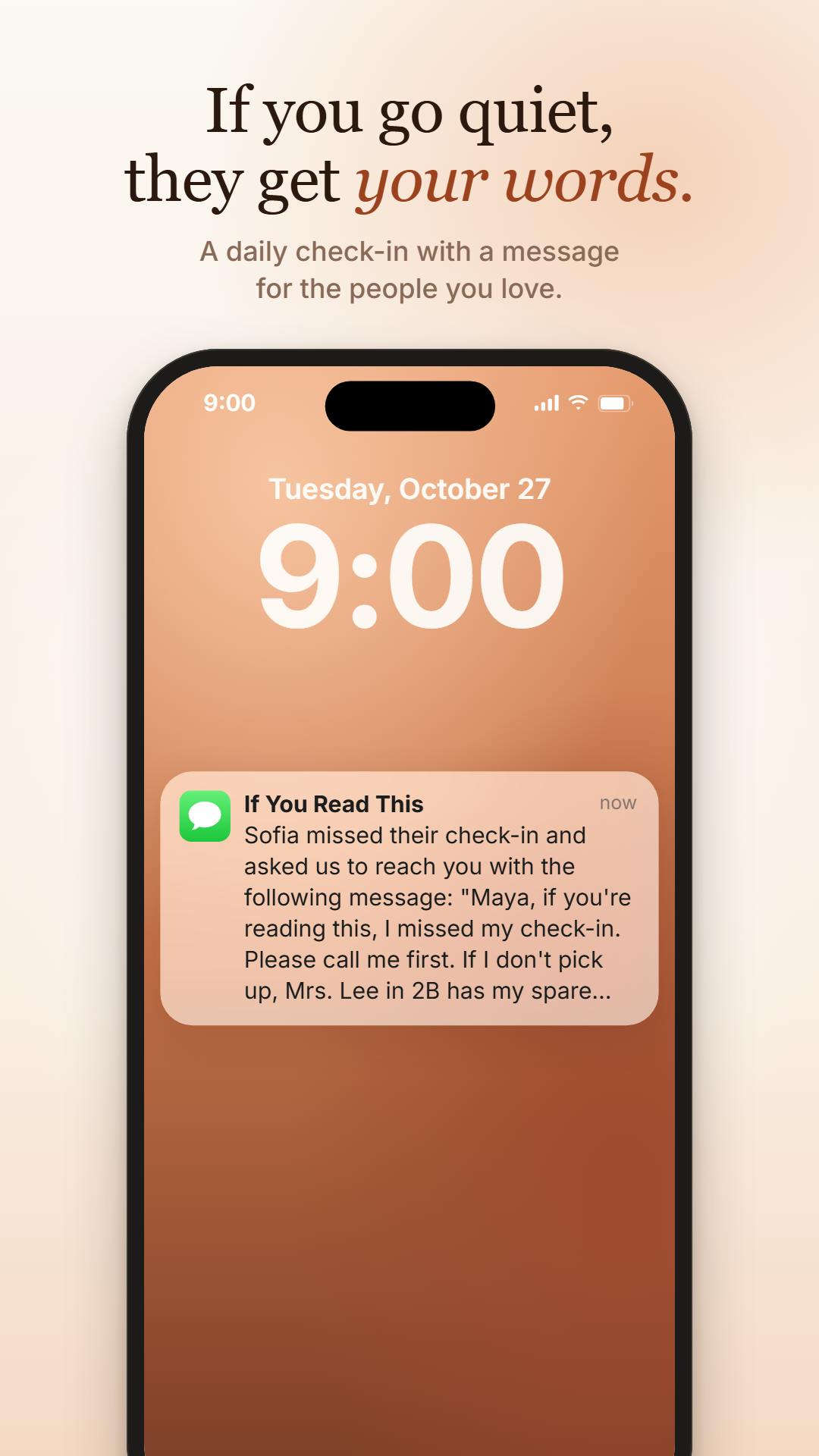
If You Read This is a new app on Product Hunt that brings the engineering "dead man's switch" into everyday communication: users open the app daily to check in, receive a reminder if they miss it, and after repeated non-response the system automatically sends a preset message via SMS to a designated contact. It currently supports only US and Canadian numbers. The article covers its workflow, use cases (safety check-ins for those living alone, regular reassurance, timed easter eggs), and minimalist design philosophy, while noting that privacy data storage and regional limits are the main constraints. The app received 73 upvotes on Product Hunt and ranked 15th for the day, serving a niche but real need.
When "Read" Becomes the Final Goodbye
In the digital age, we're used to instant messaging, but we rarely think about the meaning of "silence." If one day you suddenly can't reply to messages, how should the words left unsaid be conveyed? A new app on Product Hunt, If You Read This, offers a somewhat heavy yet practical answer: it's a daily check-in app based on the "dead man's switch" mechanism that automatically sends preset messages to the people who matter when you go silent.
What Is a "Dead Man's Switch"?
A "dead man's switch" was originally a safety mechanism in engineering: once the operator stops actively operating (for example, releasing a button), the system automatically triggers a preset action. In the digital world, this concept has been extended to mean "if you don't show up on time, something happens automatically."
If You Read This simplifies this mechanism to the extreme: you only need to open the app once a day to complete your check-in. If you still haven't checked in by the agreed time, the app first sends you a reminder; if you keep missing it, it automatically sends your pre-written message as an SMS to your designated contact. The feature currently supports US and Canadian phone numbers.
The original English term "dead man's switch" can be traced back to railway and mining engineering. In steam locomotives and early subways, the driver had to continuously press or hold a pedal/handle; if they released it due to fainting or an accident, the braking system would automatically engage to stop the vehicle. Similar mechanisms are also used in elevators, chainsaws, and military equipment. In the digital world, "dead man's switch" has been extended to mean "if the user doesn't actively confirm they're alive within a certain period, a preset operation is automatically executed," commonly seen in password escrow, encrypted inheritance, and server heartbeat monitoring (such as Healthchecks.io). Its core logic is to treat "silence" itself as the trigger signal, rather than waiting for an explicit distress request. This complements traditional alarm mechanisms, and is especially suited to extreme situations where the user may have already lost the ability to act.
How It Works: Check-In, Reminder, Send
According to the Product Hunt page, the entire process revolves around "check-in." Users complete their check-in simply by opening the app each day, at extremely low effort. Once a check-in is missed, the system tries to reach you through reminders, giving you a chance to make up for it. Only when you still don't respond after multiple reminders is the final message sent.
This design balances reliability and the risk of false alarms: occasionally forgetting to check in won't immediately alert your contacts, while when information truly needs to be conveyed, the system executes step by step.
SMS has special technical constraints as a transmission channel here. Unlike push notifications or instant messaging, SMS doesn't depend on the recipient installing the same app or staying online, making it more reliable in emergency notification scenarios. But sending SMS goes through carrier gateways, involving number verification, sending rate limits, and per-message billing—which is the practical reason the app only supports US and Canadian numbers: cross-border SMS costs more and has more complex compliance requirements. In addition, automatically sent messages arrive as plain text and can't include links or rich media, so users need to consider this format limitation when designing their "final message." Triggering the send only after multiple reminders go unanswered is essentially a debounce design, using a time window to filter out mistaken operations and brief disconnections.
Use Cases: More Than "What Comes After"
Although the name and mechanism sound related to life and death, If You Read This can be used more broadly. For people living alone, those with chronic illnesses, or people in high-risk occupations, it can serve as a lightweight safety check-in tool. For those who need to regularly reassure their families, it can also automatically send a notification when unexpectedly out of contact.
Even in some non-emergency scenarios—for example, if you want to send a friend a "timed easter egg" under specific conditions—this check-in-triggered mechanism can come in handy. Of course, the app's core value still lies in dealing with "silence"—those moments when we can't speak for ourselves.
Design Philosophy: So Simple You Won't Forget
Developer Ryan Mercado has kept the product very restrained. There's no complicated setup process, no social features, and no unnecessary permission requests. Users only need to: write a message, choose a contact, and check in daily. This minimalism lowers the barrier to use and makes the act of "daily check-in" easier to maintain.
On Product Hunt, the app received 73 upvotes, ranking 15th for the day. Although the vote count isn't outstanding, the small number of comments also suggests it hits a relatively niche but real need.
Privacy and Limitations: What You Need to Know
Any app involving "automatic message sending" can't avoid privacy concerns. If You Read This needs to store your message content and contact information, and use this data to send SMS when trigger conditions are met. Users need to trust how the developer handles their data.
In addition, it currently only supports US and Canadian phone numbers, meaning users in other regions can't use the core feature for now. For an app that relies on SMS channels, regional restrictions are a real technical and cost constraint.
The core privacy risk facing such apps is the "data escrow paradox": to convey sensitive information after going silent, users must hand over message content to a third party for storage in advance, and the storage provider itself may be breached, subpoenaed, or acquired. Safer approaches include end-to-end encryption (with keys stored only on the user's device), decrypting only at the moment of sending, and clear data retention and deletion policies. When choosing such tools, users should look at whether the developer states how messages are encrypted, how long data is stored, and whether messages are retained after triggering. Another often overlooked issue is contact consent: recipients haven't actively subscribed to the SMS, so it's necessary to ensure the sending behavior complies with local anti-spam regulations (such as the US TCPA), otherwise it may create compliance risks for the developer.
Is It Worth Trying?
If You Read This isn't an app you'll excitedly open every day, but what it offers is a kind of "insurance"—like a fire extinguisher, you hope you'll never need it, but it has to be there when you do. Its value isn't in daily engagement, but in reliability at critical moments.
If you have people you need to regularly reassure, or want to prepare for "just in case," this app offers an extremely low-cost solution. You can learn more through the Product Hunt page, and developer Ryan Mercado welcomes user feedback.
In an era where everyone is chasing "instant," If You Read This goes the opposite way, focusing on "delayed silence." That may be exactly what makes it most special.
Related articles

Open-Source AI Desktop Robot: Built with a Laptop + Android + Pico
Open-source AI desktop robot PAL9000: a MacBook runs MediaPipe vision and llama-cpp dialogue, an Android phone is the animated face, and a Raspberry Pi Pico W drives a 2-DOF pan-tilt head. Modular design, reproducible piece by piece, with a discussion of anthropomorphic design.

Why Did Your Backtest 'Beat' SOTA? The Weather Covariate Leakage Trap
A backtest showed Timestral's MASE dropping from 0.71 to 0.49, seemingly beating SOTA—but it was caused by weather covariate leakage. After correction, it was only 0.66. This article analyzes the leakage, the archived forecast dilemma, and provides a checklist for time series backtesting.
Ring Enters Robotics: Launching Home Security Drones and Enterprise Patrol Robots
Ring enters robotics with a home security drone and an enterprise rolling patrol robot. This article analyzes its product expansion logic, use cases, and practical challenges.