Illusion Code In-Depth Review: 34+ Tools and 7 Agents Working in Harmony as an AI Coding Assistant

Illusion Code combines 34+ tools, 7 Agents, and Chinese-dev optimizations into one CLI AI coding assistant.
Illusion Code is a command-line AI coding assistant featuring 34+ core tools, 7 specialized collaborative Agents, three-tier permission modes, and deep optimizations for Chinese-speaking developers including Feishu/WeChat/QQ integration and native Chinese UI. This review compares it against Claude Code, OpenAI Codex, and OpenCode, analyzing its layered extension architecture and terminal rendering quality.
When AI Coding Tools Compete, Illusion Code Chooses to Have It All
In the current landscape where Claude Code, OpenAI Codex, OpenCode, and other AI coding tools are vying for dominance, a command-line coding assistant called Illusion Code has emerged, attempting to combine the strengths of all its competitors into one package. It features over 34 core tools, 7 specialized Agents working collaboratively, and deep optimization for Chinese-speaking developers. Is this tool a "Frankenstein's monster" or a true best-of-breed solution? Let's find out.
Illusion Code Core Capabilities: 34+ Tools and 7 Agents in Collaboration
Illusion Code's core competitive advantage starts with the richness of its toolchain. Over 34 core tools cover every aspect of a developer's daily workflow: file operations, command execution, code search, and task management — allowing you to complete virtually all development tasks without leaving the terminal.
Even more noteworthy is its architectural design featuring 7 specialized Agents working collaboratively. From code exploration and bug fixing to architecture design, each Agent has its own area of expertise, and developers can invoke the most appropriate Agent for their current task. Compared to a single Agent handling everything, this division-of-labor approach delivers noticeable improvements in specialization and accuracy.
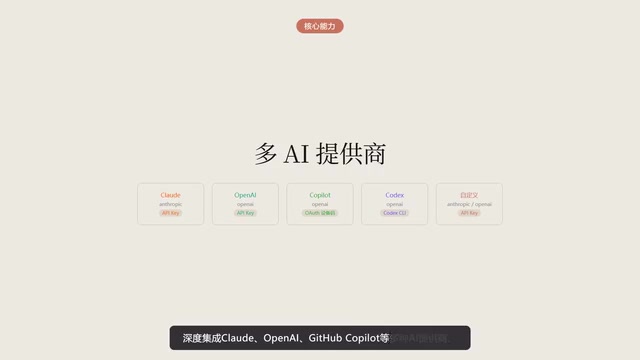
On the AI model support front, Illusion Code deeply integrates multiple AI providers including Claude, OpenAI, and GitHub Copilot, allowing developers to flexibly switch between underlying models based on their preferences and use cases — avoiding vendor lock-in.
Security and Permissions: Three Flexible, Controllable Modes
Security has always been a key concern for developers when it comes to AI coding tools. Illusion Code offers 3 permission modes, ranging from default confirmation to fully automatic execution, letting developers choose freely based on project sensitivity and their level of trust.
- Default Confirmation Mode: Requires user confirmation before every operation — ideal for production code or sensitive projects
- Semi-Automatic Mode: Low-risk operations execute automatically while high-risk ones still require confirmation
- Fully Automatic Mode: Completely trusts the AI's judgment — suitable for rapid prototyping or personal projects
This tiered permission design is uncommon among similar AI coding tools and reflects deep consideration of the balance between security and efficiency.
Terminal Rendering Experience: Details Define the User Experience
As a command-line tool, terminal rendering quality directly impacts the daily developer experience. Illusion Code has invested significantly in this area:
- Zero-flicker rendering: Completely eliminates screen jitter for comfortable extended use
- Right-angle bordered tables and rounded card-style code blocks: Comprehensive and aesthetically pleasing Markdown rendering
- Transparent thinking process: Every reasoning step is clearly displayed, letting developers understand the AI's decision logic
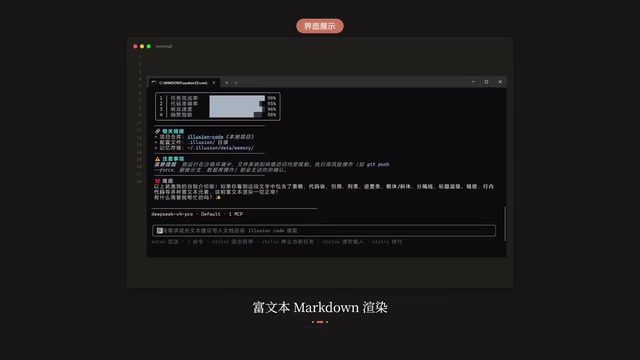
The transparency of the thinking process is particularly important. When the AI suggests a code modification, developers can see how it analyzed the problem, weighed different approaches, and ultimately made its decision — greatly enhancing trust and controllability over AI outputs.
Exclusive Optimizations for Chinese-Speaking Developers
One of Illusion Code's most differentiating features is its deep adaptation to the Chinese developer ecosystem.
Feishu, WeChat, and QQ Communication Channel Integration
The tool supports Feishu, WeChat, and QQ — the three major communication platforms in China — enabling seamless synchronization between mobile and terminal conversations. Developers can check AI execution progress on their phones at any time, approve operation requests, or even issue new commands directly.

Deep Windows Environment Optimization
Given the high proportion of Windows users among Chinese developers, Illusion Code has been deeply optimized for Windows environments, with automatic GitHub discovery and native PowerShell support — avoiding the common "compatibility issues" that many open-source tools face on Windows.
Native Chinese Interface
Unlike other tools that rely on translation plugins or community localization, Illusion Code provides a native Chinese interface — from prompt messages to documentation — offering a fully barrier-free Chinese experience throughout.
Illusion Code vs. Competitors: A Side-by-Side Comparison
Comparing Illusion Code with the three current mainstream AI coding tools provides a clearer picture of its positioning and advantages.
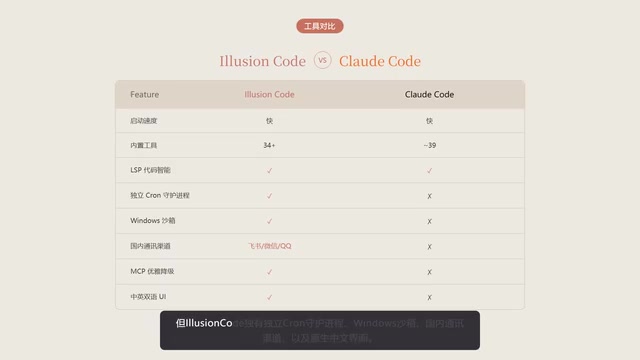
Illusion Code vs Claude Code
Both perform comparably in startup speed and tool richness, but Illusion Code uniquely offers a standalone Cron daemon (supporting scheduled tasks), Windows sandbox, Chinese communication channel integration, and a native Chinese interface. Claude Code has a natural advantage in model capabilities but falls slightly short in localization and ecosystem adaptation.
Illusion Code vs OpenAI Codex
Although Codex is written in Rust and theoretically offers better performance, its actual startup speed is paradoxically slower. More critically, Codex lacks LSP code intelligence support and has no scheduled tasks or Chinese communication tool integration — showing clear gaps in feature completeness.
Illusion Code vs OpenCode
OpenCode has the fewest tools, a weaker plugin ecosystem, and lacks fallback handling for MCP configuration. In contrast, Illusion Code's layered extension system — MCP, plugins, skills, and hooks — provides higher customizability and stronger ecosystem extensibility.
Layered Extension System: A Future-Proof Architecture
Illusion Code employs a layered extension architecture with four levels:
- MCP (Model Context Protocol): Standardized model context protocol support
- Plugin System: Third-party feature extensions
- Skills: Reusable task templates
- Hooks: Custom logic execution triggered by specific events
This layered design ensures developers at different skill levels can find an extension approach that suits them — from simple skill configuration to deep hook development — offering high flexibility.
Conclusion: Is Illusion Code Worth Trying?
Illusion Code's strategy is clear: rather than being the absolute best in one area, it aims to be the optimal solution for the overall experience. It combines Claude Code's tool richness, Codex's performance ambitions, and OpenCode's open philosophy into one package, while adding extensive localization optimizations for Chinese-speaking developers.
Of course, the "have it all" strategy comes with challenges — the more features there are, the higher the maintenance cost, and the depth of polish for each feature may not match competitors focused on a single direction. Whether Illusion Code can maintain a sustainable balance between breadth and depth will be the key factor determining its long-term competitiveness.
For developers who want to give it a try, installation is straightforward:
pap install illusion-code
In today's flourishing landscape of AI coding tools, having one more sincere option is ultimately a good thing for developers.
Related articles

Tencent WorkBuddy Hands-On: How AI Agents Crush Traditional Chat Assistants
WorkBuddy vs Doubao tested: how AI Agents directly operate computers to convert PPT to PDF, archive files and more. Analysis of WorkBuddy's low barrier, domestic ecosystem, pricing and plugin marketplace, plus AI Agent selection advice.

Azure Cross-Tenant Attack Chain: Root Cause Analysis of Five Paths
Binary Security analyzes five full cross-tenant compromise paths in Azure, trending 271 points on HN. This article interprets their shared root cause perspective and offers defense recommendations for cloud tenant isolation and reflections on responsibility boundaries.

Recreating a Real Bubble Tea Station in Isaac Sim: Script-Driven Unitree G1 Brews Tea
Developers recreated a real self-service tea station in NVIDIA Isaac Sim, using scripts to drive a Unitree G1 through a five-step tea-brewing process, exploring whether physics simulation can be a source of synthetic robot demonstration data and discussing contact stability and imitation learning.