Integrating Claude and Codex in Android Studio: A Complete Guide to ACP Configuration
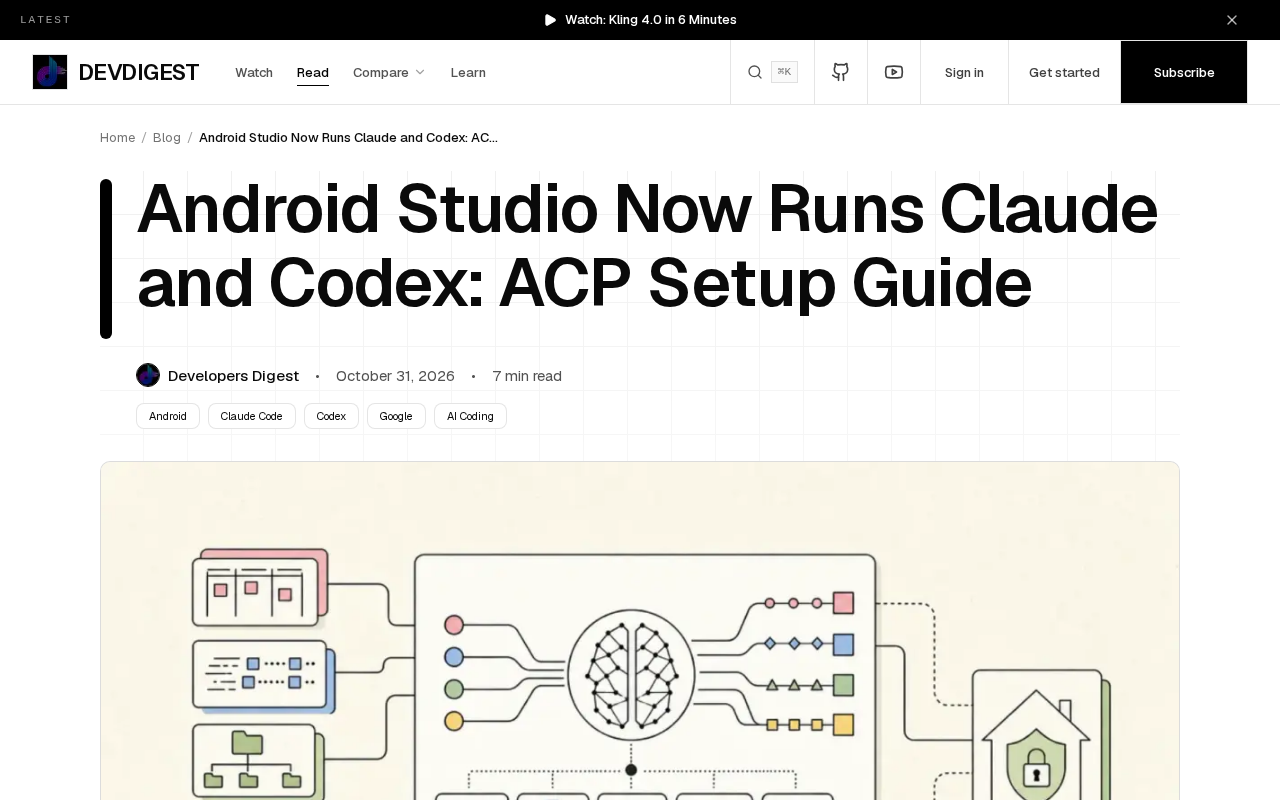
Android Studio Rabbit 2 natively integrates 40+ ACP agents and bridges the IDE with Android CLI in both directions.
Android Studio Rabbit 2 offers native support for over 40 AI coding agents through the built-in ACP protocol, including Claude and Codex. ACP unifies IDE-to-agent communication, so developers can switch agents without individual adaptation. Android CLI also lands as a plugin for Claude Code and Codex, enabling agents to operate the Android toolchain directly from the command line, creating a two-way bridge between the IDE and CLI workflows.
Android Studio Rabbit 2 is breaking down the boundaries between the IDE and AI coding agents. It ships with built-in support for over 40 ACP coding agents, and Claude and Codex are prominently among them. That said, Android CLI has also landed as a plugin for Claude Code and Codex. This means Android developers can invoke top-tier AI agents directly within their familiar development environment, without constantly switching between multiple tools.
What Is ACP, and Why It Matters
ACP (Agent Client Protocol) is a protocol that enables communication between an IDE and AI coding agents. In the past, every AI assistant needed its own IDE adapter, and developers had to maintain different configurations for different tools. ACP changes that: as long as an agent implements ACP, Android Studio can recognize and invoke it directly.
Rabbit 2 productizes this capability, onboarding over 40 ACP coding agents in one go. For developers, the most immediate benefit is choice—you can switch agents based on task type, cost, or preference while keeping a consistent IDE integration experience. Claude and Codex, as representative agents among them, cover a wide range of scenarios from code generation to complex refactoring.
The distinction between ACP and MCP is worth clarifying. The community often conflates ACP with Anthropic's MCP (Model Context Protocol), but they solve different problems. MCP is about connecting models to external data sources and tools—for example, letting a model read the file system, query databases, or call APIs. ACP, by contrast, is a session protocol between host applications like IDEs and coding agents, focused on how agents receive context, how they return code changes, and how interactions are presented within the editor. A rough way to think about it: MCP extends what an agent can do, while ACP defines how an agent is invoked and displayed by the IDE. The two are not mutually exclusive—a coding agent can implement both MCP and ACP, using the former to acquire tool capabilities and the latter to connect with IDEs like Android Studio.
The practical significance of protocol openness. As an open protocol, ACP's value lies in compressing the adaptation cost from an N-agents × M-IDEs multiplication into an addition where each side implements the protocol once. This is the technical prerequisite that allows Rabbit 2 to onboard over 40 agents at once—as long as the agent side has completed its ACP implementation, the IDE side needs no separate plugin development for each agent.
Configuring Claude and Codex in Android Studio
The configuration workflow revolves around ACP, and the core steps are not complicated. In the agent settings of Android Studio Rabbit 2, you need to find the ACP agent list, select Claude or Codex, and then follow the prompts to complete authentication and parameter configuration. Because it is a native integration, agent responses appear directly in the IDE's chat interface, and code changes can be seamlessly applied to the project.
In practice, first confirm that your Android Studio version is Rabbit 2, then enter ACP agent management from the settings panel. The first time you use a given agent, you typically need to provide an API key or complete OAuth authorization. After configuration, you can summon the agent at any point during coding to explain code, generate tests, or perform refactoring.
Authentication methods vary by agent. On the Claude side, authentication is usually completed through an Anthropic API key or OAuth authorization, while the Codex side may involve the OpenAI account system or corresponding API credentials. For initial setup, it is advisable to create a separate key for each agent, avoiding reuse of a single key that could lead to excessive permissions or difficulties with rotation. If your organization has a unified key management solution (such as a key hosting service or environment variable injection), that channel should be preferred over storing keys in plaintext in the IDE configuration.
Version and compatibility checks. Rabbit 2 is a specific release channel of Android Studio, and version numbers and feature availability may differ across channels (Stable, Beta, Canary). Before configuring, confirm that you have indeed installed the Rabbit 2 branch, and watch whether the ACP agent list changes with IDE updates—some agents may require a newer IDE version before they appear in the list.
Android CLI as a Plugin: Two-Way Integration
Beyond the in-IDE integration, Android CLI also supports Claude Code and Codex in the form of a plugin. This brings a two-way convenience: you can use ACP agents inside Android Studio, and you can also invoke Android CLI capabilities from the command-line environments of Claude Code or Codex via the plugin.
This design is especially friendly to developers accustomed to command-line workflows. Android CLI itself handles tasks such as building, deployment, and device management; once connected to AI agents as a plugin, agents can operate the Android toolchain more directly, reducing the need to manually copy and paste commands.
The positioning of Android CLI. Android CLI is the official command-line tool provided by Android, covering project builds, APK/AAB packaging, device installation, and log capture—essentially a wrapper around underlying tools such as Gradle and adb. Making it a plugin for Claude Code and Codex means AI agents can directly trigger builds, deployments, and device operations within a command-line session, rather than requiring developers to manually assemble commands and paste them back into the conversation. Compared with the earlier model where agents could only "generate commands for humans to execute," this closes the loop to a greater degree—but it also means agents gain actual operational authority over the toolchain, so the scope of operations they are permitted to execute should be restricted in use.
Pitfalls and Limitations to Watch For
Although the integration looks solid, there are still several things to keep in mind in practice. The capability boundaries of ACP agents depend on the agents' own implementations, and different agents may perform noticeably differently on Android projects. Over 40 agents sounds like abundant choice, but not every one has been optimized for Android development.
Authentication and key management are also areas prone to problems. When multiple agents coexist, key storage and permission control require extra planning. In addition, the details of collaboration between the plugin-form Android CLI and the in-IDE ACP agents may not yet be fully covered by official documentation, so troubleshooting may require digging into logs when issues arise.
Impact on the Android Development Workflow
Embedding agents like Claude and Codex directly into Android Studio changes more than just the tool entry point—it changes the developer's rhythm of work. AI-assisted tasks that previously required switching to a browser or a standalone app can now be closed out within the IDE. For Android development, which involves frequent switching between code, builds, and debugging, the benefit of reducing context switching is tangible.
The openness of the ACP protocol also means more agents will join in the future. Rabbit 2 currently supports over 40 agents, and that number itself will change as the ecosystem evolves. Developers should focus on the actual quality of agents rather than quantity, and choose combinations that match their own tech stack.
One-line Summary
Android Studio Rabbit 2 natively integrates over 40 ACP agents and offers two-way integration with Android CLI.
Paragraph Summary
Android Studio Rabbit 2 provides native support for over 40 AI coding agents through its built-in ACP (Agent Client Protocol), with Claude and Codex as representative examples. ACP unifies communication between the IDE and agents, letting developers switch between agents within the IDE and maintain a consistent interaction experience without adapting each one individually. Meanwhile, Android CLI has landed as a plugin for Claude Code and Codex, enabling agents to directly operate the Android toolchain in command-line environments and forming a two-way bridge between the IDE and the command line. The article outlines the basic workflow for configuring Claude and Codex in Rabbit 2, and notes that different agents perform differently on Android projects, while key management and plugin collaboration details when multiple agents coexist still require extra planning.
Related articles

AI Weekly: Claude Code Backdoor Incident and AI Giants' Capital Game
AI security this week: Cursor marketplace seeded with a Claude Code backdoor affecting Mac and Windows developers. Meanwhile, Amazon AI capex hits $75.9B, Google AI search revenue lags traditional search, Anthropic launches Ultra subscription, and OpenAI commits to robots.txt training signals while publicly defending fair use.

Malicious Claude Code Extension Infiltrates Cursor: Version 2.1.313 Self-Check and Cleanup Guide
A malicious Claude Code build 2.1.313 appeared in the Cursor extension marketplace for about 11 hours, affecting up to 5,000 users. StepSecurity disclosed that it stole system information, git email, and environment variable names, and attempted to implant SSH keys and reverse tunnels. This article covers the incident, malicious behavior, and complete self-check and cleanup steps.

15 Essential Prompts for Vibe Coding: Keep AI from Wrecking Your Code
Vibe Coding often tempts AI to break your code. These 15 prompts—from PRD, architecture, and database to testing and debugging—chain each output as the source of truth, turning AI coding from casual chat into a controllable engineering process.