JetBrains Open-Sources ThinkRail: A Hands-On Review of the Pi-Based Agentic IDE

ThinkRail is an open-source agentic IDE on Pi, featuring spec-driven development and parallel workspaces.
ThinkRail is an open-source agentic IDE built on Pi, available as web and desktop apps under Apache 2.0 as part of a JetBrains Innovation Hub collaboration. It inherits Pi's model config, skills, and permissions with zero migration cost, and offers Git worktree-based Workspaces for parallel multi-branch development plus spec-driven development with hierarchical Markdown specs. It suits Pi users, teams running parallel branches, and those trying spec-driven workflows.
What Is ThinkRail?
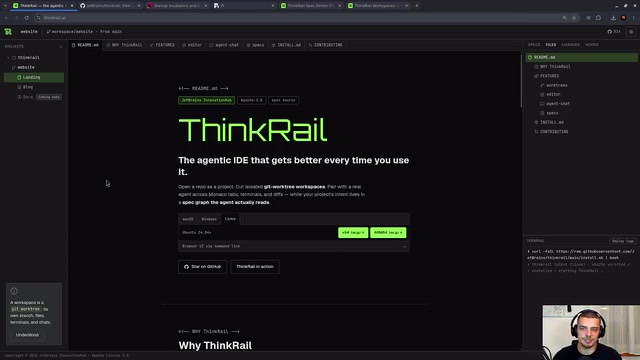
ThinkRail is an open-source Agentic IDE built on top of Pi. It comes in two forms—a web version and a desktop client—and is completely free and open source under the Apache 2.0 license. According to a Bilibili video review, its biggest selling point is the tagline "it gets better every time you use it"—and the core mechanism behind that claim is Spec-driven Development.
Its relationship with JetBrains is interesting: ThinkRail is a collaboration project under the JetBrains Innovation Hub, a program through which JetBrains partners with incubators and accelerators. The video's author openly notes that this is a sponsored episode but promises a genuine evaluation.
Pi is an open-source agent runtime framework created by independent developer Mario Zechner, designed to give AI agents programmable tool invocation, a skills system, and permission management infrastructure. It is not a complete IDE in itself but rather a low-level engine: developers can build custom agent workflows on top of it. ThinkRail is one of the products that wraps Pi's capabilities into a visual IDE, so understanding Pi's configuration model helps explain ThinkRail's inheritance behavior.
Installation and Launch: Both Web and Desktop Forms
The installation path is straightforward: visit the ThinkRail.ai website and download the installer for your operating system. To get the latest version, the video's author instead installed directly from GitHub using the curl command and ran thinkrail update --channel nightly to get the nightly build. For ordinary users, the default installer from the official website is sufficient.
There are two ways to launch it: typing thinkrail in a terminal hosts it as a server and opens the Web UI in your browser, or you can run the desktop app through your system launcher. Both offer the same functionality—only the front-end carrier differs.
Deep Integration with Pi: Configuration, Skills, and Permissions All Inherited
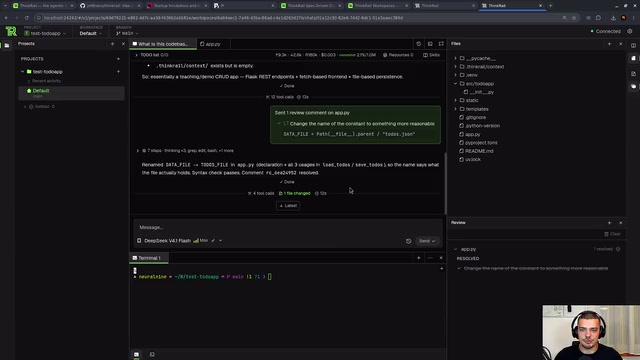
One of ThinkRail's most practical features is that it fully inherits existing Pi configuration. If a user has already configured model providers and API keys in Pi, ThinkRail automatically recognizes them when opening a new conversation—in the video, it automatically picked up OpenCode Go. Likewise, skills and permission settings in Pi (such as whether approval is required before executing code or invoking tools) are carried over as-is.
This design means virtually zero migration cost for existing Pi users. In the author's demo, he even modified Pi's configuration file (changing the default behavior to ask mode), causing ThinkRail to show a "permission required" approval prompt when attempting to modify files—confirming that the two share configuration in real time.
Core Capability: Workspaces for Parallel Multi-Branch Development
Traditionally, developing multiple features simultaneously requires manually managing Git worktrees. ThinkRail turns this workflow into a productized feature called Workspaces. Each Workspace is essentially an isolated worktree, pulling an independent branch from origin main without interfering with the others.
In the video demo, the author opens two Workspaces at once: one has the model develop a "calendar view," while the other transforms the entire to-do app into a Frutiger Aero theme (the classic visual style of the Windows Vista/7 era). Both tasks proceed in parallel, each modifying code in its own separate directory. When finished, clicking "settle" indicates that the workspace is ready and can be merged. For developers who need to push multiple feature lines forward at once, this is far more efficient than repeatedly switching branches.

Git worktree is a feature introduced in Git 2.5 that allows multiple working directories to be checked out simultaneously from the same repository, each pointing to a different branch. Unlike switching branches with the traditional git checkout, worktrees let code from multiple branches exist on disk at the same time without interfering with one another—particularly well suited to parallel development, code review, or urgent fixes. ThinkRail's Workspaces are essentially an automated wrapper around this mechanism—it handles creating worktrees, pulling branches, and cleaning up merges on the user's behalf, turning a process that once required manual command-line management into a click-and-go product feature.
Spec-driven Development: Defining Software Behavior in Markdown
This is what truly sets ThinkRail apart from ordinary coding agents. The idea behind spec-driven development is: don't write code directly, and don't just give the agent instructions—write spec files first. The example in the video contains three Markdown files—goal-and-requirements.md (goals and non-goals), architecture.md (architecture decisions), and spec.md (front-end specs)—which form a nested hierarchy through metadata in their file headers (ID, type, title, status, parent).
ThinkRail recognizes these specs as structured objects and presents them visually in the sidebar. The user simply says "implement the specs," and the agent implements and verifies them one by one according to the specs. The author likens this to test-driven development, except you write specs instead of tests. Compared with "prompt-and-pray" development, this approach has clear advantages when requirements are complex and there are many files.
Specs can also keep expanding with use—users can continue conversing with the agent to add to the specs, letting the IDE truly "grow with you."
Spec-driven Development (SDD) is a methodology that has emerged alongside AI coding agents, sharing the core idea of "define first, implement later" with test-driven development (TDD). The difference is that TDD uses executable test cases as specs, whereas SDD uses structured spec documents written in natural language as the single source of truth. Specs typically include goals, non-goals, architecture decisions, and acceptance criteria, and the agent must understand and reference these specs before implementing code. The advantage of this approach is that specs can be reviewed by humans and also parsed and executed by agents, thereby reducing "prompt drift" and missed requirements.
Review Workflow: Diff View and Issue Marking
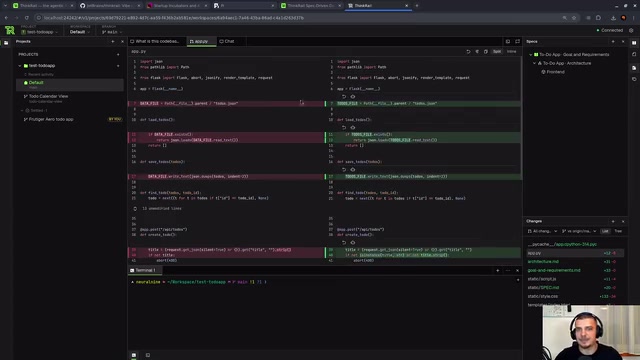
ThinkRail provides a Git-like diff view that lets you inspect changes file by file. In the video, the author demonstrates how a constant rename propagates across multiple files, as well as a preview of newly added spec files.
Another detail is the review feature: mark a section of code as "not clean enough," and that spot becomes a pending issue that you can jump to, mark as resolved, and that the agent will also attempt to fix.
Verdict: Who Is It For?
The author describes ThinkRail's UI style as having "a very Linux feel"—it uses the JetBrains Mono font, and the interface is clean and distinctly technical. It is not positioned to replace traditional IDEs but rather to give agent-based development a clearer visual shell.
The target audience is fairly clear: developers already using Pi who want a more structured workflow; teams that need to push multiple feature branches forward in parallel; and people who want to try spec-driven development without building the whole pipeline themselves. The limitations are equally obvious—if you don't buy into the "write specs first" methodology, or you only need lightweight conversational coding, then Pi itself or a simpler tool may be a better fit.
A free Apache 2.0 open-source project backed by the JetBrains ecosystem is well worth a try.
One-line Summary
ThinkRail is an open-source agentic IDE built on Pi, featuring spec-driven development and multi-branch parallel workspaces.
Paragraph Summary
ThinkRail is an open-source agentic IDE built on top of Pi, available in both web and desktop forms, licensed under Apache 2.0, and part of a JetBrains Innovation Hub collaboration. It fully inherits Pi's model configuration, skills, and permission settings, so existing Pi users face zero migration cost. Core capabilities include Workspaces for parallel multi-branch development based on Git worktree, and spec-driven development—defining software behavior in Markdown files with hierarchical metadata, with the agent implementing and verifying each spec. It also offers a diff view and an issue-marking review workflow. The article concludes it suits developers already using Pi, those needing to push multiple branches in parallel, or those wanting to try spec-driven development—but if you don't need a structured workflow, Pi itself may be a better fit.
Related articles

AI Weekly: Claude Code Backdoor Incident and AI Giants' Capital Game
AI security this week: Cursor marketplace seeded with a Claude Code backdoor affecting Mac and Windows developers. Meanwhile, Amazon AI capex hits $75.9B, Google AI search revenue lags traditional search, Anthropic launches Ultra subscription, and OpenAI commits to robots.txt training signals while publicly defending fair use.

Malicious Claude Code Extension Infiltrates Cursor: Version 2.1.313 Self-Check and Cleanup Guide
A malicious Claude Code build 2.1.313 appeared in the Cursor extension marketplace for about 11 hours, affecting up to 5,000 users. StepSecurity disclosed that it stole system information, git email, and environment variable names, and attempted to implant SSH keys and reverse tunnels. This article covers the incident, malicious behavior, and complete self-check and cleanup steps.

15 Essential Prompts for Vibe Coding: Keep AI from Wrecking Your Code
Vibe Coding often tempts AI to break your code. These 15 prompts—from PRD, architecture, and database to testing and debugging—chain each output as the source of truth, turning AI coding from casual chat into a controllable engineering process.