JetBrains Open-Sources ThinkRail: A Multi-Agent Parallel IDE

JetBrains open-sources the agent IDE ThinkRail, using Git branches to isolate parallel AI coding tasks.
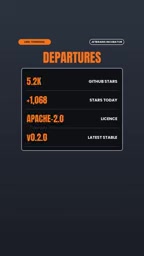
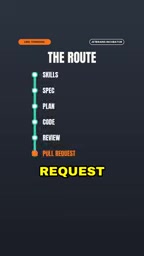
JetBrains has open-sourced the agent IDE ThinkRail on GitHub under Apache 2.0, already at ~5,200 stars. It's not an AI completion plugin but an environment built around the Pi coding agent: each workspace is an independent Git work tree and branch, letting multiple agent tasks run in parallel without touching the current checkout, with isolation guaranteed by version control. It also adds living specs—a spec graph beside the code that agents read and update—plus reusable agent skills, a built-in workflow that delivers GitHub PRs, and support for JetBrains AI or your own model provider with no account system. It's currently an incubator project with incomplete extension support.
JetBrains recently open-sourced an agent IDE called ThinkRail on GitHub under the Apache 2.0 license. It has already gained around 5,200 stars and made it onto the trending list. It's not just another AI code completion plugin—it's a development environment built from the ground up around the Pi coding agent, with the core idea of giving every AI coding task its own independent "track" so parallel work doesn't interfere with itself.
One Independent Track per Task
Traditional AI programming tools tend to modify files directly in your workspace, and running multiple tasks in parallel easily leads to overwrites or conflicts. ThinkRail's approach: every workspace is a real Git work tree with its own branch. Agents run on their own branches and never touch your current checkout.
This means you can launch multiple coding tasks at once—say, one refactoring a module while another fixes tests—each progressing independently and ultimately merging through the Git workflow. This design takes "parallel agents" from concept to engineering practice, with isolation guaranteed by version control itself rather than simulated at the tool layer.
What is a Git work tree?
Git work tree is a feature introduced in Git 2.5 that lets the same repository check out multiple working directories at once, each pointing to a different branch. Traditionally, a repository has only one working directory, and switching branches changes the files in it; with git worktree add, you can create another directory on disk and check out a specified branch there. Multiple work trees share the same .git object store, so disk overhead is minimal and commit history is fully unified.
For ThinkRail, the value of this mechanism lies in natural isolation: each agent reads and writes files, creates commits in its own work tree without interfering with others, and doesn't affect the developer's current checkout. Compared with duplicating the entire repository or relying on tool-layer isolation simulation, work tree isolation is guaranteed by Git itself, and merging still follows the standard branch-merge process, with conflicts visible and reviewable.
Living Specs: A Spec Graph Beside the Code
ThinkRail introduces the concept of "Living specs": a graph of spec files maintained alongside the code, which agents both read from and are responsible for maintaining.
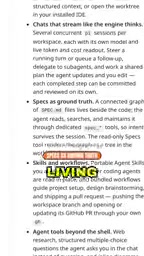
This addresses a common pain point—AI-generated code tends to drift away from project conventions. By making specs first-class citizens in the codebase and having agents continuously update them, it's like giving the AI a context source that evolves with the project. Specs are no longer documents that expire as soon as they're written—they're part of the agent workflow.
What is a coding agent?
A coding agent refers to an AI system that can autonomously carry out multi-step development tasks, not just complete code based on cursor position. It typically has the ability to read files, search the codebase, run commands, edit files, and even commit changes, and it repeatedly plans and executes around a goal until the task is done or human intervention is needed.
Compared with code completion plugins, coding agents have much greater context needs and a broader scope of action, which places new demands on the runtime environment: isolated workspaces to avoid disrupting the developer's state, persistent project knowledge to keep style consistent, and reviewable output (such as branches and PRs). ThinkRail's tracks, living specs, and PR workflow are designed precisely for these needs—which is why it's called an "agent IDE" rather than an "AI plugin."
Reusing Existing Skills and Workflows
ThinkRail can read your existing agent skills without requiring reconfiguration. It also ships with a bundled workflow that can deliver a GitHub pull request directly—the chain from coding to submitting a PR is compressed into an automated process.
For teams that have already accumulated skill files using other AI coding tools, this compatibility lowers migration costs. The workflow-level automation also shows that JetBrains's ambitions go beyond the editor—they cover the complete loop from task to delivery.
Agent skills and skill reuse
Agent skills generally refer to agent capability descriptions captured as files, such as the steps for a certain type of task, the tools that can be called, code conventions, or domain knowledge. They're usually stored in the repository as Markdown or structured configuration, and agents load them on demand at runtime. Because the format is relatively generic, the same set of skill files can often be migrated between different agent tools.
ThinkRail's ability to read existing skills directly means that the conventions and prompt assets teams have accumulated for other AI coding tools won't become obsolete, and there's no need to rewrite them when migrating. This also shows, indirectly, that skill files are becoming a cross-tool "portable asset," and the focus of competition among IDEs is shifting from model capability to the ability to carry over such assets and workflows.
Model Choice: Beyond the Built-in Account System
On model integration, ThinkRail supports JetBrains AI and also lets you connect your own model provider.
One noteworthy detail: ThinkRail itself has no account system. It doesn't force you to log in to any platform, and model credentials are managed by you. That's a plus for teams that care about data sovereignty, but it also means the configuration burden shifts to the user.
Installation and Security Reminder
ThinkRail offers a one-line script installation, after which you can run ThinkRail to start. The official introduction specifically includes a security reminder: read the script before piping it to Bash.
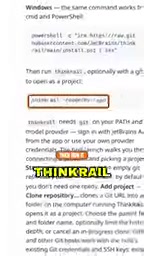
This reminder is routine in itself, but coming from the official source, it reflects the reality that with open-source tools, users must judge for themselves the balance between convenience and security.
Current Status and Limitations
ThinkRail is currently a JetBrains incubator project, and full extension support is still under development. This means it doesn't yet have the plugin ecosystem of a mature IDE, and early adopters need to accept functional incompleteness.
In terms of positioning, ThinkRail represents a direction: the IDE is no longer just a place where people write code, but a control desk for humans collaborating with multiple agents. Git work tree isolation, living specs, and bring-your-own-model integration all point to the same goal—making parallel agent work controllable. Whether it becomes a mainstream workflow depends on the extension ecosystem and the level of investment after it graduates from the incubator, but as an open-source experiment, it has already offered an answer worth referencing.
What does it mean to be an incubator project?
At large software companies like JetBrains, an incubator project usually refers to an early-stage product in which a small team explores a new direction: released as open source or under an open license to gather feedback quickly, but without a commitment to long-term maintenance or a guarantee of entering the official product line. Its scope is often deliberately narrowed, and its extension ecosystem, documentation, and stability are all in early stages.
For adopters, this means a trade-off in two directions: on one hand, you can be the first to encounter a new paradigm and influence its direction; on the other, you need to accept interface changes, missing features, and potential discontinuation risks. Judging whether such a project is worth investing in usually depends on whether its core ideas are absorbed into the mainline product and whether community contributions are active—star count is only an early signal of interest, not a measure of maturity.
One-line Summary
JetBrains open-sources the agent IDE ThinkRail, using Git branches to isolate parallel AI coding tasks.
Paragraph Summary
JetBrains has open-sourced the agent IDE ThinkRail on GitHub under the Apache 2.0 license, and it has already gained around 5,200 stars. It's not an AI completion plugin but a development environment built from the ground up around the Pi coding agent: every workspace is an independent Git work tree and branch, so multiple agent tasks can run in parallel without touching the current checkout, with isolation guaranteed by version control. It also introduces "living specs," maintaining a spec graph beside the code that agents read and update to keep AI output aligned with project conventions; it supports reusing existing agent skills, ships with a workflow that can deliver a GitHub PR directly, and can connect to JetBrains AI or a model provider of your choice, with no account system of its own. It is currently an incubator project, and extension support is not yet complete.
Related articles

Google Releases Gemini 4 Carbon: Its Strongest Model Yet, Debuting with a Cybersecurity Focus
Google releases Gemini 4 Carbon, calling it its strongest model, with a cybersecurity focus. It tops the third-party composite ranking at 59 points but leads by only one or two. This article analyzes its security test results, staged rollout, token pricing, and the divergence between self-reported and third-party tests on hallucinations.

LangChain Adds SchemagateRetriever: On-Demand Table Retrieval Cuts Text-to-SQL Prompts by 92.9%
LangChain docs add SchemagateRetriever: retrieves only the tables needed for text-to-SQL with permission filtering, cutting median prompt size by 92.9% on Spider 2.0 large schemas via offline BM25 selection with no model calls.

Multi-Step AI Agent Guardrail in Practice: Fact-Change Detection Drives False-Alarm Rate to 0%
Developer shares first version of a multi-step AI Agent guardrail: re-verifying dependency facts before irreversible actions cut false alarms from 50% to 17% across 23 scenarios, then to 0% via conservative normalization without lowering catch rate. Runs on local qwen2.5-7b.