Major Cursor Update: Deep Dive into Composer 2 Model + Glass Interface

Cursor releases Composer 2 model and Glass interface, dramatically improving AI coding speed and interaction.
Cursor has released a major update featuring the Composer 2 code generation model and the new Glass interface. Composer 2 comes in Standard and Fast versions, with the Fast version offering blazing inference speed and scoring 61.7% on Terminal Bench 2.0, positioned as "fast enough and good enough." The Glass interface introduces an intelligent "plan first, execute later" confirmation mechanism, supporting Agent sessions, a plugin marketplace, and multi-mode switching, capable of generating complete web applications from a single command.
Cursor Glass + Composer 2 Deep Dive
Cursor just dropped a substantial update—the brand-new Composer 2 model and an interface called Cursor Glass. This isn't just a routine iteration; it pushes forward simultaneously on three fronts: code generation speed, AI agent interaction, and development workflow integration. Let's break down what this update actually delivers from the perspectives of model performance, interface design, and real-world development experience.
Composer 2 Model: Balancing Inference Speed and Code Quality
Standard vs. Fast: Which One to Choose
Cursor offers Standard and Fast versions for Composer 2. This strategy mirrors the approach of GPT 5.4 Fast and OpenAI 4.6 Fast—same model base, but the Fast version provides accelerated inference at roughly three times the cost of the Standard version.
In hands-on testing, Composer 2 Fast outputs faster than both GPT 4 Fast and OpenAI 4.6 Fast. During code generation, tokens stream out so quickly you can't even read them line by line. For everyday development, this "instant results" experience noticeably reduces waiting anxiety.
Terminal Bench 2.0 Benchmark Results
In the highly watched Terminal Bench 2.0 benchmark, Composer 2 scored 61.7%. For reference, OpenAI 4.6 scores 58%, and GPT 5.4 scores 75.1%.
About Terminal Bench 2.0: This is a benchmark framework specifically designed to evaluate AI coding agents' ability to execute tasks in real terminal environments. Unlike traditional code completion benchmarks (such as HumanEval or MBPP), it simulates the full end-to-end workflow of developers completing tasks in command-line environments—including file operations, dependency installation, debugging, and test execution. This type of test is much closer to real development scenarios because it evaluates not just whether the model can write correct code, but whether it can autonomously complete tasks in complex, stateful environments. A score of 61.7% means the model can independently complete nearly 62% of test tasks from start to finish, which has significant reference value for automation tasks in daily development.
Looking at the numbers alone, Composer 2 isn't the strongest. But think about it differently: do you really need the absolute best model every single time you write code? In most scenarios, fast tool responses, accurate information retrieval within your codebase, and adherence to existing code conventions—these practical values often matter more than benchmark scores. Composer 2 is positioned as "fast enough and good enough," not "strongest but slow."

Cursor Glass Interface: A New Paradigm for AI Programming Interaction
A Desktop Experience Similar to Codex
Cursor Glass feels somewhat similar to OpenAI's Codex desktop app, but with Cursor's own design philosophy baked in. In this new interface, you can:
- Launch new Agent sessions: Issue a command to spin up an independent AI agent
- Plugin marketplace: Similar to Codex skills and Claude plugins, supporting downloadable development tool extensions
- Conversation history management: View past conversations organized by project for easy reference
- Shortcut mode switching: Press
Shift+Tabto switch to a Claude Code-like terminal mode; double-tap to enter planning mode
Plan First, Act Later: Intelligent Confirmation Mechanism
This is the most impressive design element in the Glass experience. After you issue a development instruction, the model doesn't immediately start writing code. Instead, it first conducts an overall planning pass, then confirms key details with you through a structured interface.
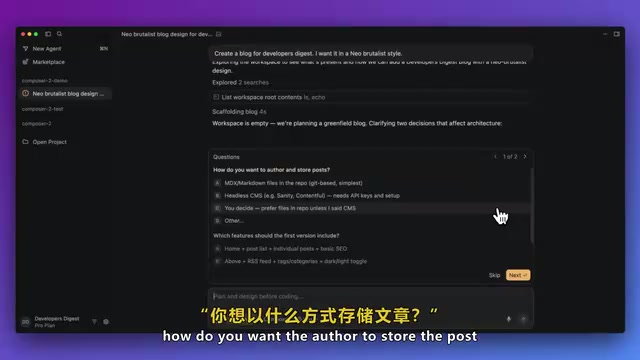
For example, when you say "help me create a blog," the model proactively asks:
- Store articles in MDX or integrate with a headless CMS?
- Which feature modules are needed? Homepage, article list, RSS feed?
- Should full-text search be included?
About these two content approaches: MDX combines Markdown with JSX, allowing React components to be embedded directly in documents. It's ideal for technical blogs where content and code are highly intertwined, with native support in frameworks like Next.js and Astro. A Headless CMS completely decouples the content management backend from the frontend presentation layer, delivering data via REST or GraphQL APIs. Contentful, Sanity, and Strapi are popular choices, better suited for team collaboration scenarios where non-technical members participate in content management. The AI proactively asking about this choice during the planning phase demonstrates its deep understanding of modern web architecture decisions—this decision directly impacts the subsequent tech stack, deployment strategy, and collaboration workflow.
After confirmation, the right panel displays the complete execution plan: task descriptions rendered in Markdown, tech stack comparison tables, and even Mermaid diagrams to illustrate the overall architecture.
About Mermaid: This is a lightweight JavaScript-based diagramming language that allows developers to generate flowcharts, sequence diagrams, architecture diagrams, and various other visualizations using plain text syntax similar to Markdown. It's natively supported by major development platforms including GitHub, Notion, and GitLab, making it a de facto standard in technical documentation. Integrating Mermaid rendering in AI programming tools means the model can not only describe architecture in text but also directly output visual system design diagrams, significantly reducing the cognitive load of understanding complex system structures.
It also includes a to-do checklist so you have full visibility into the entire development workflow.
This "plan first, execute later" approach aligns with Plot Code's highly praised Plan feature. The core logic is simple: spending two extra minutes clarifying requirements during the planning phase allows Composer 2 to execute the entire solution in one shot.
Hands-On Demo: Building a Complete Web App with a Single Command
Blog App Generation and Style Customization
In the live demo, starting from an empty directory, a single command generated a complete blog application—including an article list page, individual article detail pages, and rendering support for various Markdown elements like code blocks and blockquotes.
Even more interesting is the style customization capability. When asked to redesign the homepage as a "Neo-Brutalist SaaS landing page," the model built UI components in real time, producing a final page with bold colors and rich visual hierarchy.
About Neo-Brutalism: This is a UI design style that has emerged in recent years within SaaS products and indie developer communities, derived from the architectural Brutalism aesthetic of the 1950s-70s. Its core characteristics include: large blocks of highly saturated color, thick black borders, pronounced shadow offsets, elements with no rounded corners or minimal rounding, and a deliberate break from traditional "polished" aesthetics.
Related articles
 Tech Frontiers
A Rare Quiet Day in AI: Recursive Self-Improvement Stirs Beneath the Surface
A rare quiet day in AI sees multiple sources go silent simultaneously. Behind the calm, Recursive Self-Improvement (RSI) research continues. What this means for the industry.
 Tech Frontiers
Reve 2 vs. Ideogram 4: A Deep Dive into Layout Control in AI Image Generation
A deep comparison of Reve 2 and Ideogram 4's layout control capabilities, covering technical approaches, real-world use cases, and industry trends for designers and creators.
 Tech Frontiers
In the Weights: Check Your Influence Score in the AI World
In the Weights is an AI influence search engine that quantifies your presence in the AI world with a score. Explore how it evaluates practitioners and what it means for digital identity.