MuleSoft Agent Fabric Local Deployment and Testing in Practice

MuleSoft introduces local Docker deployment, compressing the long Agent testing chain into a short loop within the IDE.
The article introduces the new local deployment capability of MuleSoft Agent Fabric, aimed at solving the lengthy traditional AI Agent testing process. In the past, every modification to routing logic, MCP configuration, or LLM instructions required publishing assets to Exchange, configuring gateways, deploying the Broker to CloudHub 2.0 or Runtime Fabric, and waiting for deployment to complete before testing. The new solution is based on Docker Desktop and Anypoint Code Builder, launching with one click from the command palette, automatically running ingress (8081) and egress (8082) gateways locally, and automatically applying policies such as user context propagation, MCP support, A2A Agent Card, and OpenAI transcoding. Developers can directly view Agent Cards, initiate conversations, and observe reasoning and tool invocation processes within the IDE, without needing A2A Inspector or Postman. The article also reminds that MCP server URLs should not include the /mcp suffix, and points out that the local environment is only for development verification—production still requires cloud deployment.
The Pain Points of Traditional AI Agent Testing
If you've built AI Agents with MuleSoft Agent Fabric, you've likely experienced this torture: after changing a line of routing logic, adjusting MCP configuration, or modifying LLM instructions, you want to verify whether the changes took effect. The traditional process requires you to publish all assets to Exchange, configure the gateway, deploy the Agent Broker application to CloudHub 2.0 or Runtime Fabric, wait for the entire deployment to complete, and only then call the Broker to test. If something fails, you have to go back to Anypoint Code Builder and start over.
The cost of this loop isn't just time—it's fragmented attention. Every minor tweak requires going through a full publish-deploy-wait chain, making it hard for developers to stay in a flow state. MuleSoft's new local deployment capability directly targets this pain point.
The Core Mechanism of Local Deployment: Docker + Anypoint Code Builder
According to a demonstration by the YouTube channel MuleS Academy, the core idea of the new approach is to compress the deployment chain that originally happened in the cloud into a local Docker environment. Developers no longer need to publish any assets to Exchange or deploy remotely—all gateways, policies, and the Broker run in local containers.
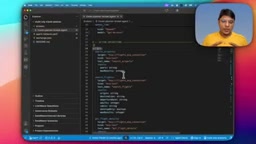
The demo showed a travel planning Broker project with a structure containing three key files:
.agent.yaml: defines the node structure of the Agent networkexchange.json: project metadata- Configuration file: declares LLM connections and MCP server connections
The nodes in .agent.yaml are, in order: system instructions, Broker configuration (using OpenAI LLM), Actions (calling three read-only tools from the Flight MCP Server: search airports, search flights, get flight details), trigger node, sub-Agent (responsible for reasoning), routing node (decides whether to return a success or error response), Agent Card, and the context and Registry that register MCP and LLM.
You might not have noticed the sensitive information exposed in exchange.json—the OpenAI API Key and the public URL of the MCP server. The presenter specifically reminds: when filling in the MCP server URL, do not include the /mcp suffix. This is a lesson learned from actual pitfalls.
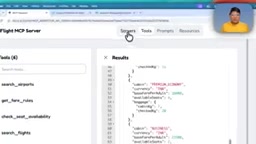
MCP (Model Context Protocol) is a protocol standard proposed and open-sourced by Anthropic, used to let LLM applications connect to external tools, data sources, and services in a unified way. In the MCP architecture, the party providing capabilities is called the MCP Server (for example, the Flight MCP Server in this article, which exposes tools like "search airports" and "search flights"), and the caller is called the MCP Client. Compared to writing adapter code separately for each tool, MCP standardizes tool descriptions, parameter schemas, and invocation interfaces, enabling Agents to dynamically discover and invoke tools at runtime. MuleSoft's built-in MCP support policy at the gateway layer is precisely to enable the Agent network to connect to external MCP Servers using a standard protocol, without hardcoding connection logic inside the Broker.
A2A (Agent-to-Agent) protocol focuses on how different Agents discover and collaborate with each other. The Agent Card is a piece of descriptive metadata that lists the Agent's skills, description, tags, and access endpoint, so that other Agents or clients can understand its capabilities before calling it. The A2A Agent Card policy automatically applied on the ingress gateway in this article exposes the Broker's capability information in a standard form—this is also why you can directly see a populated Agent Card in Code Builder.
Prerequisites and Operational Flow
To run an Agent network project locally, several prerequisites must be met: Anypoint Code Builder must be kept up to date, Docker Desktop must be installed locally, and Code Builder must be properly connected to the Anypoint platform with the appropriate permissions.
Operationally, bring up the command palette with Ctrl+Shift+P, and you'll see two newly added options—these were specifically added by MuleSoft for local deployment. After selecting "Start Agent Network Local Deployment with Default Configuration," a .deployment file directory is generated on the left, and the deployment status is visible in real time. If it stays in the "waiting for input" state, copy the UI address given in the logs and continue.
What Happens Behind the Scenes: Gateways, Policies, and Connections
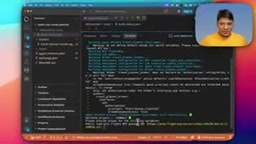
After local deployment completes, you'll see the exchange-1 environment under local-run in Docker, with the ingress gateway running on port 8081, egress on port 8082, and additionally a travel-planner-broker endpoint.
What originally required manual work—deploying gateways, applying policies, deploying the Agent network project—is now done all at once. The ingress gateway automatically applies user context propagation, MCP support policy, A2A Agent Card policy, OpenAI transcoding policy, and more. On the egress gateway, you can see the deployments of two APIs: the MCP connection and the OpenAI connection. This transparency is valuable for troubleshooting—developers can directly see the actual configuration behind each step.
Ingress and egress gateways are a pair of directional concepts in API gateway architecture. The ingress gateway receives requests from external clients or upstream Agents, handling authentication, user context propagation, protocol conversion, and other responsibilities; the egress gateway manages the Agent's calls to external services, such as accessing MCP Servers or calling OpenAI APIs, for unified management of outbound credentials, rate limiting, and auditing. The benefit of separating the two is that ingress and egress policies can be configured and observed independently, and when problems occur, you can quickly determine whether the error is at the request entry point or in the external dependency link. In this article, ports 8081 and 8082 correspond to these two gateways respectively, and the two APIs—MCP connection and OpenAI connection—seen on the egress gateway are exactly the managed external outbound dependencies.
The OpenAI transcoding policy belongs to the protocol conversion category of policies. Different LLM providers differ in request formats, authentication methods, model naming, and response structures. The transcoding policy performs format mapping of requests and responses at the gateway layer, allowing the Agent side to call models using a unified internal contract without modifying code for each provider. This way, when you need to change model providers or adjust model parameters, you only need to modify the gateway policy configuration, and the Agent logic itself remains unchanged. It also facilitates centralized management of sensitive credentials like API Keys at the gateway layer, avoiding exposing keys directly in project files like exchange.json.
Testing Agents Directly in Code Builder
Once deployment is ready, selecting the Broker shows a populated Agent Card, including the skill list, description, and tags. The presenter conducted a real test with a flight query from Chennai to Singapore: after entering the prompt, the Broker began reasoning, called the get flight details tool from the Flight MCP Server, and ultimately returned a complete result including departure time, arrival time, duration, price, and seat availability.
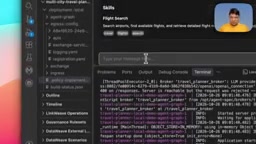
This means external tools like A2A Inspector or Postman are no longer needed—the testing loop is completed entirely within the IDE. The presenter said the test prompts will be shared in the GitHub repository.
Significance at the Developer Experience Level
The value of this update isn't in any single feature, but in replacing the long "publish-deploy-wait-test" chain with a short "change-run-see" loop. For teams that frequently iterate on Agent logic, this localization capability directly reduces verification costs and turns debugging from a black box into something observable—the ingress and egress configurations, policy applications, and tool invocation processes are all exposed to developers.
Of course, the local environment is ultimately just one part of development verification; production deployment still needs to go through the cloud process. But for daily development, this change is already substantial enough.
One-line Summary
MuleSoft introduces local Docker deployment, compressing the long Agent testing chain into a short loop within the IDE.
Paragraph Summary
The article introduces the new local deployment capability of MuleSoft Agent Fabric, aimed at solving the lengthy traditional AI Agent testing process. In the past, every modification to routing logic, MCP configuration, or LLM instructions required publishing assets to Exchange, configuring gateways, deploying the Broker to CloudHub 2.0 or Runtime Fabric, and waiting for deployment to complete before testing. The new solution is based on Docker Desktop and Anypoint Code Builder, launching with one click from the command palette, automatically running ingress (8081) and egress (8082) gateways locally, and automatically applying policies such as user context propagation, MCP support, A2A Agent Card, and OpenAI transcoding. Developers can directly view Agent Cards, initiate conversations, and observe reasoning and tool invocation processes within the IDE, without needing A2A Inspector or Postman. The article also reminds that MCP server URLs should not include the /mcp suffix, and points out that the local environment is only for development verification—production still requires cloud deployment.
Related articles

Last Week Tonight Exposé: The Dangerous Ties Between Politicians and White Supremacy
Last Week Tonight investigates Georgia Senate candidate Mike Collins and Florida candidate Marshall Rawson, exposing their multiple ties to white supremacists and the Republican Party's silent response.
AI Buzz Weekly: GPT-6.5 Leak, New Claude Model, and MiniMax's Cost-Effectiveness
This week's AI buzz roundup: suspected GPT-6.5 leak, Microsoft configs showing GPT-6.1 Tera, Anthropic's new model that can identify entire classes of bugs, disappointing early Gemini 4 Carbon results, and MiniMax M3.1 Flash beating Claude Opus 5 and GPT-5.6 Sol in benchmarks at extremely low cost.
AI Briefing: Gemini 4 Carbon Released, Ant Open-Sources Ling-3.1
AI Briefing: Google releases Gemini 4 Carbon qubit model, claiming to surpass Opus 5.5 with half-price tokens; Ant open-sources Ling-3.1-1019 for real-task Personal Agents; domestic AI drug discovery succeeds in 18 of 19 projects, hitting all 6 GPCR targets; zero-revenue company valued at $20B raises another $1B; Sichuan convenience store robot sales fail.