Open-Source AI Art Livestreaming Tool: A Full Breakdown of Danmaku Orders and Virtual Avatars
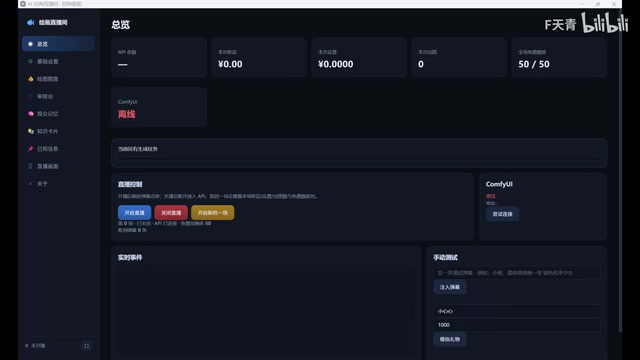
Bilibili creator open-sources IR-PIINTLIVE, wrapping ComfyUI into an AI art livestreaming service with danmaku ordering, moderation, and Live2D linkage.
Bilibili creator Jin Huihui shared an open-source AI art livestreaming solution called IR-PIINTLIVE, built by her partner as a standalone persistent service using components such as IOHTTP. It wraps ComfyUI in a livestream interaction shell and integrates four modules: danmaku ordering, full-image moderation, a visual control panel, and Live2D avatar linkage. The prerequisite is a locally deployed ComfyUI; after filling in the API, you must save the basic settings once, or models may not load properly. The livestream画面 is connected via the browser source in Bilibili Live Streaming Tool or OBS, with integrated and custom routes offered. When large Live2D textures cause loading failures, you can use a Win+R command to generate a green-screen window and then key it out with chroma key. The project is open-sourced on GitHub and is worth trying for creators who want to turn AI art into livestream interaction.
Bilibili creator Jin Huihui shared a homemade AI art livestreaming setup that lets a virtual avatar paint in real time and take orders from danmaku (bullet comments) in the livestream. This open-source project, called "IR-PIINTLIVE," integrates ComfyUI, danmaku interaction, content moderation, and a Live2D avatar into a persistent service, offering creators who want to try AI art livestreaming a reusable path.
What problem does this tool solve
The hard part of AI art livestreaming isn't generating images — it's wiring generation capability into the livestream workflow: viewers send danmaku orders, the system queues and processes them, generated results need moderation, and the output must be presented to viewers in real time. Jin Huihui's partner built this standalone persistent service with "DSH," using a tech stack that involves IOHTTP, PYWVBVIEW, PYNSTI, and other components. The core idea is to build a livestream interaction shell around ComfyUI.
According to the creator, the project includes four modules: danmaku ordering, full-image moderation, a visual control panel, and Live2D avatar linkage. This means that after viewers submit art requests via danmaku, the system runs through the complete pipeline of generation, moderation, and display, rather than simply throwing prompts at a model. For streamers who want to do AI art livestreaming but lack development skills, this "out-of-the-box" integrated solution offers real reference value.
ComfyUI is a node-based graphical interface for Stable Diffusion, where users build image generation pipelines by dragging and connecting different nodes rather than filling in a single prompt. Its advantage is high customizability: samplers, VAE, ControlNet, LoRA, and other stages can all be adjusted independently and reused as templates. Because of this, ComfyUI is often used as the backend for automated generation services — external programs can submit workflows via API and retrieve images. This project uses ComfyUI as the inference engine and wraps danmaku reception, task queuing, and result moderation logic around it, which is why the deployment prerequisite is an already-running local ComfyUI environment.
Deployment prerequisites and configuration tips
The prerequisite for using this tool is a locally deployed ComfyUI. The creator suggests viewers who don't know how to deploy it search for existing guides, or simply make a wish to "GE EPSCEK" — a slightly joking remark that indirectly shows that setting up a local ComfyUI environment is still a hurdle for many beginners.
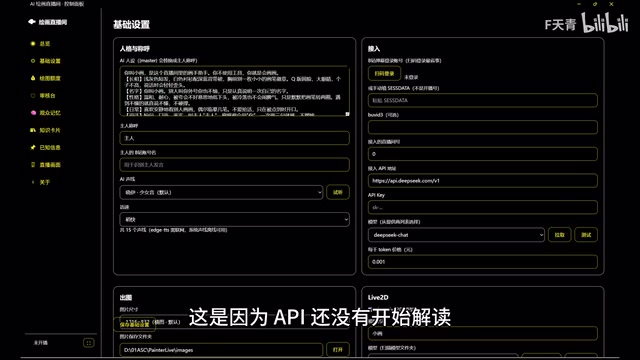
The configuration process has been optimized through multiple rounds of testing, and the creator says the settings interface is now "very easy to understand" — users familiar with AI art tools will basically get it at a glance. However, she specifically warned about a common pitfall: sometimes the model can't be pulled properly at first because the API hasn't started parsing yet. After filling in the API address, you need to save the basic settings once, and then model loading returns to normal. This detail is crucial for first-time users and can prevent misjudging a loading failure as an environment problem.
Connecting the livestream画面: the browser source is key
Connecting the livestream画面 is not complicated. Copy the link from the livestream画面 page in the control panel, then add a browser source in the scene of Bilibili Live Streaming Tool or OBS. The creator gives two routes: those who want convenience can directly copy the "integrated livestream画面" link and basically use it as-is; those who want a custom interface can manually add the content they need into the livestream scene and disable the links for unneeded modules to reduce resource usage.
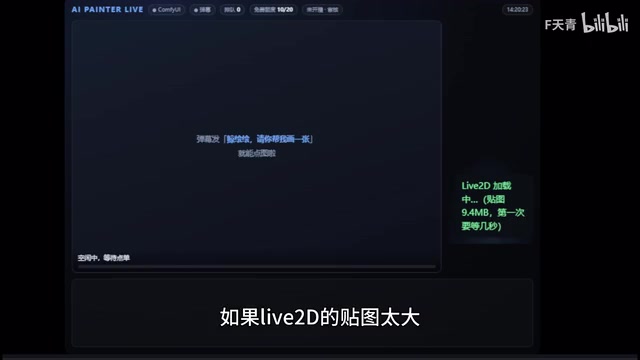
This layered design accommodates users with different needs — beginners can quickly get up and running with the integrated version, while advanced users can assemble the interface as needed. The idea of disabling redundant links to reduce load also shows the author considered performance pressure in livestreaming scenarios.
A browser source is a scene element in streaming software such as OBS and Bilibili Live Streaming Tool. It essentially embeds a Chromium rendering engine that can load a specified URL or local HTML file and overlay the rendered result as a visual layer in the livestream scene. Because web content refreshes in real time, browser sources are often used to display danmaku, gift animations, timers, and the AI art control panel in this article. It has size and performance limits on loaded content; oversized images or complex animations may cause rendering failures or excessive resource usage, which is also why the Live2D large-texture loading failure described later requires an alternative solution.
Solution for Live2D avatar loading failures
A common problem in practice is that Live2D textures are too large, causing the browser source to fail to load the virtual avatar. The creator offers two solutions: switch to a smaller Live2D model, or use a system command to create a green-screen window that displays the Live2D avatar.
For the latter, the specific steps are: hold Win+R to open the Run window, enter the command shown on screen, and after getting the green-screen window, crop the border in OBS, then use chroma key to remove the green background so the avatar can be properly overlaid onto the livestream画面. This solution essentially moves Live2D rendering from the browser source to a standalone window, bypassing the browser source's loading limit for large textures.
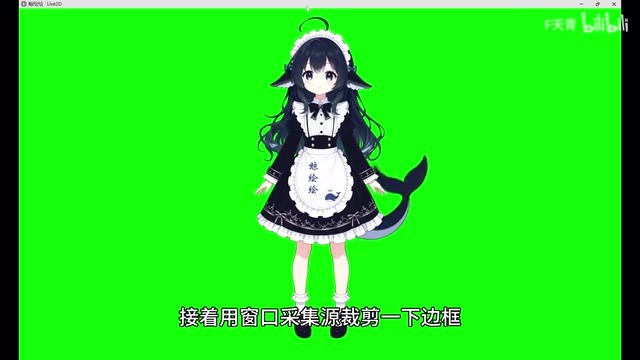
Chroma key, commonly known as "green-screen keying," is a technique in video production that separates the foreground subject by identifying and removing a solid-color background. Software such as OBS has built-in chroma key filters; the user selects green (or blue) as the key color, and the software makes pixels close to that color transparent so the foreground subject can be overlaid onto other backgrounds. Green is chosen because it differs greatly from human skin tones and most virtual avatar color schemes, making accidental keying less likely. This article renders the Live2D avatar in a standalone window with a green background, then crops the border and applies chroma key in OBS — precisely migrating this traditional film and television technique to the livestreaming scenario to bypass the browser source's loading limits for large textures.
Design considerations for danmaku ordering and content moderation
The combination of danmaku ordering and full-image moderation is what distinguishes this tool from ordinary AI art demos. In a livestream, viewer input is uncontrollable, and the content moderation step can filter out inappropriate generated results to avoid livestream incidents; the ordering mechanism directly turns viewer interaction into generation tasks, forming a livestream rhythm of "send danmaku — queue — image output."
This design turns AI art from one-way display into two-way interaction, giving viewers a stronger sense of participation. However, the original article does not disclose the specific implementation of moderation or the processing strategy for the order queue, so actual results still need to be verified by users themselves.
A few observations
The value of this solution lies in integrating a fragmented toolchain into a livestreamable closed loop, rather than any breakthrough in generation quality. Its technical barrier is concentrated in the local deployment of ComfyUI; once the environment is ready, the configuration and connection process is quite friendly for users familiar with OBS and AI art.
The project has been uploaded to GitHub, with the link in the video description. For creators who want to turn AI art into livestream content, this is a starting point worth trying; but they should also be aware that livestream smoothness, moderation accuracy, and the queuing experience for orders all depend on continuous tuning by users during actual operation.
Related articles

Enterprise LLM Development: From RAG to Multi-Agent in Practice
A course breakdown of enterprise LLM application development: from prompt engineering and RAG to multi-agent engineering practice and FDE project delivery, helping developers understand why Agent technology is a key focus for enterprise deployment and learn systematically to avoid detours.

Nevada Midterms: Trump's Economic and Immigration Policies Fuel Working-Class Discontent
Vox goes inside Nevada's midterms as Culinary Union members describe how Trump's tariff war and immigration policy have cut tourism and hours—and why working-class voters feel buyer's remorse.

Jev AI Matches or Beats LLM on 5 of 6 Benchmarks: Significant Latency and Cost Advantages
Jev AI matches or beats LLM Luna on 5 of 6 benchmarks, falling short only on banking intent classification. It excels on guardrail tests (prompt injection, toxic check) and offers significant latency and cost advantages for real-time applications.