Python SQLite in Practice: Connections, Cursors, and Commits via the Bank Model

Common pitfalls for beginners writing Python with SQLite, including transaction commits, in-memory databases, and shell dot commands.
Based on the FreeSQL series tutorial, this article uses a "bank teller" analogy to break down the six core steps of Python database access: connect, cursor, execute, fetch, commit, and close. It highlights three common pitfalls: `:memory:` databases disappear when the connection closes; forgetting to call `commit` causes changes to be lost silently without errors; and `execute` can only run one statement at a time, so multiple statements require `executescript`. It also covers the five sub-language categories of SQL commands, why SQLite doesn't support `GRANT`/`REVOKE`, SQL dialect differences, and the distinction between dot commands and SQL statements in the SQLite shell. It concludes with a pitfall roundup and a self-test question, setting the stage for learning SELECT statements.
Many beginners manage to run their first SQL statement in Python but still only vaguely understand what's happening behind the two lines connect and execute. Episode 2 of Syntax Pilot's FreeSQL series uses a "going to the bank" analogy to break down the full chain of Python-database interaction quite clearly. This article combines the core content of that tutorial to walk through the key steps from establishing a connection to committing a transaction, and points out several common pitfalls.
Understanding the six core steps through a bank teller
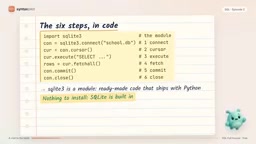
The tutorial maps the process of Python accessing a database to a bank visit: walking into the branch corresponds to sqlite3.connect(), which returns a connection object—a live link between the program and a particular database; the teller holding a finger on the ledger and remembering the current row corresponds to cursor(), which is responsible for sending SQL and iterating through results row by row; handing over the request form corresponds to execute(), which sends only one SQL statement at a time; getting the answer back corresponds to fetchone() (get the next row) and fetchall() (get a list of all remaining rows); signing to confirm corresponds to commit(), making the changes permanent; and leaving when done corresponds to close(), ending the connection.
The complete code skeleton is exactly these six steps: import the module, connect, create a cursor, execute, fetch, commit and close. Because SQLite is an embedded database bundled with Python's standard library—no installation and no server to start—it makes a zero-cost starting point for learning SQL syntax.
Why does an in-memory database "disappear"?
The first demo in the tutorial uses the special name :memory:. It creates a pure in-memory database that exists only in RAM; as soon as the connection closes, the entire database is deleted, and every new connect gets a brand-new empty database.
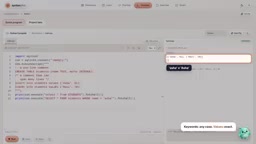
In the video, a table is created, a row "pay fees" is inserted, and the connection is committed and closed; then it reconnects to read, and the result is no such table. Many people mistakenly think they forgot to commit, but the real issue is that the database itself is temporary. The tutorial compares this to a whiteboard that gets wiped clean when you leave the room—great for quick tests, but not for saving data.
To persist, replace :memory: with a filename, such as school.db. If the file doesn't exist, SQLite creates it automatically; the first connection writes data to the file, and the second connection can read it back. The entire database—all tables, all rows, and the schema—lives in this one ordinary file, which can be copied, backed up, or even emailed. This is exactly what "single-file database" means for SQLite.
In SQLite, a database manifests as a file, but SQLite itself is an embedded database engine—it does not run as a "service process." This means that when you connect to a database via Python's sqlite3 module, what actually happens is: Python interacts directly with the SQLite library through C bindings, and the library handles reading and writing the database file on disk. As for :memory:, it is actually a special filename convention in SQLite that tells the engine to create a temporary database in memory rather than a file on the filesystem. Each connection to :memory: starts a completely new database instance; even multiple connections within the same process do not share data. If you need to share an in-memory database across multiple connections, you can use the URI format file:test?mode=memory&cache=shared, but this is typically only used in testing or special scenarios.
Forgetting to commit: the most dangerous silent trap
The second demo deliberately removes the commit line. The program runs without any error, but reading back gives an empty list: the CREATE TABLE statement took effect, but the inserted reminder is gone.
The reason is that in Python's sqlite3, an insert opens a transaction, which you can think of as a group of changes waiting for your signature. Closing the connection without committing is like tearing up unsigned paperwork—the changes are discarded. The CREATE TABLE statement survived because, in Python's default mode, only row-level changes wait for a signature. The tutorial uses this to emphasize a simple rule: whenever you modify data, you must call commit. The full mechanics of transactions are left for later chapters, but this rule alone is enough to avoid the most common pitfall.
Whether Python's sqlite3 module defaults to "autocommit" or "manual commit" depends on the version and settings. Before Python 3.6, the default value of isolation_level was `` (empty string), meaning autocommit mode is off, i.e., an implicit transaction is started; starting with Python 3.6, the default is "DEFERRED", meaning the transaction actually begins when the first data-modifying statement is executed and ends only when commit() or rollback() is explicitly called. Because DDL statements like CREATE TABLE do not trigger an implicit transaction in SQLite, they take effect immediately, while DML statements like INSERT are subject to transaction control. This is the root cause of "CREATE TABLE survives, INSERT is lost" in the tutorial. Understanding this makes it clear why calling commit is mandatory, and why closing the connection does not auto-commit.
Cursors, statements, and the boundaries of comments
In the demo, after inserting two rows into the students table, fetchone() is called three times in a row, yielding the first row, the second row, and then None—each call moves the "teller's finger" down one row, and once everything is fetched, the next call returns Python's None, meaning "nothing there." Switching to fetchall() collects all remaining rows into a list at once, which is an empty list if there is no data. Use fetchone() when you expect only one result (e.g., looking up a student by name), and fetchall() when you want all results.
At the statement level, two details are worth remembering. First, execute() can only execute one statement; stuffing two statements into a single execute raises ProgrammingError. To run a whole script, use executescript(), with each statement ending in a semicolon. Second, there are two comment styles: -- comments to the end of the line, and /* */ can span multiple lines; the database skips them entirely.
Case sensitivity is also easy to confuse. SQL keywords and SQLite table names are case-insensitive—the video tries both lowercase insert and mixed-case insert, and both rows are inserted successfully, and an all-uppercase select works as usual. But text values inside quotes are case-sensitive—searching for Asha with a lowercase a returns nothing.
The five families of SQL commands and dialect differences
The tutorial groups SQL commands into five sub-languages, using a school scenario to help remember them: DDL (Data Definition Language) designs table structures, including create, alter, drop; DML (Data Manipulation Language) modifies row data, including insert, update, delete; DQL (Data Query Language) handles asking questions, i.e., select—some textbooks classify select under DML, and both divisions are common; DCL (Data Control Language) decides who can do what, with grant to authorize and revoke to take away; TCL (Transaction Control Language) signs off on or undoes a group of changes, with begin, commit, rollback, where rollback means "tearing up the paperwork."
Dialect differences are very apparent here. Running grant in SQLite immediately raises a syntax error, because SQLite has no concept of users at all—it's just a file, and whoever can open the file can read it. grant and revoke belong to client-server databases like MySQL and PostgreSQL, and the tutorial says it will revisit them in a security-related chapter.
SQL dialect refers to the extensions and modifications that different database systems make on top of standard SQL. Besides SQLite not supporting GRANT/REVOKE, databases also differ in data types, function names, pagination syntax, string concatenation operators, and more. For example, SQLite uses || for string concatenation, while MySQL uses the CONCAT() function; pagination queries use LIMIT ... OFFSET ... in SQLite and PostgreSQL, while SQL Server uses OFFSET ... FETCH. When learning, remember: standard SQL is the common foundation, but for a specific database, you need to check its documentation to confirm syntax. This also explains why the tutorial emphasizes that "SQLite is a zero-cost starting point for learning SQL"—it supports the core of standard SQL while avoiding many complex features.
SQLite Shell: dot commands are not SQL
Besides Python, you can also enter SQL directly using SQLite's built-in shell. It has a class of special commands starting with a dot; if you send a dot command from Python, you get near ".": syntax error—dot commands are instructions for the shell program itself, and the database has never heard of them.
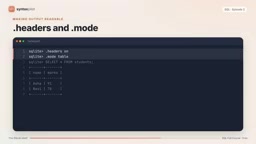
A real session looks roughly like this: type sqlite3 plus a filename in the terminal to start the CLI; .tables lists the tables in the file; .schema students shows the CREATE TABLE statement; ordinary SQL executes as usual, ending with a semicolon. By default, output separates columns with vertical bars; if you forget the semicolon, the shell shows a ... continuation prompt, waiting for the rest of the statement; .headers on prints column names; .mode table draws neat boxes, while .mode column aligns without boxes—the same query can look very different in readability. Dot commands don't need semicolons because they aren't SQL.
Other databases have similar shells: PostgreSQL's is called psql, with special commands starting with a backslash (e.g., \dt to list tables); MySQL's shell is simply called mysql, using SQL-like commands such as show tables and describe. The difference is that psql and mysql are clients that need an address, username, and password to connect to a server, whereas SQLite just opens a file.
Today's pitfall roundup and a self-test
The tutorial ends with a concentrated list of pitfalls: in-memory databases vanish when the connection closes; forgetting to commit makes changes evaporate silently—the most dangerous one; execute runs only one statement, so use executescript for multiple; dot commands only work in the shell and must never be mixed into SQL.
The video ends with a self-test question: the students table has two rows; what does calling fetchall() and then fetchone() print? The answer is None—fetchall has already taken all remaining rows, and the cursor's "finger" is at the end, so the next fetchone naturally finds nothing. The homework is to build a diary database with three notes, read them back one by one, and observe what is lost when you don't write commit. The next episode will formally cover select: choosing columns, doing calculations in queries, renaming columns, and the trap lurking when a column is named order.
One-line Summary
Common pitfalls for beginners writing Python with SQLite, including transaction commits, in-memory databases, and shell dot commands.
Paragraph Summary
Based on the FreeSQL series tutorial, this article uses a "bank teller" analogy to break down the six core steps of Python database access: connect to establish a connection, cursor to create a cursor, execute to run SQL, fetch to retrieve results, commit to commit the transaction, and close to close the connection. It highlights three common pitfalls: :memory: in-memory databases disappear when the connection closes; forgetting to call commit causes changes to be lost silently without errors; and execute can only run one statement at a time, so multiple statements require executescript. It also covers the five sub-language categories of SQL commands, why SQLite doesn't support GRANT/REVOKE, SQL dialect differences, and the distinction between dot commands and SQL statements in the SQLite shell. It concludes with a pitfall roundup and a self-test question, setting the stage for learning SELECT statements.
Related articles

Last Week Tonight Exposé: The Dangerous Ties Between Politicians and White Supremacy
Last Week Tonight investigates Georgia Senate candidate Mike Collins and Florida candidate Marshall Rawson, exposing their multiple ties to white supremacists and the Republican Party's silent response.

AI Buzz Weekly: GPT-6.5 Leak, New Claude Model, and MiniMax's Cost-Effectiveness
This week's AI buzz roundup: suspected GPT-6.5 leak, Microsoft configs showing GPT-6.1 Tera, Anthropic's new model that can identify entire classes of bugs, disappointing early Gemini 4 Carbon results, and MiniMax M3.1 Flash beating Claude Opus 5 and GPT-5.6 Sol in benchmarks at extremely low cost.

AI Briefing: Gemini 4 Carbon Released, Ant Open-Sources Ling-3.1
AI Briefing: Google releases Gemini 4 Carbon qubit model, claiming to surpass Opus 5.5 with half-price tokens; Ant open-sources Ling-3.1-1019 for real-task Personal Agents; domestic AI drug discovery succeeds in 18 of 19 projects, hitting all 6 GPCR targets; zero-revenue company valued at $20B raises another $1B; Sichuan convenience store robot sales fail.