Quiver Launcher + Game List: One-Stop Management for PC Ported Games

The game list discovers recompilation projects, while the Quiver launcher handles installation and management, forming a complete pipeline.
The article presents a complete roadmap for discovering and managing classic game recompilation projects: a GitHub game project list organizes scattered recompilation, remake, and open-source engine projects into a searchable index, while the Quiver launcher (localized in Chinese) serves as a project manager. It supports adding projects from the app catalog, selecting release files suitable for the local machine, and supplementing unlisted projects through manual entries or repository addresses. Post-installation version checks, updates, and tag classification are all centralized in the game library. For projects requiring original game data, players must legally own and import the files themselves; the tool does not provide game content.
For fans of classic game recompilation projects, the biggest pain point often isn't finding the projects—it's not knowing how to install them once found, or how to manage them once installed. Two open-source projects on GitHub—a game project list and the Quiver launcher (localized in Chinese)—happen to form a complete pipeline: the list handles discovery, and the launcher handles management. Here's a breakdown of this roadmap from browsing repositories to launching games.
Game List: A Roadmap for Old Games
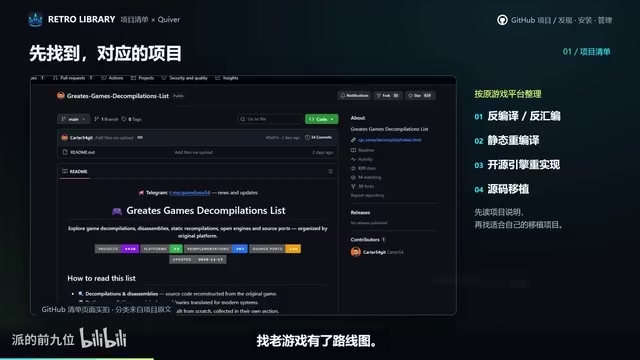
The game project list takes a straightforward approach: organizing recompilation, remake, and open-source engine projects that were previously scattered across various platforms into a searchable table. Players don't need to blindly search on GitHub—they can first locate target projects through the list.
Taking the rabbit game's engine as an example, the same project can be found in both the list and the launcher directory—meaning the discovery entry and execution entry point to the same dataset, reducing information gaps. The list functions like an index catalog, telling you "what's playable," but actual operations start with the launcher.
The Difference Between Recompile and Remake
Recompilation typically refers to using decompilation tools to reverse-engineer a game's original binary code into high-level language source code, which the community then fixes, refactors, and recompiles into executables that run on modern platforms. These projects pursue "authenticity," keeping graphics and gameplay as close to the original as possible, with the focus on making old games run stably on new systems.
Remakes involve more substantial re-creation, potentially including HD assets, rewritten rendering pipelines, adjusted controls, or even changed level designs—essentially new products based on the original work.
Open-source engine projects fall somewhere in between: they don't directly provide game content but offer engine implementations compatible with original game data. Players need to prepare legal original resource files themselves to play. Understanding the differences between these three types of projects helps players quickly determine whether an entry in the list meets their expectations.
Quiver Launcher: The Successor from Discovery to Installation
Quiver (localized in Chinese) takes on the role of project manager. After opening the app catalog, find the target project, add it to your game library, then select the release file suitable for your computer to install. This process splits "finding projects" and "installing projects" into two clear actions.
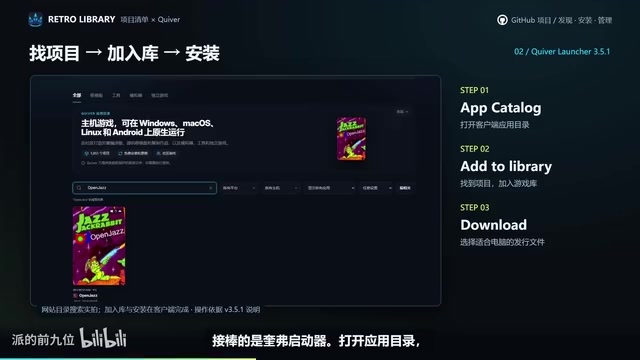
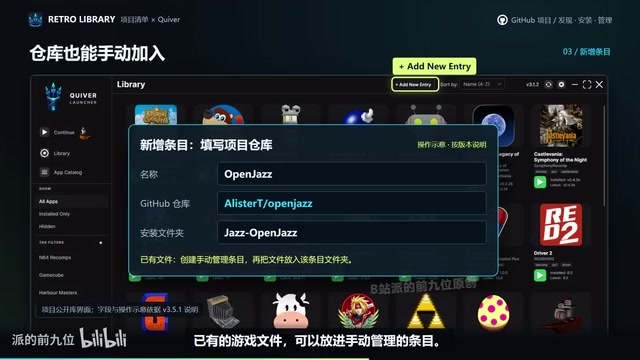
If the corresponding entry isn't found in the catalog, there's a fallback: fill in the project repository address in the new entry, or place existing game files into manually managed entries. This design accommodates projects not yet covered by the list, preventing the launcher from becoming a closed ecosystem.
What Are "Release Files"
In recompilation and open-source engine projects, the same game often has multiple builds released for different operating systems and hardware architectures, such as Windows x64, Linux x86_64, macOS ARM, etc. These build artifacts are usually attached as compressed packages on GitHub Releases pages, and players need to select matching release files based on their computer's system and architecture.
The Quiver launcher integrates this step into the installation process, listing available release files for players to choose from, avoiding the need to manually search for release attachments in repositories. Choosing the wrong architecture may prevent the program from launching or cause performance issues, so confirming your system type during installation is a necessary step.
Version and Tag Management After Installation
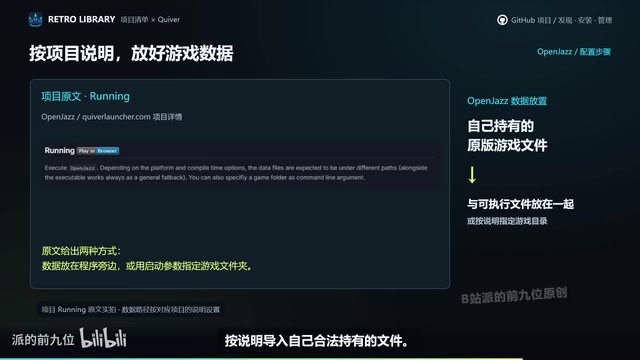
After installation, version checking and updates are handled uniformly from the game library—no need to browse original repositories individually. For projects requiring original game data, the launcher supports import by name search—provided players legally own these files themselves, and some engines clearly explain how data should be placed.
Tag classification is another practical design: if you want to find a certain type of game, simply filter for it. When your game library accumulates to a certain size, this classification method is far more efficient than manually scrolling through lists.
Original Game Data and Legal Ownership
Many open-source engines themselves contain no game assets, levels, or sound effects—they only provide the program framework to run this content. Players must extract data files from legally purchased original games (such as disc, GOG, or Steam versions) and place them according to the directory structure specified in the engine documentation for the engine to load properly.
Different engines have varying requirements for data formats and paths—some require the entire game installation directory, while others only need specific resource packages. The launcher's support for import by name search essentially helps players associate data they already own with corresponding entries, but it doesn't bypass copyright verification or provide any game content downloads.
Who Is This Solution For
From a workflow perspective, the list handles "discovery" and the launcher handles "management." Together, they connect the acquisition, installation, updating, and classification of PC ported projects into one line. It's suitable for players willing to organize their childhood game libraries themselves, and for users interested in open-source recompilation projects but discouraged by scattered repository structures. It's worth noting that projects involving original game data still require players to prepare legal files themselves—the tool itself doesn't provide game content.
Key Points Recap
- The game list and Quiver launcher share data, with the same project locatable in both places
- The launcher supports adding projects from the app catalog and selecting release files for installation
- Projects not included can be supplemented through manual entries or repository addresses
- Version updates and tag filtering are centralized within the game library
- Original game data requires legal ownership and self-import by players
Related articles

DeepSeek Harness Plugin "Footprints": Turn Your Photo Album into a 3D Earth
DeepSeek Harness plugin "Footprints" projects album photos onto a 3D Earth by GPS location, auto-generates travel storylines, and supports natural language photo search, "that day in years past," and landmark recognition, with a local read-only index for privacy.

Lost DSH Crash Logs? This Open-Source Black Box Makes Every Crash Traceable
DSH WARN logs flash by and vanish on restart? The open-source DSH Runtime Lock black box writes WARN/ERROR to local JSONL in real time, auto-rotates to keep four segments, zero dependencies, no network requests, one-command setup.
DeepSeek Vision Lead Zhang Bo Launches Open-Source Linger: Departure After Billion-Yuan Funding and the New Agent Battle
Former DeepSeek vision-language lead Zhang Bo announces a startup after billion-yuan funding, launching open-source desktop personal agent Linger, pitting local model optimization and third-party model access against token-billed cloud services.