Running and Inspecting an MCP Server: Hands-On Debugging for Agentic AI Development

Run a FastMCP dev server and systematically verify tool exposure, calculation correctness, validation fault tolerance, and log observability.
This article covers the essential debugging workflow for building Agentic AI services using a FastMCP development server. Key steps include: launching the server and using the Inspector tool to confirm that tools, resources, and prompts are all correctly exposed; validating percentage-change calculation logic with concrete values (80 and 92); performing negative tests by removing a required end value to confirm that validation failures keep the session alive rather than crashing it; and verifying resource content and rendered prompts while tracing full call paths in the logs. The entire workflow embodies the engineering principles of clear contracts, robust validation, and observable behavior.
Starting Clean: Surfacing Hidden Contract Issues
When building Agentic AI services, a "clean start" often reveals hidden issues at the interface contract level. This lesson (Stage 28 — Lesson 8) focuses on a core practical exercise: how to properly run and inspect a FastMCP-based development server, ensuring that tools, resources, and prompts are all correctly exposed.
In practice, you'll need to run FastTICPDevInspectorServer.py inside an activated project environment and keep the terminal session open. This step may seem straightforward, but it's the prerequisite for all subsequent debugging work — only with a stable server running can you use the Inspector tool to verify each capability the server exposes.
FastMCP is a Python development framework built on the Model Context Protocol (MCP), designed by Anthropic to provide AI Agents with standardized interfaces for tool invocation, resource access, and prompt management. In this context, an "interface contract" refers to the explicit agreement between the server and its callers regarding input parameter names, types, required fields, and return value structure — any deviation by either party will result in silent failures or type errors that are difficult to trace. The Inspector tool is a visual debugging panel provided by the MCP ecosystem that lets you invoke a running development server directly, view responses, and inspect the list of exposed capabilities — all without writing any client code. It's the go-to method for validating server behavior during development.
Verifying the Three Types of Capabilities Exposed by the Server
MCP (Model Context Protocol) services typically expose three core types of capabilities: tools, resources, and prompts. The course emphasizes confirming that STO correctly exposes all three — this is the first checkpoint for determining whether the server is functioning as expected.

Once the basic exposure check is complete, the next step is to closely inspect the interface definition of a specific tool. Using a calculation tool like "percentage change" as an example, you need to verify each required input, output field, and corresponding data type. The clarity of the interface contract directly determines whether callers can pass parameters correctly and parse the returned results.
In the MCP architecture, "tools" correspond to functions that an Agent can actively invoke — typically used to perform calculations, query external APIs, or carry out operations with side effects that need to return a result. "Resources" are read-only context data sources, such as document snippets, database records, or configuration data, which an Agent retrieves before reasoning to enrich its context. "Prompts" are predefined templates that, once filled with variables, are passed to the large language model as system instructions or user messages. Each has a distinct role: tools "do things", resources "provide information", and prompts "give instructions". STO is short for Server-Tools-Objects, a collective term for the set of capabilities a MCP server exposes. Confirming that all three are correctly exposed is the foundational prerequisite for all subsequent functional verification.
Testing Calculation Logic with Concrete Data
After theoretical inspection, you must validate the logic against real data to confirm it behaves as expected. The course provides a clear test case: input 80 and 92, and verify that the result correctly reflects a 15-percentage-point increase (15-point row and increase). This approach — testing with explicit expected values — is the standard practice for verifying the correctness of calculation-oriented tools.
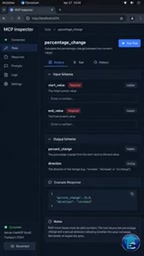
A round-trip call with real numbers simultaneously confirms two things: first, that the tool's core calculation logic is correct; and second, that the field mapping and type conversion for inputs and outputs are accurate. For Agent tools used in finance or data analysis, this kind of numerical consistency validation is especially critical.
Validating the Failure Path: Removing the End Value to Trigger Validation
A robust service must not only return correct results for valid inputs — it must also gracefully reject invalid ones. The course specifically designs a "negative test": remove the end value and observe whether validation fails as expected.
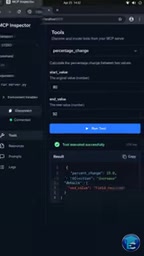
There's a noteworthy detail here — when validation fails, the session should remain connected rather than dropping the entire connection due to a single bad input. This reflects good interface design and fault tolerance: validation failures should be local and recoverable, not capable of crashing the entire service. This "validation fails but session stays alive" behavior is the kind of stability that production-grade Agent services should exhibit.
"Negative testing" is a software engineering strategy dedicated to verifying that a system behaves as expected when given invalid or boundary inputs — it complements "positive testing", which validates normal paths. For Agent tools, negative testing is especially important: if a service throws an uncaught exception and drops the connection when a required parameter is missing, the client Agent cannot distinguish between a "parameter error" and a "service crash", leading to chaotic retry logic. The MCP specification requires that tool-level input validation return a structured error response (rather than a transport-layer disconnection), allowing the Agent to read the error, adjust its parameters, and retry without needing to rebuild the entire session. The "session stays connected" behavior is fundamentally a protection of the HTTP long-connection or WebSocket session, and is a key aspect of fault-tolerant design in production-grade services.
Inspecting Resource Content and Rendered Prompts
Beyond tool invocation, you also need to verify that the resource content provided by the server is correct. Resources often carry the contextual data an Agent needs to operate, and their accuracy directly affects the quality of downstream reasoning.

Rendered prompts also need to be checked individually. The final form of a prompt template — after its variables have been filled in — determines the actual instructions the large language model receives. Finally, the course requires tracking both of these paths in the logs — the call traces for both resources and prompts — to ensure that server behavior is observable and traceable.
Summary
This lesson walks through the key stages of Agentic AI debugging by running and inspecting an MCP development server: from server startup and capability exposure, to interface contract verification, positive and negative testing, resource and prompt validation, and log tracing. This workflow reflects an engineering mindset for building reliable Agent services — one that goes beyond asking "does it work?" to emphasizing clear contracts, thorough validation, and observable behavior. Following the course schedule, the next step is Stage 28, Lesson 9.
Related articles
Microsoft Fabric Database Agent in Action: From Reactive Firefighting to Intelligent Detective
A deep dive into the Microsoft Fabric Database Agent: how to enable it, supported monitoring scenarios, a blocking-issue demo, and the roadmap from reactive to autonomous operations.

Zendesk Uses ChatGPT Enterprise to Build a Sales Agent with 1,000 Daily Active Users
Zendesk opened ChatGPT Enterprise to all employees, who built about 600 apps themselves, including a sales expansion agent with about 1,000 daily active users. This article analyzes how it turns internal data into sales opportunities and its "don't wait" implementation strategy.

Google Releases Gemini 4 Carbon: Its Strongest Model Yet, Debuting with a Cybersecurity Focus
Google releases Gemini 4 Carbon, calling it its strongest model, with a cybersecurity focus. It tops the third-party composite ranking at 59 points but leads by only one or two. This article analyzes its security test results, staged rollout, token pricing, and the divergence between self-reported and third-party tests on hallucinations.