Running Real-Time Local Voice AI on a Single 12GB GPU: Full Pipeline with a 35B Model and Voice Conversation

A full 35B MoE voice conversation stack runs locally on one 12GB GPU with 2–3s end-to-end latency.
A developer deployed a complete real-time voice AI stack locally on a single 12GB GPU, including the Qwen 3.6 35B MoE language model, Whisper ASR, Breeze TTS2 speech synthesis, and Celery VAD. By placing MoE expert weights on the CPU and shrinking context to 32K, the whole stack fits in 12GB VRAM. Latency optimization came in layers: streaming transcription so recognition is done while the user speaks; sentence splitting with parallel synthesis and playback to eliminate long silences and inter-sentence pauses; and disabling thinking on the first turn so the AI speaks immediately. The biggest breakthrough was Q8 quantization of the voice model plus streaming audio, boosting speed 2–3× and freeing VRAM, cutting end-to-end latency from about 8s to 2–3s. After integrating with an Agent framework, the freed VRAM was used to raise the micro-batch and solve the prefill bottleneck, while preset phrases fill the silence while the AI works.
Why Run Real-Time Voice AI Locally?
OpenAI's Astra demo gave many people their first taste of what it feels like to "talk to a computer naturally." But cloud solutions mean uncontrollable latency, privacy leaks, and accumulating costs. A developer abroad shared his attempt on Bilibili: cramming the entire AI voice conversation stack into a single 12GB GPU, running everything locally end to end.
His goal was clear — not just to make it run, but to make it fast enough to feel "like talking to a real person." The previous version still had 5–6 seconds of latency and required two machines to run the language model and the voice model separately. This time he set out to solve: single GPU, low latency, fully local.

Model Selection: 35B MoE + Whisper + Breeze TTS2
The stack consists of four core components:
- Qwen 3.6 35B (a Mixture-of-Experts model) handles language understanding and reasoning. The developer stresses that 2B or 3B small models are just "toys" — a real working Agent needs a 35B-class model. The advantage of the MoE architecture is that even with all expert weights running on the CPU and only a small portion kept on the GPU, it can sustain roughly 40 tokens/sec generation — fast enough to keep up with conversational pacing.
- Whisper handles speech-to-text; it's tiny and uses very little memory.
- Breeze TTS2 (3.5B parameters) handles speech synthesis. According to the developer, this model ranks first on the Artificial Analysis leaderboard, surpassing Gemini and ElevenLabs, and has open weights.
- Celery VAD handles voice activity detection for hands-free operation — determining when the user starts speaking and when they finish.
According to analyses of this project by the Bilibili creator and a YouTube channel, the core idea behind this combination isn't chasing maximum intelligence but pairing "good enough" models with extreme engineering optimization.
Mixture of Experts (MoE) is a sparsely activated neural network architecture: the model contains multiple "expert" subnetworks and a gating/routing mechanism, and each forward pass activates only a few of the experts rather than all parameters. This allows the total parameter count to be very large while the actual computation per inference is far smaller than a dense model of equivalent size. The Qwen 3.6 35B in this article is such a model; its advantage is that inactive expert weights can be placed in CPU or system memory, with the GPU retaining only the router and a small set of resident weights, maintaining usable generation speed under limited VRAM. The cost of MoE is that total VRAM/memory usage is still calculated based on the full parameter count, and the inference framework must support on-demand scheduling of expert weights.
The Memory Allocation Arithmetic for a 12GB GPU
Cramming all the models into 12GB of VRAM requires careful budgeting. The developer's strategy: keep only the speed-sensitive parts in VRAM and leave the rest to the CPU and system memory.
Language model portion: expert weights go on the CPU, keeping under 2GB on the GPU. With context and compute buffers, the entire LLM takes up nearly 4GB at 128K context. The problem is the voice model — Breeze TTS2 needs about 8.5GB (weights plus runtime overhead), and it must be entirely on the GPU, otherwise responses are too slow. The two together exceed 12GB.
The solution was to shrink the context: from 128K down to 64K, then to 32K, reducing context usage accordingly. With Whisper added, the total just barely fits under 12GB, leaving a small margin for peaks.
But the first version with this configuration wasn't pleasant: from the moment the user stops speaking to the AI starting to talk took about 10–11 seconds. Worse were long answers — the model had to write the entire paragraph and the voice model had to synthesize the entire audio segment before the first word played.
Latency Optimization Layer 1: Streaming and Parallelization
The developer broke the latency problem into two parts: initial wait and inter-sentence pauses.
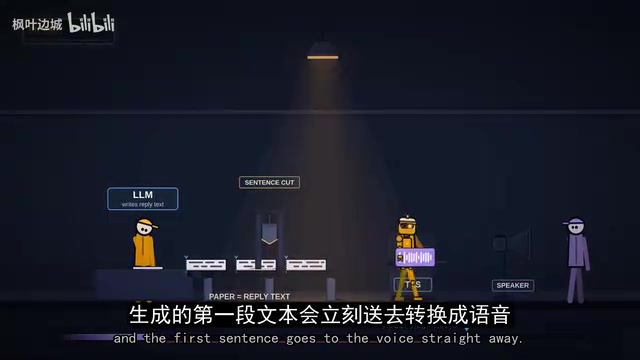
Solving long silences: no longer waiting for the model to finish the entire answer. As the model writes, the text is split into sentences (short phrases of three words or fewer are merged into the next sentence to avoid choppy-sounding speech), and the first sentence is immediately sent to speech synthesis and played while the model continues writing in the background. This step significantly improved the "say one sentence, wait forever" problem.
Solving inter-sentence pauses: while the first sentence is playing, the next one is being synthesized. Completed sentences enter a queue, keeping at most two waiting to play. Model writing, speech synthesis, and speaker playback all happen in parallel. The result is that sentences mostly flow together, with only occasional brief pauses when a particularly long sentence comes up.
The developer admits his speech generation speed is about 1.1× real-time — just slightly faster than playback — so gaps still occasionally occur. But this speed is the "acceptable" lower bound.
Streaming means a model or component outputs in segments rather than waiting for the complete result, allowing downstream stages to start work early. In a voice conversation pipeline, this shows up at three levels: the language model outputs token by token rather than waiting for the whole reply; text is split into sentences and sent to speech synthesis immediately; and the voice model pushes audio chunks to the speaker as it synthesizes. The accompanying "parallelization" means the three pipeline stages — writing text, synthesizing speech, and playing audio — run simultaneously, with queues controlling buffer depth. Streaming can significantly reduce first-word latency and inter-sentence pauses, but it imposes a lower bound on the throughput of each stage — synthesis speed must be slightly faster than real-time playback, otherwise the queue drains and playback stutters.
Latency Optimization Layer 2: Streaming Transcription and Thinking Control
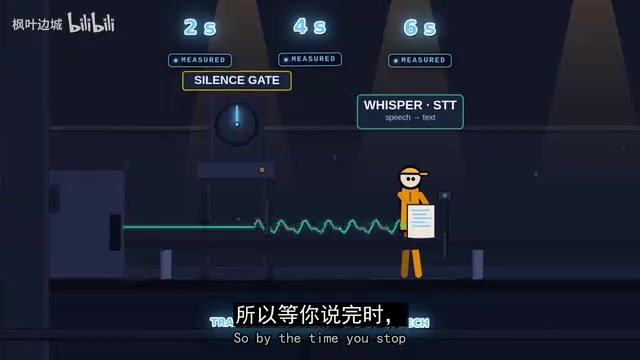
The root cause of the initial wait is the serial pipeline: wait for you to stop speaking → send the recording for transcription → model reads and thinks → writes the first sentence → speech synthesis completes the full sentence → playback. Each step looks fast on its own, but stacked together they add up to seven or eight seconds.
Streaming transcription: while the user is still speaking, transcription runs in the background at short intervals, so by the time the user stops, the text is already ready. According to the developer, this means the transcription step no longer adds any extra waiting time.
Retaining a 1-second silence threshold: the developer deliberately kept about 1 second of silence waiting to avoid interrupting users mid-thought. For people who fill pauses with "um" and "ah," this wait can be shortened.
Disabling thinking on the first turn: Qwen is a thinking model that reasons before answering, sometimes thinking for a long time just to say "hello." His approach: disable thinking on the first response after the user finishes speaking, while keeping thinking capabilities for subsequent tool calls and actual work. This lets the AI speak immediately instead of first planning how to greet you.
Key Breakthrough: Voice Model Quantization and Streaming Audio
An unexpected discovery brought the biggest gain: the developer had been running the full BF16 version of Breeze TTS2, since the official code doesn't quantize. After switching to audio.cpp and the Q8 quantized version, the audio quality was indistinguishable, but generation speed improved 2–3×, freeing up considerable VRAM.
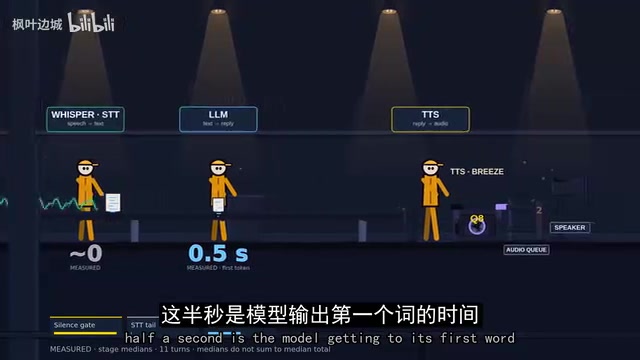
audio.cpp supports streaming audio output, so the speaker no longer waits for a full sentence to be synthesized — playback starts as soon as speech generation begins. This change nearly eliminated the inter-sentence pause problem. After all optimizations, end-to-end latency dropped from about 8 seconds to 2–3 seconds, with a measured median under 3.5 seconds.
The latency breakdown also became clear: about 1 second is the deliberately retained silence threshold, a short time is the model producing the first word, and most of the remainder is the voice model generating the first syllable.
Quantization is the process of converting neural network weights from high-precision floating point (e.g., BF16, FP16) to lower-precision integers (e.g., INT8), aiming to reduce VRAM usage and leverage faster low-precision compute instructions. Q8 quantization converts weights to 8-bit integers, typically with scaling factors used to dequantize at inference time or to compute directly in integer arithmetic. For speech synthesis models, quantization can compress weight size to roughly half with virtually no loss in perceived quality while improving generation throughput. audio.cpp, mentioned in the article, is a C++ inference framework for audio models — analogous to what llama.cpp is for language models. It supports quantized formats such as GGUF and streaming audio output, enabling voice models to run efficiently on consumer GPUs without the official PyTorch code.
New Challenges in Agent Scenarios: Prefill and "Speaking"
Voice chat is only the starting point. The developer integrated this system into his own Agent framework, Pythagoras, giving the AI a browser, terminal, and canvas, plus a work panel so users can see what the AI is doing.
The prefill bottleneck: chat messages are only a few hundred tokens, but web pages can be tens of thousands. The original configuration had a prefill speed below 200 tokens/sec — a single YouTube page has about 15,000 tokens, taking the model nearly a minute and a half to read. The cause was a micro-batch size of 128. Using the space freed by voice quantization, he raised the micro-batch to 1024 and moved some expert layers back to the GPU, boosting prefill speed to about 800 tokens/sec. The remaining space also accommodated MTP (speculative prediction for tool calls) and the vision encoder, raising context from 32K to 100K. Conversation caches are saved to disk, so switching away from a session and back requires no re-reading.
Filling silence with language: the Agent is silent while working, leaving users unable to tell whether it's working or stuck. The solution isn't more speed — it's making the AI talk. Every message from the voice interface carries a tag, and the system prompt requires concise replies and stating what it's about to do before calling a tool. For silence while reading tool output or thinking, the system randomly picks a phrase from a preset list to announce. When compressing context, the AI also says outright, "Context is almost full, let me compress the conversation."
How Replicable Is This Setup?
The developer emphasizes that all the numbers — weights, context, compute buffers, voice model — can be recalculated for your own GPU's capacity. Less VRAM means shrinking context or switching to a smaller voice model; the methodology stays the same. At the end, he had the AI actually perform a task: go to r/LocalLLaMA, read the latest posts, and generate a report — which the AI completed quite smoothly.
This system is still far from Astra, and its intelligence level doesn't match cloud solutions. But as the developer puts it, what makes an experience feel "like the future" is often not raw intelligence but the interface itself. The model is the swappable piece — local models get stronger every few months, and swapping in a new model means all the surrounding engineering optimizations benefit too.
The full code is released as open source on the developer's GitHub, and he encourages people to try it on their own machines and submit PRs.
Background Notes
Prefill is one of the two stages of LLM inference: all tokens in the input prompt must first pass through the model in a single pass to generate the KV cache, after which the token-by-token decode stage begins. Prefill computation scales with input length and typically consists of compute-intensive matrix operations, so its speed (tokens/sec) determines how long the model takes to "read" a long piece of text. In chat scenarios the input is only a few hundred tokens, making prefill time negligible; but when an Agent reads a web page, the input can reach tens of thousands of tokens, making prefill the main bottleneck. Micro-batch size refers to the number of samples processed in parallel in a single forward pass; increasing it appropriately improves GPU utilization and speeds up prefill, but uses more VRAM, competing for space with context length and model weights.
Related articles
Microsoft Fabric Database Agent in Action: From Reactive Firefighting to Intelligent Detective
A deep dive into the Microsoft Fabric Database Agent: how to enable it, supported monitoring scenarios, a blocking-issue demo, and the roadmap from reactive to autonomous operations.

Zendesk Uses ChatGPT Enterprise to Build a Sales Agent with 1,000 Daily Active Users
Zendesk opened ChatGPT Enterprise to all employees, who built about 600 apps themselves, including a sales expansion agent with about 1,000 daily active users. This article analyzes how it turns internal data into sales opportunities and its "don't wait" implementation strategy.

Google Releases Gemini 4 Carbon: Its Strongest Model Yet, Debuting with a Cybersecurity Focus
Google releases Gemini 4 Carbon, calling it its strongest model, with a cybersecurity focus. It tops the third-party composite ranking at 59 points but leads by only one or two. This article analyzes its security test results, staged rollout, token pricing, and the divergence between self-reported and third-party tests on hallucinations.