Self-Hosting n8n in Practice: Docker + PostgreSQL + Caddy Deployment Guide

Complete guide to self-hosting n8n: three-service orchestration, 2.x breaking changes, and key/backup essentials.
This article is for readers who want to move n8n from the cloud to their own server. It first explains three reasons to self-host—data boundary, internal network access, and billing by resources rather than execution count—while noting that ops costs fall on you. It then presents a Compose architecture with three services: PostgreSQL, n8n, and Caddy, emphasizing that 5678 is bound only to localhost and public access goes through Caddy on 443. Next it lists four breaking changes in n8n 2.x, breaks down the eight-step deployment process and the most common `.env` pitfalls, especially that the encryption key can't be changed. Finally, it walks through a five-node website monitoring plus Feishu alerting workflow as a hands-on example, and covers backups, upgrade and rollback, and post-launch operational conventions.
Why Self-Host n8n
Cloud automation services that bill by execution count get expensive fast once you have a lot of workflows. Self-hosting trades subscription fees for ops time, and in return you gain autonomy over your data boundary, internal network access, and execution volume costs.
Data boundary is the first reason: you decide where the instance, database, and execution records live. But note that self-hosting doesn't mean data never leaves—when you call external services like Feishu or LLMs, the request content still goes out.
Internal network access is the second reason: n8n running on your own server can directly reach databases and NAS devices on the same internal network. Third is the cost advantage at high execution volume: the community edition bills by server resources, not execution count. The trade-off is that upgrades, backups, certificates, and security hardening are all your responsibility.
Deployment Architecture: Three Services, One Compose File
A single Docker Compose file holds three services: PostgreSQL stores data (workflows, encrypted credentials, execution records), n8n runs the editor and execution engine, and Caddy handles HTTPS.
Caddy lives in a profile called https: it isn't started for local trials, but when you deploy to a server you add --profile https, and it automatically obtains and renews certificates for your domain, then forwards requests to n8n.
There's a deliberate design choice here: n8n's port 5678 is bound only to 127.0.0.1, so it's accessible only from the local machine, and all public access goes through Caddy on 443, preventing anyone from bypassing HTTPS to reach it directly. And precisely because there's an extra proxy layer in front, you need to set PROXY_HOPS to 1 in the environment variables.
Remember the four data volumes: database, n8n data, Caddy certificates, and Caddy config. You'll need these for backups later.
Docker Compose and the profile mechanism: Compose is Docker's official multi-container orchestration tool. It uses a single YAML file to describe services, networks, and volumes, and docker compose up brings up all containers in dependency order. Profiles are Compose's conditional enablement mechanism: services tagged with a profile aren't started by default, and are only included in orchestration when you explicitly add --profile <name> on the command line. This design lets a single configuration file serve both local trials and server production scenarios, avoiding the need to maintain two sets of files.
Reverse proxy and PROXY_HOPS: Caddy acts as a reverse proxy here, receiving HTTPS requests on public port 443 and forwarding them to the internal n8n. n8n needs to know how many proxy layers a request passed through in order to correctly reconstruct the client's real IP and protocol; PROXY_HOPS tells it how many hops of the X-Forwarded-For header to trust. Setting it wrong causes discrepancies in webhook URLs, IP whitelists, and logging. When there's only one layer (Caddy) in front, set it to 1.
What You Must Know About n8n 2.x Changes Before Deploying
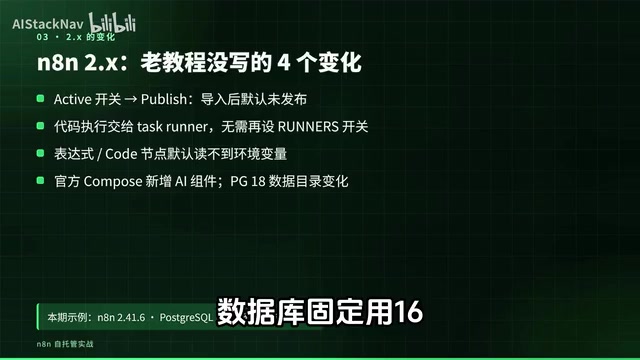
Many older tutorials don't cover these four points. First, the old Active toggle became Publish; imported workflows are unpublished by default, so neither schedules nor webhooks will fire. Second, code execution is now handled by the task runner; the Runners toggle that used to be set separately is no longer needed as of 2.0. Third, expressions and the Code node can't read environment variables by default; only when BLOCK_ENV_ACCESS (variable name approximate; refer to your actual version) is explicitly set to false is access allowed. Fourth, the official Compose example added optional AI-related components and notes that PostgreSQL 18 changed its data directory; today's configuration doesn't include these components.
Task Runners: Starting with n8n 2.0, execution of Code nodes and expressions was moved out of the main process and handed to separate runner processes, with the goal of isolating untrusted code and avoiding blocking the main event loop. This means the code execution environment is isolated from the main process's memory and environment variables by default, which also explains why expressions can't read environment variables by default and require explicitly granting access.
Eight-Step Deployment Process
Step one: prepare the server and Docker. For personal or small-team trials, 2 cores, 4 GB RAM, and 20 GB+ disk is a solid starting point. After installing Docker Engine and the Compose plugin, verify the version with docker compose version.
Step two: calibrate server time. Use timedatectl status to confirm NTP sync is enabled; scheduled triggers and Feishu signatures both depend on accurate time.
Step three: for production server use, add an A record at your domain registrar pointing to the server IP, and allow ports 80 and 443 in your security group and firewall. Don't allow 5678.
Step four: put the Compose file, the .env example file, and the Caddyfile in the same directory, copy out .env, and set its permissions to 600.
Step five: generate two random values—don't write them by hand: use openssl rand -base64 24 to generate the database password and openssl rand -hex 32 to generate the encryption key. Be sure to save the encryption key separately in a password manager.
Step six: change the access addresses based on your scenario. For local use, keep the defaults; for production server use, change the N8N_HOST, N8N_PROTOCOL, WEBHOOK_URL, and PROXY_HOPS lines to your domain. The template already has comments written in.
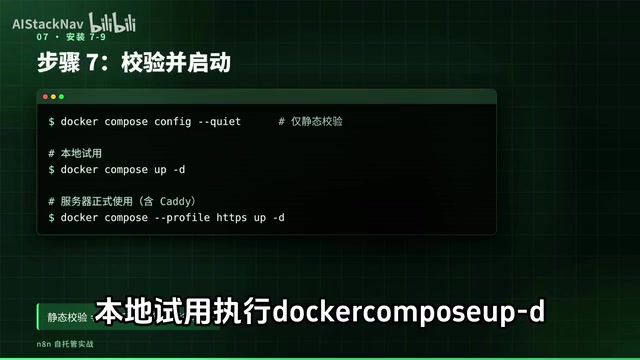
Step seven: before starting, validate the configuration with docker compose config --quiet. Note that this only does static validation; it can't prove the password is correct, the image can be pulled, or the database can be reached. For local use, run docker compose up -d; for production server use, add --profile https to bring up Caddy as well.
Step eight: verify. First check docker compose ps, then hit the two health check endpoints separately: liveness only indicates the process is alive, while readiness actually checks the database connection, and first startup requires waiting for migrations to complete. Then open the editor—locally at localhost:5678, or for a remote server at your HTTPS domain once the domain and certificate are ready—create the Owner account, set a strong password, and enable two-factor authentication.
The Most Critical Environment Variable Pitfalls
The .env file has only a dozen or so variables, but each one corresponds to a real pitfall.
If WEBHOOK_URL isn't set, the address shown by Webhook nodes becomes localhost, and external systems can't call in at all. Set GENERIC_TIMEZONE to Asia/Shanghai, or scheduled tasks will be off by 8 hours. Pin N8N_VERSION to a specific version number—using latest may upgrade without your knowledge and migrate the database along the way. Keep the two execution record cleanup variables at 336 hours and a maximum of 10,000 records to prevent the database from growing indefinitely.
The most critical one is the encryption key. We tested it: start with one key, then restart with a different key, and n8n outright refuses to run, reporting Mismatching Encryption Keys. Once the key is set, don't change it; when reinstalling the server, restore it along with the backup rather than regenerating it. If you truly lose the key, saved credentials can't be decrypted, and you'll have to re-enter each one.
Credential encryption mechanism: n8n uses N8N_ENCRYPTION_KEY to symmetrically encrypt credentials in the database (such as Feishu bot URLs and API keys) before writing them to disk, so the key is the only thing that can decrypt this data. The key isn't included when you export the database, so it must be stored separately; when restoring, the database and key must be restored as a pair, otherwise the credential fields are just unrecoverable ciphertext and you'll have to re-enter each one manually.
First Practical Workflow: Website Monitoring with Feishu Alerts
We chose this because everyone can use it, and it doesn't require applying for any API key—just a Feishu group bot. The whole workflow has five nodes and two entry points: manual execution for testing, and a scheduled trigger that fires every 30 minutes.
To check the website, use an HTTP Request node to GET your URL, enable Return Full Response, Don't Error on Error Status Code, and a 10-second timeout, and set the node to continue on error so that connection failures also reach the next step. Then an IF node checks whether the status code isn't 200 and takes the true branch, and finally the Feishu notification is connected only on the true branch, with the message including the status code, error info, and time.
Why not send on both branches? Pushing notifications when everything is normal quickly becomes noise, and people stop looking. Alerting workflows should only speak when something is wrong.
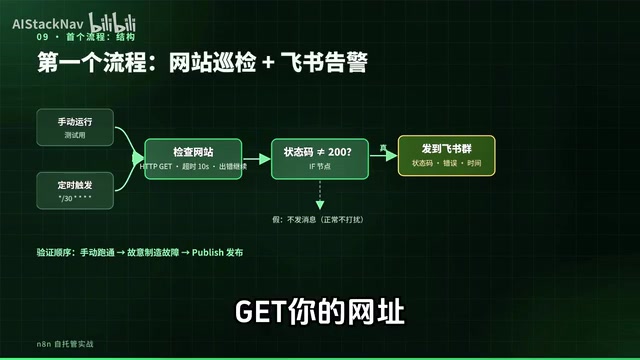
Six concrete steps: first, add a custom bot in your Feishu group settings, copy the webhook URL, and choose custom keywords under security settings with "网站" (website) as the keyword; then in the n8n editor, select Import from file in the top right to import the workflow file, and replace the URL in the check-website node and the bot URL in the Feishu node with your own; click Execute Workflow—when the website is normal, the IF node's false branch outputs and the Feishu group receives no message, which is expected behavior; next, deliberately create a failure by changing the URL to a nonexistent path, and test at least three cases—returns 200 with no alert, returns 503 with an alert, and connection refused with an alert; finally, change the URL back and click Publish—schedules only take effect after publishing, and the Executions page will gain a record every 30 minutes.
One more reminder: a green check on the Feishu node doesn't mean the alert was delivered. You need to check both the business response returned by the API and whether the message actually arrived in the group.
Backup, Upgrade, and Rollback
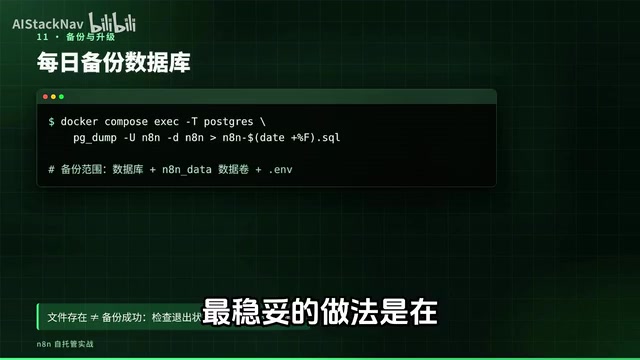
Do your backups before going live. Back up at least three things: the PostgreSQL database, the n8n data volume, and the .env file. Export the database with pg_dump, put it in cron, run it daily, and copy it to another machine or object storage. Note that a failed export can still leave an empty file behind—a file existing doesn't mean the backup succeeded, so check the command's exit status and error output.
The safest approach is to actually restore once in an isolated environment, with schedules and outbound notifications turned off, and verify that workflows and credentials decrypt correctly.
Upgrades follow five fixed steps: read the release notes for the target version, focusing on breaking changes; back up the database; change the version number in .env; pull and rebuild only the n8n service; finally check the logs to confirm migrations completed and readiness returns normally, then spot-check two or three key workflows.
Be especially careful with rollback: database migrations run during an upgrade aren't automatically undone. To go back to the old version, you must first restore the database from the pre-upgrade backup, then change the version number back.
A Few Conventions After Going Live
A deployed n8n only creates real value once you plug in repetitive work like daily reports, data collection, and notifications. Before you do, establish a few conventions: proactively check API responses—make the execution fail when a Feishu return code isn't 0 or a WeChat Rcode isn't 0, so it doesn't look successful when nothing was actually written; also create a global error workflow using the Error Trigger node and select it in each workflow's settings so failures trigger alerts—note that the error workflow itself must also be published; for collection-type workflows, deduplicate across executions, but be aware that wrong parameters in the deduplication node won't throw an error, so pay attention to modified dedup logic and don't confirm the second run has no new data by running twice in a row.
On security: set .env permissions to 600 and don't commit it to Git; add at least a token check to public webhooks; test any workflow that sends messages or writes data in a test group or test sheet first; and for anything using an LLM to write daily report copy, always have a human review it before publishing externally.
Summary: Four Things You Must Get Right When Self-Hosting n8n
The Webhook URL, encryption key, timezone, and database backup—get any of these four wrong and everything downstream is wasted effort. Get it running locally first, then move to the server, pin the version number, and always back up before upgrading.
One-line Summary
A complete guide to self-hosting n8n: three-service orchestration, 2.x breaking changes, and the red lines around keys and backups.
Paragraph Summary
The article is for readers who want to move n8n from the cloud to their own server. It first explains three reasons to self-host—data boundary, internal network access, and billing by resources rather than execution count—while noting that ops costs fall on you. It then presents a Compose architecture with three services: PostgreSQL, n8n, and Caddy, emphasizing that 5678 is bound only to localhost and public access goes through Caddy on 443. Next it lists four breaking changes in n8n 2.x, breaks down the eight-step deployment process and the most common .env pitfalls, especially that the encryption key can't be changed. Finally, it walks through a five-node website monitoring plus Feishu alerting workflow as a hands-on example, and covers backups, upgrade and rollback, and post-launch operational conventions.
Related articles

Running a PS2 Emulator in the Browser with Claude: Inside TabStationToo
TabStationToo ports the PCSX2 core to the browser with WebAssembly and WebGPU, letting a PS2 emulator run in a tab. We break down its tech, AI workflow, and optimization.

AI Customer Service Evaluation Gone Wrong: 41 Failures, 28 Were Test Bugs
A live evaluation of a Shopify AI customer service agent produced 41 failures, but 28 were test bugs. This article analyzes scorer flaws, overly strict response checks, and other evaluation pitfalls, and summarizes best practices to prevent test bugs from masking real model failures.

No API Needed! Build a WhatsApp Receptionist with a Free Claude Account
A developer shares a weekend experiment: using a free Claude.ai account and browser scripts to turn WhatsApp Web into an automated receptionist—no API required.