Spiik: AI Meeting Notes Assistant That Records Without a Bot Joining the Call
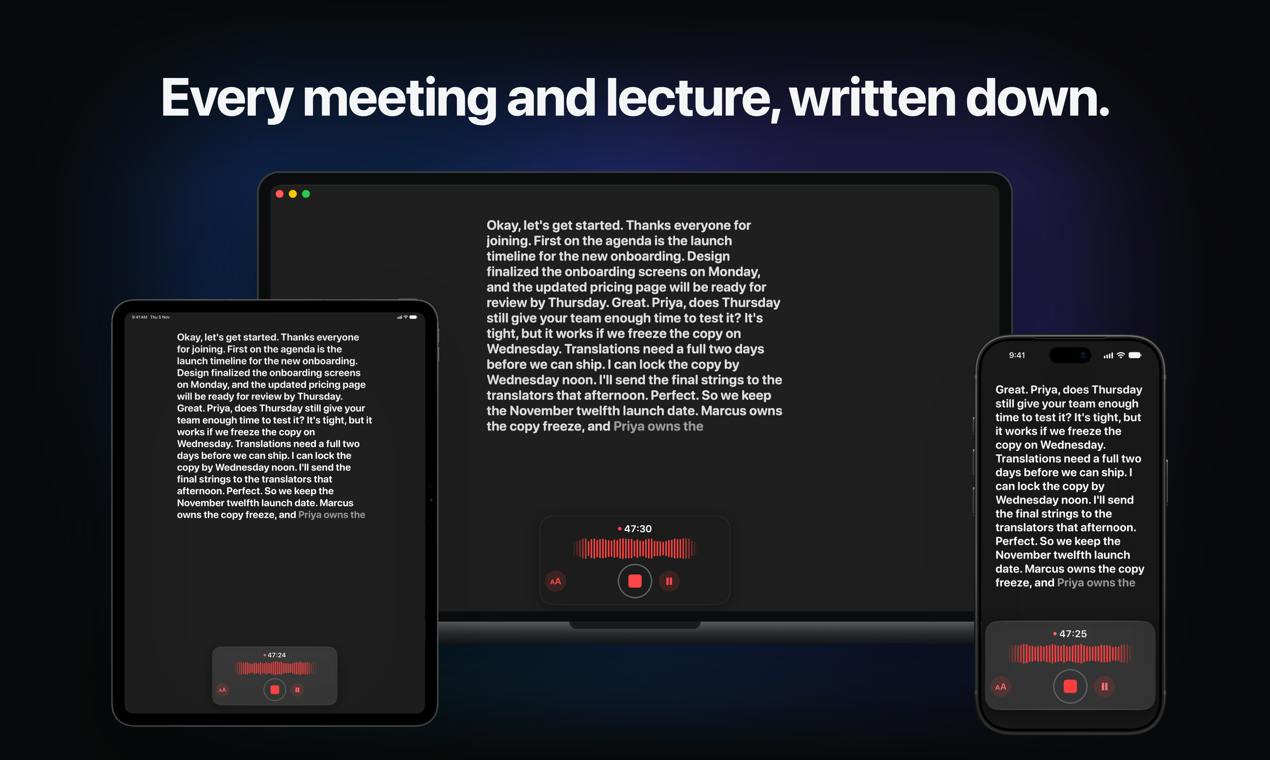
Spiik is an AI tool that records meetings on Mac without a bot and generates notes, quizzes, and flashcards.
Spiik is an AI note-taking tool from Product Hunt that records meetings, lectures, interviews, and calls, producing speaker-labeled transcripts robust to accents and noise, with translation into 100+ languages. Its key differentiator is bot-free recording of Zoom, Meet, and Teams on Mac, avoiding privacy concerns and extra attendees. It also generates structured notes, quizzes, and flashcards and supports asking questions about recordings. Spiik covers iPhone, iPad, and Mac and received 73 votes on Product Hunt, ranking 12th for the day, though accuracy, pricing, and platform limits remain undisclosed.
Spiik: AI Meeting Notes Assistant That Records Without a Bot Joining the Call
In an era where remote collaboration is the norm, organizing meeting minutes and class notes still consumes a great deal of effort. Spiik, which debuted on Product Hunt, aims to solve this pain point: it's an AI note-taking tool that records meetings, lectures, interviews, and calls and generates reliable transcripts. Its standout feature is that when recording Zoom, Meet, and Teams on a Mac, no bot needs to join the call.
Core Features: From Recording to Structured Knowledge
Spiik's core capabilities revolve around "record–transcribe–understand." It supports recording audio in a variety of scenarios and then generating transcripts. The company emphasizes that its transcription is robust against accents and noisy environments, and it automatically labels speakers (who said what). In addition, Spiik supports translation across more than 100 languages, which is convenient for cross-language communication scenarios.
Once transcription is complete, Spiik doesn't stop at the written transcript. It can further generate structured notes, quizzes, and flashcards to help users review and reinforce the content. You can also ask questions directly about the recording to quickly locate key information. This extension from recording to knowledge management distinguishes Spiik from simple transcription tools.
Speaker diarization is a key technology in meeting transcription—it answers "who said what, and when." It runs as a parallel processing chain alongside automatic speech recognition (ASR): ASR converts acoustic signals into text, while diarization uses voiceprint clustering to segment continuous audio into different speaker segments and then aligns the text with those segments. The challenges lie in people talking over one another, varying speech rates, differences in microphone distance, and speakers with similar timbres; it usually requires specifying the number of speakers in advance or estimating it automatically. The metric is Diarization Error Rate (DER), which consists of missed detection, false alarm, and speaker confusion. Most commercial tools can achieve DER as low as under 10% on clear two-person recordings, but it rises noticeably in noisy multi-person meetings—which is precisely the capability boundary that similar products are really pointing to when they advertise "support for accents and noisy environments."
No Bot Joining: A Unique Advantage on Mac
Many AI meeting assistants rely on a bot account joining the meeting to record audio, which can sometimes raise privacy concerns or technical issues. On Mac, Spiik takes a different approach: it records Zoom, Meet, and Teams audio directly, without a bot joining the call. This means participants won't see an extra "bot" attendee, making the recording process more discreet and seamless.
This design is appealing to teams that care about meeting experience and privacy. However, this feature currently appears to be Mac-only; Spiik also offers iPhone and iPad apps, but bot-free recording may depend on Mac system capabilities.
Meeting recording implementations generally fall into two technical paths. One is the "virtual participant" model: an AI assistant joins the meeting as a bot account through the meeting platform's open API and receives the audio and video streams pushed by the platform—most products such as Otter.ai and Fireflies.ai use this approach. Its advantages are decoupling from the platform and cross-device consistency, but the bot must appear in the participant list and is constrained by the platform API's permissions and stability. The other is the "local capture" model: capturing audio output or microphone input at the operating system level, bypassing the meeting platform. Since macOS 13 Ventura, macOS has offered system-level audio capture capabilities such as ScreenCaptureKit; combined with virtual audio devices (such as BlackHole) or sound card loopback, it can record the meeting audio played through the speakers without joining the call. This path avoids exposing a bot, but it requires handling system permissions, echo cancellation, and audio track separation, and is usually tightly bound to a specific operating system—which is precisely the technical reason Spiik's bot-free recording is Mac-only.
Cross-Device and Multi-Scenario Use
Spiik covers iPhone, iPad, and Mac, making it convenient for users to record on different devices. Whether it's an in-person lecture, an online meeting, or a phone interview, it can be used. Its transcription and translation capabilities make it suitable for multilingual environments, while the quiz and flashcard features are especially practical for educational scenarios.
Flashcards are a learning method based on spaced repetition: a question on the front and an answer on the back; learners self-assess the difficulty of recall, and the algorithm uses that to schedule the next review time. Its cognitive science basis is "retrieval practice" and the "forgetting curve"—active recall strengthens long-term memory more than repeated reading. Modern tools such as Anki and SuperMemo use algorithms like SM-2 to dynamically adjust intervals. Automatically turning meeting or lecture recordings into flashcards essentially means extracting unstructured spoken content into "concept–explanation" pairs, which requires the model to have key-point identification, redundancy removal, and question generation capabilities. The quality of automatically generated cards varies, and manual filtering is usually still needed, but it can significantly reduce the initial organizing cost from recording to reviewable material.
Market Positioning and Competition
The AI note-taking tool space already has many players, such as Otter.ai and Fireflies.ai. Spiik's differentiation lies in its bot-free recording approach and its focus on learning scenarios (quizzes, flashcards). According to Product Hunt data, Spiik received 73 votes and 6 comments, ranking 12th for the day, indicating some early interest.
However, information about Spiik is currently limited; for example, transcription accuracy, pricing, and specific platform limitations are not yet clear. For potential users, these are factors that require further investigation when making a decision.
Summary
Spiik is a distinctive AI note-taking tool that seeks to stand out in a crowded field through bot-free recording, multilingual support, and learning features. Its seamless recording experience on Mac is worth watching, but the product's maturity and detailed specifications remain to be tested by the market.
One-line Summary
Spiik is an AI tool that records meetings on Mac without a bot and generates notes, quizzes, and flashcards.
Paragraph Summary
Spiik is an AI note-taking tool that debuted on Product Hunt. It can record meetings, lectures, interviews, and calls and generate speaker-labeled transcripts, handling accents and noisy environments, with translation into more than 100 languages. Its biggest differentiator is that when recording Zoom, Meet, and Teams on a Mac, no bot account needs to join the call, making recording invisible to participants and avoiding privacy concerns and extra attendee disruption. After transcription, Spiik can also generate structured notes, quizzes, and flashcards, and supports asking questions directly about the recording, targeting learning and knowledge management scenarios. The product covers iPhone, iPad, and Mac and received 73 votes on Product Hunt, ranking 12th for the day. However, key information such as transcription accuracy, pricing, and platform limitations has not been disclosed, and its maturity remains to be tested by the market.
Related articles
Gemini 4's Three Coding Models Compared: How to Choose Between Neon, Hydrogen, and Argon
How to choose among Gemini 4's Neon, Hydrogen, and Argon coding models? This article compares official positioning, API pricing and the price-increase date, coding benchmark scores from Artificial Analysis and Cursor, and summarizes developer feedback to offer scenario-based selection advice.
Gemini 4 Neon Hands-On: Crushes Opus at Coding, but the Free Agent Hides Three Major Pitfalls
Gemini 4 Neon tops the Coding Agent Index, beating Carbon and Opus 5.5 in four real code battles—but hidden reasoning tokens bill at $15 and free Tasks silently fails.

Gemini 4 Neon Released: Google's Strongest Coding Model Tops the Rankings
Gemini 4 Neon tops the Artificial Analysis Coding Agent Index with 58.6. We break down its coding agent benchmarks, 1M token context, four thinking levels, and pricing below Carbon starting in December.