Stable Diffusion Local Deployment Guide: A Complete Free Alternative to Midjourney

A beginner-friendly guide to deploying Stable Diffusion locally as a free Midjourney alternative.
This guide walks beginners through deploying Stable Diffusion locally, covering hardware requirements (6GB+ VRAM NVIDIA GPU), all-in-one launcher installation, WebUI configuration, and model selection. It highlights SD's advantages over paid alternatives — zero cost, unlimited generation, full privacy, and creative freedom — making professional AI art accessible to everyone.
The Era of Democratized Open-Source AI Art
While paid AI art tools like Midjourney and DALL-E build barriers with monthly subscriptions costing tens of dollars, Stable Diffusion (SD) is rewriting the rules of the game in a different way — fully open-source, permanently free, and running locally offline.
This is not a compromise. In fact, many paid tools heavily borrow from the achievements of the open-source community, and SD is the core engine of this ecosystem. All it takes is a consumer-grade GPU to run professional-level AI image generation on your personal computer.
Core Advantages of Stable Diffusion
Zero Barrier, Zero Cost
Compared to cloud-based AI services like Midjourney, SD's local deployment offers several undeniable advantages:
- Completely free: No subscription fees, no per-use charges, no hidden costs
- Unlimited generation: No quota limits — generate as many images as you want
- Privacy protection: All data is processed locally; your creative content never gets uploaded to any server
- No content restrictions: Not bound by platform content policies, offering greater creative freedom
Hardware Requirements Are Not Demanding
Many people have misconceptions about "running AI locally," assuming it requires a high-end GPU costing thousands of dollars. In reality, any NVIDIA GPU with 6GB+ VRAM (such as GTX 1660 or RTX 3060) can smoothly run most models. This means mid-range gaming PCs purchased within the last three to four years can handle SD for everyday use.
Hands-On Deployment for Beginners: A Complete Step-by-Step Process
Step 1: Environment Preparation and Package Download
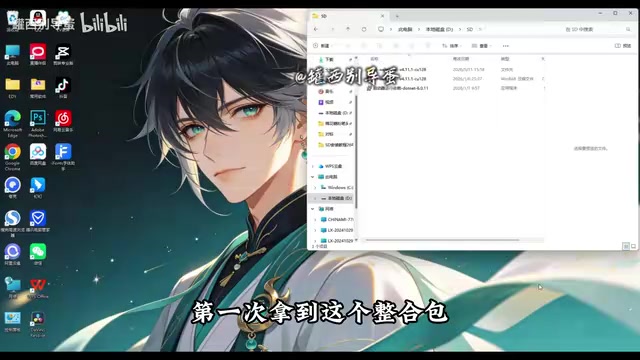
For users with no technical background, the community has developed very mature all-in-one packages. Taking the Qiuye (A FINAL) Launcher as an example, it simplifies the originally complex deployment process into just a few steps:
- Install runtime dependencies: Install the basic components required by the launcher before first use
- Extract the package: Fully extract the downloaded archive to a local disk (recommended: non-C drive, with at least 50GB of free space)
- Run the launcher: Simply double-click the launcher program
Key tip: Don't rush to open WebUI immediately after extraction. Make sure to complete the dependency installation first, or you'll encounter errors.
Step 2: Launcher Configuration and Feature Overview
Modern SD launchers have solved many pain points from early deployment:
- Automatic base plugin installation: Eliminates the hassle of manual configuration
- No environment variable setup needed: This used to be a technical hurdle that discouraged countless beginners
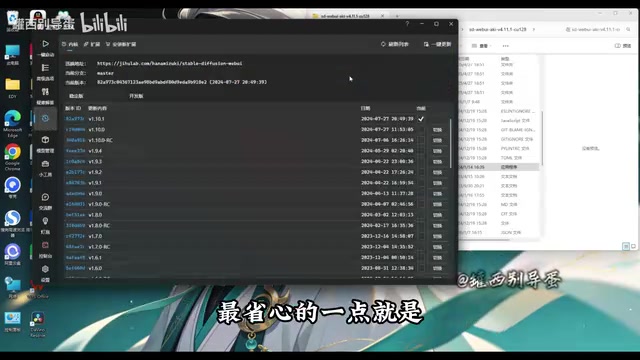
- Kernel version switching: Freely switch between different versions of WebUI
- One-click extension updates: Install new features or update components directly from the interface
- Unified model management: Categorize and manage downloaded checkpoints, LoRA models, and more
Step 3: Generate Your First AI Image
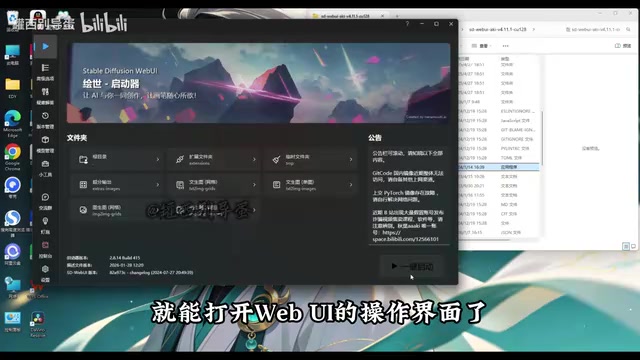
After clicking "One-Click Launch," your browser will automatically open the WebUI interface. The core workflow is extremely simple:
- Describe the image you want to generate in the prompt input box
- Select an appropriate model (this determines the visual style)
- Click the generate button
Model Selection: The Key to AI Art Quality
Models are the most critical resource in the SD ecosystem. Different models excel at different styles — some specialize in photorealistic portraits, others in anime illustrations, and some are ideal for concept art and scene design.
For beginners, it's recommended to start with pre-installed models that come with clear labels. Mature all-in-one packages typically include multiple well-tested, high-quality models with style preview images, greatly reducing the cost of choosing. No more guessing what a model does based on cryptic English filenames.
As you gain experience, you can explore more community-created professional models on platforms like Civitai. The richness of this ecosystem far exceeds what most people imagine.
Final Thoughts: The Value of AI Art Tools Lies in How You Use Them
The significance of Stable Diffusion goes beyond saving money. It represents a trend toward technological democratization — professional-grade AI capabilities are no longer monopolized by a few companies but have become creative tools accessible to everyone.
Of course, the tool itself doesn't create value; the real difference lies in how you use it. Whether designers use it to accelerate creative iteration, content creators use it to generate visual assets, or developers build commercial applications on top of it, SD provides a starting point of infinite possibilities.
Related articles

Tencent WorkBuddy Hands-On: How AI Agents Crush Traditional Chat Assistants
WorkBuddy vs Doubao tested: how AI Agents directly operate computers to convert PPT to PDF, archive files and more. Analysis of WorkBuddy's low barrier, domestic ecosystem, pricing and plugin marketplace, plus AI Agent selection advice.

Azure Cross-Tenant Attack Chain: Root Cause Analysis of Five Paths
Binary Security analyzes five full cross-tenant compromise paths in Azure, trending 271 points on HN. This article interprets their shared root cause perspective and offers defense recommendations for cloud tenant isolation and reflections on responsibility boundaries.

Recreating a Real Bubble Tea Station in Isaac Sim: Script-Driven Unitree G1 Brews Tea
Developers recreated a real self-service tea station in NVIDIA Isaac Sim, using scripts to drive a Unitree G1 through a five-step tea-brewing process, exploring whether physics simulation can be a source of synthetic robot demonstration data and discussing contact stability and imitation learning.