StereoLift Live: Bringing Your Desktop to Quest in Real-Time 3D

StereoLift Live streams your desktop in stereoscopic 3D to Quest over the LAN, relying on an NVIDIA GPU.
StereoLift Live is a tool released on Product Hunt that renders a Windows or Linux desktop as stereoscopic images with left-right parallax and streams them in real time over the local network to a Meta Quest headset, giving windows and icons depth layering. It requires an NVIDIA GPU, a Quest headset, and the same LAN environment; data doesn't pass through the cloud and latency is controllable, but this also limits its range of use. The product received 66 upvotes and ranked 19th, making it a niche tool aimed at power users. The article notes that a stereoscopic desktop may enhance the immersion of VR office work, but scenarios requiring precise focus such as word processing may not be well suited to it, and with limited community feedback, its maturity remains to be verified.
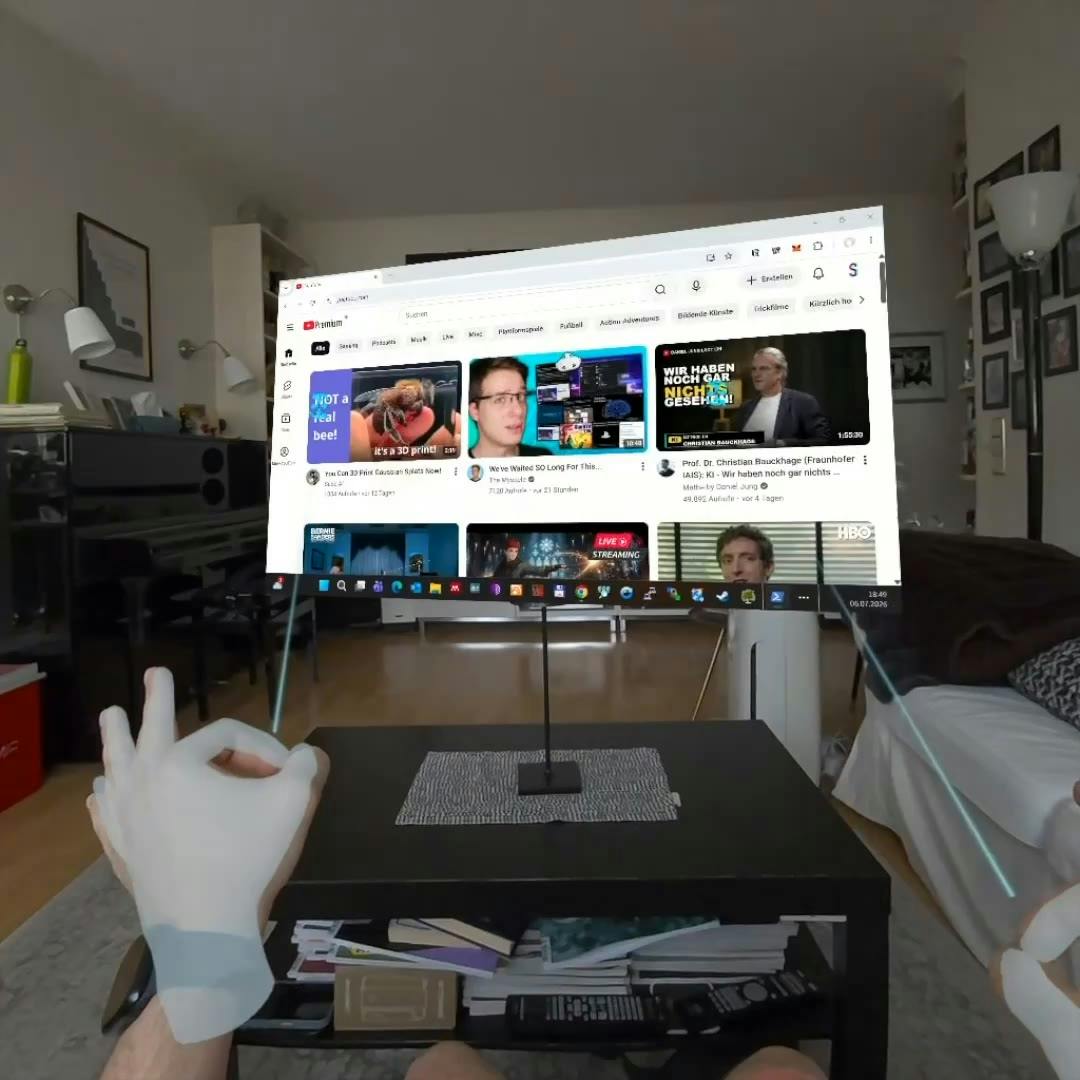
StereoLift Live is a newly released product on Product Hunt, with the tagline "Bring your desktop to Quest in true 3D, in real time." It streams the desktop of a Windows or Linux PC in stereoscopic 3D to a Meta Quest headset over the local network, opening up new possibilities for remote work, immersive entertainment, or multitasking.
Core Concept: Local Streaming + Stereoscopic 3D
StereoLift Live works in a straightforward way: you run it on a Windows or Linux PC with an NVIDIA GPU, and it renders the desktop as two images with slight parallax for the left and right eyes, then transmits them in real time to the Quest headset over the LAN. As a result, you no longer see flat 2D windows but a 3D desktop with a sense of depth—windows can float in space, and the mouse pointer and icons have front-to-back layering.
The product received 66 upvotes and 1 comment on Product Hunt, ranking 19th for the day, categorized under Virtual Reality and Video Streaming. Judging from the numbers, it's a niche but precisely targeted utility aimed at power users who own both a VR headset and an NVIDIA graphics card.
Stereo Parallax is one of the core mechanisms by which human eyes perceive depth: the left and right eyes are about 6.5 cm apart, so they see the same scene from slightly different angles, and the brain fuses the two images to produce a sense of depth. StereoLift Live simulates exactly this process—rendering a frame with a horizontal offset separately for each eye, then feeding each to the corresponding display in the Quest. Unlike the traditional approach of "pasting a 2D image onto a virtual plane," stereoscopic rendering requires computing perspective independently for each eye, roughly doubling the computational load—one of the reasons it relies on NVIDIA GPU hardware acceleration. Understanding this makes it clear why ordinary streaming software can't directly achieve the same effect.
Requirements and Barriers to Use
To use StereoLift Live, you need to meet several prerequisites: a Windows or Linux PC, an NVIDIA GPU, and a Meta Quest headset, with both devices on the same local network. The NVIDIA GPU requirement likely implies that its stereoscopic rendering or encoding depends on specific hardware acceleration capabilities, which also means AMD or Intel GPU users cannot use it for now.
The advantage of local network streaming is that latency is relatively controllable and data doesn't pass through the cloud, offering better privacy. On the other hand, this also limits the use cases—you can't use it outdoors or away from your PC and must stay within LAN coverage.
The NVIDIA GPU dependency is likely related to the NVENC encoder. NVENC is a dedicated video encoding hardware unit on NVIDIA graphics cards that can compress frames into H.264/H.265 video streams with low latency and low CPU usage. VR streaming is extremely latency-sensitive (typically requiring end-to-end latency below 20-30 milliseconds), and pure software encoding struggles to meet this reliably, which is why many streaming solutions are tied to NVIDIA hardware. This also explains why AMD or Intel GPU users can't use it for now: it's not that stereoscopic rendering itself is infeasible, but that there's no equally efficient hardware encoding path.
The Practical Value of a 3D Desktop
Turning your desktop into 3D sounds cool, but what problem does it solve? For VR users, traditional streaming solutions often just paste a 2D desktop onto a virtual screen, lacking a sense of space. StereoLift Live's stereoscopic rendering gives windows, icons, and UI elements depth layering, which in theory can improve comfort during extended use and make the virtual desktop more immersive.
However, whether this 3D-ification suits all kinds of work still needs real-world verification—for scenarios requiring precise focus, such as word processing and code editing, stereoscopic display may actually increase visual strain. The product currently has only one comment, with limited community feedback, and its actual experience awaits validation from more users.
Vergence-Accommodation Conflict is a key physiological limitation of stereoscopic displays in office scenarios. In reality, the distance your eyes focus on and the angle at which your eyes converge are consistent; but in a VR headset, the physical focal distance of the screen is fixed (usually about 2 meters), while the stereoscopic image requires the eyes to converge at different depths. When processing content that requires fine focus over long periods, such as text and code, this inconsistency can easily cause eye strain, headaches, or double vision. Therefore, a 3D desktop is better suited to macro-layout scenarios like layered window browsing and spatial multitasking, rather than prolonged close-up reading—this is the deeper reason the article takes a reserved stance on the product's applicability.
Who Should Try It
If you already own a Quest headset and an NVIDIA graphics card and are interested in working or playing in VR, StereoLift Live offers a low-barrier opportunity to give it a try. It doesn't require additional hardware—it streams directly over the LAN using your existing devices. But if you're looking for a mature virtual desktop solution, or you use non-NVIDIA hardware, this product may not be for you yet.
Overall, StereoLift Live represents a niche direction in VR desktop streaming—using stereoscopic rendering to enhance the sense of space rather than simply projecting a flat image. Its arrival gives Quest users more choices, but the product's maturity and applicable scenarios still need further market validation.
One-line Summary
StereoLift Live streams your desktop in stereoscopic 3D to Quest over the LAN, relying on an NVIDIA GPU.
Paragraph Summary
StereoLift Live is a tool released on Product Hunt that renders a Windows or Linux desktop as stereoscopic images with left-right parallax and streams them in real time over the local network to a Meta Quest headset, giving windows and icons depth layering. It requires an NVIDIA GPU, a Quest headset, and the same LAN environment; data doesn't pass through the cloud and latency is controllable, but this also limits its range of use. The product received 66 upvotes and ranked 19th, making it a niche tool aimed at power users. The article notes that a stereoscopic desktop may enhance the immersion of VR office work, but scenarios requiring precise focus such as word processing may not be well suited to it, and with limited community feedback, its maturity remains to be verified.
Related articles

LLM Application Development: A High-Paying Career Guide for Ordinary People
LLM application development offers fresh graduates up to 35K/month, with SP offers reaching 600K. This article explains the core skills, how to break in, and how ordinary people can seize AI opportunities through learning by doing.

Say Goodbye to AI Influencer Faces: A Complete Guide to Creating Visual Assets for AI Comic Dramas from Scratch
Bilibili creator shares a full workflow for zero-basics AI comic drama visual assets: use Doubao Work skills with script-first, visual references, and real-person texture to escape AI influencer faces, then lock character and scene consistency with asset sheet layouts, weapon detail images, scene nine-grids, and cinematic color palettes.

The AI Production Pipeline Behind Great Videos: From Research to Agent Validation
AI video production isn't just a model race. This article breaks down a transferable four-step pipeline: researching professional workflows, organizing a skill checklist, configuring agents, and experimental validation—and explains how general-purpose LLMs like DeepSeek can replace paid tools to run the entire process.