Templify AI: The iPhone Editor That Lets You Make Short Videos Without Editing Skills
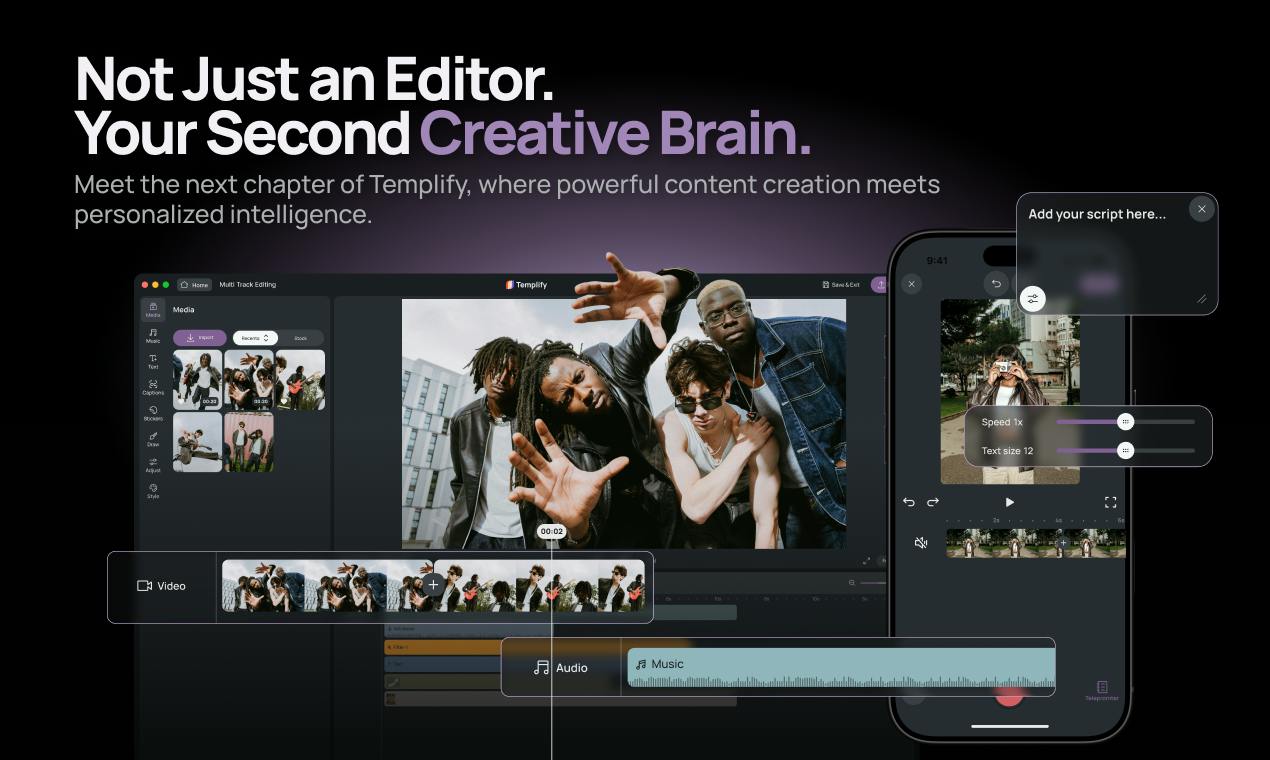
Templify AI replaces the timeline with templates and AI to lower the barrier to short-video creation for non-professionals.
Templify AI is an iPhone content editor that topped Product Hunt, positioned as "for people who aren't editors." It includes 1,200+ designer templates; users pick a template and add assets to quickly produce vertical videos or collages for Reels, TikTok, and YouTube Shorts. Unlike traditional editors, Templify abandons the multi-track timeline, turning "how to edit" into "which one to pick," and integrates AI video editing, beat-synced transitions, auto subtitles, background removal, and AI Studio. Its model is free use plus a Pro subscription. The article also notes its limits: templating compresses personalization and content tends to converge, and platform adaptation and iPhone exclusivity are clear constraints.
In the short-video era, the barrier to content creation seems to have lowered—but for people unfamiliar with editing software, timelines, keyframes, and transition curves remain unavoidable obstacles. Templify AI, which topped Product Hunt, aims to solve exactly this problem—its tagline says it plainly: "A content editor for people who aren't editors."
An iPhone editor that ditches the timeline
Templify positions itself as an all-in-one editor for videos, photos, and carousels on iPhone. It ships with over 1,200 designer templates; users pick a template, drop in their assets, and within minutes can produce vertical videos or collages sized for Reels, TikTok, and YouTube Shorts.
The biggest difference from traditional editing software is that Templify completely abandons the multi-track timeline. For ordinary users who just want to post a piece of social content, the freedom a timeline offers often becomes a cognitive burden—and a template-driven workflow turns "how to edit" into "which one to pick."
A multi-track timeline is the core interaction paradigm of professional editing software: video, audio, subtitles, effects, and other elements sit on separate tracks, and users adjust in/out points by dragging edges and achieve picture-in-picture or mixing by stacking tracks. It offers extremely high control precision, but it also requires users to understand concepts like layering, track hierarchy, and timecode. For users who just want to quickly publish a vertical short video, the freedom a timeline offers often translates into a learning cost and decision burden. Templify abandoning the timeline means it abstracts editing operations into "replacing template placeholders" and "adjusting order," sacrificing frame-by-frame fine-tuning in exchange for a shorter onboarding path.
How AI features lower the cost of operation
Templify's feature list is essentially built around "reducing manual work":
- AI video editing: models handle editing decisions, so users don't have to drag clips segment by segment
- Beat-synced transitions: transitions automatically land on the music's beats, saving the effort of aligning tracks
- Automatic subtitles: speech-to-text generates subtitles, suited to social scenarios where people watch on mute
- Background removal: one-tap cutout, no green screen or manual masking required
- Filters and AI Studio: stylistic processing plus an extra entry point for generative creation
None of these capabilities is novel on its own, but packaged into a mobile app aimed at non-professional users, the value lies in integration. Users don't need to export and import back and forth between four or five apps—the entire pipeline for a piece of content can be completed within a single interface.
Beat-synced transitions refer to detecting beat points in music through audio analysis and then automatically aligning video clip cut points to those beats, so that visual changes match the musical rhythm. The traditional approach requires manually listening for beats, placing markers on the timeline, and adjusting transition durations segment by segment—extremely unfriendly to non-professional users. Automating this effect typically relies on combining beat-detection algorithms with preset cut points in templates, and is one of the key means by which template-driven editors enhance the "finished-product feel."
Background removal (cutout) on mobile is usually implemented based on portrait segmentation or general subject segmentation models, where the model predicts a foreground mask frame by frame and then composites it onto a new background. Compared with green-screen shooting plus chroma keying, AI cutout doesn't require a controlled shooting environment, but edge details (such as hair strands and semi-transparent objects) and frame-by-frame stability remain difficult. One-tap cutout compresses work that previously required manually drawing masks into a single click—exactly in line with Templify's positioning for non-professional users.
A business model that starts free
Templify adopts a free-to-use plus Pro subscription model. Basic features are free, lowering the barrier to trying it; the Pro subscription carries more advanced needs. For a template-library product, this structure is reasonable—the number of templates itself is a reason for continued payment, and the scale of over 1,200 templates means there's room for further expansion.
Judging from Product Hunt feedback, the product received 180 upvotes and 37 comments and ranked first for the day. This data shows it hit a real need: a large number of users who want to publish but lack editing skills have been waiting for a more foolproof tool.
Product Hunt's ranking mechanism is mainly based on the number of new upvotes during the day, combined with factors such as comment activity, and the daily leaderboard resets at midnight Pacific Time. Topping the day with 180 upvotes and 37 comments shows the product gained concentrated community attention within its launch window, but this data reflects early adopters and community exposure—it does not directly equate to long-term retention or paid conversion. When evaluating the degree of market validation of such products, Product Hunt ranking is better used as a reference signal of demand rather than proof of commercial success.
Where's the ceiling for template-based editors?
What's worth considering is the boundary of such products. Template-driven means improved efficiency and consistency, at the cost of compressed room for personalization—when everyone is using similar templates and beat-synced cut points, the output tends to converge. Templify compensates to some extent with AI editing and AI Studio, but the core experience is still built on "choosing" rather than "creating."
Another variable is platform adaptation. Reels, TikTok, and Shorts differ in specs and recommendation logic, and whether templates can keep up with platform changes determines the tool's lifecycle. Currently it's iPhone-exclusive, so Android users can't use it for now—a clear limitation in coverage.
For the "non-editor" segment of content creators, Templify offers a sufficiently short path: pick a template, fill in assets, export and publish. It may not replace professional editing software, but it was never meant for that audience anyway.
One-line Summary
Templify AI replaces the timeline with template-driven workflows and AI features, lowering the barrier to short-video creation for non-professional users.
Paragraph Summary
Templify AI is an iPhone content editor that topped Product Hunt, positioned as "for people who aren't editors." It includes over 1,200 designer templates; users select a template and add assets to quickly produce vertical videos or collages for Reels, TikTok, and YouTube Shorts. Unlike traditional editing software, Templify completely abandons the multi-track timeline, turning "how to edit" into "which one to pick," and integrates AI video editing, beat-synced transitions, automatic subtitles, background removal, and AI Studio to reduce manual work and cross-app switching. Its business model is free use plus a Pro subscription. The article also notes its boundaries: templating compresses personalization and makes content prone to convergence, while platform adaptation and iPhone exclusivity are clear limitations.
Related articles

Van Hollen on Holding Trump Accountable: Hearings and Building the Evidentiary Record
Senator Chris Van Hollen on holding the Trump administration accountable: focused hearings to expose corruption and wrongdoing, plus building an evidentiary record now to preserve space for future criminal charges.

Generating SVG and 3D Models with the Codex Plugin: A Hands-On Guide for Developers with Zero Art Background
Codex's SVG & 3D Design plugin lets developers with zero art background generate vector graphics and 3D models via code—editable, Blender-ready, with best practices built in.
Why Recursive Self-Improvement Holds Up: Responding to Six Major Objections One by One
Dwarkesh Patel responds point by point to six major objections about recursive self-improvement and superintelligence by 2030: whether verifiable proxy metrics exist, the human-link threshold for RSI, whether the math explosion can be analogized to AI research, the experimental compute bottleneck, reward hacking and the motivation for power-seeking, and whether METR acceleration rates can be extrapolated.