Tencent MiaoYing Agent Hands-On: One Canvas for the Entire AI Video Workflow

Tencent MiaoYing Agent uses a canvas-based card workflow to move AI video creation from hand-crafting prompts to reviewing and adjusting.
Using Bilibili creator Jiang Maineng's "zombies fighting over a foldable phone" cringe film as a hook, the article shows how Tencent MiaoYing Agent completes AI video production from idea to finished film on one canvas. The Agent generates a story outline and story cards from a single idea, replacing traditional node-based wiring; it then creates character cards, bios, and storyboard cards, with all assets fully retained. When upstream settings change, downstream cards update in a linked fashion, reducing repetitive work and wasted compute. After storyboard confirmation, video clips can be batch-generated, edited directly on the canvas with transitions and effects, and exported with one click—no third-party software switching. The author argues its core value is shifting creation from execution to judgment, though actual generation quality and complex plot comprehension still need independent verification.
Bilibili creator Jiang Maineng used a cringe-worthy short film about "zombies fighting over a foldable phone" to demonstrate a new possibility for AI video creation: going from a single idea to a finished film without ever leaving one canvas. The short itself is absurd and funny, but the tool behind it—the Agent feature in Tencent's MiaoYing—is the part truly worth paying attention to.
From "Idea" to "Story Card": The Agent Takes Over Pre-production
Traditional AI video production often requires users to manually break down the script, define characters, and write storyboard prompts. MiaoYing's Agent steps in directly: the user only needs to provide a core idea, such as "zombies fighting over a foldable phone," and the Agent automatically generates a story outline.
In the video, the creator demonstrates this process: the Agent first outputs a story outline for confirmation, and once confirmed, directly creates a story card on the canvas to the right. This "structured cards + Agent" interaction replaces the cumbersome wiring operations of earlier node-based tools. The creator says outright that the old connect-this-to-that workflow was "getting a bit tiring," while the card-based layout makes the whole process more unified.
"Node-based tools" in AI video generation
Node-based tools are a common interaction paradigm in early AI video/image creation, typified by ComfyUI and some AI workflow platforms. The core logic is to split steps such as "prompt writing," "model selection," "parameter tuning," "image generation," and "video synthesis" into individual nodes, with users defining data flow by dragging connections to build reusable generation pipelines. The advantage of node-based tools is high flexibility and fine-grained control, but the cost is a steep learning curve: users must understand each node's inputs and outputs and manually maintain the connections. Once the pipeline gets long, the canvas becomes cluttered, and the "connect-this-to-that" burden rises significantly. The story cards, character cards, and storyboard cards used by MiaoYing's Agent essentially encapsulate these nodes and their dependencies in structured cards, so users no longer need to worry about the underlying wiring and instead focus on reviewing and adjusting card content—lowering the barrier to entry.
Character Cards and Storyboard Cards: Asset Retention Is the Highlight
After the story card is confirmed, the Agent proceeds to create character cards and automatically generates character bios. If the user is satisfied with a character's appearance, they can generate multi-angle views with one click; if not, they can regenerate it individually.
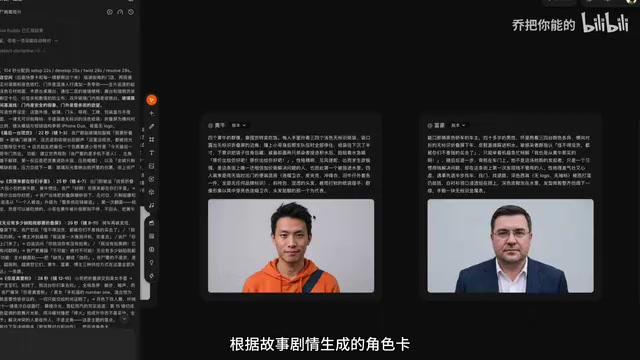
Then comes the storyboard stage. The Agent automatically creates storyboard cards based on the plot and pre-fills the prompts and scene descriptions for each video segment. The creator specifically notes that every asset created is fully retained and can be called up and modified at any time.
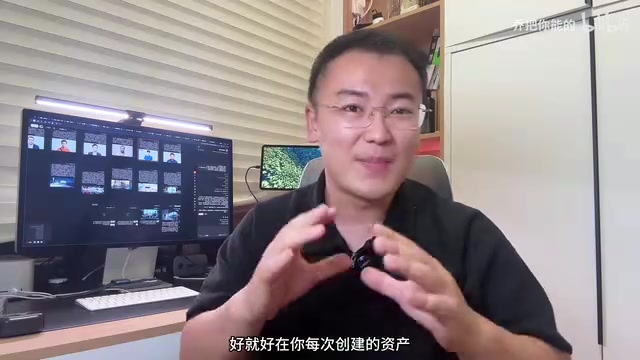
This is very practical for content creators: AI-generated content is often random, and if every adjustment had to start from scratch, efficiency would suffer greatly. The asset retention mechanism makes iteration controllable.
Linked Updates: Change an Upstream Setting, Downstream Adapts Automatically
The video mentions a key design: if the user modifies the original story settings, the story cards, character cards, and storyboard cards update in a linked fashion—the parts that need changing are changed automatically, and no compute is wasted on the parts that don't.
The creator calls this an "enterprise-grade feature." From a practical standpoint, this linkage mechanism solves the consistency problem in AI creation. In traditional workflows, changing a character setting means manually syncing every storyboard prompt, whereas linked updates automate this step.
The consistency problem in AI video creation
Consistency has long been a challenge for AI-generated video. In multi-shot narratives, the same character's appearance, clothing, and apparent age need to remain stable across different storyboards, and the lighting, color tone, and props of a scene need to stay coherent. Traditional text-to-video models sample independently each time, with strong randomness, making it very easy for "the same character to look different in every shot." Common mitigations include fixing the random seed, using character reference images, and locking prompt templates, but all of these rely on manual, repeated syncing. When story settings or character settings change, all downstream storyboard prompts need to be manually modified, otherwise the settings drift. MiaoYing's Agent linked-update mechanism essentially builds a dependency graph of "settings—characters—storyboards," letting upstream changes propagate automatically downstream and recomputing only the affected parts. This ensures consistency while avoiding the compute waste of full regeneration.
Generation, Editing, Export: The Whole Workflow Stays on the Canvas
After the storyboard is confirmed, users can batch-generate video clips. The scenario the creator describes is "go grab a coffee and the video is ready when you come back."
More importantly, there's what comes next. The generated clips don't need to be downloaded and imported into third-party editing software—the canvas provides an editing station directly, where you can stitch clips together, add transitions and effects, and export with one click.
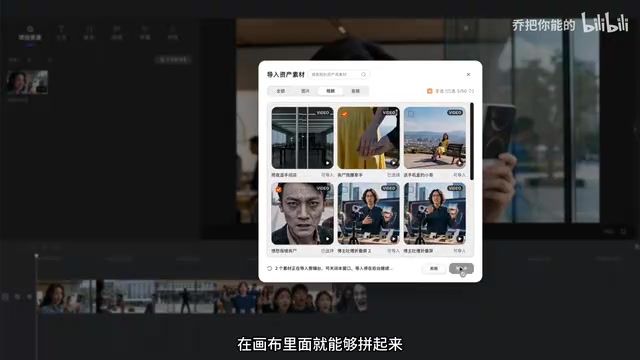
The creator's summary: "You never have to leave the workbench. The entire process, from having an idea to assembling the finished film, is completed right inside the canvas." This integrated experience reduces the cost of file transfers and software switching.
Canvas-based integrated creation environment
Canvas-style interaction first became popular in design and whiteboard tools and has been introduced into AI creation tools in recent years as a vehicle for organizing multi-step generation workflows. Unlike the traditional "linear timeline + standalone software" model, the canvas places assets, cards, generation results, and the editing station in the same two-dimensional space, letting users complete everything from idea to finished film within a single interface. Its advantages lie in reducing context loss caused by exporting/importing files and switching software, while also visualizing the reference relationships between assets. For AI video, the canvas also readily accommodates structured intermediate products like "story cards—character cards—storyboard cards," making the creation process traceable and modifiable. However, canvas-based tools are usually still weaker than professional non-linear editing software in complex project management and fine-grained editing, making them better suited to drafting and rapid output stages.
Hands-On Assessment and Limitations
Based on the creator's demonstration, the core value of MiaoYing's Agent lies in moving AI video production from "hand-crafting prompts" to a mode of "review and adjust." The user's focus shifts from execution to judgment: is the outline right, are the characters satisfactory, are the storyboards reasonable.
One caveat: this video is essentially a personal "cringe film" demo by the creator, and the point is to showcase the workflow rather than to evaluate image quality or generation stability. The actual quality of the Agent's generated content, the success rate of batch generation, and its ability to understand complex plots all still need more independent testing to verify. The creator also admits that making this kind of film "is really satisfying but also really simple"—the barrier to creativity has been lowered, but the creativity itself still comes from humans.
For creators who need to rapidly produce short videos, this full-workflow canvas tool is worth watching. It may not replace professional editing software, but in the 0-to-1 drafting stage, the efficiency gains are plainly visible.
Related articles

Last Week Tonight Exposé: The Dangerous Ties Between Politicians and White Supremacy
Last Week Tonight investigates Georgia Senate candidate Mike Collins and Florida candidate Marshall Rawson, exposing their multiple ties to white supremacists and the Republican Party's silent response.
AI Buzz Weekly: GPT-6.5 Leak, New Claude Model, and MiniMax's Cost-Effectiveness
This week's AI buzz roundup: suspected GPT-6.5 leak, Microsoft configs showing GPT-6.1 Tera, Anthropic's new model that can identify entire classes of bugs, disappointing early Gemini 4 Carbon results, and MiniMax M3.1 Flash beating Claude Opus 5 and GPT-5.6 Sol in benchmarks at extremely low cost.

AI Briefing: Gemini 4 Carbon Released, Ant Open-Sources Ling-3.1
AI Briefing: Google releases Gemini 4 Carbon qubit model, claiming to surpass Opus 5.5 with half-price tokens; Ant open-sources Ling-3.1-1019 for real-task Personal Agents; domestic AI drug discovery succeeds in 18 of 19 projects, hitting all 6 GPCR targets; zero-revenue company valued at $20B raises another $1B; Sichuan convenience store robot sales fail.