Testing DeepSeek Desktop Agent: Auto-Generate a Full Video for Just $0.35

DeepSeek Harness desktop Agent completes video, daily briefing, and app-build tasks for under $0.60 total.
DeepSeek Harness is an AI Agent that evolved from an open-source CLI tool into a Windows/Mac desktop app with usage-based billing. A tech blogger tested it across three tasks: auto-generating a 35-second explainer video with self-selected music and bug fixes ($0.35); building an unattended daily briefing that runs every morning at 8 AM (22 seconds, with weather, headlines, and an interactive to-do list); and constructing a monthly budget calculator app with pie charts and dark mode from a plain-English description in ~75 seconds. All three tasks, including retries, cost just $0.59 total.
What Is the DeepSeek Desktop Agent?
DeepSeekAd Harness isn't an entirely new product — it's been available as an open-source AI Agent on GitHub for a while, previously accessible only through the command line. A few days ago, DeepSeek launched an official desktop app for Windows and Mac, bringing this Agent out of the terminal and into everyday workflows for regular users.
A tech blogger overseas put it to the test. The core premise is simple: you only pay for the compute your AI actually uses. That means transparent, usage-based billing — a model that's particularly appealing to anyone who relies heavily on automation tools.
The blogger made it clear this wasn't a comparative review against other tools, but purely a test of DeepSeek's own capabilities — starting from the basics. His reasoning: if an Agent can't handle the fundamentals, there's no reason to trust it with more complex, high-stakes tasks. The evaluation covered three tasks, with time and cost tracked throughout.
An AI Agent is a type of AI system capable of autonomously planning, calling tools, and executing multi-step tasks. The key difference from a regular chatbot is that it doesn't just generate text responses — it can actively call external APIs, operate file systems, run code, and adjust its next steps based on intermediate results. Harness, in this context, means an "orchestration framework" — a scheduling layer that allows large language models to reliably drive a variety of tools. The pay-per-usage model (pay-per-token/usage) differs from subscriptions: users pay only for the compute actually consumed during model inference, with no charges during idle time. This suits users with irregular task frequencies. The cost transparency also makes expenses predictable — the $0.59 spent across three complex tasks in this article is a concrete demonstration of that advantage.
Task 1: Automatically Generate a Complete Video from Scratch
The first task was to have DeepSeek Harness independently produce a full video — script, voiceover, music, animation and all. The blogger's prompt called for a 35-second vertical-format explainer video about ChatGPT, along with a fixed voice, a locked fact sheet (to prevent AI hallucinations), and a brief design brief. The one requirement: the background music had to be sourced by the Agent itself.
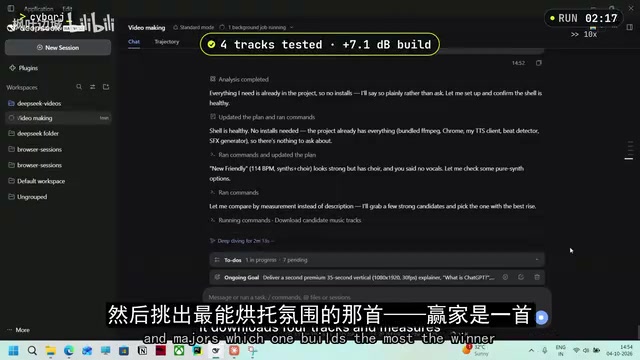
Surprisingly, the Agent didn't just grab a random track. It downloaded four audio clips, measured each one, and evaluated which had the strongest emotional progression — ultimately selecting "New Friendly" at 114 BPM. It even flagged that this track contained a wordless choir, since the blogger had requested "no vocals" — a check he never explicitly asked for.
It then mapped the beat (approximately 117 BPM), precisely syncing every scene transition to the rhythm. More importantly, before the final render it ran test frames, self-reviewed them, caught a text misalignment bug in the GPT scene and fixed it on its own — and also corrected a music attribution link it had guessed at. The whole process took about 20 minutes, with rendering accounting for roughly 7 of those.

The quality of the final video genuinely impressed the blogger: clean typography, natural voiceover, smooth animation, and music synced to the beat. The only flaw was that a few lines of voiceover came in slightly before the subtitles at the end. The cost was the real highlight — the account balance dropped from $10.63 to $10.28, meaning the entire video cost just $0.35. The blogger's tip: if you provide your own logo, images, and music, you can skip the sourcing step and get a finished video in 7 to 10 minutes.
BPM (Beats Per Minute) is the standard unit for measuring music tempo — the higher the number, the faster the rhythm. The process of aligning video cut points to music beats (known as "beat-syncing") is essentially mapping keyframe timestamps on the video timeline to the beat grid of the audio waveform. At 114 BPM, there are roughly 1.9 beats per second, meaning a cut interval of about 0.53 seconds — precision that requires millisecond-level timeline operations. The Agent's ability to handle this automatically indicates it not only called a video rendering tool, but also had the capability to perform beat analysis on audio — something that typically requires specialized audio processing libraries (such as librosa) paired with beat-tracking algorithms, well beyond the default capabilities of a standard text generation model.
Task 2: A Daily Briefing That Runs Itself
The second task tested the Agent's ability to operate autonomously: build a daily briefing that auto-generates every morning at 8 AM, then leave it alone.
DeepSeek Harness includes a built-in plugin called "Scheduled Tasks" — flip the switch, and the Agent runs on a schedule. The blogger's prompt asked for a daily 8 AM delivery of weather, top tech headlines from Hacker News and The Verge (with brief summaries), and a checkable to-do list. To avoid waiting until the next morning, he had the Agent run a test three minutes out.

The Agent built a reusable script so that each morning it just needed to fetch the news and run. The test task fired at 10:34 exactly, with no human intervention, completing in 22 seconds. The generated page displayed the date and local weather at the top, listed five headlines each from Hacker News and The Verge with one-line summaries — since Hacker News doesn't provide summaries natively, the Agent wrote them itself. Every headline linked to the original article, the to-do list was fully interactive (check, strikethrough, update count), state persisted on refresh, and it reset cleanly the next day.
The blogger called this task "genuinely impressive": set it once, never prompted again, and it shows up every morning. He went further, imagining the possibilities: connect it to Gmail or WhatsApp and the briefing lands in your inbox or chat window daily; anyone running a newsletter or channel could use the same workflow to generate a daily digest for their audience.
Task 3: Describe an App in Plain English, Let It Build
The hardest task: no code, just plain English describing an app — drop it in a folder and see if DeepSeek can build it autonomously.
The prompt: watch a folder; when a text file appears, read it, build the app, run it, and open it in the browser — and ask for all necessary permissions upfront, then don't interrupt me again. The Agent listed four permissions it needed — write files, run a server, open a browser, install dependencies — and the blogger approved all of them at once. It then confirmed the folder was empty and began checking every 10 seconds.

The blogger created a text file and described his needs the way you'd message a friend: a monthly budget calculator. Even though the filename was accidentally saved as ".xd", the Agent detected it within seconds and chose to build it with zero dependencies — nothing to install, nothing to break. It spun up a server, self-checked that it was running, and went from text file to working app in about 75 seconds.
The finished app showed income, top spending categories, and a live pie chart at the top — change any number and everything updates instantly. It also calculated balance and savings rate. The blogger hadn't asked for currency switching, but the Agent added it anyway; switching to euros worked fine. The dark mode he had explicitly requested also worked smoothly. The whole thing required "not a single line of code written." What truly amazed him was the speed — built and running on localhost in under two minutes.
Zero-dependency builds mean an application uses only the built-in standard library of the programming language or runtime, without any third-party packages. For a web app, this means building everything with vanilla HTML, CSS, and JavaScript — no npm, no React, no Vue. The upside is minimal setup: no package manager needed, no version conflicts, instant startup. The trade-off is that developers have to write more foundational code by hand. The Agent's decision to proactively choose this approach — rather than defaulting to a popular framework — reflects a "stability-first" judgment: in an unknown user environment, zero-dependency solutions have the lowest failure rate. Localhost refers to an application running on a local server on the user's own machine, inaccessible from external networks — ideal for rapid prototyping of personal utility apps.
Total Cost and Whether It's Worth It
With all three tasks done, the blogger ran the numbers. Starting balance: $10.63. Total spent: approximately $0.59 — and that includes all retries. The video took three or four attempts to get a satisfying result; the briefing was re-run two or three times. Every test and retry is baked into that $0.59.
His conclusion was positive, but with one caveat: you need to know how to use it. Give it clear prompts and the right assets, and it delivers. Of the three tasks, the video was the "weakest" performer — but that's because the blogger gave it nothing to work with: no music, no images, no logo, everything from scratch at nearly zero cost. That result is more than acceptable. What genuinely surprised him were the other two: the daily briefing ran on schedule after setup, delivered a page in 22 seconds with a fully functional to-do list; the app went from plain-English description to running on localhost in two minutes.
His advice: if you're willing to spend a few minutes refining your prompts, DeepSeek Harness delivers a lot of value at very low cost. Start simple — a daily briefing, or a small tool you'll actually use — then build from there.
Related articles

Tencent WorkBuddy Hands-On: How AI Agents Crush Traditional Chat Assistants
WorkBuddy vs Doubao tested: how AI Agents directly operate computers to convert PPT to PDF, archive files and more. Analysis of WorkBuddy's low barrier, domestic ecosystem, pricing and plugin marketplace, plus AI Agent selection advice.

Azure Cross-Tenant Attack Chain: Root Cause Analysis of Five Paths
Binary Security analyzes five full cross-tenant compromise paths in Azure, trending 271 points on HN. This article interprets their shared root cause perspective and offers defense recommendations for cloud tenant isolation and reflections on responsibility boundaries.

Recreating a Real Bubble Tea Station in Isaac Sim: Script-Driven Unitree G1 Brews Tea
Developers recreated a real self-service tea station in NVIDIA Isaac Sim, using scripts to drive a Unitree G1 through a five-step tea-brewing process, exploring whether physics simulation can be a source of synthetic robot demonstration data and discussing contact stability and imitation learning.