Triwarden: A Native Mac Password Manager with Vaultwarden and Bitwarden Support

Triwarden is a native Mac password manager compatible with Bitwarden, featuring system integration and a one-time purchase model.
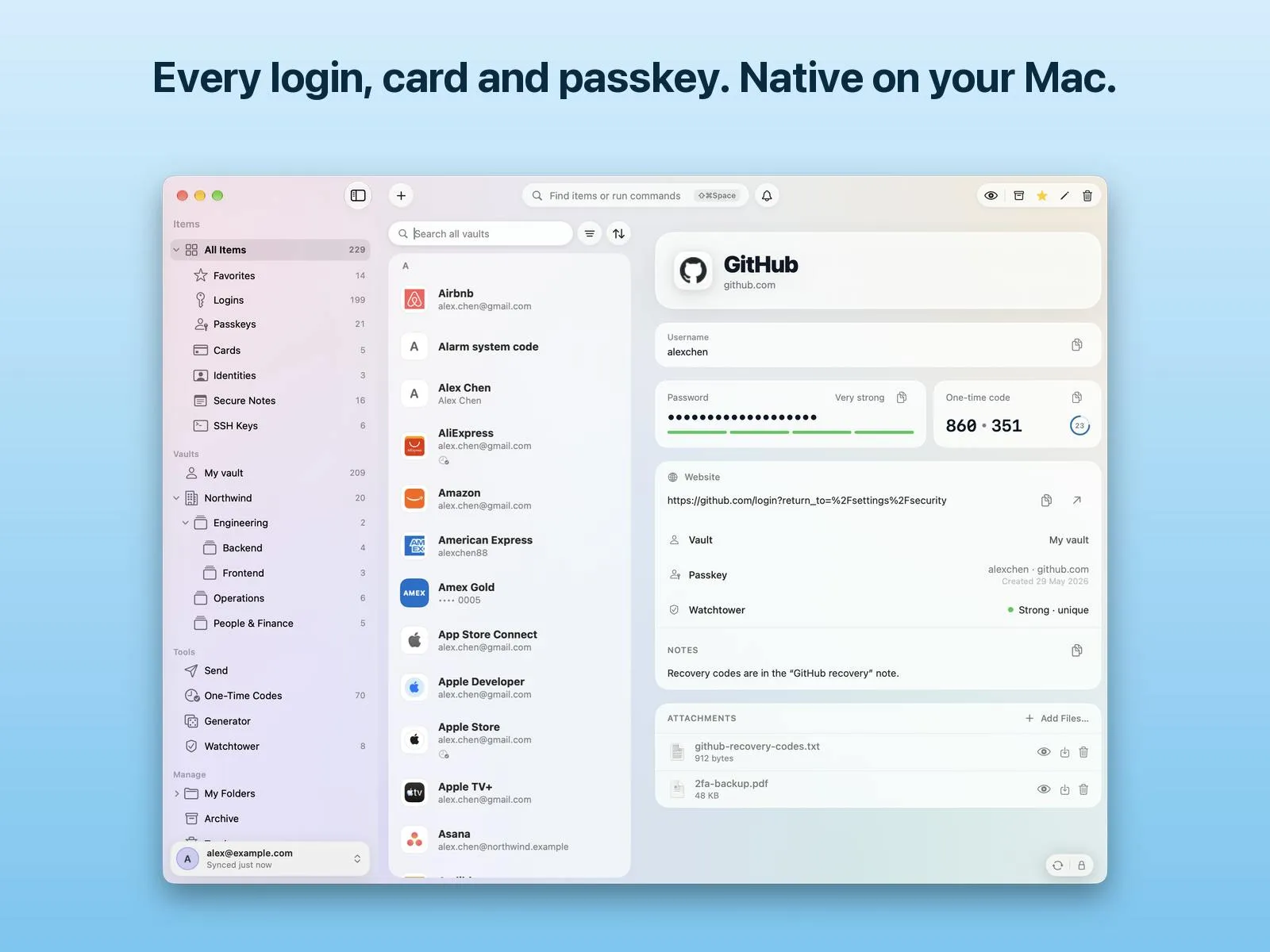
Triwarden is a native Mac password manager built with Swift and SwiftUI, compatible with the official Bitwarden service and self-hosted Vaultwarden. It offers Touch ID unlock, password and passkey autofill, a global command palette, Auto-Type, and developer-oriented features like SSH key storage and Git signing. Multi-account management and unified search address the pain point of switching between personal and team instances. In business model, personal use is free and open source, while work use is a one-time purchase—distinct from mainstream subscriptions. Its advantages lie in native system integration and differentiated features, but it only supports macOS, and as a newer project, its long-term maintenance capacity and depth of security auditing still need time to verify.
Why Do Mac Users Need a Native Password Manager?
The password manager market is not lacking in products, but tools truly built for the Mac ecosystem are few. Most cross-platform password managers are built with Electron or web technologies, which always involve compromises in system integration and performance. Triwarden took a different path: built from scratch with Swift and SwiftUI, serving Mac users exclusively.
Triwarden is a native Mac app compatible with the official Bitwarden service and self-hosted Vaultwarden. It offers Touch ID unlock, password and passkey autofill, a global command palette, and Auto-Type functionality for other applications. Personal use is completely free and open source, while work scenarios use a one-time purchase license.
Core Features: More Than Just Password Storage
Touch ID and System-Level AutoFill
As a native app, Triwarden's most direct advantage lies in system integration. Touch ID unlock makes accessing the vault seamless, while password and passkey AutoFill connect to macOS's system-level mechanisms, callable directly in Safari and various applications. This is more unified than solutions relying on browser extensions and reduces the friction of switching between apps.
Passkey is a passwordless authentication technology based on the FIDO2/WebAuthn standard. It uses public key cryptography: during registration, the device generates a key pair; the private key is securely stored locally (such as in the Secure Enclave or a password manager), and the public key is given to the website. During login, the website sends a challenge, and the device signs it with the private key to complete verification. Passkeys effectively resist phishing attacks because the private key never leaves the device and is bound to a specific domain. When a password manager supports passkeys, it means these credentials can be synced across devices and called directly in the system autofill flow—an important direction in the evolution of password managers.
Global Command Palette and Auto-Type
For users who prefer keyboard operation, Triwarden provides a global command palette for quickly searching and invoking password entries. Auto-Type is designed for applications that don't support AutoFill—by simulating keyboard input, it "types" credentials into the target window. Together, these two features cover most common password entry scenarios on Mac.
SSH Keys and Git Signing
Triwarden also supports storing SSH keys in the vault, used for authentication and Git commit signing. For developers, this means key management can be unified with other credentials in one place, reducing plaintext files scattered in the ~/.ssh directory. This feature is uncommon among similar products and represents a differentiated design targeting developers.
The difference between Electron and native apps: Electron allows developers to build desktop apps using web technologies (HTML/CSS/JavaScript), with low cross-platform costs, but at the price of bloated app size, high memory usage, and integration with native OS APIs often requiring additional bridging, which degrades deep features like Touch ID and system-level autofill. Native apps directly use the platform's official language and frameworks (such as Swift and SwiftUI on macOS), seamlessly calling system services with better performance, faster startup, and interfaces that better conform to platform conventions. Triwarden chose the native path precisely to gain advantages in system integration and responsiveness.
SSH keys and Git commit signing: SSH (Secure Shell) keys are commonly used for passwordless login to remote servers, typically stored as plaintext files in the ~/.ssh directory. Git commit signing is used to verify committer identity—traditionally with GPG keys, but in recent years Git also supports signing commits with SSH keys (configured via gpg.format = ssh). Storing SSH keys in a password manager avoids private keys scattered in plaintext on disk, while enhancing security through the vault's encryption and access controls. However, note that some password managers still have limited SSH key support, so compatibility and signing workflows should be confirmed before actual use.
Multi-Account and Unified Search
Triwarden supports managing multiple accounts and provides unified search. For users who simultaneously use a personal Bitwarden account and a team Vaultwarden instance, this eliminates the hassle of switching back and forth. Unified search is especially useful when searching for entries across accounts, without needing to first determine which account an entry belongs to.
From a product positioning perspective, Triwarden clearly targets Mac users who already use the Bitwarden ecosystem but are dissatisfied with the official client experience. It does not attempt to replace Bitwarden's server side, but rather to be a better client.
Open Source and Business Model
Triwarden's code is open source, and personal use is free. Work use requires purchasing a one-time license, with no subscription. This model is relatively rare in the password manager space—mainstream products like 1Password and Dashlane use subscriptions. A one-time purchase appeals to subscription-averse users, but it also means ongoing development and maintenance must be supported by new user purchases.
Interestingly, being open source is a plus for password managers. The auditability of security product code is directly tied to user trust; even with a good reputation, closed-source password managers leave users with no choice but to trust the vendor. Triwarden's open source strategy lowers this trust cost, though the premise is that the community actually participates sufficiently in security audits.
The trade-off between one-time purchase and subscription: Subscriptions provide developers with recurring revenue to support long-term updates, security responses, and server costs, but users must pay continuously; one-time purchases are friendlier to users, especially those averse to subscriptions, but developers lack recurring income, which may affect long-term maintenance motivation. For security products, continuous updates are crucial—vulnerability fixes, protocol upgrades, and system compatibility adaptations all require investment. Triwarden adopts a one-time purchase model, and its sustainability depends on new user growth and community contributions—a risk worth noting when evaluating such new tools.
Target Audience and Limitations
Triwarden is best suited for three types of users: Mac users of Bitwarden or Vaultwarden, developers who need SSH key management, and those who prefer native app experiences and dislike subscriptions.
The limitations are also obvious. It only supports macOS, so Windows and mobile users cannot use it. Multi-platform sync can only rely on Bitwarden/Vaultwarden's server side; the client itself has no cross-platform capability. Additionally, as a relatively new project (72 upvotes, 3 comments, rank 20 on Product Hunt), its long-term maintenance capacity and depth of security auditing still need time to verify. Password managers hold users' most sensitive credentials, so caution is necessary when choosing new tools.
Position in the Competitive Landscape
In the Mac password manager market, Triwarden's competitors include the official Bitwarden desktop client, 1Password, and Strongbox. The official Bitwarden client is feature-complete but not native; 1Password offers a good experience but is expensive and closed source. Strongbox is also Mac-native and supports the Bitwarden format, making it Triwarden's most direct competitor.
Triwarden's differentiation lies in SSH key management, the global command palette, and the one-time purchase model. Whether these points can win over enough users depends on its performance in stability and security auditing. For Mac users willing to try something new, it offers a noteworthy new option; for mainstream users who prioritize password security, waiting a while before deciding is the safer choice.
One-line Summary
Triwarden is a native Mac password manager compatible with Bitwarden, focused on system integration and a one-time purchase model.
Paragraph Summary
Triwarden is a native Mac password manager built with Swift and SwiftUI, compatible with the official Bitwarden service and self-hosted Vaultwarden. It offers Touch ID unlock, password and passkey autofill, a global command palette, Auto-Type, and developer-oriented features like SSH key storage and Git signing. Multi-account management and unified search solve the pain point of switching between personal and team instances. In terms of business model, personal use is free and open source, while work use is a one-time purchase—distinct from mainstream subscriptions. Its advantages lie in native system integration and differentiated features, but it only supports macOS, and as a newer project, its long-term maintenance capacity and depth of security auditing still need time to verify.
Related articles

Google Releases Gemini 4 Carbon: Its Strongest Model Yet, Debuting with a Cybersecurity Focus
Google releases Gemini 4 Carbon, calling it its strongest model, with a cybersecurity focus. It tops the third-party composite ranking at 59 points but leads by only one or two. This article analyzes its security test results, staged rollout, token pricing, and the divergence between self-reported and third-party tests on hallucinations.

LangChain Adds SchemagateRetriever: On-Demand Table Retrieval Cuts Text-to-SQL Prompts by 92.9%
LangChain docs add SchemagateRetriever: retrieves only the tables needed for text-to-SQL with permission filtering, cutting median prompt size by 92.9% on Spider 2.0 large schemas via offline BM25 selection with no model calls.

Multi-Step AI Agent Guardrail in Practice: Fact-Change Detection Drives False-Alarm Rate to 0%
Developer shares first version of a multi-step AI Agent guardrail: re-verifying dependency facts before irreversible actions cut false alarms from 50% to 17% across 23 scenarios, then to 0% via conservative normalization without lowering catch rate. Runs on local qwen2.5-7b.