Vercel Container Runtime: Deploy Dockerfiles Directly

Vercel container runtime supports direct deployment of a plain Dockerfile in the root directory, with framework detection still taking priority.
Vercel's container runtime update: if a project root contains only a plain Dockerfile or Containerfile and no other framework is detected, Vercel automatically recognizes it as a container project, builds and deploys it, routing all traffic to the image. Framework detection still takes priority; developers can override with `vercel project update --framework container` or `"framework": "container"` in vercel.json. Dockerfile.vercel/Containerfile.vercel always take priority, multi-service projects still need `services` config, and the runtime is in Beta with Active CPU billing.
Vercel's Container runtime has received a practical update: now, even if a project's root directory contains only a plain Dockerfile or Containerfile and no other framework is detected, Vercel can directly recognize it as a container project for building and deployment. This provides a smoother experience for developers accustomed to containerized workflows.
When a Plain Dockerfile Becomes the Deployment Entry Point
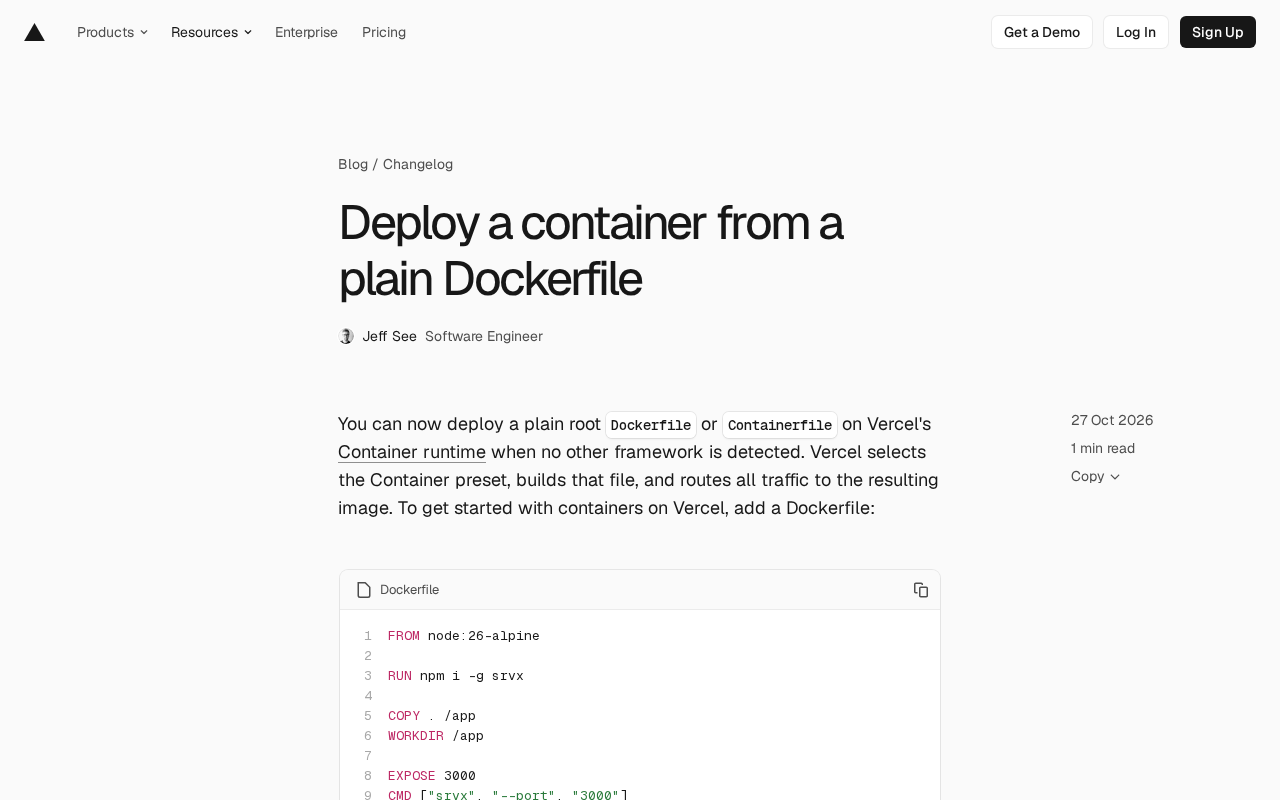
Previously, deploying containers on Vercel typically required a specific project structure or explicit configuration. Now, as long as Vercel does not detect any other known framework (such as Django, Next.js, etc.), it will automatically select the Container preset, use the Dockerfile or Containerfile in the root directory for building, and route all traffic to the resulting image. This means a standard containerized application can be migrated to Vercel's container runtime with virtually zero configuration.
The official example Dockerfile is very concise: based on the node:26-alpine image, it globally installs srvx, copies the current directory to /app, sets the working directory, exposes port 3000, and starts with srvx --port 3000. This demonstrates how a typical lightweight Node.js service can run on Vercel through a container.
Containerfile is an alternative naming convention gaining popularity in the Docker ecosystem, originally introduced by tools like Podman to emphasize "containers" rather than being "Docker-specific." It is fully syntax-compatible with Dockerfile, differing only in filename. Vercel supports both, meaning image definitions built with toolchains like Podman or Buildah can be migrated directly without renaming or additional configuration.
srvx is a lightweight Node.js server framework focused on providing minimal HTTP service and routing capabilities. It is small in size and fast to start, making it suitable for running in containers. In the example, it is installed globally and started with --port 3000, reflecting the typical pattern for containerized Node services: the image contains only the runtime and dependencies, and the startup command directly listens on the specified port.
Framework Detection Priority and Override Methods
Although a plain Dockerfile can now be automatically recognized, Vercel's framework detection mechanism still takes priority. When a project matches another framework (e.g., Django), that framework "wins," and Vercel will build according to that framework's default method rather than using the Dockerfile.
If developers want to force a Dockerfile or Containerfile build, they can override framework detection in two ways: run the vercel project update --framework container command, or explicitly set "framework": "container" in vercel.json. This provides flexibility for projects that need precise control over the build process.
Additionally, Dockerfile.vercel or Containerfile.vercel files always take priority over detected frameworks, offering a more granular level of control. For multi-service projects, each service's entrypoint still needs to be configured via the services field in vercel.json; the container runtime does not currently change this structure.
Vercel's framework detection automatically infers project type based on project file characteristics (such as package.json, manage.py, next.config.js, etc.) and applies the corresponding build preset. This mechanism reduces configuration but can sometimes conflict with developer intent—for example, when a Node.js project's root directory contains both package.json and a Dockerfile, framework detection may prioritize identifying it as a Node project.
vercel.json is Vercel's project configuration file, supporting fields such as framework, buildCommand, and services. The services field is used to define the various entry points of a multi-service project, where each service can specify an entrypoint (such as a container image or directory). The container runtime does not currently change the multi-service structure, so services must be explicitly configured to distinguish between different services.
Current State and Billing of the Container Runtime
Vercel's container runtime is currently in Beta, runs on top of Vercel Functions, and uses Active CPU billing. This means users only pay for the CPU time actually used, not for idle resources. For developers who want to deploy applications as containers while enjoying the capabilities of the Vercel platform, this is an option worth considering.
To get started, simply add a Dockerfile to your project root directory, and Vercel will automatically handle the rest. More details can be found in Vercel's container runtime documentation.
What This Means for Developers
This update lowers the barrier to using containers on Vercel. Previously, developers might have needed to adjust project structure or add extra configuration to have Vercel recognize a container project; now, a standard Dockerfile is enough. For containerized applications migrated from other platforms, or for teams that want to maintain build environment consistency, this undoubtedly simplifies the deployment process.
However, it's worth noting that the container runtime is still in Beta, and the priority of framework detection may affect expected behavior. Developers should ensure that they explicitly specify the container framework via vercel.json or the command line when needed, to avoid unintentionally using another framework's build method.
Overall, Vercel is gradually improving its container support, enabling developers to choose deployment methods more flexibly while retaining the platform's original automation advantages.
One-line Summary
Vercel container runtime supports direct deployment of a plain Dockerfile in the root directory, with framework detection still taking priority.
Paragraph Summary
Vercel's container runtime has been updated: now, when a project root directory contains only a plain Dockerfile or Containerfile and no other framework is detected, Vercel automatically recognizes it as a container project, builds and deploys it, and routes all traffic to the resulting image. Framework detection still takes priority—if a framework like Django or Next.js is detected, the build follows that framework's method. Developers can force container usage via the vercel project update --framework container command or by setting "framework": "container" in vercel.json. Dockerfile.vercel or Containerfile.vercel files always take priority over framework detection, and multi-service projects still need to configure entry points via the services field in vercel.json. The container runtime is currently in Beta, based on Vercel Functions, and uses Active CPU billing. This update lowers the barrier for migrating containerized applications to Vercel, but note that framework detection may affect expected behavior.
Related articles

LangChain Retry Middleware Configuration: Practices and Selection Guide
Based on Reddit community discussion, this article analyzes LangChain ModelRetryMiddleware retry parameter configuration practices, covering the selection logic and alternatives for key options like max_retries, backoff_factor, and jitter.

Texas Senate Race in Trouble: Why Are Republicans Nervous?
Texas Senate race stirs Republican anxiety. Based on street interviews, this article analyzes the Democratic offensive in funding, organization, and running everywhere, and how Republicans are defending "Texas, Texas" amid the political pendulum effect.

Gemini Chat Now Generates and Edits Google Docs Directly, a New Breakthrough in Office Productivity
Google Gemini's chat interface now generates and edits PDF, Google Docs, Sheets, Slides, Markdown, TXT, and code files. Available to all users; web supports all formats, mobile only PDF for now.