WebYes Free PDF Accessibility Checker: Check WCAG 2.1 AA Issues Without Registration

WebYes launches a free, no-registration PDF accessibility checker that screens and highlights issues against WCAG 2.1 AA and PDF/UA.
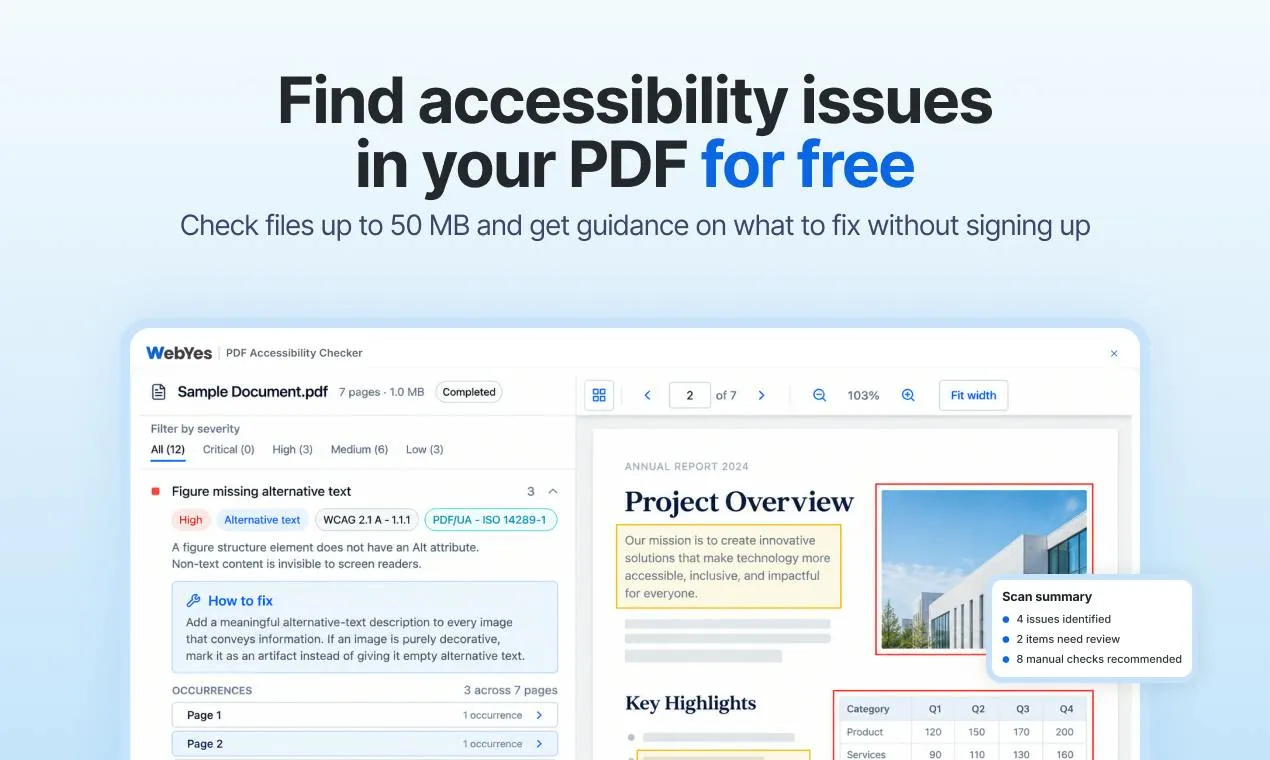
WebYes released a free PDF accessibility checker on Product Hunt. It requires no registration and stores no files, and supports uploading PDFs up to 50 MB or pasting a public link. The tool checks against WCAG 2.1 AA and PDF/UA standards, identifies issues such as missing image descriptions and disordered heading structures, highlights affected content on the page, displays issues by severity, and provides remediation guidance. It clearly marks sections requiring manual review, reminding users that automated checks cannot cover judgments such as reading order or complex table semantics. The tool received 92 upvotes and 13 comments, ranking 6th for the day, and is suitable as a zero-cost first screening step before publishing public PDFs.
WebYes Free PDF Accessibility Checker: Check WCAG 2.1 AA Issues Without Registration
For developers, designers, or content teams who need to ensure PDF documents are readable by everyone, a free tool released by WebYes on Product Hunt is worth a look. It requires no registration and does not upload or store files. It checks documents against WCAG 2.1 AA and PDF/UA standards to find accessibility issues that may prevent people with disabilities from reading them, and it provides remediation guidance.
What it solves: more than just missing image captions and messy headings
This online tool, called PDF Accessibility Checker, targets common accessibility defects in PDF documents. The official description explicitly states that it can find issues such as "missing image descriptions and heading structure problems" that make PDFs difficult for users with disabilities to use. More specifically, the tool highlights problematic content on the page so users can directly see which paragraph, image, or heading structure is causing the issue.
This is not a black box that only gives a "pass/fail" verdict. Check results are displayed by severity level, helping users prioritize the defects that most affect accessibility. At the same time, the tool clearly marks which content requires manual review—this is crucial, because automated tools cannot cover all accessibility judgments, such as whether image alternative text truly conveys intent or whether a table is reasonable.
Free, no registration, no file retention
WebYes has made "lightweight" extreme with this tool. Users can directly upload PDF files up to 50 MB, or paste a public link for checking. The entire process is completely free, requires no account registration, does not ask for an email address, and the official policy promises no file storage. This strategy greatly lowers the barrier for teams to introduce accessibility checks early in a project, especially for small teams that do not want to go through procurement before compliance review.
The standards referenced are WCAG 2.1 AA and PDF/UA—the former is the widely adopted AA-level requirement in the Web Content Accessibility Guidelines published by the World Wide Web Consortium, and the latter is the international standard for general PDF accessibility. A free tool covering both standards at once means its issue list has a clear compliance reference, which has practical value for teams that need to meet government procurement, education, or public information publishing requirements.
WCAG 2.1 AA is a version of the Web Content Accessibility Guidelines published by the W3C in 2018. AA level is the compliance level most often cited in regulations and procurement requirements, covering specific success criteria under the four principles of perceivable, operable, understandable, and robust. PDF/UA (ISO 14289) is the international standard specifically for general PDF accessibility, specifying requirements for tag structure, reading order, alternative text, and more. The two do not fully overlap: WCAG targets web content, while PDF/UA targets the semantic structure of the PDF document itself, but the goal is the same—enabling assistive technologies (such as screen readers) to correctly parse content. A tool that checks against both standards at once means its issue list can serve both web compliance review and PDF document-level accessibility remediation, which is especially valuable for teams that need to meet regulations such as Section 508 and EN 301 549.
Highlighting and remediation guidance: turning issues into action
A simple "issue list" is often not enough. What sets WebYes's checker apart is that after identifying issues, it provides remediation explanations. Although the official description does not detail how deep the guidance goes, combined with its design of "categorizing by severity + highlighting affected content," users can locate and understand issues within the same interface without having to cross-reference between the checker and a document editor.
For content teams unfamiliar with accessibility standards, this experience matters: the most common bottleneck in accessibility remediation is not finding issues, but knowing how to fix them. By connecting issue—location—remediation suggestion, the tool can shorten the learning curve.
Many PDF accessibility issues stem from the underlying structure rather than the visual presentation. PDFs typically use a "tag tree" to describe the logical structure of content; heading levels, lists, tables, and image alternative text all rely on tags to convey information to screen readers. If a document is exported from a scanned file or from layout software without tagging, the tag tree may be missing or chaotic, causing screen readers to fail to read it correctly. Automated checkers can identify issues such as missing tags, skipped heading levels, and images without Alt text, but whether the reading order is reasonable and whether table headers are correctly associated with data cells often require human judgment combined with content semantics. This is why the tool flags "requires manual review"—it checks structural signals, not semantic correctness.
Positioning and limitations: automated checks are only the first step
On Product Hunt, this tool received 92 upvotes and 13 comments, ranking 6th for the day, under the categories of Productivity, Developer Tools, and Inclusivity. This shows that it resonates to some extent with developers and content operations groups. But it is important to recognize clearly: current capabilities are still mainly automated detection. Structural issues such as missing image descriptions and disordered heading levels are easy to identify, while reading order, the semantics of complex tables, and the actual usability of form fields often depend on human judgment. The "requires manual review" section explicitly marked by WebYes is precisely a reminder that users cannot equate automated passing with accessibility compliance.
Its value lies in making the first screening a zero-cost, zero-barrier entry point. For teams preparing to publish public PDFs, running it first and then manually remediating high-severity issues is a practical workflow.
One-line Summary
WebYes launches a free, no-registration PDF accessibility checker that automatically screens and highlights issues against WCAG 2.1 AA and PDF/UA standards.
Related articles

AI Comic Drama with WorkBuddy from Scratch: A Step-by-Step Skill Pack Installation Guide
Learn how to create AI comic dramas with WorkBuddy from scratch. This guide covers installation, Skill pack import and invocation, plus a script generation demo with manual revision tips to get you through the first step from script to storyboard.

WorkBuddy Agent Runs the Entire GEO Database Mining Pipeline with a Single Prompt
WorkBuddy agent automates GEO database mining: from data search and curation to batch correction, differential analysis, co-expression networks, feature gene screening, and immune infiltration—a single prompt generates a complete bioinformatics report, greatly lowering the barrier to bioinformatics analysis.

PC Memory Wasted? Hacker News Debates Centralized Data Centers
Hacker News users argue that personal computer memory is wasted and should be centralized in data centers, sparking debate on centralized vs. distributed computing resource allocation. This article analyzes the logic behind the claim, the costs of centralization, and new tensions in memory resource allocation in the AI era.