What Is Claude Code? A Deep Dive into Agentic AI Coding Tools

Claude Code is Anthropic's local agentic AI coding tool that reads your entire codebase and auto-debugs — far beyond conversational AI.
Claude Code is Anthropic's terminal-based agentic AI coding assistant. Unlike conversational tools like DeepSeek or ChatGPT, it reads your entire project codebase and forms a local loop of code generation, execution, and error correction. The article traces the evolution from GitHub Copilot and Cursor to TRAE and Codex, arguing that all tools ultimately compete on underlying model quality. Powered by Claude Sonnet, Claude Code earns consistently higher accuracy ratings from developers, reducing rework and debugging costs significantly.
What Is Claude Code
Claude Code is a terminal-based AI coding assistant developed by Anthropic, designed as a local agentic coding tool. Contrary to what many people assume, the barrier to entry is actually quite low — you don't need deep technical knowledge to use it. Once installed, you can invoke it directly from the terminal and get started right away.
In practice, Claude Code's standout feature is that it runs locally on your machine without requiring you to log into a website. Once your development environment is set up, you can call it instantly within any project. It does have certain operating system requirements, but most mainstream systems are supported. This low barrier to entry is a big reason why it has gained rapid traction among developers.

The Core Difference Between Conversational and Agentic AI Coding
To truly understand the value of Claude Code, you first need to grasp the fundamental difference between it and conventional conversational AI tools (like DeepSeekAd or the ChatGPT web interface) when used for programming.
The Limitations of Conversational Coding
When you use DeepSeek or ChatGPT for conversational coding, the model can only give you an isolated code snippet. You then have to manually copy that code into your project, run it, test it, and figure out whether it actually works. If there are errors, you have to go back to the chat window and iterate through corrections — a process that's far from efficient.
The more critical issue is context limitations: conversational tools have no way to read your entire project codebase. If your project contains hundreds of files, the model simply can't see them. You'd have to manually describe your project structure, dependencies, and other details, which adds enormous communication overhead.
The Agentic Coding Breakthrough
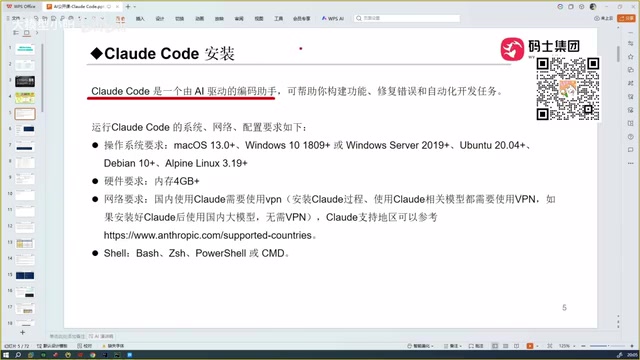
Claude Code works in an entirely different way. It can read all the files in your project, feeding the entire codebase as context to the underlying model, which allows it to generate code that actually fits your real business needs. Going further, it also has automatic debugging and error correction capabilities, iterating until it produces a working version of the code.
This workflow — reading the full project, auto-generating code, and auto-correcting errors — elevates Claude Code from a simple code snippet generator to a true agentic development tool.
The Evolution of AI Coding Tools: From Copilot to Claude Code
Claude Code didn't emerge from nowhere. It's the product of continuous evolution in AI coding tools. Understanding this progression helps clarify where each tool fits in the landscape.
GitHub Copilot and Cursor
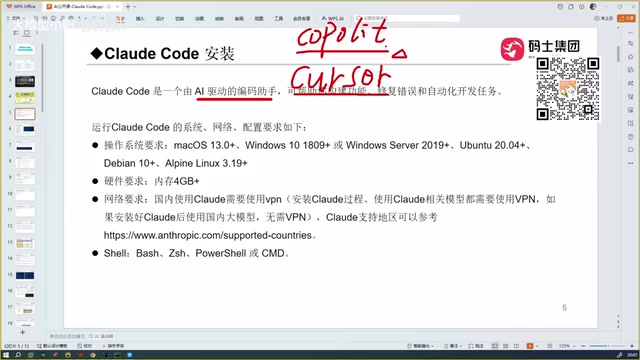
The first tool to attract widespread attention was GitHub Copilot (powered by OpenAI technology), which functioned as a code editor plugin offering autocomplete suggestions — a genuinely game-changing experience at the time.
Cursor came next and pushed automation even further, with noticeably greater intelligence than Copilot. In terms of actual capability, Cursor and Claude Code are now in the same tier.
A Side-by-Side Comparison of Popular AI Coding Tools
Other AI coding tools worth knowing about include:
- TRAE: Available in both international and domestic Chinese versions. The domestic version is free and excels at understanding Chinese, with targeted optimizations for developers in China. Its downside is weaker code generation accuracy, especially in complex technical scenarios.
- Codex: Deeply integrated with the OpenAI ecosystem and designed to work with GPT-series models. Its coding capabilities are said to rival Claude Code, making it another strong option worth watching.
- OpenCode: The overall experience is mediocre, and it struggles to compete with other tools in this category.
- Domestic Chinese LLM solutions: Models like Qwen (Tongyi Qianwen) and GLM can also be integrated as coding backends.
Why Claude Code Outperforms Other Tools
The real-world performance of any AI coding assistant ultimately comes down to the capabilities of the underlying model. Claude Code's core competitive advantage stems from the Claude Sonnet series of models powering it.
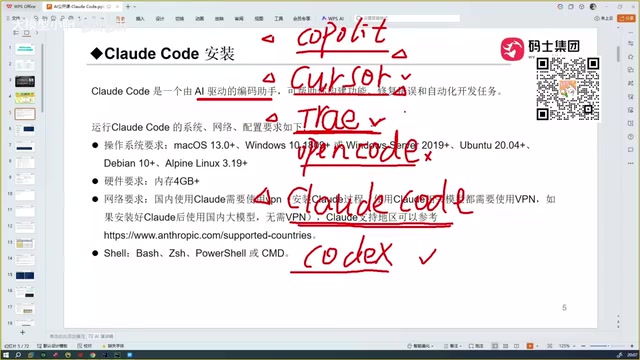
Based on hands-on feedback, many developers who have used Copilot, Cursor, TRAE, and similar tools in succession consistently report that Claude Code performs "a notch above the rest." While all these tools offer automated coding, the code generated by Claude Code has a noticeably higher accuracy rate.
For developers, accuracy directly determines how many revision cycles and how much debugging time a project requires. The efficiency gap between code that runs on the first try and code that needs three to five rounds of fixes is enormous. This is the key differentiator that sets Claude Code apart.
How Beginners Should Choose an AI Coding Tool
If you're just getting started with AI-assisted coding, here are a few practical recommendations:
- The barrier is lower than you think: Claude Code installs locally and doesn't require a complex setup process — beginners can get up and running quickly.
- Prioritize code accuracy: Free tools like TRAE's domestic version are great for getting started and learning, but if code quality matters to you, tools like Claude Code and Codex are worth the investment.
- Leverage project-level context: The most powerful feature of agentic coding tools is their ability to understand your entire project. Making full use of this capability can dramatically boost your development efficiency.
- Try multiple tools and compare: Performance varies across versions and use cases. It's worth testing a few options against your specific needs before committing to one.
It's worth noting that AI coding tools are still evolving rapidly. The comparisons in this article are based on hands-on experience with current versions, and each tool's performance may change as they continue to be updated.
Related articles

Cursor AI in Practice: Weighing Efficiency Gains Against Costs in an AI IDE
An in-depth look at Cursor AI IDE's interface layout, four modes (Agent/Plan/Debug/Ask), model selection, and Git context integration, with hands-on demos weighing subscription costs against going direct to Claude.

Free Landing Page Design Rules Library: A Practical Guide for Claude Code and Cursor
A free landing page design skill for Claude Code and Cursor: MIT licensed, nearly 9,000 stars, asks about offer/audience/action before planning 12 sections with hard font and spacing constraints.

Cursor Keeps Writing Wrong Code? The Problem May Be Context, Not Prompts
Cursor keeps writing wrong code? The problem may be context, not prompts. Learn how to supply relevant files, full error messages, and expected results, plus a plan-first, small-step, test-driven workflow to reduce AI coding errors—while remembering code review remains the developer's job.