Cursor AI in Practice: Weighing Efficiency Gains Against Costs in an AI IDE

Cursor is a VS Code fork IDE with deep AI integration—powerful, but Pro costs are questionable.
Based on a Spanish-language YouTube creator's hands-on demo, the article breaks down Cursor's interface layout, four interaction modes, model selection, and context management. Cursor places the agent chat on the left and supports managing multiple agents in parallel; it offers Agent, Plan, Debug, and Ask modes, with Plan inserting manual confirmation before execution; model options include Auto balancing and manual selection of Opus 4.8, Codex 5.3, etc.; context can include Git branches, custom docs, history, and images, plus automatic subagent triggering. The author also relays the creator's pricing reservations: under the current Pro subscription, calling Claude via Cursor may cost significantly more than direct access, so teams should validate workflows with the free quota before measuring cost differences.
Cursor is an AI IDE built on a fork of Visual Studio Code, deeply integrating AI capabilities while preserving the original VS Code experience. In a hands-on video, a Spanish-language YouTube creator demonstrated Cursor's interface layout, four interaction modes, model selection strategy, and context management features, while also offering a cautionary conclusion: under the current pricing model, calling Claude through Cursor may cost significantly more than using Claude directly. Below, drawing on the video's demonstrations, we break down Cursor's core usage and where its limits lie.
Interface Layout: Chat Pane on the Left, Subagents Always On
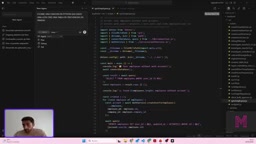
After opening Cursor, the most obvious difference is the layout. Unlike the Claude extension in VS Code, which places the chat panel on the right, Cursor puts the agent chat area on the left. Each "agent" corresponds to an independent conversation, and the list on the left serves as the management entry point for these agents. The creator emphasized that this design makes "agents" first-class citizens: you are no longer just asking questions to a chat box, but managing multiple persistent AI work units.
This layout choice hints at Cursor's product orientation—it assumes users will be pushing multiple tasks forward simultaneously, each backed by an agent with its own context, rather than single-turn Q&A assistance. For developers used to the right-side panel in VS Code, there is some adaptation cost, but the fluidity of switching between multiple tasks improves.
A Visual Studio Code fork refers to a product built by secondary development on top of VS Code's open-source code (Code OSS). Because VS Code uses the MIT license, third parties can freely reuse its editor core, extension ecosystem, and UI framework, then layer their own features on top. Cursor is built exactly this way, so users can directly carry over their existing shortcuts, themes, plugins, and settings with low migration cost. At the same time, the fork model also means Cursor's update cadence is partly constrained by upstream, and it cannot directly use all extensions from Microsoft's official marketplace—these must be distributed through its own channels.
Four Modes: Agent, Plan, Debug, and Ask
Cursor's agent supports several working modes, and the video demonstrated their differences one by one. In Agent mode, the agent not only answers questions but also directly edits code in the project and performs actions; Plan mode only plans, listing the steps it intends to execute and waiting for your confirmation before actually carrying them out; Debug mode targets error-fixing scenarios; Ask mode only answers questions about the codebase and produces no modifications.
This mode division addresses a real pain point: the biggest risk in AI programming is "changing before reviewing." Plan mode acts as a manual confirmation checkpoint before action, suitable for refactoring tasks with a large scope of change; Ask mode is good for understanding the structure of an unfamiliar codebase; Agent mode suits small tasks with clear boundaries. The creator demonstrated generating Python code live in Agent mode—asking the agent to create a frequency table from a given list using Pandas, and the agent completed the code writing directly.
MCP (Model Context Protocol) is an open protocol for letting AI models connect to external data sources and tools in a standardized way, such as databases, file systems, third-party APIs, or internal services. After configuring MCP in Cursor, the agent can proactively call these external capabilities during a conversation to retrieve information or perform actions, without having to manually paste everything into the context. Its value lies in expanding context sources from "files within the project" to "any external system," but it also raises permission and security boundary issues—teams adopting it need to clearly define the scope the agent can access.
Model Selection: Auto Balancing vs. Manual Specification
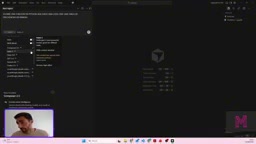
For model selection, Cursor offers an Auto mode that automatically balances among Claude-family models based on the question and picks the "most suitable" one. If you want to always use a stronger model, or conversely want to keep costs down, you can turn off Auto and specify manually. The selectable models mentioned in the video include Anthropic's Opus 4.8, Codex 5.3, and others.
However, there is a prerequisite: using these models requires an API Key, meaning an upgrade to Cursor's Pro subscription, which includes a certain token quota and charges extra per query beyond that. In the demonstration, the creator directly expressed reservations about this billing approach, arguing that under the current mechanism, the same query initiated through Cursor would be much more expensive than going directly through Claude. This point deserves careful verification by teams evaluating the tool—whether the convenience premium of an AI IDE is worth it depends on your call frequency and task types.
Context Engineering: Docs, Git Branches, and Subagents
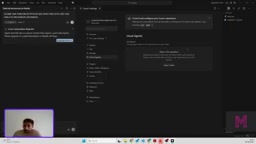
Cursor has a high density of features for context management. In Settings, you can configure preferred models, extensions, hooks, and MCP, and also sync Cloud agents in Git. In the input box, use a slash to invoke commands (action verbs like explain), and use the @ symbol to reference folders and files within the project, or even paths outside it.
The Documentation area comes with a batch of documentation indexes by default, and you can also manually add custom documentation links. The creator noted that if a project depends on an uncommon API or library, feeding the corresponding documentation to Cursor can noticeably reduce irrelevant answers. It also supports uploading images to supplement context, as well as using historical conversations, terminal sessions, and Git branches as context sources.
Git branch integration is one of the most valuable features. When the agent can read the full branch structure and commit history, you can directly tell it "the thing you changed last time is now broken," and it can pinpoint which change introduced the problem rather than guessing. This is especially useful for teams developing in parallel across multiple branches.
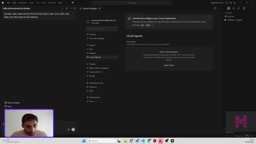
Another unique feature is subagents. They hang under a repository and are automatically triggered when the repository changes, checking modifications, performing adjustment actions, or running tests for verification. The creator mentioned that this kind of capability is currently a Cursor specialty, with other vendors catching up, and it is expected to appear in tools such as Visual Studio.
Subagents can be understood as automated agent instances triggered by specific events, independent of the agent in the main conversation. They are usually bound to a repository or a workflow, awakened at moments such as code commits or branch changes, executing preset tasks like checks, fixes, or test verification, and reporting results back. Compared with conversations initiated manually by users, subagents are closer to continuously running background daemons, suitable for automating repetitive verification work. The trade-off is that they consume additional tokens and compute resources, so they need to be paired with trigger conditions and scope limits to avoid generating large numbers of useless calls in frequently changing repositories.
Cost Judgment: Free Tier Is Enough, Pro Requires Caution
The conclusion at the end of the video is quite direct: the creator himself stays on the free plan and explicitly does not recommend upgrading to the paid tier, on the grounds that in his testing it consumed a large number of tokens with disproportionate returns. His alternative suggestion is to use Claude directly, or at most interact through an extension in VS Code.
This judgment has its standpoint—it comes from a creator focused on demonstrations and teaching, with limited task scale, and may not represent heavy-usage scenarios. But it raises a question that all AI programming tools cannot avoid: when underlying model capabilities converge, the IDE's added value lies mainly in context integration and workflow orchestration, and users need to judge whether that added value covers the premium. Cursor's depth in Git awareness, subagents, and documentation indexing does constitute differentiation, but pricing strategy will directly affect its penetration among individual developers and small teams.
For teams in the evaluation stage, a more pragmatic path is: first use the free quota to verify whether Agent and Plan modes match existing workflows, then measure the cost difference between Cursor calls and direct model access for high-frequency tasks, and finally decide whether to include subscription costs in the toolchain budget.
One-line Summary
Cursor is a VS Code fork IDE with deep AI integration—powerful, but Pro costs are questionable.
Paragraph Summary
Based on a hands-on demonstration by a Spanish-language YouTube creator, the article systematically breaks down Cursor's interface layout, four interaction modes, model selection, and context management capabilities. Cursor places the agent chat area on the left and supports parallel management of multiple agents; it offers four modes—Agent, Plan, Debug, and Ask—with Plan mode inserting manual confirmation before execution; for models, it supports Auto balancing and manual specification of Opus 4.8, Codex 5.3, and others; for context, it can integrate Git branches, custom documentation, historical conversations, and images, and features automatic subagent triggering. The author also relays the creator's reservations about pricing: under the current Pro subscription, calling Claude through Cursor may cost significantly more than direct access, and teams are advised to first validate workflows with the free quota before measuring the cost difference.
Related articles

Will GitHub Die? Open Source Maintainer Burnout and the Collaboration Crisis in the AI Era
Lex Fridman podcast discussion on open source maintainer burnout and GitHub's predicament: massive pull requests overwhelm core maintainers, and AI worsens code bloat. Using math journal peer review and Poincaré conjecture verification as analogies, the article analyzes why verification in knowledge production must be deliberately slow, and how open source communities can avoid the failure mode of maintainers exiting.

Stop Building Cookie-Cutter AI Websites: 3 Tools That Transform Your Coding Agent
Three tools that boost AI coding agents: FFmpeg skill for local video editing in Claude Code and Cursor, Hallmark's 50 design themes to fix cookie-cutter AI sites, and Jailbreaks' 25+ model prompts.

How America's Gerontocracy Squeezes the Younger Generation
Americans over 55 hold nearly three-quarters of national wealth, alongside an 80-year-old president and elderly congressional leaders. The Atlantic's Idrees Kahloon explains how gerontocracy drives up housing costs, squeezes opportunities for the young, and explores zoning reform and child poverty reduction as practical fixes.