WorkBuddy Complete Beginner's Guide: Master Your AI Digital Employee in 7 Days
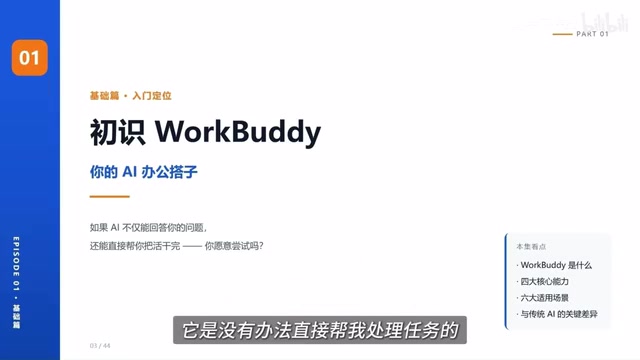
WorkBuddy, a domestic Codex alternative, lets ordinary people reach the AI Agent threshold in 7 days.
The article breaks down the core logic of Bilibili's "WorkBuddy Complete Beginner's Guide," explaining that WorkBuddy is a "domestic alternative to Codex" — an AI Agent that can directly operate a computer and complete tasks for users. Unlike traditional large models that excel at Q&A and suggestions, an Agent's focus is driving tasks to results within the user's authorization. The article compares WorkBuddy and Codex across four dimensions: onboarding difficulty, connector capability, usage cost, and Skill installation efficiency, concluding the former is more beginner-friendly. The accompanying Blue Book covers installation, case breakdowns, Skill customization, and industry implementation, plus 12 common Skills. It ends with a reminder: Agent lowers the usage barrier, not your judgment — the larger the authorization scope, the higher the efficiency, but users must manage the risks themselves.
WorkBuddy Complete Beginner's Guide: Master Your AI Digital Employee in 7 Days
In today's world of AI tool overload, most people are still stuck in the "ask a question, get an answer" conversation mode. But AI Agents that can actually do the work for you are becoming the new dividing line. This "WorkBuddyAd Complete Beginner's Guide" on Bilibili claims to take you from beginner to expert in 7 days — but what does it actually teach? And why is WorkBuddy called the "domestic Codex"? This article breaks down the core logic from the video.
What Is WorkBuddy? How Is It Fundamentally Different from Traditional AI?
WorkBuddy is positioned as a "domestic alternative to Codex" — an AI digital worker that can directly help you get things done on your computer. Its barrier to entry is lower: no need for special network environments, no complex configuration, and it's extremely beginner-friendly. Whether it's writing proposals, building spreadsheets, analyzing data, creating content, designing posters, developing software, or even taking over your browser to operate various applications, it can deliver the results directly to you.
So how exactly does it differ from traditional large models like ChatGPT? The video gives a very intuitive demonstration: there's a document with messy formatting — inconsistent punctuation and jumbled body text. With traditional AI, you send a message and it tells you how to quickly unify the formatting, but you still have to do the actual work yourself.
With WorkBuddy, you send the same message and it finds that document on your desktop by itself and automatically completes the formatting. All you do is wait, and the task finishes on its own. The video author sums it up well: traditional large models are better at Q&A, analysis, and making suggestions, while the focus of an AI Agent is — within the scope of your confirmation and authorization — driving tasks through to results. It's not just "you say something, it replies"; it's more like a digital employee arranged for you, capable of operating your computer, calling tools, and directly getting things done.
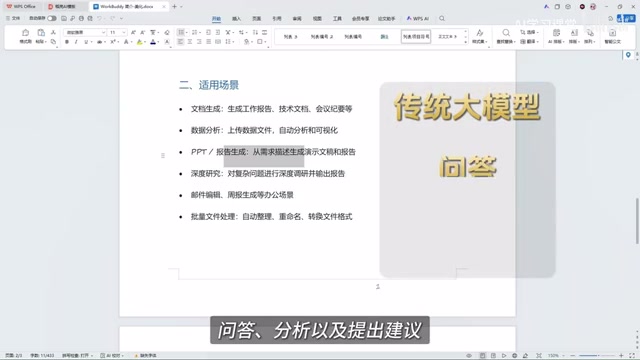
AI Agent differs from traditional large models in its core "action capability." A traditional large language model (like ChatGPT) is essentially a text-to-text mapping function: input a prompt, output an answer, all within the chat window. An Agent adds planning, tool calling, and an execution loop on top of the model — it can break down task goals, call local file systems or external APIs, and adjust its next action based on execution results. The industry typically describes an Agent using a three-layer architecture of "perception—planning—action," where the "action" layer relies on tool-calling protocols (such as Function Calling) and sandboxed execution environments. This is why WorkBuddy can directly open and modify desktop documents, while a chatbot can only tell you "how to modify them."
Why Beginners Should Start with Tools Like WorkBuddy
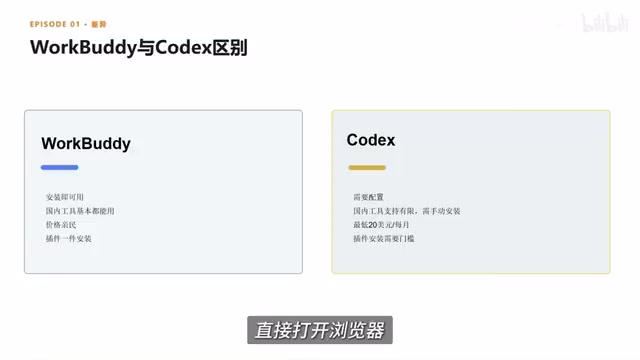
The video author doesn't avoid comparisons, but instead analyzes WorkBuddy and tools like Codex across four dimensions. The first is ease of onboarding: for WorkBuddy, you just open a browser, search for the product name, download, install, and deploy it to your computer — a very intuitive process.
The second is connector capability. In WorkBuddy, you select connectors to link up commonly used office software — essentially an entry point for authorizing AI to use a certain software or service. For example, connect it to WeCom and grant it certain permissions, and it can help you reply to messages, or compile chat records or communication content into documents. The value of connectors is that they let AI not just "know how to do something," but also participate in completing the entire workflow within the scope you allow.
The third is usage cost. The video mentions that WorkBuddy's pricing is very affordable — you get a certain number of credits upon registration and can claim a daily quota, which for light users is basically enough to complete daily experiences and basic tasks. By contrast, some overseas products require subscription payments, and you need to use them heavily to get value.
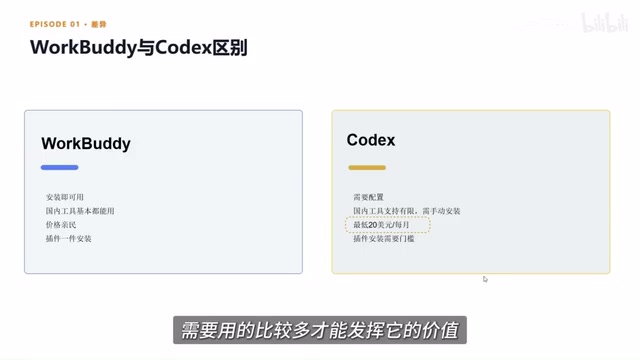
The fourth is the installation efficiency of plugins and Skills. WorkBuddy has a built-in Chinese Skill marketplace, where common capabilities can be installed to your computer with one click. A Skill can be understood as a pre-trained professional tool or work capability. The platform also has an "Expert" module, like digital employees for different roles — if your team needs a senior development engineer to build a process from scratch, you can directly find the corresponding expert and invoke it with one click.
Tools like Codex offer more freedom, but require users to have more technical background, such as understanding code, configuring environments, and calling workflows. For most entry-level users, choosing an AI Agent that's easier to deploy, compatible with domestic office scenarios, and cost-controllable is a very practical starting point.
Connectors are key infrastructure in the AI Agent ecosystem — essentially a standardized authorization protocol that lets an Agent access external services' data and operation interfaces with user permission. Its technical foundation typically includes OAuth authorization, API encapsulation, and scope control. For example, after connecting to WeCom, the Agent doesn't get "all WeCom permissions" but only the specific capabilities the user checks off — reading designated conversations, sending messages, etc. The significance of connectors is that they transform "what AI can do" from a model capability question into a permission configuration question; users can balance efficiency and security by tightening or loosening authorization. This is also the most commonly underestimated link when Agent products are deployed: the richness of the connector ecosystem often determines whether an Agent can truly embed itself in daily workflows.
What Does This Tutorial Actually Teach?
The video author mentions that the accompanying "WorkBuddy Blue Book" covers four major sections: installation, case breakdowns, Skill customization, and industry implementation. It also includes 12 commonly used Skills and more hands-on materials. Judging from the course structure, the ambition of this tutorial isn't just to teach you which buttons to click, but to help you understand the working logic of an Agent — from "give it a standard and let it batch-process files" to "provide requirements and let it help complete a PPT," gradually turning AI from a chat partner into a productivity tool.
The PPT case shown in the video is a microcosm: after providing requirements, the AI helped complete an entire slide deck including animations. This kind of "compile into a file" operation is exactly the core capability that distinguishes an AI Agent from traditional AI.
Skill in the Agent context is not a simple "plugin," but a reusable capability unit that encapsulates domain knowledge and operational workflows. A Skill typically contains three parts: trigger conditions (which tasks should invoke it), execution logic (which tools to call and in what order), and output specifications (what format the results should take). Its difference from traditional software plugins is that a Skill often embeds prompt templates and examples, effectively solidifying an expert's "work methodology." Therefore, the prosperity of a Skill marketplace directly reflects how deeply an Agent platform covers vertical scenarios. For users, installing a Skill is far easier than writing a workflow from scratch — which is why WorkBuddy emphasizes "one-click installation of Chinese Skills."
A Sobering Reminder
What WorkBuddy lowers is the barrier to use, not a replacement for your judgment. The video author repeatedly emphasizes "within the scope of your confirmation and authorization" — meaning the Agent's autonomy has boundaries. The larger the authorization scope, the higher the efficiency, but the more you need to control the risks yourself. When choosing a tool, the key isn't how long its feature list is, but whether it suits your work scenario. For light users, the free quota may be enough; for heavy users, long-term cost and data security need to be evaluated.
From "ask a question, get an answer" to "give a task, wait for results," the dividing line for AI tools has appeared. The value of products like WorkBuddy isn't how much better it is than Codex, but that it lets more ordinary people truly touch the threshold of "digital employees" for the first time.
Related articles

The Truth About AI Coding: Code Output Soars, So Why Is Delivery Still Hard to Speed Up?
Engineering leaders from Databricks, Uber, and Google Maps discuss AI coding's real impact: code output soars but delivery bottlenecks shift, code review faces rethinking, and enterprises begin fine-grained token governance.

A New Paradigm for Text Editing in Compose: TextFieldState Replaces the Old API
Jetpack Compose introduces the TextFieldState API to fix dropped characters and cursor jumps from async input. The old value/onValueChange callbacks will be deprecated in 1.13. This article covers InputTransformation, OutputTransformation, four state hoisting patterns, and new formatted text editing capabilities.

Remote Compose: A New Document-Driven Paradigm for Cross-Platform UI on Android
Remote Compose transmits compact binary documents instead of screen pixels, enabling efficient UI rendering on remote surfaces like Wear OS and widgets. This article covers its document creation API, expression animations, size optimization techniques, and Wear OS progress.