WorkBuddy in Action: How a Desktop Agent Automates Your Work

WorkBuddy is a command-line-driven desktop AI agent that can automatically operate computers to complete office tasks and monetize through taking orders.
WorkBuddy is a desktop-level AI agent workbench, regarded as a domestic alternative to Codex, with low device requirements, a free quota, and adaptation to domestic office software. Its core difference from ordinary large models is that it can directly control the computer to do work: driven by the command line, the large model generates commands and WorkBuddy executes them, completing file operations, program scheduling, browser operations, and even automatically writing code. It can also connect to external services such as email, meetings, maps, and documents through connectors, MCP, and APIs. When handling complex tasks, it uses an iterative closed loop: planning and decomposition, generating commands or scripts, execution, and self-repair after failure until completion. WorkBuddy also has memory capabilities and understands users better the more they use it. The article also introduces a four-step monetization path from basic operations to taking orders on platforms, along with course resources covering 28 knowledge points.
WorkBuddy is a desktop-level AI agent workbench that you can think of as a domestic alternative to Codex. It requires no complex configuration, has low device requirements, offers a free quota, and is adapted to commonly used domestic office software. While ordinary AI large models only give you ideas, WorkBuddy can directly control your computer to do the work for you: breaking down tasks, processing files, organizing data, and generating documents—all automated end to end. Whether you're making posters, editing videos, or creating e-commerce ads, it can jump right in.
Recently, a content creator shared their monetization experience: using WorkBuddyAd to take on orders and complete tasks such as spreadsheet organization, PPT drafting, and comic storyboarding, and summarized a complete path from getting started to taking orders. This tutorial has been organized into 28 knowledge points across introductory, case study, advanced, and industry application sections, covering the entire process from basic operations to real office scenarios.
WorkBuddy's Core Capability: Command-Line-Driven Computer Control
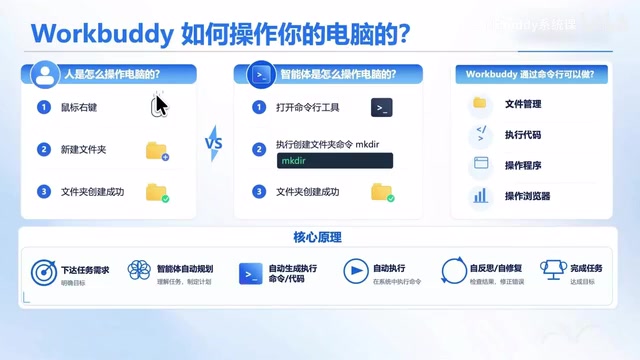
Install WorkBuddy on your office computer (Windows or Mac), and it can operate the computer on your behalf to complete various tasks. It works differently from humans: humans need to look at the screen, move the mouse, and type on the keyboard—a complex and inefficient process. WorkBuddy uses a command-line approach to drive the computer, which is more efficient.
For example: ask WorkBuddy to create a folder named "Course Materials" on the desktop. It will have the large model determine the requirement—create a folder named "Course Materials"—and the large model directly generates a command, WorkBuddy executes it, and the folder is created. You can expand the small arrow to view the specific command executed; the whole process is clear and transparent.
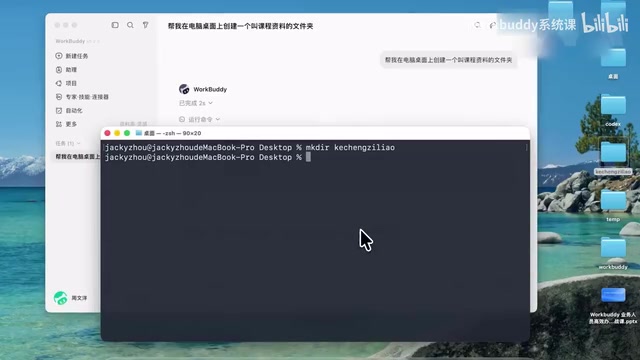
If you understand the command line, you can also manually enter a pinyin command to create a folder with the same effect. Here, the large model is responsible for "thinking up" the command, and WorkBuddy is responsible for "executing" it—together they replace human thinking and execution capabilities.
Based on command-line driving, WorkBuddy has a wide range of capabilities: operating files and folders, operating programs, and operating browsers to complete technical work; for tasks that simple commands can't handle, it can have the large model automatically write a piece of code (Python, Node, etc.) and execute it; it can even install software and complete operations by scheduling software.
Command Line is an interaction method that operates a computer by entering text instructions, as opposed to a graphical interface (clicking icons, dragging files). On Windows it corresponds to cmd or PowerShell, and on macOS to Terminal. The command line is efficient because each command precisely describes an operation, with no need to simulate mouse movement and clicks; execution is fast and commands can be automatically generated by programs. For AI agents, the command line is a natural execution interface: the large model only needs to output a line of text instructions, and the system can run it directly, eliminating the cost of visually recognizing the screen and simulating input. Understanding this makes it clear why WorkBuddy can complete tasks like file organization and program invocation faster and more reliably than humans.
Connecting External Tools: Connectors, MCP, and APIs
Scheduling only the local computer may not cover all business scenarios. For example, sending emails, scheduling meetings, route planning, and reading external documents require integration with external systems. WorkBuddy provides multiple ways to connect external tools: connectors, MCP, and API interfaces, which can connect to platform services such as QQ Mail, meeting tools, Amap, Feishu Docs, and Tencent Docs, making its capabilities more powerful.
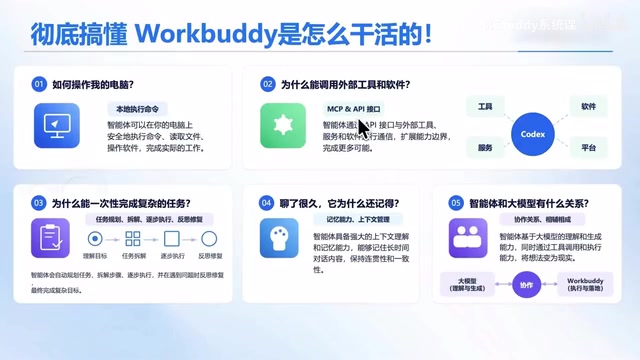
MCP (Model Context Protocol) is an open protocol proposed by Anthropic, designed to let large models connect to external tools and data sources in a standardized way. You can think of it as the "USB interface" of the AI world: as long as an external service (such as email, documents, maps) is encapsulated according to the MCP specification, any agent that supports the protocol can call it plug-and-play, without writing separate adapter code for each service. Compared with traditional API calls, MCP emphasizes unified context management and tool descriptions, allowing large models to automatically discover available tools and understand their parameters. WorkBuddy supports MCP, which means it can quickly access a rich ecosystem of third-party services and expand its capability boundaries.
How Complex Tasks Are Processed: Iterative Loops and Self-Repair
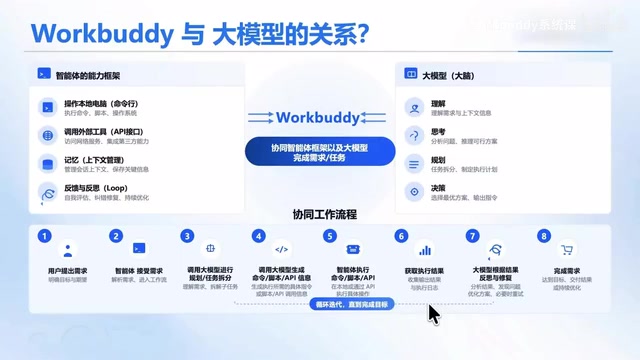
WorkBuddy's process for completing complex tasks is a closed loop of iterative cycles. After the user submits a request, WorkBuddy first hands it to the large model to understand the requirement, think and plan, and break it down into small tasks. Then the large model determines how to complete each task: whether to schedule a command, call an API or external tool, or directly write a script or small program.
After generating commands, scripts, or API calls, they are handed to WorkBuddy for execution. Execution may succeed or fail; WorkBuddy obtains the execution log or result and sends it back to the large model for judgment. If it fails, the large model thinks on its own, fixes the problem, and executes again, looping until the task succeeds, then moves on to the next task. All tasks are executed cyclically in this process until the entire requirement is completed.
In addition, WorkBuddy has memory capabilities and automatically remembers your name, preferences, and work style, understanding you better the more you use it—like a work partner with good chemistry.
Iterative loops and self-repair are key features that distinguish an agent from a single-turn Q&A large model, often called the ReAct (Reasoning + Acting) pattern or Agent Loop in the industry. Its core is: the model first reasons (Reasoning) to produce an action plan, then acts (Acting) and observes the result, and decides the next step based on the result. When execution fails, the model does not simply report an error and terminate; instead, it analyzes the error log, adjusts the command or code, and tries again. This "execute—observe—correct" loop enables agents to handle uncertain tasks in open environments, such as common issues like non-existent file paths or missing dependencies. The loop usually has a maximum round limit to prevent infinite retries. Understanding this mechanism helps determine which tasks are suitable for agents and why they can complete multi-step complex work without human intervention.
The Relationship Between Agents and Large Models
Agents and large models complement each other. An agent is a capability framework: WorkBuddy can operate computers, schedule and integrate external tools, manage context memory, and has its own work processing flow. The large model is WorkBuddy's brain, helping it understand requirements, plan tasks, break down tasks, and make decisions. Understanding this basic principle allows you to judge which of your business scenarios are suitable for WorkBuddy, how to do them specifically, and which may not be suitable.
In the AI field, a large model (Large Language Model, LLM) refers to a neural network trained on massive text that has language understanding and generation capabilities, such as GPT and Claude; it only outputs text and cannot directly operate a computer. An agent is a system framework built on top of a large model; in addition to calling the model for reasoning, it also includes modules such as tool invocation, memory management, task planning, and execution environment. An analogy: the large model is the "brain," and the agent is the "brain + hands and feet + workbench." The industry usually summarizes this relationship as "Agent = LLM + Planning + Memory + Tools." WorkBuddy is a typical desktop agent; it turns the reasoning capabilities of large models into actual computer operations, thereby completing the leap from "giving suggestions" to "doing it for you."
The Path from Getting Started to Taking Orders
The path summarized by the content creator is clear: first, learn basic operations; second, run through a case; third, build a portfolio; fourth, post links on platforms to take orders. Many people get stuck at the first step because no one explains the steps, no one explains the methods, and no one tells you where you might stumble. This course uses 28 knowledge points and a supporting document resource pack to guide you step by step through the setup process and skill resource pack.
For ordinary users, WorkBuddy's value lies in advancing AI from "giving suggestions" to "doing it for you." Understanding its command-line driving mechanism, external tool connection methods, and iterative loop process is key to judging whether it can play a role in your workflow.
One-line Summary
WorkBuddy is a command-line-driven desktop AI agent that can automatically operate computers to complete office tasks and monetize through taking orders.
Paragraph Summary
WorkBuddy is a desktop-level AI agent workbench, regarded as a domestic alternative to Codex, with low device requirements, a free quota, and adaptation to domestic office software. Its core difference from ordinary large models is that it can directly control the computer to do work: driven by the command line, the large model generates commands and WorkBuddy executes them, completing file operations, program scheduling, browser operations, and even automatically writing code. It can also connect to external services such as email, meetings, maps, and documents through connectors, MCP, and APIs. When handling complex tasks, it uses an iterative closed loop: planning and decomposition, generating commands or scripts, execution, and self-repair after failure until completion. WorkBuddy also has memory capabilities and understands users better the more they use it. The article also introduces a four-step monetization path from basic operations to taking orders on platforms, along with course resources covering 28 knowledge points.
Related articles

world2vec: Building Mechanistic World Models with Latent Dynamics Learning
world2vec proposes a reward-free method for learning mechanistic world models via latent dynamics, faithfully reproducing systems over long horizons with at least an order of magnitude fewer parameters than DreamerV3, TD-MPC2, and LeWM, and achieving accurate system identification on 71 attractor benchmarks.

A New KL-DRO Paradigm: Adaptive Scenario Generation Around a Learned Density Model
KL-DRO research proposes centering the KL ball on a learned density model instead of the empirical distribution, with adaptive scenario generation guiding sampling toward the worst case. Experiments show lower cost under distribution shift when records are scarce and the model can extrapolate, with comparable in-distribution cost.

ODE Samplers for Discrete Diffusion Models: Exponential Residual Flows Accelerate Generation
Discrete diffusion models lack deterministic ODE sampling? This article introduces Exponential Residual Flows (ERFs), which introduce continuous residual variables per token to construct piecewise ODEs for deterministic sampling and support consistency distillation acceleration. Superior to prior methods on code and text generation tasks.