WorkBuddy In-Depth: The Leap from Conversational AI to Office Automation

Tencent WorkBuddy evolves AI from "telling you how to do it" to directly "doing it for you," reshaping the barrier to office automation.
WorkBuddy is an AI agent desktop tool launched by Tencent, whose core consists of an AI brain, hands that operate the computer, and an automation engine. Unlike traditional conversational AI, it does not just give suggestions or code; it directly reads local files, operates Word/Excel/PDF, plans multi-step tasks, and outputs deliverable finished products. Through the scenario of an HR professional organizing 80 resumes, the article explains that traditional AI is a "smart advisor" while WorkBuddy is a "capable employee." It also supports scheduled background tasks, remote control from a phone, connecting to external systems such as Tencent Docs and WeCom through MCP, and expanding capabilities such as browser operation with skill packages. Its applicable scenarios center on highly repetitive work that involves switching between multiple software programs and manually moving data, and zero-code users can get started quickly through 28 exercises.
In today's flood of AI tools, most people still treat AI as a smarter search engine—ask a question, get an answer, then manually copy and paste. But Tencent's WorkBuddy is breaking that habit: it's no longer satisfied with "telling you how to do it"—it directly "does it for you." One Bilibili creator, after using WorkBuddy for a month, canceled two paid AI subscriptions. The reason was simple—this one tool does the work of three.
What Is WorkBuddy: An AI Brain Combined with a Pair of Hands
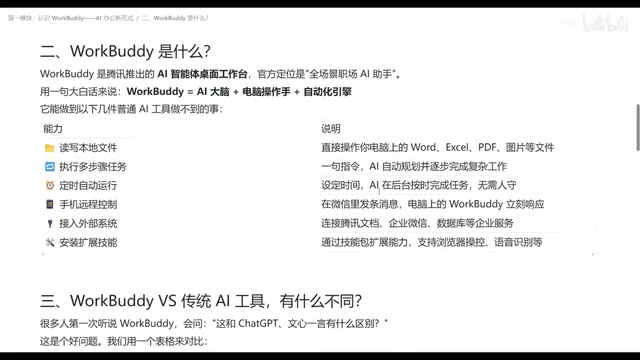
WorkBuddyAd is an AI agent desktop tool launched by Tencent, officially positioned as a "full-scenario workplace AI assistant." That description sounds abstract, but break it down and it becomes clear: it equals an AI brain, plus a pair of hands that can operate a computer, plus an automation engine.
The AI brain understands your Chinese instructions and plans the execution path; the hands let it actually read and write local files, and operate Word, Excel, PDF, images, and more; the automation engine lets you turn solidified workflows into scheduled tasks, such as automatically compiling weekly reports every week.
The fundamental difference from conversational tools like ChatGPT, Doubao, and Tongyi Qianwen is this: traditional AI stays at "question and answer." You ask it "how do I organize resumes," and it generates a piece of Python code or a set of steps, and then you go execute them yourself. WorkBuddy directly receives the instruction—"read all the candidates' PDF resumes in this folder, extract name, education, years of work experience, core skills, and salary expectations, generate an Excel summary table and save it to the specified directory"—and then it does the work itself.
The Essential Difference: The Divide Between Advisor and Employee
In the tutorial, the creator used an HR scenario for an intuitive comparison: 80 candidate resumes need to be organized into a structured table before the end of the day, including fields such as name, education, years of work experience, core skills, and salary expectations, then sent to the hiring department for screening.
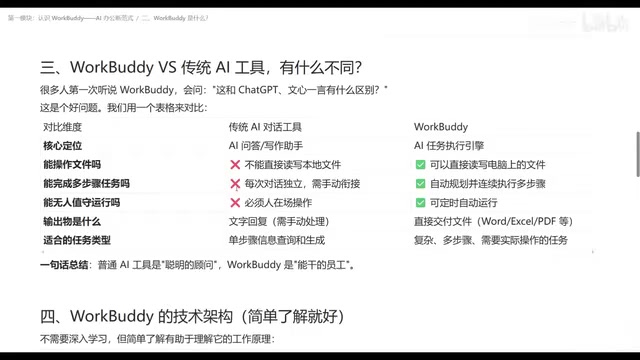
With traditional AI tools, you first need to ask "how to do it," get a piece of code or operational guidance, and then execute it step by step by hand. With WorkBuddy, you just need to state your requirements clearly, and it can understand them and plan a path, reading data and generating files on your computer. All you have to do is pour a glass of water, and when you come back, check whether the generated table meets expectations.
Behind this is a comprehensive expansion in capability dimensions. The core positioning of traditional AI tools is that of a "smart advisor"—it can optimize the content you input and give feedback, but it cannot touch local files, cannot read or write, and each conversation is an isolated question-and-answer exchange; the user must be present throughout to issue instructions. WorkBuddy, by contrast, is like a "capable employee": it can read and write local files, automatically plan multi-step tasks and execute them step by step, run in the background via scheduled tasks when you are away, output files ready for delivery (Word, Excel, PDF, etc.), and even redesign its path when it encounters problems during execution.
Operational Capabilities Far Beyond Conversation: From Files to Systems
WorkBuddy's real capability boundary is far broader than "organizing files." It supports complex multi-step tasks: you tell it the goal, and it breaks down the steps itself and advances them one by one. It supports scheduled tasks—as long as WorkBuddy on your computer stays running, it can complete preset work even when you are not present.
Remote control is another practical dimension. Through the WorkBuddy mini program on your phone or the WeChat client, you can send an instruction to WorkBuddy on your computer, have it perform operations, and return the results to your phone—so the work gets done at home while you are out. In addition, WorkBuddy can connect to external systems through MCP (Model Context Protocol), such as Tencent Docs, WeCom, and even databases, bringing data scattered across different places into a unified scope of operation. Extension skill packages further open up the imagination: browser data browsing, screenshots, audio-to-text summaries, and more can all be achieved by installing skills.
MCP (Model Context Protocol) is a standardized protocol proposed and open-sourced by Anthropic, designed to let large language models connect to external tools and data sources in a unified way. You can think of it as the "USB interface" of the AI world: in the past, every AI application that wanted to connect to Tencent Docs, a database, or WeCom had to separately develop a custom connector; with MCP, as long as the target system provides a protocol-compliant Server, any AI client that supports MCP can plug and play. For WorkBuddy, MCP naturally extends its scope of operation from local files to cloud documents, enterprise contact directories, and databases, without rewriting the underlying logic for each system—this is also the technical foundation that enables it to quickly cover a variety of scenarios both inside and outside the Tencent ecosystem.
Who Should Use It and How: Scenario Judgment and Getting Started
The criterion for deciding whether to use WorkBuddy is simple: if your task requires switching back and forth between multiple software programs, manually moving data, or has fixed repetitive processes, then it is the right tool. Material organization, table summarization, document generation, scheduled reports—these scenarios with "high manual effort but low creative demand" are exactly where WorkBuddy shines.
The creator's tutorial divides the learning path into four modules: first install and get it running, then master the core operations, then work through real cases, and finally map it to your daily work scenarios, with 28 follow-along exercises throughout. For users with zero coding background, this path lowers the barrier to entry—no need to fiddle with environments, you can use it the day you register, and there is a free quota.
One detail worth noting is that WorkBuddy's way of working is similar to automation tools such as OpenClawAd, but as a product within the Tencent ecosystem, it has a natural advantage in connecting with scenarios such as WeChat, WeCom, and Tencent Docs. For teams already in the Tencent office ecosystem, this means lower integration costs and a smoother workflow.
As AI tools evolve from "able to talk" to "able to do," the barrier to office automation has truly been lowered. Not everyone can write scripts or build workflows, but almost everyone can explain their requirements clearly. WorkBuddy's value lies in removing the execution step from people and making "explaining clearly" the final step in getting work done.
OpenClaw (formerly Clawdbot/Moltbot) is an open-source AI agent framework focused on letting models autonomously operate browsers, file systems, and command lines in local or self-hosted environments to complete multi-step tasks. Its similarity to WorkBuddy lies in both adopting a "brain + hands" architecture: the large model plans the steps, and the execution layer carries out the operations. The difference is that OpenClaw leans more toward developers and geek users, requiring you to configure the model API, runtime environment, and permissions yourself; WorkBuddy is a commercial product that works out of the box, with installation, model access, and Tencent ecosystem integration all packaged. Understanding this comparison helps you judge whether you are better suited to an open-source solution that is "highly customizable but requires hands-on tinkering" or a finished tool that is "zero-configuration but constrained by the ecosystem."
One-line Summary
Tencent WorkBuddy lets AI evolve from "telling you how to do it" to directly "doing it for you," reshaping the barrier to office automation.
Paragraph Summary
WorkBuddy is an AI agent desktop tool launched by Tencent, with a core consisting of three parts: an AI brain, hands that operate the computer, and an automation engine. Unlike traditional conversational AI, it does not just give suggestions or code; it directly reads local files, operates Word/Excel/PDF, plans multi-step tasks, and outputs deliverable finished products. Through the scenario of an HR professional organizing 80 resumes, the article explains that traditional AI is a "smart advisor" while WorkBuddy is a "capable employee." It also supports scheduled background tasks, remote control from a phone, connecting to external systems such as Tencent Docs and WeCom through MCP, and expanding capabilities such as browser operation with skill packages. Its applicable scenarios center on highly repetitive work that involves switching between multiple software programs and manually moving data, and zero-code users can get started quickly through 28 exercises.
Related articles

RAG Interview Essentials: Breaking Down the Full Offline Indexing and Online Retrieval Pipeline
A complete breakdown of the RAG retrieval-augmented generation workflow: offline document loading, chunking, vectorization, and indexing; online query rewriting, vector retrieval, reranking, and generation, plus core interview points and system optimization directions.

AI Large Models for Absolute Beginners: Principles and API Calling in Practice
From AI's evolution to large model training principles and core concepts like Token, Temperature, and Top-P, this article explains system prompts, Function Call, RAG, and memory with hands-on examples and four API call scenarios—ideal for beginners.

Will GitHub Die? Open Source Maintainer Burnout and the Collaboration Crisis in the AI Era
Lex Fridman podcast discussion on open source maintainer burnout and GitHub's predicament: massive pull requests overwhelm core maintainers, and AI worsens code bloat. Using math journal peer review and Poincaré conjecture verification as analogies, the article analyzes why verification in knowledge production must be deliberately slow, and how open source communities can avoid the failure mode of maintainers exiting.