AI Agents for Auto-Generating Excel Test Cases: From Setup to Private Deployment — A Complete Guide

A complete guide to building AI agents that auto-generate Excel test cases with deployment options.
This article explains the key difference between LLMs and AI agents: LLMs give advice, while agents execute complete workflows and produce deliverables. Using the Coze platform as an example, it demonstrates how to build a test case generation agent, then compares online platforms with Dify private deployment (DeepSeek + Dify + Ollama), emphasizing that workflow design and prompt engineering are the critical factors determining output quality.
The Fundamental Difference Between AI Agents and Large Language Models
Many test engineers are already accustomed to using AI large language models (LLMs) like Doubao, Kimi, and GPT to assist their work — ask a question, get an answer; have it write some code, then copy and paste. But this interaction pattern has clear limitations: LLMs can only give you suggestions and solutions, they can't actually complete an entire workflow for you.
AI Agents are different. They not only understand your requirements but can also autonomously execute multiple steps according to a predefined workflow, ultimately producing deliverables you can use directly — such as a complete Excel test case document. Based on a practical walkthrough shared by a Bilibili content creator, this article breaks down in detail how to build a tool that automatically generates test cases using an AI agent platform.
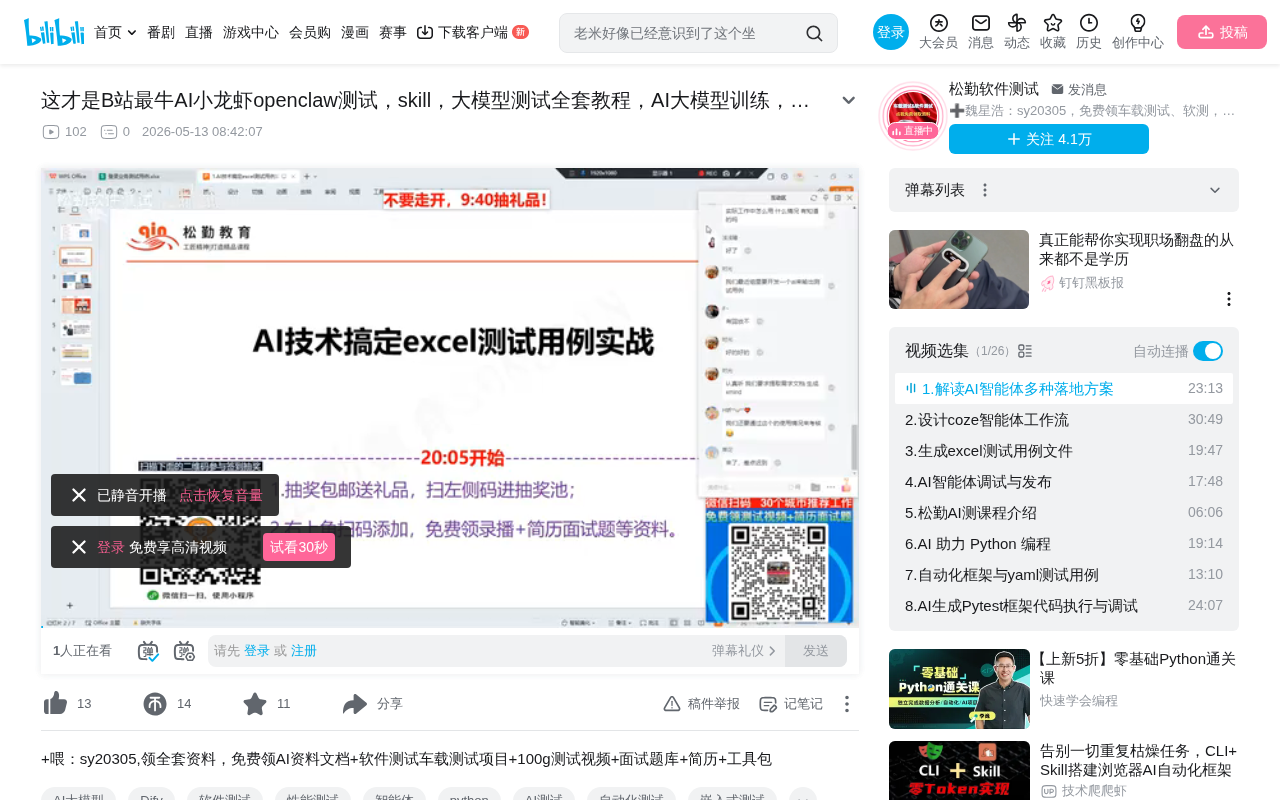
What Are AI Agents? Why Should Testers Master Them?
LLMs Give Advice; Agents Do the Work
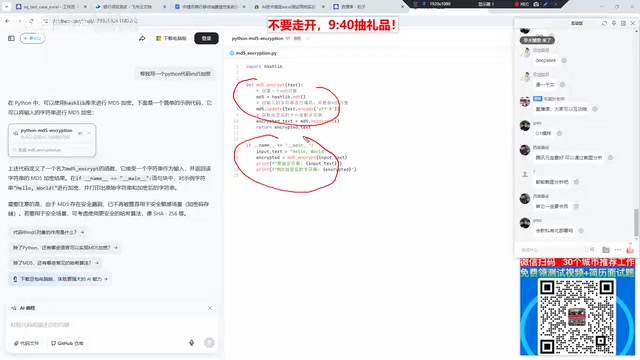
The tools we use daily — Doubao, Kimi, ERNIE Bot, Tongyi Qianwen, and others — are essentially AI large language models. They excel at conversational interaction: ask about key considerations for testing a banking project, and you'll get an analysis; ask for a Python function for MD5 encryption, and it'll generate the code directly.
But the capability boundary of LLMs is clear — they're responsible for "answering," not "executing." If you send an API documentation link to Doubao, it won't know what to do with it, because it lacks the context and execution workflow specific to your project.
AI Agents are entirely different. Think of them as a "tireless work assistant":
- You give it an API documentation URL
- Tell it which business function to generate test cases for
- It automatically invokes the workflow, generates test cases and Python automation test code
- Finally outputs files to a specified path — you just click download
This is the core value of AI Agents: perceive the environment, make autonomous decisions, execute actions, and achieve goals.
From a theoretical perspective, the concept of AI agents originates from classical research in artificial intelligence. As early as the 1990s, computer scientists proposed four core characteristics of agents: Autonomy, Reactivity, Pro-activeness, and Social ability. Modern AI agents, empowered by large language models, have elevated these characteristics to new heights. They complete complex tasks through a Perception-Reasoning-Action loop, essentially layering tool invocation, memory management, and task planning capabilities on top of the LLM's reasoning ability. This means agents can not only "think" but also "act" — they can call APIs, read and write files, operate databases, and transform their reasoning results into concrete actions.
Workflows: The Soul of AI Agents
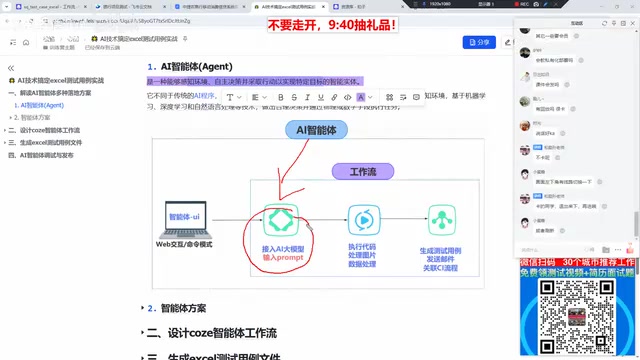
The most critical concept for AI agents is the Workflow. The workflow determines the steps and logic the agent follows:
- LLM Integration: Leveraging the LLM's data analysis and semantic understanding capabilities — this is the foundation of the workflow. Without an LLM, the workflow degrades into an ordinary script, losing its "intelligence."
- Code Processing: After the LLM produces initial results, custom code performs secondary processing such as optimization, formatting, and image handling.
- Plugin Invocation: Processed results are passed through plugins to generate documents, send emails, manage projects, and complete final delivery.
Workflow engines are a mature technology in enterprise software, originally widely used in BPM (Business Process Management). In AI agents, the workflow engine orchestrates the execution order of multiple AI calls and tool operations, supporting conditional branching, loops, parallel execution, and other control logic. Unlike traditional workflows, each node in an AI agent's workflow may involve non-deterministic output (due to the inherent randomness of LLM generation), so mechanisms like Temperature parameter control, output format constraints (such as JSON Schema), and result validation are needed to ensure stability. Lower temperature values produce more deterministic outputs; stricter format constraints yield more standardized results.
The quality of workflow design directly determines the quality of the agent's output. A well-designed workflow produces stable, reliable test cases every time; a poorly designed one may yield different — or even erroneous — results each time.
Hands-On Demo: Building a Test Case Agent on the Coze Platform
Platform Selection and Setup Process
The content creator chose ByteDance's Coze platform, one of the most widely used online AI agent platforms in China.
Coze is an AI agent development platform launched by ByteDance in late 2023. It supports integration with multiple LLMs (including Doubao models, the GPT series, etc.) under the hood. The platform uses a low-code/no-code visual orchestration approach, where users build workflows by dragging and dropping nodes. Its core components include: Bot (the agent itself), Workflow (workflow orchestration), Plugin (plugin marketplace), Knowledge (knowledge base), and Memory (long-term memory). The platform also provides API interfaces, enabling the embedding of built agents into enterprise internal systems (such as Feishu/Lark, DingTalk, WeCom, etc.) for seamless integration with existing workflows.
The entire setup process can be summarized in four steps:
- Design the Workflow: Define the agent's execution steps, including which LLM to use, how to parse API documentation, and how to format test cases
- Configure the Interface: The platform automatically generates a chat window where users simply input the API URL and business description
- Debug and Optimize: Repeatedly test the workflow, adjust prompts and parameters to improve output quality
- Publish and Share: After one-click publishing, team members can use it directly via a shared link
Results Demo: Input Two Parameters, Fully Auto-Generate Excel Test Cases
In the demonstration, the creator only input two pieces of information:
- The project's API documentation URL
- The specific business function for test case generation (e.g., "food delivery login")
The agent then automatically identified the project type, generated complete page test cases along with corresponding Python automation test code, and saved the files to a specified path.
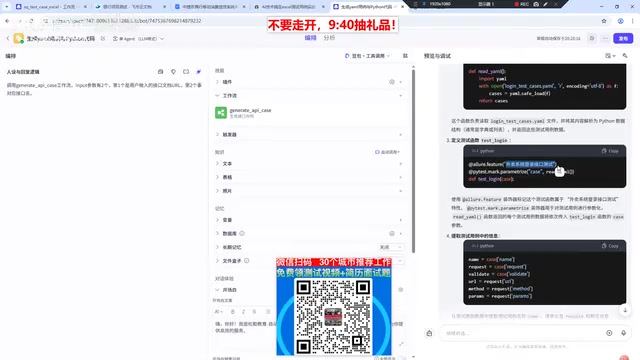
The key difference: if you send the same API link to Doubao or Kimi, they simply won't know what to do. But a customized agent understands your project context — it knows this is a food delivery project, knows what format to output test cases in, and knows how to organize the code.
After publishing, the workflow can be continuously iterated: fix issues anytime, adjust the process for new project requirements, and team members automatically get the latest version after updates.
Comparing Two Approaches: Online Platforms vs. Private Deployment
Option 1: Online AI Agent Platforms
Current mainstream online platforms include:
| Platform | Company | Key Features |
|---|---|---|
| Coze | ByteDance | Most widely used in China |
| ERNIE Bot Agent Platform | Baidu | Deep integration with ERNIE models |
| Tongyi Agent | Alibaba | Alibaba Cloud ecosystem support |
| iFlytek Spark Agent | iFlytek | Strong voice interaction capabilities |
| Tiangong Agent | Kunlun Tech | Higher degree of openness |
Online platforms offer the advantage of zero setup cost — register and start using immediately. However, there's one critical issue: data security.
Option 2: Private Deployment with Dify
Many enterprises — especially banks, automotive companies, and others with extremely high data confidentiality requirements — explicitly prohibit uploading internal documents to any public platform. Some project environments can't even access the internet. These enterprises typically need to comply with information security certifications such as China's Classified Protection Level 3 (等保三级) and ISO 27001, where any information involving customer data or business logic must not leave the corporate intranet.
In such cases, Dify is recommended for private deployment. Dify is an open-source LLMOps platform under the Apache 2.0 license, developed and maintained by the Dify.AI team. It has earned over 40k stars on GitHub and has a very active community. Its tech stack is based on a Python backend (Flask framework) and React frontend, supporting one-click deployment via Docker Compose, making it very DevOps-friendly.
Dify's core advantage lies in its model-agnostic architecture — it can connect to OpenAI, Anthropic, local Ollama, and various other model backends, meaning you can flexibly switch models based on task requirements. Ollama is a local LLM runtime framework that supports running open-source models like DeepSeek, Llama, and Qwen on consumer-grade GPUs (such as the NVIDIA RTX 4090), enabling fully offline inference. DeepSeek, as a leading Chinese open-source LLM, has demonstrated excellent reasoning capabilities across multiple benchmarks, with notable strengths in Chinese language understanding and code generation.
The combination of these three (DeepSeek + Dify + Ollama) forms a complete private deployment tech stack from model inference to application orchestration:
- Ollama handles loading and running the DeepSeek model on local hardware, providing an inference API
- Dify handles workflow orchestration, knowledge base management, and the application interface
- DeepSeek provides the core language understanding and generation capabilities
Once deployed, the results are identical to online platforms, but all data stays on the enterprise's internal servers, meeting compliance requirements for industries like finance and automotive.
What Determines the Quality of Agent Output?
A common question is: Are the test cases generated by AI agents granular enough? Can the quality meet standards?
The answer is: It depends on the quality of your workflow design. Specifically, several key factors are involved:
- Prompt Engineering: Are your instructions to the LLM precise enough? Have you clearly defined the test case format, coverage scope, and output requirements?
- Workflow Design: Is the step decomposition reasonable? Are the inputs and outputs of each step clearly defined?
- Model Selection and Tuning: Different LLMs perform very differently on different tasks — you need to choose the right model for your specific scenario
- Continuous Iteration: Constantly adjust and optimize based on actual output to progressively improve generation quality
In the specific scenario of test case generation, Prompt Engineering plays an especially critical role. Effective prompts need to include several core elements: a clear role definition (e.g., "You are a senior test engineer with 10 years of experience"), output format constraints (e.g., specifying Excel column headers as "Case ID / Module / Priority / Preconditions / Test Steps / Expected Results"), specific coverage requirements (requiring the application of classic test design methods such as equivalence partitioning, boundary value analysis, and error guessing), and Few-shot Examples (providing 1-2 standard test cases as reference templates). Through structured prompt templates, you can significantly improve the consistency and coverage of generated test cases, reducing manual review and modification effort by over 60%.
Initially generated test cases may be coarse-grained, but through repeated debugging and prompt optimization, you can eventually achieve standardized output that matches your team's conventions. The key is how much effort you're willing to invest in refining the workflow.
Conclusion: Make AI Agents Your Testing Assistant
AI agents are moving from concept to practical implementation. For test engineers, mastering the setup and use of agents is no longer a "nice-to-have" — it's rapidly becoming a must-have skill.
Whether you quickly build on online platforms like Coze or go with enterprise-grade private deployment through Dify, the core lies in designing a good workflow — making AI truly your "testing assistant" rather than just a Q&A chatbot. When your agent can consistently output high-quality Excel test cases, the time you save can be invested in more valuable exploratory testing and quality strategy development.
Key Takeaways
- The core difference between AI agents and LLMs: LLMs give advice, while agents execute complete workflows and produce deliverables
- Workflows are the soul of agents — design quality directly determines output effectiveness, encompassing three core components: LLM integration, code processing, and plugin invocation
- Online platforms (Coze, etc.) are great for quick setup but pose data security risks; Dify's open-source solution supports fully private deployment
- The quality of agent-generated test cases depends on prompt engineering, workflow design, and continuous iterative optimization
- The DeepSeek + Dify + Ollama combination enables an enterprise-grade AI agent solution that works completely offline
Related articles
 Tutorials
Cursor + Codex Dual-IDE Collaboration: A Practical Methodology for Open-Source Project Customization
A complete methodology for open-source project customization based on real-world experience, detailing the Cursor+Codex dual-IDE workflow, seven-stage process, MVP validation, and AI source code reading techniques.
 Tutorials
Cursor Multi-Agent in Practice: Building a Full-Stack Next.js Blog in 50 Minutes
Build a full-stack blog in 50 minutes using Cursor IDE's multi-Agent mode with Next.js, Clerk auth, and Supabase. Learn the 4-phase AI Agent workflow and key integration pitfalls.
 Tutorials
Building an AI Software Factory from Scratch: A Cursor Engineer's Hands-On Experience with Multi-Agent Collaboration
Cursor engineer Eric shares practical insights on building an AI software factory: automation levels, guardrail design, parallel Agent management, and scaling to 1000+ Agents for 24/7 development.