Bolt.diy + Gemini 2.0: A Complete Tutorial for Free No-Code APP Development
Bolt.diy + Gemini 2.0: A Complete Tuto…
Build free apps with zero code using Gemini 2.0 Pro and the open-source tool Bolt.diy
This article explains how to integrate the top-ranked Gemini 2.0 Pro model into the open-source tool Bolt.diy via OpenRouter for free, enabling no-code application development. The entire workflow requires just three steps: configure the API Key, describe your requirements in natural language, and preview and iterate. This approach is ideal for rapid prototyping and small tool development, though complex applications still require manual intervention.
How Powerful Is Gemini 2.0? Why It's Worth Integrating with Bolt.diy
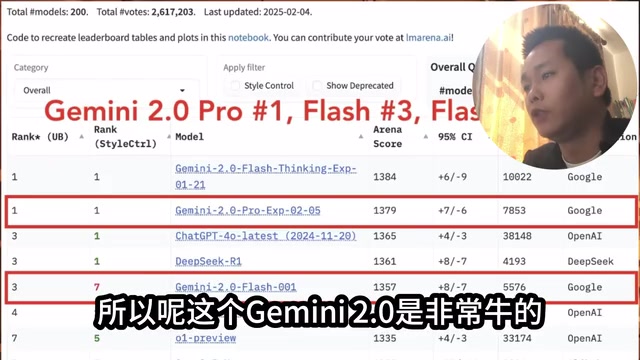
Google's latest Gemini 2.0 Pro has claimed the #1 spot across various benchmarks on the LM Arena leaderboard, demonstrating exceptionally strong overall capabilities.
About the LM Arena Evaluation System: LM Arena (formerly Chatbot Arena) is an anonymous model battle evaluation platform developed by a team at UC Berkeley. Its core mechanism lets real users blindly vote on responses from two models without knowing their identities, then calculates comprehensive rankings through an Elo rating system (derived from chess ranking algorithms). This evaluation method is considered more reflective of real-world model performance than traditional static benchmarks, as it relies on millions of human judgments rather than fixed test sets. Gemini 2.0 Pro taking the overall #1 position on this platform means it has received strong endorsement from real users across multiple dimensions including code, reasoning, and creative writing.
When we integrate such a top-tier large language model into the open-source no-code development tool Bolt.diy, we achieve an exciting combination — generating a complete APP from scratch with AI, without writing a single line of code.
More importantly, the entire process can be completed completely free of charge. This article walks through the complete workflow to help you get started quickly.
Tool Preparation: Setting Up a Free No-Code Development Environment
To run this no-code development workflow, you need three things:
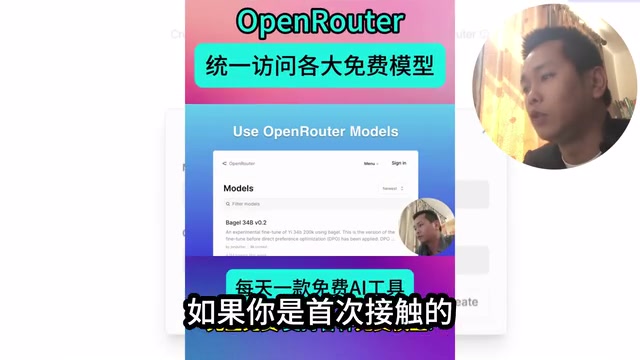
OpenRouter: Your Free Gateway to Gemini 2.0
OpenRouter is an AI model aggregation platform that provides unified API access to multiple large language models. Importantly, you can access Gemini 2.0 for free through OpenRouter, eliminating the costs that might come with using Google's API directly.
OpenRouter's Technical Architecture and Free Tier Strategy: OpenRouter is essentially a reverse proxy aggregation layer for AI models. Through a unified OpenAI-compatible API format, it wraps models from dozens of different providers — Claude, Gemini, Llama, and more — into a single calling interface. Developers only need to switch the model parameter without maintaining separate SDKs and authentication logic for each provider. The free quota typically comes from promotional partnerships with model providers — companies like Google provide OpenRouter with a certain amount of free token allocation in exchange for broader developer ecosystem coverage. This explains why calling Gemini 2.0 through OpenRouter can be free, while using Google AI Studio's API directly charges per token. For low-frequency personal projects, this free pathway is more than sufficient.
If you're using OpenRouter for the first time, you'll need to register an account and create an API Key, which will be used later when configuring Bolt.diy.
Bolt.diy: Open-Source No-Code Development Platform
Bolt.diy is an open-source AI-powered code generation tool that can be deployed and run locally. Its core philosophy is: you describe your requirements in natural language, and AI automatically generates the complete application code. Unlike online versions, Bolt.diy supports freely switching backend LLMs — this is exactly what enables us to integrate Gemini 2.0.
Technical Differences Between Bolt.diy and Commercial Bolt.new: Bolt.diy is the open-source fork of StackBlitz's commercial product Bolt.new. Bolt.new runs on cloud-based WebContainer technology — a sandbox technology that simulates a complete Node.js runtime environment within the browser, allowing code execution without any local dependency installation. Bolt.diy opens this capability to the community, allowing users to self-deploy and connect any model compatible with the OpenAI API format. Both share the same core code generation logic; the key differences are: the commercial version locks in specific models and charges by usage, while the open-source version is completely free but requires users to configure their own Node.js runtime environment (typically requiring Node 18+). This open-source strategy has also helped Bolt.diy rapidly accumulate community contributors who continuously add new model support.
Gemini 2.0 Pro: Significantly Enhanced Code Generation Capabilities
Gemini 2.0 Pro has shown significant improvements over its predecessor in code generation, logical reasoning, and other areas. Using it as Bolt.diy's backend model means higher quality generated code and more complete applications.
Hands-On Demo: Generating a To-Do APP with Natural Language
Step 1: Launch Bolt.diy and Configure the Gemini 2.0 Model
After getting Bolt.diy running locally, go to the settings interface and complete two key configurations:
- Select the model: Find the Gemini 2.0 version provided by OpenRouter in the model list
- Enter the API Key: Paste the API Key you created on OpenRouter into the corresponding input field
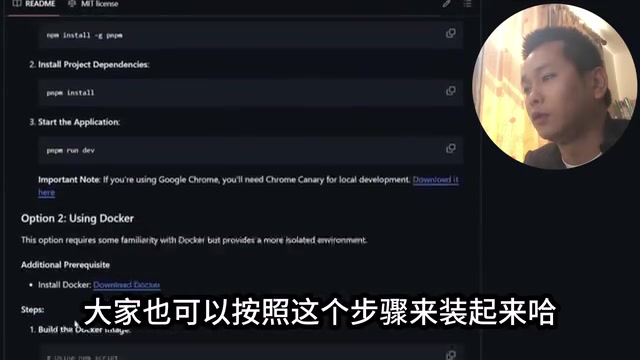
Once configured, Bolt.diy is connected to Gemini 2.0 and ready to go.
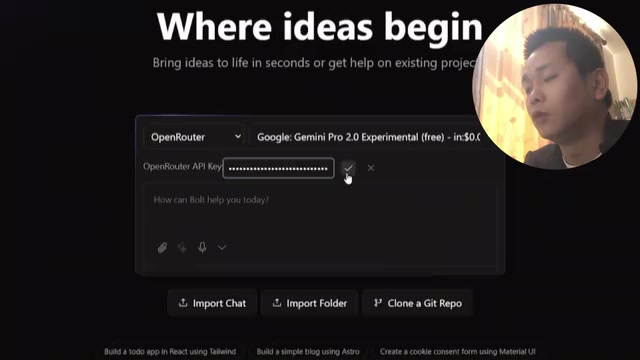
Step 2: Describe Your Requirements in Natural Language
This is the easiest step in the entire workflow. You simply tell the AI what application you want in the input box using natural language. For example, the demo case is:
"Generate a to-do application"
With just this simple sentence, Gemini 2.0 begins automatically writing code. You can watch the code being generated in real-time on the interface, as if a programmer were typing at lightning speed.
Technical Principles Behind AI Code Generation: The core principle of current AI code generation tools is based on large language models' in-context learning capability — during training, the model absorbs tens of billions of lines of open-source code from GitHub, developing a deep understanding of code structures, framework conventions, and design patterns. Bolt.diy builds on this by adding carefully designed system prompts that guide the model to output complete project structures in specific formats, rather than scattered code snippets. This is why the same Gemini 2.0, when called through Bolt.diy, can directly output a runnable complete application instead of just code fragments.
Step 3: Preview Results and Iterate
After code generation is complete, Bolt.diy provides a direct application preview. From the demo results, a fully functional to-do application was essentially "spoken" into existence — complete with task adding, list display, and other basic features, with a clean interface to boot.
If you're not satisfied with the generated result, you can continue making modification requests in natural language, such as "add a dark mode" or "add task categorization," and the AI will iterate on the existing codebase.
Advantages and Limitations of the Bolt.diy + Gemini 2.0 Approach
Advantages
- Completely free: Gemini 2.0 is called for free through OpenRouter, and Bolt.diy itself is open-source and free
- Zero coding barrier: No programming background needed — development is done entirely through natural language
- Switchable models: Not satisfied with Gemini 2.0's output? Switch to another model anytime
- Local deployment: Data doesn't pass through third-party servers (except for model API calls), providing better privacy
Limitations
- Complex applications remain challenging: Large language models have "context window" limitations — when application logic becomes complex enough to span dozens of files, involving database schema design and backend API authentication, the model struggles to maintain global consistency within a single conversation, easily producing variable naming conflicts and interface mismatches. This is why the approach currently works best for front-end-focused small to medium applications. For logic-heavy applications involving databases and backend services, purely AI-generated code may require manual intervention.
- Limited free quota: OpenRouter's free tier typically has rate or quota limits; heavy usage may require payment
- Requires local environment: Installing and running Bolt.diy requires some environment configuration (Node.js, etc.), which still presents a barrier for complete beginners
Conclusion: A Practical Starting Point for No-Code Development
The Bolt.diy + Gemini 2.0 combination provides a highly practical pathway for no-code development. Especially for rapid prototype validation, small tool development, and personal projects, this approach offers exceptional efficiency. As LLM capabilities continue to improve, the boundaries of AI-assisted development will keep expanding.
If you haven't tried AI no-code development yet, why not start with this simple to-do application and experience firsthand the development approach where you "say it and it works."
Related articles
 Tutorials
Cursor + Codex Dual-IDE Collaboration: A Practical Methodology for Open-Source Project Customization
A complete methodology for open-source project customization based on real-world experience, detailing the Cursor+Codex dual-IDE workflow, seven-stage process, MVP validation, and AI source code reading techniques.
 Tutorials
Cursor Multi-Agent in Practice: Building a Full-Stack Next.js Blog in 50 Minutes
Build a full-stack blog in 50 minutes using Cursor IDE's multi-Agent mode with Next.js, Clerk auth, and Supabase. Learn the 4-phase AI Agent workflow and key integration pitfalls.
 Tutorials
Building an AI Software Factory from Scratch: A Cursor Engineer's Hands-On Experience with Multi-Agent Collaboration
Cursor engineer Eric shares practical insights on building an AI software factory: automation levels, guardrail design, parallel Agent management, and scaling to 1000+ Agents for 24/7 development.