Bolt DIY Setup Guide: Complete Guide to the Free Open-Source AI Coding Tool
Bolt DIY Setup Guide: Complete Guide t…
Bolt DIY is a free open-source AI coding tool that builds websites and apps at zero cost with free APIs.
Bolt DIY is the open-source free version of Bolt.new, supporting integration with multiple AI model APIs including Google Gemini, running a complete development environment in the browser. Setup takes just two minutes, and through natural language you can quickly generate high-performance websites and apps. AI-generated code scores 99 for performance and 100 for SEO in PageSpeed tests, far surpassing WordPress. It also supports screenshot-driven design, multi-model switching, and other advanced features, making it the most cost-effective zero-cost development solution available.
Want to build websites, apps, and tools for free? Bolt DIY is a completely free, open-source AI coding tool that, combined with free APIs like Google Gemini, lets you accomplish in minutes what used to take days or even weeks of development work. This article provides a detailed walkthrough of setting up Bolt DIY from scratch and demonstrates its powerful capabilities.
What is Bolt DIY?
Bolt DIY is the open-source, free version of Bolt.new, hosted on GitHub. Bolt.new was developed by the StackBlitz team, and its core technology is based on WebContainers—a breakthrough technology that runs a complete Node.js development environment directly in the browser. The open-source Bolt DIY liberates this capability, allowing developers to deploy locally and freely integrate any LLM (Large Language Model) API, forming a "Bring Your Own Model" (BYOM) open architecture. This represents an important trend in AI tools evolving from closed SaaS to open infrastructure.
Compared to the paid version Bolt.new, it's not only completely free but also offers more customization—you can freely choose and switch between different AI model APIs, including Google Gemini, Anthropic Claude, Perplexity, and more.
Its core advantages include:
- Completely free: The tool itself costs nothing, and works with free APIs
- Local deployment: Data and projects stay on your own machine, ensuring privacy
- Flexible API switching: Choose the most suitable AI model for different tasks
- Richer features: Supports file attachments, voice commands, chat export, and other features not available in the paid version
Environment Setup: Get Started in Two Minutes
Prerequisites
Setting up Bolt DIY requires two free tools: Node.js and Docker. Make sure they're installed and running in the background. Then head to the Bolt DIY GitHub repository and follow the instructions.
The steps are straightforward: open your terminal and copy-paste the commands listed on the GitHub page one by one. The entire process takes about two minutes. If you encounter any errors, you can screenshot them and send them to ChatGPT, which will help you troubleshoot quickly.
Once setup is complete, the terminal will provide a local access address (localhost URL). Copy it into your browser, and you'll see the Bolt DIY interface.
Configuring Free API Keys
Before you start coding, you need to insert an API key. The recommended choice is Google Gemini 2.0 Flash, a multimodal flagship model launched by Google DeepMind in 2025, optimized for speed and efficiency. It supports multimodal inputs including text, images, and audio, with a context window of up to 1 million tokens, and performs exceptionally well on code generation tasks. Through the free API quota provided by Google AI Studio, individual developers can make dozens of requests per minute—more than enough for daily development needs. This stands in stark contrast to OpenAI's GPT series' purely paid model, making it one of the most developer-friendly top-tier models currently available.
Here's how to get it:
- Visit AI Studio
- Create an API key (completely free)
- Return to Bolt DIY, select Google Gemini 2.0 Flash from the API list
- Paste your API key
Besides Gemini, you can also choose Perplexity (supports real-time web access), Anthropic Claude 3.5 Sonnet (strongest coding capabilities), and other models, switching between them at any time during your project.
Hands-On Demo: Building Apps and Websites with Bolt DIY
Quickly Generate Interactive Applications
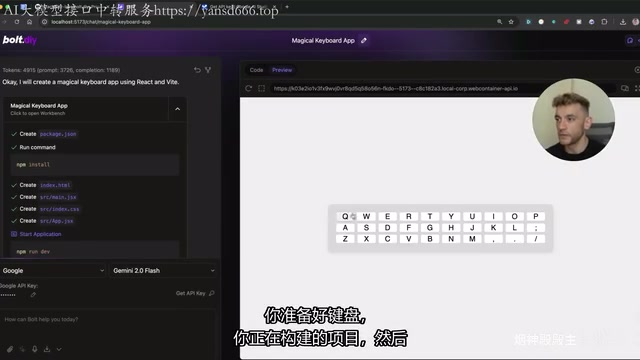
Bolt DIY works similarly to ChatGPT—there's a chat window on the left and real-time code generation with preview on the right. For example, type "build me a magical keyboard app" and within seconds you'll have an interactive keyboard application.
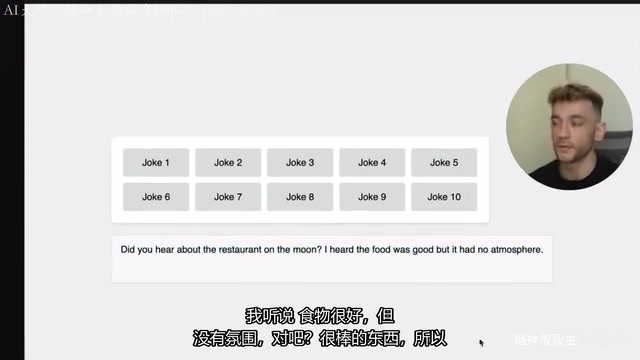
You can continue iterating through natural language. For instance, tell a "dad joke generator" app to "change the button to bright orange, add animations, and add a rainbow background," and Bolt will automatically modify the existing project code, applying all changes while preserving the original functionality.
Building SEO-Friendly, High-Performance Websites
This is one of Bolt DIY's most practical use cases. You can quickly generate a complete blog website or landing page with a single prompt. For example:
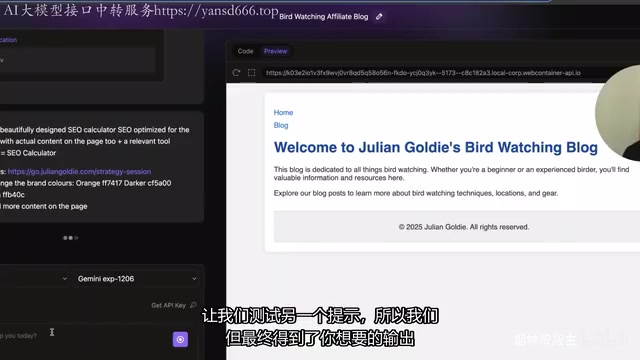
"Create an affiliate SEO blog about bird watching. My name is Julian Goldie. Here's my Amazon affiliate ID. Make this website about birdwatching."
The generated website is not only structurally complete but produces code quality far superior to WordPress. The reason: WordPress sites typically rely on numerous plugins (page builders, SEO plugins, caching plugins, etc.), generating redundant JavaScript and CSS. AI-generated static code naturally avoids this problem, outputting streamlined HTML/CSS/JS with no unnecessary dependencies.
The test results are impressive: running the AI-generated website through Google PageSpeed Insights yields a performance score of 99 and an SEO score of 100. This tool is based on the Lighthouse engine and comprehensively evaluates LCP (Largest Contentful Paint), INP (Interaction to Next Paint), CLS (Cumulative Layout Shift), and other Core Web Vitals—metrics that have been incorporated into Google's search ranking algorithm since 2021, directly affecting a website's position in search results. Comparable WordPress sites often can't even pass Core Web Vitals, meaning websites built with Bolt DIY have an inherent structural advantage in search engine rankings.
One-Click Deployment
Once your project is complete, you can publish your website to the internet with these steps:
- Click "Download" to download the complete code
- Use "Push to GitHub" to push the code to a GitHub repository
- Import the GitHub project on a free hosting platform like Netlify for one-click deployment
Netlify is one of the most popular static website hosting platforms, built on the JAMstack architecture philosophy. Its free tier provides 100GB bandwidth per month, automatic HTTPS, and global CDN distribution. More importantly, it supports a "Git-based deployment" CI/CD workflow—every time you push code to GitHub, the website automatically rebuilds and publishes, dramatically lowering the operations barrier. Similar platforms include Vercel and Cloudflare Pages, all three offering generous free tiers and serving as the go-to infrastructure for independent developers.
Throughout the entire process, the only paid component is domain hosting costs.
Advanced Tips: Screenshot-Driven Design Optimization
When you're not satisfied with the generated website's appearance, there's a highly practical technique: the screenshot imitation method.
How to do it:
- Find a website design you like online
- Take a screenshot and upload it to Bolt DIY's chat window
- Type "Follow the same design style as this screenshot"
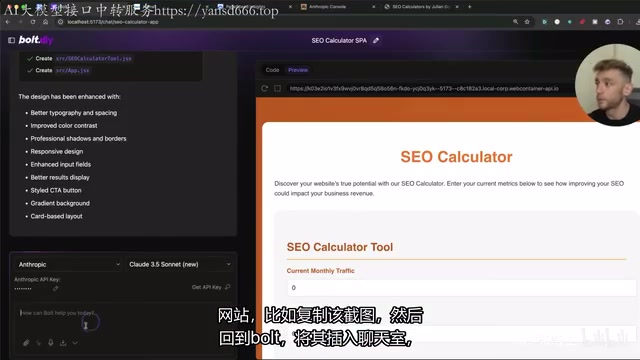
This feature works thanks to modern LLMs' multimodal visual understanding capabilities. The model performs semantic analysis on the screenshot, identifying color hierarchies (primary/secondary/background colors), typography patterns (font size ratios, line height), component patterns (cards, navigation bars, CTA button styles), and overall layout grids. Essentially, it automates "Design-to-Code"—work that traditionally required professional front-end engineers. Bolt will redesign your project in a similar style, with remarkably impressive results—transforming a plain page into a professional-grade design instantly.
Here's a key tip: during the design optimization phase, switch your API to Anthropic Claude 3.5 Sonnet. It performs better in this scenario because its training data includes a large volume of high-quality UI code examples, offering higher precision in reproducing visual details and more accurately translating visual intent into semantic CSS and component structures. While it's a paid API, the cost is very low, making it ideal for final project polish.
Bolt DIY vs. Bolt.new Feature Comparison
| Feature | Bolt DIY (Free) | Bolt.new (Paid) |
|---|---|---|
| Cost | Free | Requires purchasing tokens |
| API Selection | Freely choose any API | Fixed, not customizable |
| File Attachments | ✅ | ❌ |
| Voice Commands | ✅ | ❌ |
| Chat Export | ✅ | ❌ |
| Deployment | Self-hosted locally | Cloud-hosted |
Overall, Bolt DIY surpasses the paid version in both features and flexibility. The only barrier is needing to set up the environment yourself—but as mentioned earlier, this process takes just two minutes.
Conclusion
Bolt DIY represents an important trend in AI coding tools: the democratization of professional-grade development capabilities. Whether you want to quickly build an SEO blog, create a small utility, or develop a complete application, it can help you accomplish it in minutes. Combined with the free Google Gemini API, the entire process is zero-cost.
For non-technical entrepreneurs and content creators, this is likely the most cost-effective solution currently available for website building and application development.
Key Takeaways
- Bolt DIY is a completely free, open-source AI coding tool that, combined with Google Gemini's free API, enables zero-cost website and app development
- Setup takes only two minutes—install Node.js and Docker, then follow the GitHub instructions
- AI-generated website code quality far exceeds WordPress, with PageSpeed performance scores reaching 99 and SEO scores of 100
- Supports screenshot-driven design—upload a screenshot of a website you like and AI will imitate its style to redesign your project
- Compared to the paid Bolt.new, the free Bolt DIY offers more features and supports freely switching between API models
Related articles
 Tutorials
Cursor + Codex Dual-IDE Collaboration: A Practical Methodology for Open-Source Project Customization
A complete methodology for open-source project customization based on real-world experience, detailing the Cursor+Codex dual-IDE workflow, seven-stage process, MVP validation, and AI source code reading techniques.
 Tutorials
Cursor Multi-Agent in Practice: Building a Full-Stack Next.js Blog in 50 Minutes
Build a full-stack blog in 50 minutes using Cursor IDE's multi-Agent mode with Next.js, Clerk auth, and Supabase. Learn the 4-phase AI Agent workflow and key integration pitfalls.
 Tutorials
Building an AI Software Factory from Scratch: A Cursor Engineer's Hands-On Experience with Multi-Agent Collaboration
Cursor engineer Eric shares practical insights on building an AI software factory: automation levels, guardrail design, parallel Agent management, and scaling to 1000+ Agents for 24/7 development.