Build a Claude Code Agentic OS in 3 Steps — Stop Using AI Like a Slot Machine
Build a Claude Code Agentic OS in 3 St…
Transform Claude Code into an optimizable, deliverable Agentic OS in three systematic steps.
This article presents a methodology for upgrading Claude Code from random usage into a systematic Agentic Operating System. It's built through three layers: an architecture layer that breaks work into Domains → Tasks → Skills → Automation; a memory layer using Obsidian's Raw/Wiki/Output structure as a lightweight RAG alternative paired with Claude.md configuration; and an observability layer with a visual dashboard that turns skills into buttons for team empowerment and system monitoring — ultimately creating an optimizable, trackable, and deliverable work system.
Most people use Claude Code like a slot machine — random prompts, random tasks, random results. But if you shift your mindset and build Claude Code into an Agentic OS (Agentic Operating System), you get a complete system that's optimizable, trackable, and even deliverable to teams and clients.
What is an Agentic OS? An Agentic Operating System is a system design paradigm that has emerged alongside the growing capabilities of large language models. While traditional operating systems schedule hardware resources, an Agentic OS orchestrates AI capabilities, tool calls, and workflows. This concept grew out of the AI Agent field — Agents don't just passively answer questions; they're autonomous systems capable of planning, calling tools, and executing multi-step tasks. Companies like Anthropic and OpenAI released models supporting Tool Use and multi-step reasoning around 2024, making it possible to build truly Agentic systems. Claude Code, with its file read/write, terminal execution, and code running capabilities, is naturally suited as the execution core of an Agentic OS.
The core logic of this methodology is: Daily workflows → Skills → Automation → Architecture, all wrapped together with a memory layer and an observability layer. Here's how to build this Agentic OS in three steps.
Step 1: Architecture Layer — Systematize the Chaos
Breaking Down Domains into Skills
Architecture is the core of the entire Agentic OS and where real value is generated. The idea is simple: you're already using Claude Code, but if you're like most people, you just have a terminal open doing random odd jobs with no system whatsoever.
The right approach is to break down your personal and business work into distinct Domains. For a content creator, domains might include: memory management, productivity, research, content creation, community operations, etc. Your specific domains depend on your work, but the key is having clear categories.
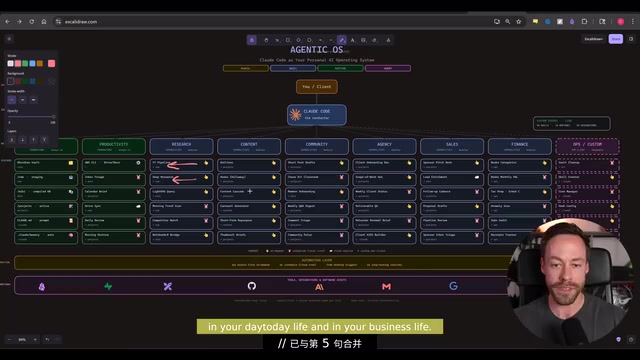
Each domain contains multiple independent Tasks. For example, under the "Research" domain, you might have: YouTube research, deep research, lightweight RAG processing, morning briefing generation, competitor monitoring, etc.
Tasks Become Skills, Skills Become Automation
If these tasks are repetitive, they can be transformed into Skills. Skills range from simple to complex:
- Simple skills: Like "search YouTube" — instead of manually opening a browser to search every time, encapsulate it as a skill that delivers a complete report each time
- Complex skills: Like "deep research" — requiring simultaneous checks across Twitter, GitHub, web pages, YouTube, plus reviewing historical records in Obsidian, revisiting past content, and synthesizing output
Once skills are defined, the next step is determining which ones are suitable for automation. Not everything needs to be automated, but some things are natural fits. For example, "morning trend scanning" is perfect — every morning it automatically generates a report in your Obsidian vault telling you the latest developments in AI and from your competitors.
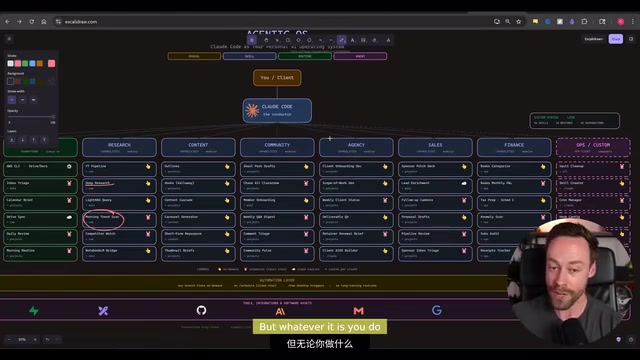
Automation comes in two types: local automation and remote automation. The good news is you don't even need to agonize over which to choose — just tell Claude Code what you need and it'll handle it.
The Real Value of Architecture
This architecture's value extends far beyond personal use. If you work in a team or with clients, the significance multiplies:
- You can hand the system to team members who "should be using AI but never will"
- You can build the exact same system for clients and deliver it as a package
- Team members don't even need to touch the terminal — they just click buttons to execute skills
Step 2: Memory Layer — Knowledge Management with Obsidian
Why Obsidian as the Memory Layer
Just having skills and automation running in the system isn't enough — we also need to view history and store information. Before understanding Obsidian's advantages, it helps to understand what it replaces — RAG systems.
RAG (Retrieval-Augmented Generation) is the standard technical architecture for combining external knowledge bases with large language models: documents are chunked, vectorized, and stored in vector databases (like Pinecone or Chroma), then relevant fragments are retrieved at query time before being passed to the model for generation. This approach is powerful but expensive to deploy and complex to maintain. The Obsidian + Markdown approach proposed by Andrej Karpathy (former Tesla AI Director, OpenAI co-founder) is essentially a lighter alternative — leveraging Claude's ultra-long context window (supporting 200K tokens) to directly read structured Markdown files, bypassing the vector database entirely. For personal knowledge base scales, this approach strikes an excellent balance between cost and effectiveness.
Obsidian's specific advantages as Claude Code's memory layer:
- Completely free
- Essentially just a convenient interface for working with Markdown files
- Sits between a full RAG system and a lightweight solution — just right for 99.9% of people
- No need for complex vector database solutions — Claude handles Markdown files perfectly
Karpathy-Style File Structure
Following the Obsidian RAG structure proposed by Andrej Karpathy, your Vault should have three core subfolders:
- Raw folder: A temporary staging area for chat logs with Claude Code, research materials, and miscellaneous content — essentially a working area
- Wiki folder: The middle layer, extracting materials from Raw and organizing them into structured Wiki articles, preventing the system from being just a pile of disorganized information
- Output folder: The output layer, storing final deliverables like slides, reports, etc.
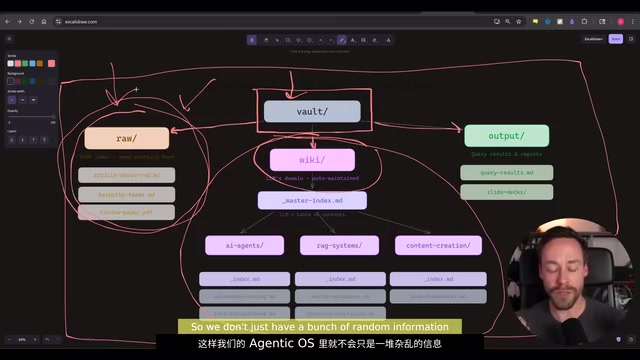
For example: you research RAG systems, all raw materials go into the Raw folder; Claude Code generates a detailed report stored in the Wiki knowledge base; if you need to create slides, they go to the Output folder. The data flow is clear and straightforward.
The Claude.md Configuration File is Essential
In this system, you must create a proper Claude.md file. To understand its role, you first need to understand the concept of System Prompts. A system prompt is a background instruction injected into the model before each conversation begins, defining the AI's role, behavioral norms, and tool usage — it's the core practice of "meta-prompting" in prompt engineering. In Claude Code, the CLAUDE.md file in the project root directory is automatically loaded as context, essentially giving the model a "work manual."
Specifically, it tells Claude Code:
- What's going on in the system and what your purpose is
- How it should operate and what Claude Code should focus on
- The memory mechanism and how memory is structurally organized
The Claude.md file is essentially appended to every prompt you give. If we inform it how memory is structured, it will follow that structure, find what it needs with fewer tokens, and ultimately give you a more efficient, lower-cost system. From a token economics perspective, clear structural descriptions allow the model to find correct information with fewer reasoning steps, directly reducing API call costs — this is why large AI engineering teams universally treat system prompts as core assets under version control.
This step is essential and cannot be skipped. The memory system also lets us track progress and optimize — if everything runs independently, we'll never know what's actually working.
Step 3: Observability Layer — Dashboards and Team Empowerment
Turning Skills into Clickable Buttons
The core of the observability layer is a visual dashboard that lets us operate the entire Agentic OS outside the terminal. The approach is to turn all skills and automations into buttons — one click, anyone can use them.
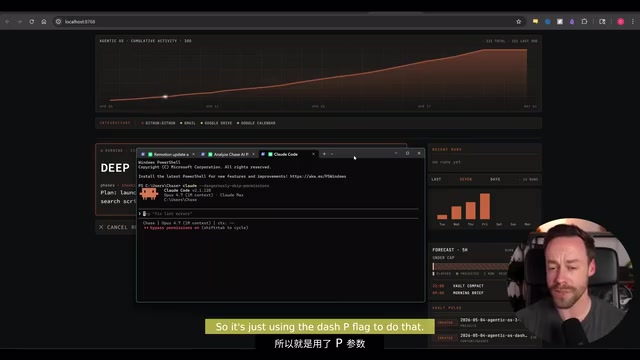
For example, clicking the "Deep Research" button auto-fills the prompt, you just enter the research topic, and the system launches a headless Claude Code instance running in the background, returning results directly.
What is Headless Mode? Headless execution originally comes from browser automation, referring to running programs without a graphical interface. In the AI Agent context, headless execution means an AI instance runs autonomously in the background without requiring real-time user interaction. Claude Code supports launching in non-interactive mode via command-line parameters, receiving task descriptions and autonomously completing multi-step operations before returning results. This mode is key to building automated workflows — it allows embedding AI capabilities into cron jobs, CI/CD pipelines, or web service backends, achieving truly "unattended" automation.
Deep research output provides an overview, links to all sources, and corresponding links in Obsidian, forming a complete information loop.
Customizing the Observability Dashboard
Another important function of the dashboard is system observability. Observability is a software engineering concept measuring how well a system's internal state can be inferred from the outside, typically achieved through three dimensions: Logs, Metrics, and Traces. In AI Agent systems, observability is particularly significant: since LLM outputs are non-deterministic, without observability you can't determine whether the system is working as expected or identify which prompting strategies are more effective. Tools like LangSmith and Langfuse, designed specifically for LLM application observability, have formed their own market segment, while the dashboard approach described here is a lightweight self-built practice.
You can display on the dashboard:
- Usage data (5-hour window, weekly window, number of sessions used that day)
- Recent Vault change logs
- Predictions and trend analysis
- Any metrics you want to track outside the terminal
This part is highly customizable — ideally it should connect to your various skills, and whatever you want to track goes here. The terminal is powerful but has limitations, and this visual system bypasses those constraints. By tracking token usage, task execution frequency, knowledge base change logs, and other metrics, the Agentic OS's operational state transforms from a "black box" into a "white box," providing a data foundation for continuous optimization.
Team Empowerment is the Ultimate Value
Frankly, if you're already proficient with Claude Code and terminal operations, turning skills into buttons doesn't mean much for you personally. But if you're doing AI agent-related work, especially with team collaboration, this becomes incredibly important.
You can teach anyone to get started immediately — put them in front of the Agentic OS, tell them to execute a certain task, here's the skill library, and they can do it. You're essentially giving them the power of Claude Code without them ever needing to touch the terminal.
Summary: Build Your Agentic OS in Three Steps
- Architecture Layer: Map out your work domains, break down tasks, transform repetitive work into skills, then automate suitable skills
- Memory Layer: Build a knowledge base with Obsidian, set up a rational file structure and Claude.md configuration, making data flow clear and controllable
- Observability Layer: Build a visual dashboard, turn skills into buttons, enable team empowerment and system monitoring
Integrate these three layers and you have an Agentic Operating System powered by Claude Code. It's no longer a random slot machine — it's a complete work system that's optimizable, trackable, and deliverable. Even if you only complete the architecture setup in Step 1, you've already surpassed the vast majority of Claude Code users.
Key Takeaways
- The core logic of an Agentic OS is transforming daily workflows into skills, skills into automation, and automation into architectural systems
- The architecture layer is the most important step: break work down into Domains → Tasks → Skills → Automation for systematic management
- The memory layer uses Obsidian's Raw/Wiki/Output three-tier file structure as a lightweight replacement for complex RAG systems, paired with a Claude.md file for efficient knowledge management
- The observability layer turns skills into buttons via a visual dashboard, letting team members use AI capabilities without touching the terminal; simultaneously transforming system state from a "black box" into a "white box"
- The ultimate value of this system lies in its deliverability — it can be packaged for team members or clients, enabling scalable AI empowerment
Related articles
 Tutorials
Cursor + Codex Dual-IDE Collaboration: A Practical Methodology for Open-Source Project Customization
A complete methodology for open-source project customization based on real-world experience, detailing the Cursor+Codex dual-IDE workflow, seven-stage process, MVP validation, and AI source code reading techniques.
 Tutorials
Cursor Multi-Agent in Practice: Building a Full-Stack Next.js Blog in 50 Minutes
Build a full-stack blog in 50 minutes using Cursor IDE's multi-Agent mode with Next.js, Clerk auth, and Supabase. Learn the 4-phase AI Agent workflow and key integration pitfalls.
 Tutorials
Building an AI Software Factory from Scratch: A Cursor Engineer's Hands-On Experience with Multi-Agent Collaboration
Cursor engineer Eric shares practical insights on building an AI software factory: automation levels, guardrail design, parallel Agent management, and scaling to 1000+ Agents for 24/7 development.