Claude Code Segfaulted All Day — Turned Out to Be a Node.js Version Incompatibility
Claude Code Segfaulted All Day — Turne…
A teen debugged Claude Code segfaults all day — the fix was switching from Node.js V24 to 22 LTS.
A 16-year-old developer in rural China spent an entire day debugging persistent segfaults in Claude Code. After ruling out API keys, network issues, and configuration problems, he used MCP tools to diagnose from a different angle and discovered the root cause: Node.js V24's ABI changes are incompatible with Claude Code's native modules. Switching to Node.js 22 LTS immediately resolved the issue. The article summarizes practical lessons including preferring LTS versions for AI tools and using nvm for version management.
A 16-Year-Old's Daily Life as an AI Entrepreneur
In rural Gansu, China, a 16-year-old named Bruce chose an unconventional path — dropping out of school to start a business, with AI as his tool. Today he shared a debugging experience that made him "cry from stupidity": Claude Code crashed for an entire day, and the root cause turned out to be embarrassingly simple.
Although this story is brief, it's a lesson worth documenting for every developer currently using AI programming tools.
The Symptom: Claude Code Crashes with Segfault on Startup
While using Claude Code, Bruce encountered a persistent error — Segmentation Fault and Core Dump. No matter how many times he restarted, the problem persisted.

A Segmentation Fault is a protection mechanism triggered at the operating system level. When a program attempts to read or write to an unauthorized memory address, the OS kernel sends a SIGSEGV signal to the process, forcibly terminating it. A Core Dump is a memory snapshot captured at the moment of the crash, typically saved as a core file on disk for developers to analyze post-mortem.
In the Node.js ecosystem, segfaults have a unique characteristic: Node.js itself is powered by the V8 engine written in C++. When JavaScript calls native modules (Native Addons, typically binary files with .node extensions), these native modules are compiled against a specific Node.js ABI (Application Binary Interface) version. Once the runtime version mismatches the compile-time version, memory layout misalignment occurs, triggering a segfault. This is the fundamental reason why native modules must be recompiled or reinstalled after version upgrades. These low-level errors are often baffling because they can be caused by countless factors — from system configuration to dependency versions, and even hardware issues.
The Investigation: Ruling Out Common Causes One by One
Facing this thorny problem, Bruce systematically checked the usual suspects:
- API Key check: Confirmed the key was correctly configured, ruling out authentication issues
- Network check: Confirmed connectivity was fine, ruling out connection timeouts
- Configuration file check: Reviewed all relevant configs line by line, found no anomalies
All routine checks came back clean. At this point, Bruce started wondering: Could my computer itself be broken?
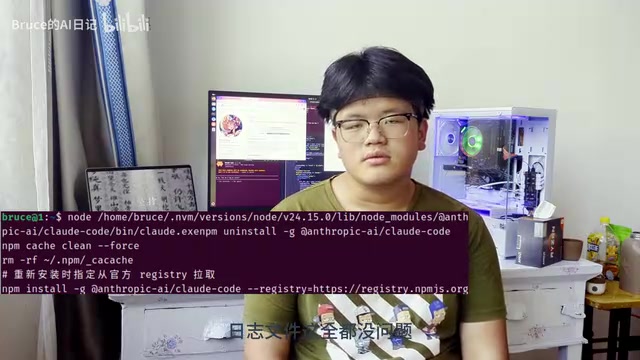
After conventional methods proved ineffective, he deployed a clever approach — using MCP to read local files for further diagnosis.
MCP (Model Context Protocol) is an open protocol standard released by Anthropic in late 2024, designed to solve the fragmentation problem of integrating AI models with external tools and data sources. MCP uses a client-server architecture: the AI model acts as a client, communicating with various MCP Servers through standardized JSON-RPC protocol. These servers can encapsulate capabilities like file system access, database queries, and API calls. In this case, Bruce used MCP's file system reading capability to bypass the crashed Claude Code main process, directly letting the AI model read local log files, configuration files, and error reports — this approach of "using AI tools to diagnose AI tool failures" perfectly demonstrates the core value of MCP's protocol design: decoupling AI capabilities from the local environment, so that even when one link in the toolchain fails, AI context awareness can be maintained through alternative paths. Through this method, he finally pinpointed the true root cause.
The Truth Revealed: Node.js V24 Is Incompatible with Claude Code
The final discovery was laughably simple:
Node.js V24 is incompatible with the npm version that Claude Code depends on.

Node.js officially maintains two parallel release tracks. Even-numbered versions (like 18, 20, 22) enter the LTS (Long Term Support) phase, providing up to 30 months of maintenance; while odd-numbered versions and even-numbered versions that haven't yet entered LTS (like the current V24) are called Current versions, maintained for only 6 months, primarily for experimenting with new features and collecting community feedback. Node.js V24 was released in 2025, introducing major V8 engine upgrades and new built-in APIs, but a large number of packages in the npm ecosystem that depend on native modules haven't yet released pre-compiled binaries for the new ABI version, causing runtime crashes after installation. This is the essential nature of the problem Claude Code encountered: some underlying dependency in the toolchain contains native modules that trigger ABI-incompatible segfaults under V24.
The solution was equally straightforward — switch the Node.js version to 22 LTS (Long Term Support), then reinstall Claude Code.
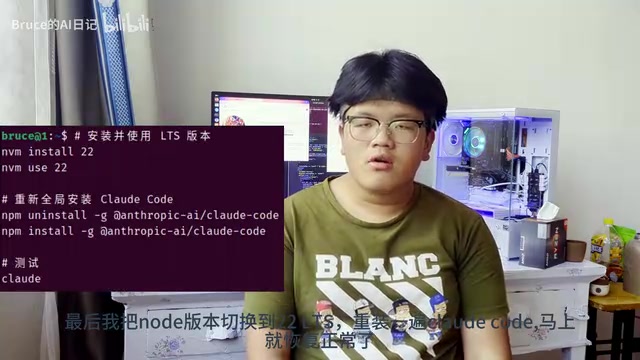
After the switch, Claude Code immediately returned to normal operation. A problem that consumed an entire night was solved by a single version number.
Lessons Learned: Version Compatibility Guide for AI Programming Tools
Although this case might seem "basic," it's actually an extremely common pitfall in development. The following points are worth noting for all developers using AI programming tools:
Always Prefer Node.js LTS Versions
The latest Node.js version (Current) often contains experimental features, and third-party packages in the ecosystem may not adapt in time. LTS versions are divided into Active LTS (actively maintained, 18 months) and Maintenance LTS (security fixes only, 12 months) phases, providing approximately 30 months of stable support overall. For production environments and toolchains, always use LTS (Long Term Support) versions. Currently, Node.js 22 LTS is the most stable choice.
Use nvm for Node.js Version Management
nvm (Node Version Manager) achieves Node.js version switching by modifying the shell's PATH environment variable, installing different Node.js binaries in isolated directories. Each version has a completely independent global npm package space, fundamentally eliminating dependency pollution between versions. It's recommended to create a .nvmrc file in the project root directory with the required version number. Team members only need to run nvm use to automatically switch. Combined with CI/CD pipelines, this ensures build environment consistency. For Windows users, nvm-windows is a functionally equivalent alternative.
nvm install 22
nvm use 22
Segfaults Aren't Necessarily a Big Deal
Don't panic when you encounter a Segmentation Fault. Although it looks very "low-level" and "serious," in the Node.js ecosystem, native module crashes caused by version incompatibility are one of the most common causes. Native modules (.node files) are bound to a specific Node.js ABI version at compile time. When the runtime version doesn't match, memory layout misalignment inevitably triggers a segfault. Check runtime versions and dependency compatibility first — this often leads to a quick resolution.
When Routine Debugging Fails, Think from a Different Angle
After exhausting checks on API Key, network, and configuration files, Bruce pivoted to using MCP tools to diagnose the problem from another dimension. This approach is worth emulating. The core of debugging isn't brute force — it's systematically narrowing down the problem scope. When direct tools fail, leveraging side-channel methods (like MCP file reading, strace system call tracing, ldd dependency checking, etc.) can often open new diagnostic perspectives.
Final Thoughts
A 16-year-old from rural Gansu chose to drop out of school and start a business with AI, battling code late into the night every day. Even after being "beaten up all day," he continues the next day. Technical skills can be accumulated over time, but this kind of resilience and bias toward action is what's truly scarce.
As he put it himself: "Another day of getting beaten up by AI. Tomorrow, we continue."
Related articles
 Tutorials
Cursor + Codex Dual-IDE Collaboration: A Practical Methodology for Open-Source Project Customization
A complete methodology for open-source project customization based on real-world experience, detailing the Cursor+Codex dual-IDE workflow, seven-stage process, MVP validation, and AI source code reading techniques.
 Tutorials
Cursor Multi-Agent in Practice: Building a Full-Stack Next.js Blog in 50 Minutes
Build a full-stack blog in 50 minutes using Cursor IDE's multi-Agent mode with Next.js, Clerk auth, and Supabase. Learn the 4-phase AI Agent workflow and key integration pitfalls.
 Tutorials
Building an AI Software Factory from Scratch: A Cursor Engineer's Hands-On Experience with Multi-Agent Collaboration
Cursor engineer Eric shares practical insights on building an AI software factory: automation levels, guardrail design, parallel Agent management, and scaling to 1000+ Agents for 24/7 development.