Claude Code Toolbox: One-Click Deployment Tutorial for the Latest Official Version

Chinese developer launches Claude Code one-click deployment toolbox with flexible multi-model API Key support.
A Chinese developer shared a self-developed Claude Code toolbox on Bilibili that enables one-click installation and deployment of the latest official version 4.7, with support for configuring various model API Keys. The toolbox addresses three major deployment obstacles faced by Chinese users: network access, environment dependencies, and authentication configuration, significantly lowering the barrier to entry. However, users should be aware of third-party tool security risks, including supply chain attacks, key leakage, and man-in-the-middle attacks.
Overview
Recently, a Chinese developer shared a self-developed Claude Code toolbox on Bilibili that enables one-click installation and deployment of the latest official Claude Code version 4.7, with support for configuring various model API Keys. For users who want to quickly get started with Claude Code but are struggling with deployment barriers, this toolbox offers a convenient new option.
Claude Code Technical Background
Claude Code is an AI programming assistant launched by Anthropic in 2025. It runs as a command-line tool that can directly understand codebase context in the terminal, execute file operations, run commands, and engage in multi-turn conversational programming. Unlike traditional IDE plugins (such as GitHub Copilot's completion mode), Claude Code adopts an agentic coding approach—meaning the AI doesn't just passively respond but can autonomously plan and execute complex programming tasks, including code refactoring, bug fixing, test writing, git operations, and more. Version 4.7 is the latest iteration to date, with continued optimization of context understanding capabilities and tool-calling stability, supporting analysis of larger-scale codebases.
Core Toolbox Features
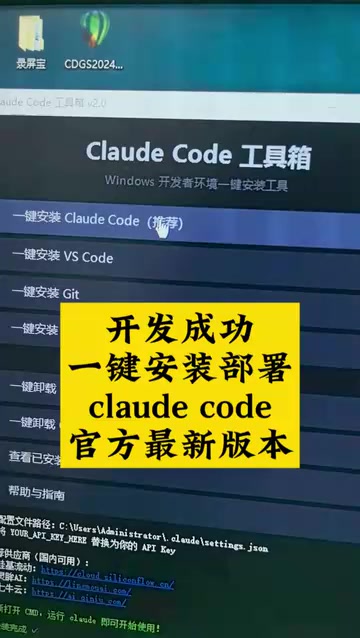
One-Click Installation and Deployment of Claude Code
The toolbox's biggest selling point is "one-click installation and deployment." As an AI programming tool from Anthropic, Claude Code's installation process is not user-friendly for Chinese developers—requiring handling of network environments, Node.js dependencies, authentication configuration, and multiple other steps. This toolbox packages and automates these steps, significantly lowering the barrier to entry.
Specifically, Chinese users face multiple obstacles when deploying Claude Code: First, at the network level, both npm package downloads and Anthropic API access require special network configuration. Second, there are runtime environment dependencies—Claude Code requires Node.js 18+ and has specific requirements for operating system environment variables. Finally, there's the authentication process—the official default uses OAuth authentication bound to an Anthropic account, and Chinese users often need to switch to API Key mode and configure custom endpoints (such as setting the ANTHROPIC_BASE_URL environment variable). Any error in these steps can cause installation failure, and the toolbox encapsulates these complex steps into an automated workflow.
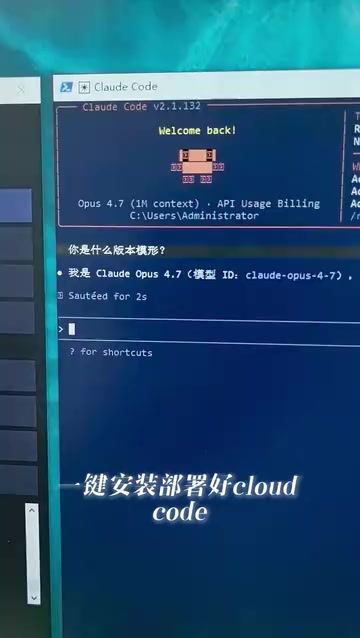
Direct Link to the Latest Open-Source Version
According to the developer, the toolbox directly links to the open-source Claude Code 4.7 native latest version, ensuring users get the latest official features. Users don't need to search for installation sources or worry about outdated versions. It's worth noting that Claude Code itself is open-sourced on GitHub (under the Apache 2.0 license), meaning the community can verify its code logic, while the toolbox simplifies the deployment path from source code to usable tool.
Flexible Model API Key Configuration
The toolbox supports configuring API Keys for various models according to user preferences, offering high flexibility. Users can choose different model service providers based on their needs and budget, accommodating diverse use cases.
From a technical perspective, Claude Code supports configuring different model providers through environment variables. Core variables include ANTHROPIC_API_KEY (Anthropic's official key), OPENAI_API_KEY (OpenAI-compatible interface), and custom API_BASE_URL (for pointing to third-party proxies or compatible services). Through this mechanism, users can route requests to different model service providers, including domestic API relay services, self-hosted model proxies, or even other large models that support the OpenAI-compatible protocol. This flexibility provides more options for both the cost and access methods of using Claude Code, freeing users from being locked into a single official subscription plan.

Usage Recommendations and Security Considerations
Security Considerations
For third-party toolboxes like this, users should note the following before use:
- Source Credibility: Confirm whether the toolbox's code is open-source and auditable
- API Key Security: Ensure the tool won't upload or leak key information when configuring keys
- Version Verification: Verify that the installed Claude Code version is genuinely the official original
Security risks of third-party deployment toolboxes are concentrated in three areas: First, supply chain attack risk—the toolbox may inject malicious code or replace official binaries during installation. Second, key leakage risk—once API Keys are collected by the toolbox's backend, attackers can steal users' API quotas or even access associated accounts. Third, man-in-the-middle risk—if the toolbox modifies the routing path of API requests, all interaction content with the model (including the code you're developing) could be intercepted. Users are advised to prioritize tools with fully open-source code that can be audited locally, and to verify whether there are abnormal network requests using packet capture tools (such as Wireshark or mitmproxy) before use.
Applicable Scenarios
This type of toolbox is primarily suitable for the following user groups:
- Developers unfamiliar with command-line operations
- Newcomers who want to quickly experience Claude Code
- Teams that need to deploy across multiple machines in batch
Summary
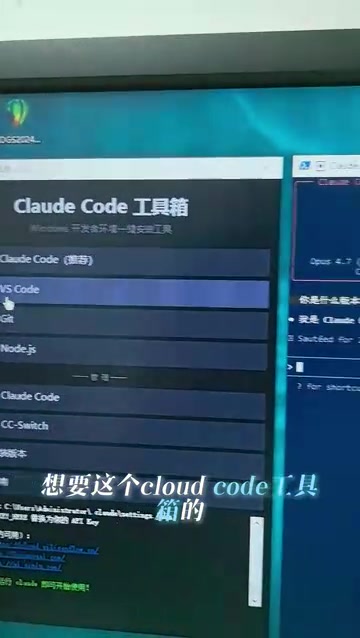
As AI programming tools become more widespread, auxiliary tools that lower deployment barriers will continue to grow. This Claude Code toolbox developed by a Chinese developer, with its one-click deployment and flexible API Key configuration design philosophy, provides Chinese developers with a more convenient way to use Claude Code. Users interested in trying it are advised to confirm its security first, and we also hope the developer can provide more detailed technical documentation and open-source code for community review.
From an industry trend perspective, AI programming tools are evolving from "assisted completion" to "autonomous agents," with Claude Code, Cursor, Windsurf, and other products representing different technical approaches. The emergence of toolbox-type projects reflects the community's strong demand for lowering the barriers to AI tool usage and signals that ecosystem development around core AI tools is accelerating.
Key Takeaways
- A Chinese developer created a Claude Code toolbox supporting one-click installation and deployment
- Directly links to the official Claude Code 4.7 latest native version
- Supports flexible configuration of various model API Keys, compatible with multiple service providers
- Lowers the deployment barrier for Chinese users (addressing three major obstacles: network, dependencies, and authentication)
- When using third-party toolboxes, pay attention to API Key security and code credibility; prioritize open-source auditable solutions
Related articles
 Tutorials
Cursor + Codex Dual-IDE Collaboration: A Practical Methodology for Open-Source Project Customization
A complete methodology for open-source project customization based on real-world experience, detailing the Cursor+Codex dual-IDE workflow, seven-stage process, MVP validation, and AI source code reading techniques.
 Tutorials
Cursor Multi-Agent in Practice: Building a Full-Stack Next.js Blog in 50 Minutes
Build a full-stack blog in 50 minutes using Cursor IDE's multi-Agent mode with Next.js, Clerk auth, and Supabase. Learn the 4-phase AI Agent workflow and key integration pitfalls.
 Tutorials
Building an AI Software Factory from Scratch: A Cursor Engineer's Hands-On Experience with Multi-Agent Collaboration
Cursor engineer Eric shares practical insights on building an AI software factory: automation levels, guardrail design, parallel Agent management, and scaling to 1000+ Agents for 24/7 development.