CLAUDE.md Configuration Guide: Write Your Project Spec Using a Six-Section Structure
CLAUDE.md Configuration Guide: Write Y…
CLAUDE.md is Claude Code's project spec—use a six-section structure to guide AI development.
CLAUDE.md is a Markdown file in your project root that Claude Code automatically loads with every request. It's essentially a structured system prompt that uses a six-section format (project overview, feature requirements, tech stack, directory structure, code conventions, and constraints) to answer three core questions: what to build, what to build with, and how to build it. Anthropic recommends keeping it under 200 lines, focusing on precision over detail, transforming Claude Code from a general assistant into a dedicated one that follows your project rules.
What is CLAUDE.md?
CLAUDE.md is a Markdown file placed in your project's root directory. Every time you open Claude Code, it automatically reads this file and uses its contents to understand your entire project.
It's not a configuration file, nor code, nor documentation—it's a concise project specification that tells Claude what your project is, how to build it, and what rules to follow.
The key point is: every time Claude Code sends a request to the large language model, the entire contents of CLAUDE.md are included in the context. To understand why this matters, you need to know about the "Context Window" mechanism of large language models—the model can only "see" all the text carried in the current request, including system prompts, conversation history, code files, and the contents of CLAUDE.md. Tokens are the basic unit of measurement for how LLMs process text—roughly every 750 English words or 500 Chinese characters correspond to 1000 tokens. The context window has a total capacity limit, and the more tokens consumed, the higher the inference cost and the slower the response. For this reason, Anthropic officially recommends that this file should not exceed 200 lines, striking a balance between information completeness and token efficiency—keep it concise and only include essential information.
Why Do You Need CLAUDE.md?
CLAUDE.md is essentially a structured "System Prompt" practice. System prompts are a core concept in Prompt Engineering—they are background instructions injected before a conversation begins, used to constrain the model's behavioral boundaries, role positioning, and output style. Unlike regular conversational prompts, system prompts are persistent—they remain in effect throughout the entire session. CLAUDE.md solidifies this mechanism at the file level, giving each project its own dedicated "system prompt template," which aligns closely with the "Convention over Configuration" design philosophy in software engineering.
In real-world software engineering, there's a lot of project knowledge that's unrelated to business functionality but still critically important, such as:
- Git branch naming conventions: use
feature/,release/, ordev/? - Function naming style: camelCase or snake_case?
- Table naming conventions: use a
t_prefix or name directly? - What's the versioning number pattern?
- What's the code architecture layering?
If these rules aren't unified and consolidated in advance, you'll spend a lot of extra effort correcting and standardizing things during development with Claude Code. For example, after development is complete, you'd have to ask it to go back and fix naming conventions and adjust structures one by one, drastically reducing efficiency.
Anthropic designed the CLAUDE.md mechanism precisely to solve this problem—define the rules upfront, reduce friction, and boost development efficiency.
The Six-Section Structure of CLAUDE.md
A complete CLAUDE.md can be summarized in three questions: What are you building, what tools are you using, and how should it be done? These expand into the following six sections:
Section 1: Project Overview
Write the project name plus one sentence explaining what the project does. After reading this, Claude Code knows it's building a web page rather than a backend service. Keep it concise—one or two lines is enough.
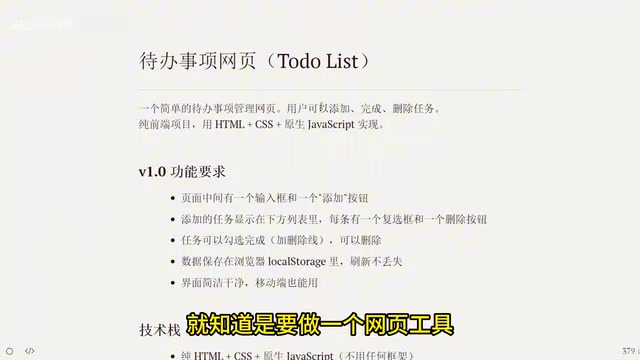
Section 2: Feature Requirements
List feature points with bullet points, clearly stating what users can do for each item. This is the most important section in CLAUDE.md, because all your product ideas and feature requirements live here. After reading this section, Claude Code will proactively check whether any key features are missing when generating code.
When your product iterates to the point where there are many feature requirements, you can put the detailed version in a separate file, such as docs/requirements.md or docs/prd.md, and use @ references for progressive inclusion:
## Feature Requirements
@docs/prd.md
This @ reference syntax is a "progressive context loading" strategy, similar to module import mechanisms in programming languages. Its design philosophy aligns with the core idea of RAG (Retrieval-Augmented Generation)—rather than stuffing all knowledge into the model, provide the right information at the right time, maintaining response quality while controlling token consumption. Keep only the three to five most essential feature points in CLAUDE.md itself.
Section 3: Tech Stack
Tell the LLM what tools to use. Stick to the essentials: only state what you're using, not why. If you omit this section, the LLM will automatically choose the technology combinations that appear most frequently in its training data—since the model learned from massive code repositories like GitHub during training, it has a strong statistical preference for "mainstream approaches," which often isn't the specific tech stack you want.
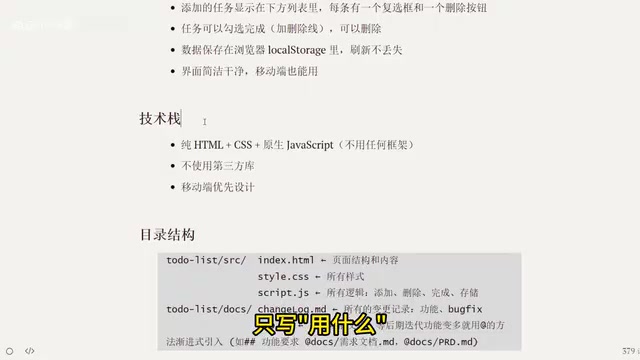
Section 4: Project Directory Structure
Tell the LLM where files go and what each folder is responsible for. A clear directory structure enables Claude Code to automatically place newly generated files in the correct location, preventing project structure chaos.
Section 5: Code Conventions
Tell the LLM how to write code—just state your personal preferences and default habits. For example:
- Use
constfor all variables,letwhen mutation is needed, never usevar - Function names use camelCase rather than snake_case, describing actions like
addTask
There's an important principle here: Claude is already a competent code developer—you only need to tell it the few things you care about most. You don't need to list every coding convention because it already knows basic standards. The core value of the code conventions section is "course correction"—LLMs have statistical preferences for mainstream patterns in their training data. When your project has non-mainstream preferences (such as specific naming prefixes or non-standard file organization), you must explicitly declare them here, otherwise the model will override your habits with "majority rule" patterns. What you should write are your special preferences—like disliking a certain word in naming, or having specific comment style requirements.
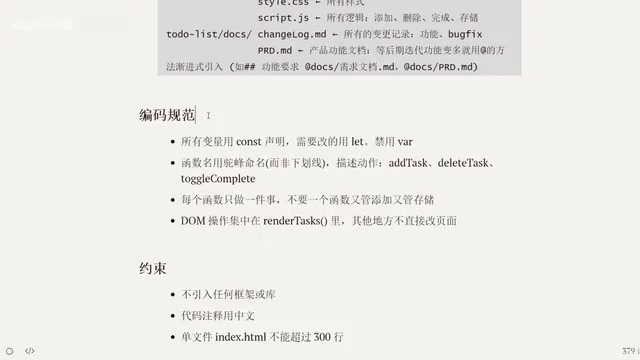
Section 6: Constraints
Tell the LLM what it cannot use, what it can use, and what hard limits exist when generating code. For example:
- A single-file
index.htmlmust not exceed 300 lines - Certain third-party libraries are prohibited
- Must be compatible with specific browser versions
Practical Results and Best Practices
A CLAUDE.md written following the six-section structure above totals approximately 38 lines—extremely concise.
The core logic of the entire file can be condensed into three questions:
| Dimension | Corresponding Sections | Core Question |
|---|---|---|
| What to build | Project Overview + Feature Requirements | Product Definition |
| What to build with | Tech Stack + Directory Structure | Technology Choices |
| How to build it | Code Conventions + Constraints | Execution Standards |
After writing a good CLAUDE.md, Claude Code transforms from a general-purpose assistant into a dedicated assistant that works according to your rules and habits. It understands your project context, follows your coding style, and knows where files should go and how code should be written.
Summary
CLAUDE.md is the "foundation" file when using Claude Code for project development. Its value lies not in how detailed it is, but in how precise it is. Within 200 lines and six sections, clearly communicate your project's most essential conventions, and you'll significantly reduce communication costs and rework during development.
For developers just starting with Claude Code, I recommend beginning with this six-section template and gradually adjusting and optimizing based on project needs during actual use. Remember: CLAUDE.md is not documentation written for humans—it's a project specification written for AI, conveying the most critical information with the fewest words.
Related articles
 Tutorials
Cursor + Codex Dual-IDE Collaboration: A Practical Methodology for Open-Source Project Customization
A complete methodology for open-source project customization based on real-world experience, detailing the Cursor+Codex dual-IDE workflow, seven-stage process, MVP validation, and AI source code reading techniques.
 Tutorials
Cursor Multi-Agent in Practice: Building a Full-Stack Next.js Blog in 50 Minutes
Build a full-stack blog in 50 minutes using Cursor IDE's multi-Agent mode with Next.js, Clerk auth, and Supabase. Learn the 4-phase AI Agent workflow and key integration pitfalls.
 Tutorials
Building an AI Software Factory from Scratch: A Cursor Engineer's Hands-On Experience with Multi-Agent Collaboration
Cursor engineer Eric shares practical insights on building an AI software factory: automation levels, guardrail design, parallel Agent management, and scaling to 1000+ Agents for 24/7 development.