Complete Tutorial: Using GPT to Automatically Configure Claude Opus 4
Complete Tutorial: Using GPT to Automa…
Using GPT 5.5 to automatically configure Claude Opus 4.6/4.7 and Max thinking mode in OpenCode
This article explains how to configure Claude Opus 4.6/4.7 and its Max thinking mode in OpenCode. Since Claude and OpenAI have completely different API protocols, a separate channel and key must be created in the API proxy. The core method leverages the already-configured GPT 5.5 high-intensity thinking mode to automatically complete model parameter configuration, Extended Thinking setup, availability probing, and config file writing through a single instruction—achieving an efficient "AI configuring AI" workflow.
Introduction
In the previous tutorial, we successfully configured GPT 5.4, 5.5, and their thinking modes through OpenCode. This article continues the series by introducing how to configure another top-tier model—Claude Opus 4.6/4.7—in OpenCode with Max thinking mode enabled. The entire configuration process will be handled automatically by GPT 5.5, truly achieving "using AI to configure AI."
Why Claude Needs a Separate Channel
In the API proxy's channel management, OpenAI and Claude (Anthropic) belong to two completely independent channel systems. This means the API Key previously created for GPT series models cannot be reused—you must create a new channel and key specifically for Claude.
This difference stems from fundamental distinctions at the API architecture level. OpenAI uses a standard REST API with /v1/chat/completions as its core endpoint, while Anthropic uses a completely independent API specification with /v1/messages as its core endpoint. The request body structure, authentication method (using the x-api-key header instead of Authorization: Bearer), and response format are all different. This is why the API proxy needs independent channel systems for both—the underlying protocol adaptation logic is entirely different and cannot share the same parsing pipeline.
From a cost perspective, Claude's pricing structure is quite friendly:
- Free input: Claude's input tokens incur no charges
- 95% cache hit rate: Output largely hits cache, with very little actual billing
- Advanced mode support: Including Opus 4.6, 4.7, and Max thinking mode
The 95% cache hit rate is not coincidental—it's the result of Anthropic's specifically designed Prompt Caching feature. This mechanism allows frequently repeated long contexts (such as system prompts, codebases, documentation) to be cached server-side. When subsequent requests hit the cache, cached tokens are billed at only 10% of the standard input price. In coding assistant scenarios, system prompts and code context often occupy a large number of tokens, resulting in extremely high cache hit rates—this explains why Claude Opus's actual cost in practice is far lower than what its listed price might suggest.
This pricing model makes Claude Opus an exceptionally cost-effective top-tier model choice.
Complete Claude Opus Configuration Walkthrough
Step 1: Create a New API Key in the Proxy
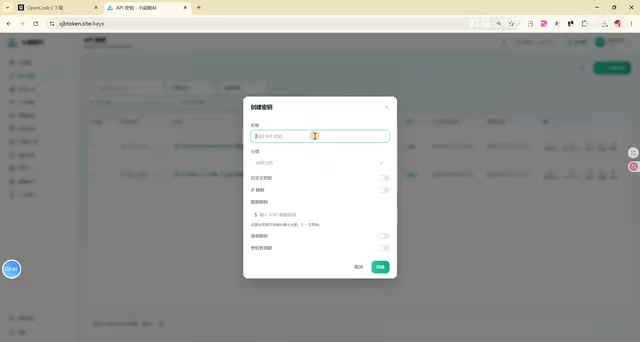
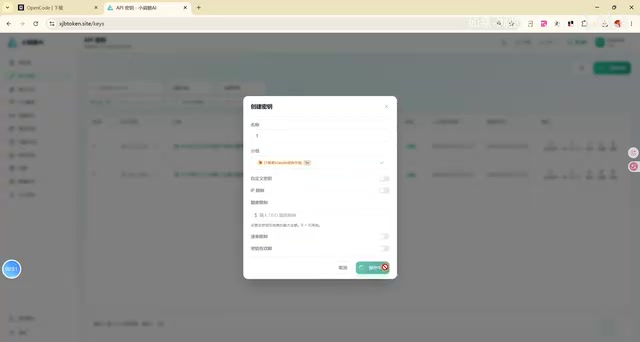
Go to the API proxy backend and create a new Key, selecting the "1x rate reverse group" as the group. This group setting ensures Claude models are called at the standard rate without additional rate multiplier charges.
Step 2: Let GPT Automatically Complete the Model Configuration
This is the core step of the entire tutorial. After enabling GPT 5.5's high-intensity thinking mode, give it a clear instruction:
"Please help me configure Claude Opus 4.6 and 4.7, set up thinking and max thinking modes, probe availability, and then get it displayed in the OpenCode desktop interface."
Provide the key and proxy URL along with the instruction.
After receiving the instruction, GPT will automatically list the task checklist and execute each item:
- Parse Claude API's calling format
- Configure model parameters for Opus 4.6 and 4.7
- Set up thinking and max thinking modes
- Probe model availability
- Write to OpenCode's configuration file
- Set environment variables
Notably, the Max thinking mode in Step 3 corresponds to Anthropic's official Extended Thinking feature. When enabled, the model outputs an internal reasoning process (<thinking> block) before generating the final answer. This reasoning is visible to users but not counted in the conversation context. Technically, this requires passing an additional thinking parameter object in the API request, specifying type: 'enabled' and budget_tokens (thinking budget, controlling reasoning depth). Max mode typically corresponds to a higher budget_tokens ceiling, suitable for complex mathematical derivations, multi-step code architecture design, and other tasks requiring deep reasoning—this is why thinking mode parameters need to be handled separately during configuration and cannot simply reuse the regular model's calling format.
GPT can accomplish all of this automatically because OpenCode's configuration file is essentially structured JSON text. For large models with code comprehension capabilities, reading, modifying, and writing such files falls within basic competency. Combined with Tool Use capabilities, AI can directly operate the file system and execute shell commands, fully automating a process that would otherwise require manual documentation review and editing. The entire process requires almost no human intervention—GPT handles all configuration details automatically.
Step 3: Environment Variables and Client Configuration
After the model is connected, GPT will continue configuring environment variables. It will also attempt to configure the CLI client (command-line tool), though this step isn't mandatory. If you only need to use it in the OpenCode desktop app, you can stop at this point, then close and restart OpenCode.
Configuration Verification and Testing
After restarting OpenCode, open the model selection dropdown menu and you'll see Claude Opus appearing in the list. Select the Opus 4.7 Max model, enter a simple test question "Who are you," and the model successfully returns a response confirming it's Claude from Anthropic.
At this point, the complete configuration of Claude Opus 4.6/4.7 Max in OpenCode is finished.
Core Philosophy: The AI-Managing-AI Workflow
There's a noteworthy concept behind this tutorial: Once you successfully configure one top-tier AI model, you can use it to complete the configuration of all remaining models.
The traditional approach to configuring each new model requires:
- Reading API documentation
- Manually writing configuration files
- Debugging parameter formats
- Testing connectivity one by one
Now, all these tedious knowledge-based tasks can be handed off to AI. This represents an emerging Agentic workflow paradigm: a successfully connected high-capability AI model (like GPT 5.5) acts as the "Orchestrator," responsible for planning tasks, calling tools, and handling exceptions; while the model being configured (like Claude Opus) becomes the "Executor." This layered architecture is known as a Multi-Agent system in the AI Agent field. Its core value lies in the fact that high-capability models possess sufficient contextual understanding and error recovery abilities to handle edge cases during configuration (such as API format differences, network probe failure retries, etc.)—and these cases are often the most time-consuming parts of manual configuration.
What you really need to focus on is no longer "how to configure" but "whether you can access these top-tier models in time."
This also reflects the current development trend in AI toolchains—the barrier to using tools is rapidly decreasing, and the ability to access resources is more important than mastering technical details. As model capabilities continue to improve, the "AI managing AI" workflow will become the standard paradigm for individual developers to boost efficiency.
Summary
Through this tutorial, we accomplished the following:
- Created a separate API Key and channel for Claude in the proxy (understanding the fundamental protocol-level differences from OpenAI channels)
- Used GPT 5.5's high-intensity thinking mode to automatically complete all configuration for Claude Opus 4.6/4.7 (including Extended Thinking parameter setup)
- Successfully called Claude Opus 4.7 Max in the OpenCode desktop app and passed verification
- Practiced the "using AI to configure AI" Agentic efficient workflow
Combined with the previous GPT 5.4/5.5 configuration tutorial, your OpenCode now has top-tier models from both the OpenAI and Anthropic camps, allowing you to flexibly switch between them based on different task scenarios.
Related articles
 Tutorials
Cursor + Codex Dual-IDE Collaboration: A Practical Methodology for Open-Source Project Customization
A complete methodology for open-source project customization based on real-world experience, detailing the Cursor+Codex dual-IDE workflow, seven-stage process, MVP validation, and AI source code reading techniques.
 Tutorials
Cursor Multi-Agent in Practice: Building a Full-Stack Next.js Blog in 50 Minutes
Build a full-stack blog in 50 minutes using Cursor IDE's multi-Agent mode with Next.js, Clerk auth, and Supabase. Learn the 4-phase AI Agent workflow and key integration pitfalls.
 Tutorials
Building an AI Software Factory from Scratch: A Cursor Engineer's Hands-On Experience with Multi-Agent Collaboration
Cursor engineer Eric shares practical insights on building an AI software factory: automation levels, guardrail design, parallel Agent management, and scaling to 1000+ Agents for 24/7 development.