Cursor: Build a Professional UI Design System in Three Steps — Complete Tutorial
Cursor: Build a Professional UI Design…
A three-step prompt workflow transforms design screenshots into AI-readable structured design system specs.
Senior designer Chris presents a three-step workflow solving the problem of cookie-cutter default styles in AI coding tools: first use GPT-5 to extract high-level design language from Dribbble design system screenshots into Design.json, then use Claude 4.5 to transform it into runnable React+Tailwind components, and finally use GPT-5 again to generate a complete design-system.json specification based on actual components. This structured design data can be seamlessly reused across Cursor, Lovable, Bolt, and other tools, achieving consistently professional UI.
When developing apps with AI coding tools, are you constantly frustrated by "purple gradients" and cookie-cutter default styles? Senior product designer Chris shares a proven three-step prompt workflow that extracts styles from any design system screenshot, generates a structured design specification file, and enables AI coding tools to precisely replicate professional-grade UI.
Core Concept: Why You Can't Just Upload a Screenshot
Many people using AI coding tools habitually upload a nice-looking design screenshot and ask the AI to "imitate" it. But this approach has clear limitations — AI can only do surface-level pixel copying without understanding the systematic logic behind the design, such as spacing rules, color hierarchy, component variants, etc.
Chris's methodology is fundamentally different: first extract the design language, then describe it structurally, and finally generate a complete component specification. The output of this workflow isn't a replica of a single screenshot, but a complete, AI-readable design system document that can be reused in Cursor, Lovable, Bolt, or any other AI development tool.
Step One: Find the Right Design System Screenshot on Dribbble
The workflow starts with Dribbble — a professional designer portfolio community founded in 2009 with over 12 million monthly active users. The key isn't searching for "beautiful interfaces" but specifically searching for Design Systems.
What is a Design System? A design system is the core infrastructure of modern product design, pioneered by tech companies like Airbnb, Google (Material Design), and Apple (Human Interface Guidelines). It's not just a component library — it's a complete system encompassing design principles, visual language, interaction specifications, and code implementation. A mature design system ensures visual and interaction consistency across different platforms and team members. For AI coding tools, the structured nature of design systems makes them ideal "feed material" — compared to vague natural language descriptions, structured design specifications allow AI to understand design intent more precisely.
Searching for "Design System" or "UI Kit" on Dribbble yields numerous carefully crafted component collections from professional designers. These works typically feature clear visual hierarchy and systematic design logic, making them excellent source material for extracting design language. When choosing screenshots, several important principles apply:
- Avoid poster-style designs: These can skew AI's understanding of the design system
- Choose flat, component-clear screenshots: Where you can clearly see each individual component
- Avoid screenshots with decorative borders: Such as purple dashed borders — AI might incorporate these decorative elements into the style
- Ensure screenshots contain only UI components: Nothing beyond color palettes, typography, and layout
Once you find a suitable screenshot, copy it to your clipboard and prepare to process it in Cursor.
Step Two: Use GPT-5 to Analyze the Screenshot and Generate Design.json
Open Cursor, switch to the Agent view at the top, and enter chat interaction mode. For this step, select the GPT-5 model, as it excels at processing visual and interface elements.
Why GPT-5 over other models? Different large language models have significantly different capability strengths. GPT-5 (OpenAI) excels in multimodal visual understanding and high-level concept synthesis, capable of identifying design intent, color emotion, and style tone from images — ideal for "describe what you see" tasks. This capability differentiation based on training data and architecture differences is the core reason for switching models at different steps in the workflow.
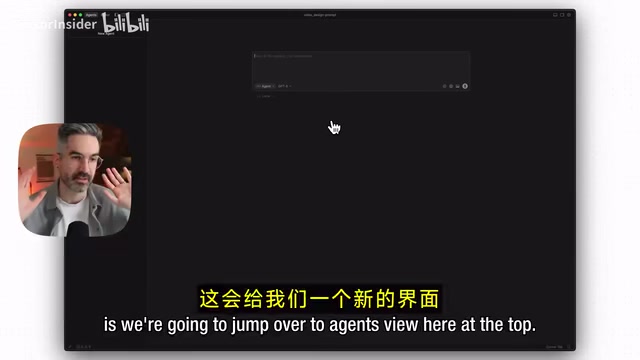
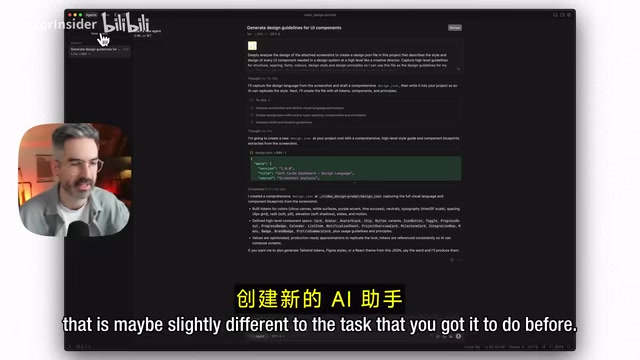
Paste the screenshot into the conversation, then enter the first prompt. The core instruction is:
Deeply analyze the screenshot design and generate a Design.json file. From the high-level perspective of a creative director, describe the style and design of each design system component. Write only the big picture — don't nail down every design detail. Summarize high-level guidelines about structure, spacing, typography, colors, design style, and principles.
Why "write only the big picture"? Chris explains: if you ask AI to reproduce all details from a single screenshot, it tends to generalize and fill information gaps on its own, using default basic styles where there isn't enough information. Establishing a high-level description first, then refining gradually, produces better results.
Why store design specifications in JSON format? JSON (JavaScript Object Notation) is a lightweight data interchange format with multiple advantages: AI models can parse JSON key-value pairs with extremely high precision, avoiding the ambiguity of natural language; JSON files can be directly referenced by code, enabling synchronization between design variables and code; and it facilitates version control (Git) and team collaboration. Industry-standard design token specifications (such as Style Dictionary and the Design Tokens W3C specification) also use JSON as their core format — this workflow's output aligns closely with industry standards.
The generated Design.json file contains structured design information: brand tone (e.g., "optimistic, clear, useful"), design language (e.g., "soft, rounded white interface with dry orange backgrounds"), design principles (e.g., "soft over sharp, spacious layouts"), foundational styles (border radius, grid system, primary colors), etc.
Step Three: Build a Visual Component Showcase Page
After confirming the Design.json content, create a new Agent conversation (this is a good habit — always clear conversation history when starting a new task), and switch to the Claude 4.5 model — it excels at coding tasks.
Why switch to Claude 4.5 here? Claude 4.5 (Anthropic) is more precise in code generation, instruction following, and long-context processing, capable of transforming abstract design descriptions into runnable, high-quality code. This "GPT-5 for visual understanding, Claude for code generation" division of labor is one of the current best practices in AI-assisted development, fully leveraging the training advantages of different models.
Why create a new Agent conversation for each new task? The "context window" of large language models refers to the maximum amount of text the model can process in a single conversation. When conversation history becomes too long, earlier information gets truncated or down-weighted, causing AI to "forget" key instructions. More importantly, context from different tasks can interfere with each other — conversation history from analyzing screenshots can affect judgment in code generation tasks. Creating an independent Agent conversation for each new task is essentially a "context isolation" strategy, ensuring the AI works in the clearest possible state at each step.
Enter the second prompt:
Create a simple interface showcasing all UI components from the design system, placing them on a simulated dashboard, following the design style defined in Design.json. Build with React and Vite, convert all styles to Tailwind CSS. Run the project locally.
Why choose the React + Vite + Tailwind tech stack? React is a frontend UI framework developed by Meta, known for its component-based development model, currently holding the #1 market share among frontend frameworks. Vite is a next-generation frontend build tool developed by Vue.js creator Evan You, offering build speeds over 10x faster than traditional Webpack. Tailwind CSS is a "utility-first CSS" framework that dramatically improves development efficiency by writing styles directly in HTML through predefined utility classes. This combination has become the de facto standard tech stack for AI coding tools — mainstream tools like Lovable, Bolt, and v0 all output code based on this combination by default. Choosing this tech stack means the design system can migrate frictionlessly between different AI tools.
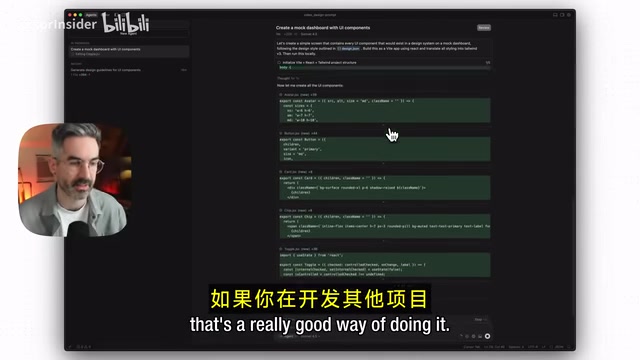
Cursor automatically scaffolds the project, generating all code and design components. The final result in the browser shows a complete component showcase: various heading styles, buttons with hover effects (primary, secondary, tertiary), cards with icons, avatar groups, progress bars, calendar views, and more. Compared to the original screenshot, the style is highly consistent.
Step Four: Generate the Complete Design System Specification Document
Create a new Agent again, switch back to GPT-5, and enter the third prompt:
Create a design folder in the project and generate a design-system.json file that describes in detail the design specifications for all components and styles in the application. The purpose of this file is to give AI a comprehensive guide to follow when developing new features.
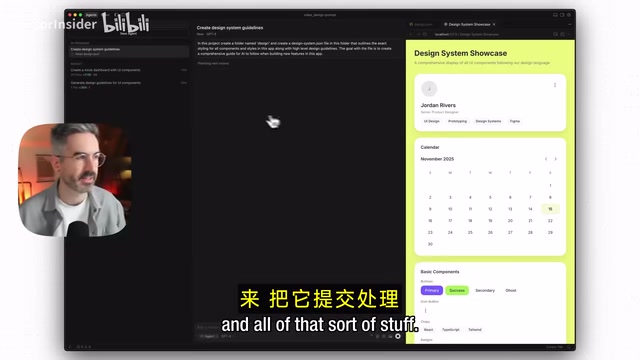
The final design-system.json file spans 646 lines and contains extremely detailed information:
- Brand information and metadata: Tone, keywords, design language
- Complete definitions for every component: All variants, states, style parameters
- Tailwind-specific style code: Directly applicable to projects
- Usage guidelines: Notes on structure, spacing, typography, colors, accessibility, animations, interactions, etc.
The value of this document lies in the fact that it's not just a one-time design description, but a continuously evolving design infrastructure — every time a new feature is added, AI can reference it to maintain visual consistency. This is exactly the same logic that companies like Airbnb and Shopify use to maintain their internal design systems.
How to Reuse This Design System Across Different AI Tools
This design system can be applied in highly flexible ways:
Continue development in Cursor: Directly reference the design-system.json file — AI will automatically follow the design specifications when developing new features. You can also use Cursor's built-in browser to select specific elements for fine-tuning while updating the design system file to stay in sync.
Migrate to Lovable or Bolt: Copy the design-system.json content into these tools' knowledge bases, and they'll automatically apply this style when creating content. If you have an existing project that needs a makeover, use the instruction "Redesign my app interface, keep functionality unchanged, but strictly follow the new design specifications."
Start a new project from scratch: You can include the design system in your initial prompt, though Chris recommends not providing too much text at once to avoid confusing the AI about priorities. A better approach is to add it to the knowledge base first, letting AI reference it automatically when needed.
Methodology Summary
The essence of this three-step process is transforming visual design into structured data:
- Extract: Extract high-level design language and principles from design screenshots (GPT-5 excels at visual understanding)
- Build: Transform design language into runnable Tailwind component code (Claude 4.5 excels at coding)
- Standardize: Generate complete design system documentation based on actual components (GPT-5 excels at synthesis and summarization)
This is far more powerful than simply uploading a screenshot for AI to imitate — what you get isn't a one-time replica, but a continuously evolving design infrastructure. In subsequent development, every new feature addition maintains visual consistency — that's what a professional-grade application should look like.
Key Takeaways
- Through a three-step prompt workflow, extract styles from Dribbble design system screenshots and generate a structured Design.json file as the design foundation for AI coding
- Strategically combine AI models: GPT-5 handles visual analysis and design language extraction, Claude 4.5 handles code generation, leveraging each model's strengths
- The generated design-system.json file contains 646 lines of detailed specifications, covering all component definitions, Tailwind style code, and usage guidelines — seamlessly portable across Cursor, Lovable, Bolt, and other tools
- The core philosophy is transforming visual design into structured data, enabling AI to not just imitate screenshots but understand and follow complete design system rules
- Creating a new Agent conversation for each new task is an important best practice — "context isolation" prevents conversation histories from interfering with each other, ensuring output quality
Related articles
 Tutorials
Cursor + Codex Dual-IDE Collaboration: A Practical Methodology for Open-Source Project Customization
A complete methodology for open-source project customization based on real-world experience, detailing the Cursor+Codex dual-IDE workflow, seven-stage process, MVP validation, and AI source code reading techniques.
 Tutorials
Cursor Multi-Agent in Practice: Building a Full-Stack Next.js Blog in 50 Minutes
Build a full-stack blog in 50 minutes using Cursor IDE's multi-Agent mode with Next.js, Clerk auth, and Supabase. Learn the 4-phase AI Agent workflow and key integration pitfalls.
 Tutorials
Building an AI Software Factory from Scratch: A Cursor Engineer's Hands-On Experience with Multi-Agent Collaboration
Cursor engineer Eric shares practical insights on building an AI software factory: automation levels, guardrail design, parallel Agent management, and scaling to 1000+ Agents for 24/7 development.