Decoding LLM Naming Conventions: Parameter Counts, Quantization Formats & VRAM Requirements Quick Reference
Decoding LLM Naming Conventions: Param…
A systematic guide to decoding LLM naming conventions and estimating VRAM requirements for model selection.
This article systematically explains the meaning of each field in HuggingFace LLM names (model series, parameter count, fine-tuning type, quantization strategy, etc.) and provides practical VRAM estimation methods: parameter count × 2 for FP16, parameter count ÷ 1.5~1.75 for 4-bit quantization. It emphasizes that KV Cache from context length is the most overlooked VRAM killer, and that MOE models must be estimated by total parameter count. Finally, it compares GGUF, AWQ, IMatrix, and NVFP4 quantization strategies with practical model selection advice by VRAM tier.
Faced with model names on HuggingFace that are often dozens of characters long, many people are confused: What does 32B mean? What's the difference between AWQ and GGUF? Can my GPU even run this? This article systematically breaks down LLM naming conventions and provides a practical VRAM estimation method to help you determine whether your hardware is sufficient before downloading.
Dissecting LLM Names: What Each Field Means
Taking Qwen3-32B-Instruct-AWQ as an example, let's break it down segment by segment:
- Qwen3: Model series and generation — Alibaba's Qwen (Tongyi Qianwen) third generation
- 32B: Parameter count, B = Billion, so 32B means 32 billion parameters
- Instruct: Instruction-tuned version, indicating the model has been optimized for conversational scenarios
- AWQ: Quantization strategy, determining the model's precision and size
Now let's look at a more complex community model name: DavidYu-Qwen3.6-40B-Cloud4.6Opus-Deckard-Uncensored-Thinking-NearCode-IMatrix-Max-GGUF. Here's what each field means:
| Field | Meaning |
|---|---|
| DavidYu | Creator name |
| Qwen3.6 | Base model architecture |
| 40B | Parameter count (expanded from 27B) |
| Cloud4.6Opus | Teacher model used for distillation |
| Deckard | Architecture enhancement strategy (homage to the Blade Runner character) |
| Uncensored | Content censorship restrictions removed |
| Thinking | Supports reasoning/thinking mode |
| NearCode | Enhanced coding capabilities |
| IMatrix | Importance matrix quantization method |
| Max-GGUF | High-quality GGUF packaging format |
Once you master this naming convention, you can quickly understand the core characteristics of any LLM name you encounter.
Parameter Count & VRAM: How Much GPU Do You Actually Need
VRAM Estimation at FP16 Original Precision
For unquantized FP16 models, VRAM estimation is straightforward: Parameter count × 2 = Required VRAM (GB). For example, a 7B model needs about 14GB, and a 32B model needs about 64GB.
The "×2" comes from the FP16 format itself: each parameter is stored as a 16-bit (2-byte) floating-point number, so 1B (one billion) parameters occupy approximately 2GB of VRAM. FP16 is the mainstream precision for deep learning training and inference today — it halves the VRAM usage of FP32 while retaining sufficient numerical precision. However, this precision level is essentially impractical for individual users, so let's focus on post-quantization requirements.
4-bit Quantization VRAM Quick Reference
Quantization is a technique that compresses model weights from high-precision floating-point numbers to low-precision integer representations. 4-bit quantization (Q4) is currently the most popular "sweet spot" — each parameter occupies only 0.5 bytes, reducing size by approximately 75% compared to FP16, while performance loss is typically only around 10%. Different quantization algorithms (AWQ, GPTQ, GGUF, etc.) are all essentially solving the same problem: finding the optimal balance between compression ratio and precision loss. The estimation formula is: Parameter count ÷ 1.5~1.75 ≈ Required VRAM (GB) (excluding context).
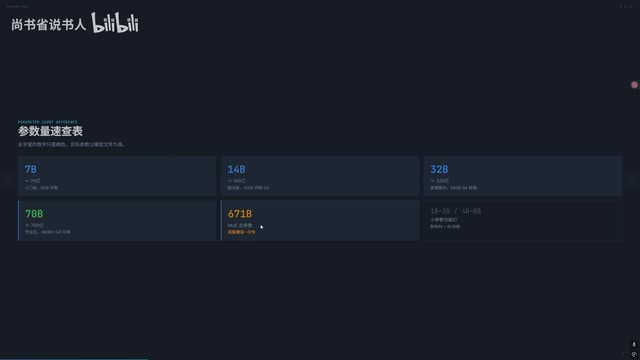
| Model Size | Q4 Minimum VRAM (excluding context) | Recommended VRAM |
|---|---|---|
| 7B | 4GB | 8GB |
| 14B | 8GB | 12GB |
| 27B | ~15.5GB | 24GB |
| 32B | 18GB | 24GB+ |
| 70B | 40GB+ | 48GB |
It's crucial to emphasize that the numbers above do not include context memory usage. In practice, the VRAM consumption of context is often severely underestimated.
Context Length: The Most Overlooked VRAM Killer
Context length directly affects how much conversation history the model can "remember." Understanding this requires knowledge of the KV Cache mechanism in the Transformer architecture: during autoregressive generation, the model needs to access the attention Key-Value Pairs of all historical tokens for each new token generated. KV Cache stores these intermediate computation results in VRAM to avoid redundant calculations, but the cost is that VRAM usage grows linearly with context length. Its approximate usage is: number of layers × number of attention heads × head dimension × sequence length × 2 (one each for K and V) × precision bytes.
Taking a 32B Q4 model as an example: the model itself occupies about 18GB, but if you enable 128K context, the KV Cache alone requires an additional ~30GB — more than the model itself!
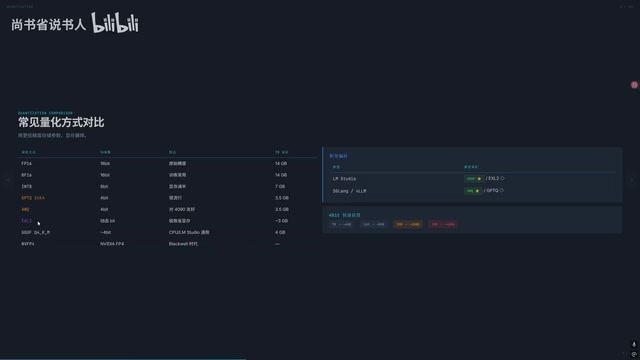
In practice, using an RTX 5090 (32GB VRAM) to deploy Qwen 3.6's 27B model, the context can only be stretched to about 60K. If you need Agentic workflows or long document processing, you'll need at least 50-100K context, which puts enormous pressure on VRAM.
Fortunately, tools like LM Studio support offloading KV Cache to system RAM, which can alleviate VRAM shortages to some extent.
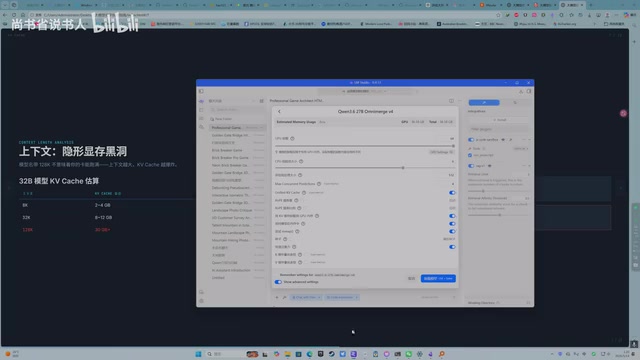
The prerequisite is that your system RAM must be large enough — if deploying a 32B model, it's recommended to have at least 64GB of RAM as backup.
The VRAM Trap of MOE Models
Mixture of Experts (MOE) is an architecture that splits a model into multiple "expert" sub-networks, with a gating network dynamically deciding which experts to activate for each token. This design was first validated at scale by Google in the Switch Transformer and later widely adopted by DeepSeek, Alibaba, and others. Its core advantage: using total parameter counts far exceeding a single model to achieve greater knowledge capacity, while only activating a small portion during each inference pass — so computational cost doesn't scale linearly with total parameters.
Many people misunderstand MOE models. For example, Qwen 3.6's 35B MOE model only activates 3B parameters per inference, and DeepSeek R1's 671B model only activates 37B.
But this doesn't mean you only need VRAM corresponding to 3B or 37B.
The reason is simple: the model needs to "select" which parameters to activate from the full set, and this selection process requires all parameters to be accessible in high-speed storage at all times. Therefore, when deploying MOE models, you must estimate VRAM requirements based on total parameter count, not activated parameter count.
While some in the community are researching solutions to place inactive parameters in RAM or even on SSDs, the speed penalty is still significant and not recommended as a standard approach.
Quantization Strategy Comparison: GGUF, AWQ, or EXL2
Overview of Major Quantization Methods
| Quantization Method | Compatible Tools | Characteristics |
|---|---|---|
| GGUF + Q4_K_M | LM Studio / Ollama | Most universal, most common on HuggingFace |
| AWQ / GPTQ | LM Studio / Ollama | Widely supported, but average precision |
| EXL2 | vLLM / SGLang | Significant VRAM savings, but not supported by Ollama/LM Studio |
| NVFP4 | Blackwell architecture exclusive | A game-changer for 50-series GPUs, precision approaching FP16, 40-50% faster |
| IMatrix | GGUF format | Importance matrix quantization, precision savior for Dense models |
IMatrix Quantization: The Precision Savior for Dense Models
IMatrix (Importance Matrix Quantization) is currently the most noteworthy quantization method for Dense models. Its principle is similar to APEX quantization for MOE models: by running inference on a calibration dataset, it measures the importance of activations across model layers, applying high-precision quantization (e.g., Q8) to critical layers and low-precision quantization (e.g., Q4) to peripheral layers. This "differentiated precision allocation" strategy maintains overall size at Q4 levels while bringing performance significantly closer to the FP16 original — essentially spending the limited "precision budget" where it matters most.
If you're downloading a 27B Dense model, prioritize versions with the IMatrix label.
Must-Read for 50-Series GPU Owners: NVFP4 Quantization
NVFP4 is a 4-bit floating-point quantization format specifically designed by NVIDIA for the Blackwell architecture (RTX 50 series). Unlike traditional INT4 integer quantization, FP4 retains the exponent bits of floating-point numbers, enabling more precise representation of weight dynamic ranges — resulting in far less precision loss than INT4. More critically, the Blackwell architecture natively integrates FP4 tensor computation units at the hardware level, significantly boosting throughput compared to FP16 — this is the underlying reason for the "40-50% speed improvement."
If you own an RTX 5090 or other Blackwell architecture GPU, NVFP4 quantization is the top choice. But never use it on non-50-series GPUs: on architectures lacking native hardware support, FP4 operations degrade to software emulation, not only failing to provide speed advantages but also incurring additional overhead from format conversion — resulting in high VRAM usage, poor precision, and zero benefits.
Choosing the Right Model by VRAM Tier
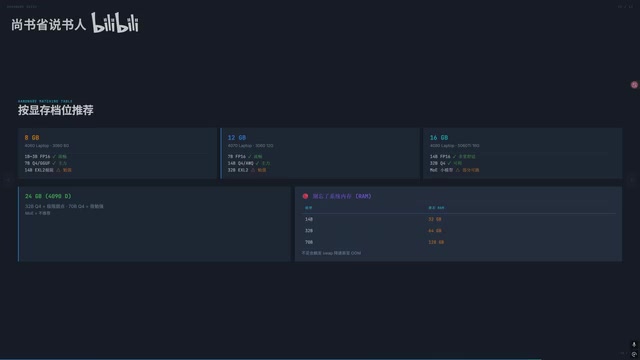
- 8GB VRAM: Can only run 7B and smaller models, limited experience
- 12GB VRAM: Can attempt 14B Q4, but context will be quite short
- 16GB VRAM: 14B Q4 is comfortable, 32B is essentially not feasible
- 24GB VRAM: 32B Q4 is usable but context-limited, recommend pairing with 64GB RAM
- 32GB VRAM (5090): 32B Q4 + 32K context, or 27B + 60K context
A practical tip: Don't sacrifice context length just to run a larger model. A 14B model with ample context often performs better in real-world use than a 32B model that's starved for context.
Summary
Understanding LLM naming conventions and VRAM estimation methods helps you make informed decisions before downloading, avoiding wasted time and bandwidth. Remember three core principles: parameter count determines base VRAM requirements, quantization strategy determines the balance between precision and size, and context length (along with the underlying KV Cache mechanism) is the most easily overlooked VRAM killer. Choose models of appropriate size and quantization method based on your hardware capabilities to achieve the best user experience.
Related articles
 Tutorials
Cursor + Codex Dual-IDE Collaboration: A Practical Methodology for Open-Source Project Customization
A complete methodology for open-source project customization based on real-world experience, detailing the Cursor+Codex dual-IDE workflow, seven-stage process, MVP validation, and AI source code reading techniques.
 Tutorials
Cursor Multi-Agent in Practice: Building a Full-Stack Next.js Blog in 50 Minutes
Build a full-stack blog in 50 minutes using Cursor IDE's multi-Agent mode with Next.js, Clerk auth, and Supabase. Learn the 4-phase AI Agent workflow and key integration pitfalls.
 Tutorials
Building an AI Software Factory from Scratch: A Cursor Engineer's Hands-On Experience with Multi-Agent Collaboration
Cursor engineer Eric shares practical insights on building an AI software factory: automation levels, guardrail design, parallel Agent management, and scaling to 1000+ Agents for 24/7 development.