Ollama + Gemma 4 Local Codex Setup: Complete Guide to Zero-Cost AI Programming
Run Gemma 4 locally via Ollama to use Codex's full AI coding features at zero cost.
This guide shows how to replace paid OpenAI Codex with Ollama + Gemma 4. Ollama runs open-source models locally with an OpenAI-compatible API, while Gemma 4 is Google's strongest open-source model (Apache 2.0 license, 2B to 31B sizes, 128K context window). Setup requires only installing Ollama, downloading a model, and running one command to integrate with Codex—turning $20-200/month into zero-cost local usage.
The Rise of Codex and the Paywall Problem
OpenAI Codex has quietly become one of the hottest coding tools available. As of April this year, 3 million people use Codex weekly—a 5x increase in just three months. Sam Altman even posted about resetting Codex usage limits, with the product consistently adding over a million new users per week.
However, powerful features come with a hefty price tag. Codex is primarily offered through paid services: the cheapest entry point is ChatGPT Plus at $20/month (which includes a small Codex usage quota), followed by the Pro plan at $100/month (5x the Plus quota), and the flagship tier at $200/month (20x the Plus quota).
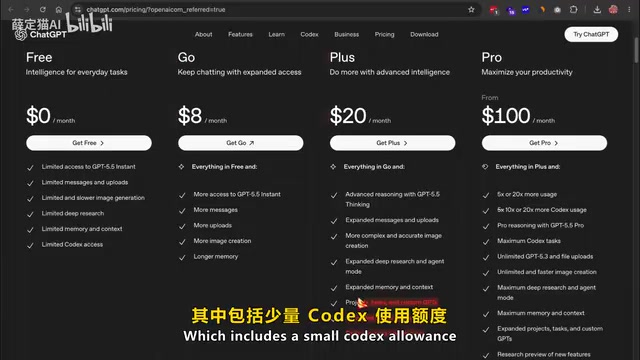
For indie developers and hobbyists, most power users burn through their free quota within a week. So is there a way to use Codex's full functionality at zero cost? The answer is: Ollama + Gemma 4.
What Is Ollama: A Local Runtime for Open-Source Models
Ollama is a local runtime environment for open-source models. Once installed, it downloads models from its model library and exposes an OpenAI-compatible API endpoint on your local machine (port 11434). This is where the magic lies—because Ollama mimics OpenAI's API format, Codex can communicate with it as if it were talking to OpenAI's servers, except all data never leaves your local hardware.
The Technical Principle Behind OpenAI API Compatibility
The key reason Ollama can seamlessly replace OpenAI's cloud service is that it implements an HTTP interface fully compatible with the OpenAI Chat Completions API. OpenAI's API specification has become the de facto standard in the LLM space—virtually all major tools and frameworks (including LangChain, LlamaIndex, Continue, etc.) integrate based on this standard. When Ollama starts locally, it exposes a REST API on localhost:11434 that accepts JSON request bodies in the same format as OpenAI (including parameters like model, messages, temperature, etc.) and returns responses in the same format. This means any client originally designed to call OpenAI's servers can immediately switch to local inference simply by changing the API address from api.openai.com to localhost:11434, without modifying any business logic code. This "API compatibility" design philosophy enables the entire open-source ecosystem to build upon the standard OpenAI established, rapidly achieving tool chain interoperability.
Ollama's model library contains hundreds of models, including Gemma 4, DeepSeek, Llama 4, Mistral, and more. You can easily switch between models with a single command. Codex uses whichever model you specify, so this setup works with all models.
Gemma 4: Google's Most Powerful Open-Source Coding Model
A Major Licensing Breakthrough
Gemma 4 is Google's most powerful open-source release to date. The biggest change is its license—previous Gemma versions used Google's custom restrictive license, which gave enterprise legal teams pause. Gemma 4 adopts the Apache 2.0 license, offering complete commercial freedom with no usage restrictions. You can freely develop and ship products based on it.
The Apache 2.0 license is one of the most permissive licenses in the open-source software world, maintained by the Apache Software Foundation. Compared to the Google custom license used by previous Gemma versions, the core difference with Apache 2.0 is: it allows anyone to freely use, modify, distribute, and commercialize the model in any scenario, with the only requirement being to retain the original copyright notice and license text. This means enterprises can embed Gemma 4 directly into commercial products without worrying about user count limits, revenue threshold restrictions, or specific use-case prohibitions. By comparison, Meta's Llama series, while also called "open source," has community license restrictions for companies with over 700 million monthly active users. The adoption of Apache 2.0 eliminates enterprise legal concerns and significantly reduces compliance costs for commercial deployment—which is why important open-source projects like Kubernetes and TensorFlow also chose this license.
Four Sizes for Different Hardware Requirements
The series comes in 4 sizes:
- 2B: The smallest, with approximately 2 billion active parameters, requiring less than 1.5GB of RAM, designed for phones and lightweight hardware
- 4B: Approximately 4 billion active parameters, suitable for edge devices and laptops
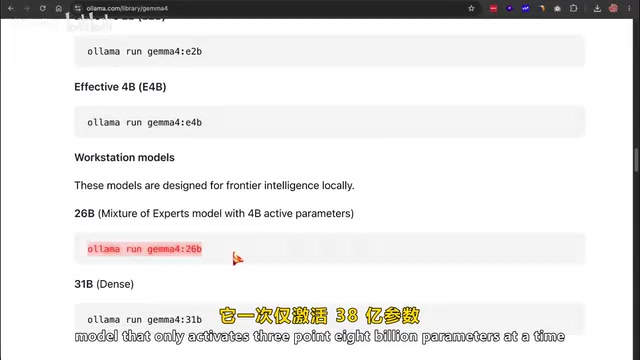
- 26B: Mixture of Experts (MoE) model, activating 3.8 billion parameters at a time, very friendly to consumer GPUs
- 31B: Dense model, currently ranked third on the Erna AI leaderboard
Mixture of Experts (MoE) Architecture Explained
Gemma 4's 26B version uses the Mixture of Experts (MoE) architecture, one of the most important efficiency breakthroughs in the large model space in recent years. Traditional dense models activate all parameters during every inference pass, while MoE architecture splits the model's feed-forward network layers into multiple "expert" sub-networks, with a gating network selectively activating only a small subset of experts during each inference. For example, while the 26B model has a total of 26 billion parameters, it only activates 3.8 billion per inference pass, making its actual computational overhead and VRAM usage far lower than a dense model of equivalent parameter scale. This architecture was first validated at scale by Google in the Switch Transformer paper and has since been widely adopted by models like Mixtral and DeepSeek-V2. The core advantage of MoE is: the model can have greater knowledge capacity (due to more total parameters) while maintaining lower inference costs (since only a small portion of parameters are used each time)—this is exactly why the 26B model can run smoothly on consumer GPUs.
Core Technical Highlights
Google uses a technique called "per-layer embedding" that results in far less computation during actual inference than the theoretical parameter count would suggest, so these smaller models punch well above their weight class. All Gemma 4 models natively support multimodal input (text, images, up to 30 seconds of audio), feature a 128K token context window, support over 40 languages, and have native function calling capabilities and structured output—exactly the behavior needed for agentic coding.
A 128K token context window means the model can process approximately 100,000 English words or about 200,000 Chinese characters in a single conversation. In programming scenarios, this roughly equates to reading an entire medium-sized project's codebase at once (approximately 3,000-5,000 lines of code plus related documentation). The context window size directly determines the practicality of an AI coding assistant—if the window is too small, the model cannot understand cross-file dependencies and overall project architecture; if the window is large enough, the model can make precise code modifications and refactoring based on a global understanding of context. Early GPT-3.5 had only a 4K token context window, which severely limited its ability to handle complex programming tasks. The 128K window enables Gemma 4 to simultaneously process multiple source files, test files, and configuration files, achieving true project-level code understanding and generation.
The 31B model scores 89.2% on the M2026 benchmark, with a code model Elo rating of approximately 2500, reaching the level of professional competitive programmers.
Complete Ollama + Codex Installation and Configuration Tutorial
Step 1: Install Codex
First, install the Codex desktop application, or use Codex CLI via NPM if you prefer working exclusively in the terminal. Both methods support Ollama integration.
Step 2: Install Ollama
Download the installer from the official website or install via curl in the terminal. Make sure the version is 0.24 or newer, as the Codex launcher integration requires the latest version. After installation, let Ollama run in the background—you should see an icon in your menu bar/system tray.
Step 3: Download the Gemma 4 Model
Open your terminal and enter the following command to start the download:
ollama pull gemma4:2b
The 2B model file is small, only two to three GB.
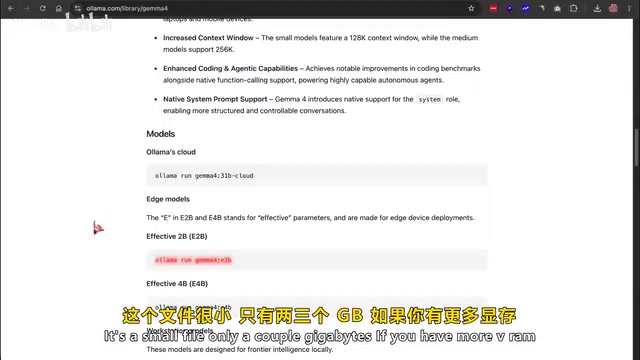
If you have more VRAM and want better output, you can choose:
- 14B: Close to 9GB
- 26B/31B: Requires a dedicated GPU with 16GB to 24GB of VRAM
If you're unsure which models your hardware can run, visit the "Can I Run It Locally" website and enter your hardware specs for recommendations.
Step 4: Integrate Ollama with Codex
The simplest method is to use the one-line launcher that Ollama adds to your terminal:
ollama run codex
This command opens a selector that detects all locally installed models and lists them. Select the Gemma 4 model from the list, press Enter, and the Codex application will launch with that model loaded.
Once Codex opens, you'll see a small Ollama badge indicating local mode is active. From here on, the entire Codex experience is the same—you can have it perform generative coding tasks, edit files, use the built-in browser, run terminal commands—all features are available.
Local AI Programming: Real-World Demo
In the demo, I used a simple prompt to have Gemma 4 (2B version) build a SaaS landing page, including a header, feature grid, pricing cards, and call-to-action.
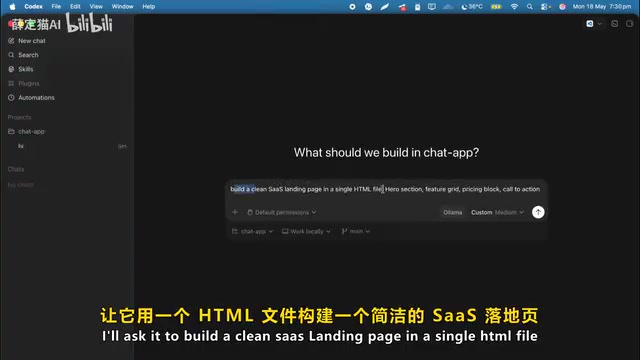
Processing speed was approximately 30 to 40 tokens per second, fast enough for iterative coding.
Token Generation Speed and Developer Experience
A generation speed of 30-40 tokens per second is a critical experience metric in local inference scenarios. One token corresponds to approximately 0.75 English words or 0.5 Chinese characters, so 30-40 tokens/s means outputting about 22-30 English words per second, close to human fast-reading speed. In programming scenarios, a typical line of code contains about 10-15 tokens, so this speed means generating 2-4 lines of code per second. For interactive coding, this speed is sufficiently fluid—developers can watch code generate line by line in real time, judge whether the direction is correct, and interrupt at any point. For comparison, OpenAI's cloud-based GPT-4o typically achieves 80-100 tokens/s, but this relies on high-end GPU clusters on remote servers. Local inference speed is primarily limited by GPU memory bandwidth and compute capability, and using quantization techniques (such as Q4_K_M) can significantly improve inference speed with only a minor sacrifice in precision.
The generated page includes: a header with gradient background, three-column feature showcase, clean pricing cards, and a footer with social links. CSS styles are inlined, and responsive breakpoints are already set.
For a model with only 2 billion active parameters, running locally and offline on consumer hardware and producing results like this—that's a real achievement. Of course, it doesn't match Claude Opus quality, but for a free local deployment with no billing model, this workflow is perfectly adequate for daily use.
How to Restore Cloud Codex
If you want to remove the local integration and go back to using regular cloud Codex, run this in your terminal:
ollama codex restore
This resets the configuration and returns you to your original ChatGPT plan.
Summary: Best Practices for Zero-Cost AI Programming
Open-source models like Gemma 4, combined with Ollama and the Codex desktop app, let you build a fully autonomous, locally-running programming stack—private, free, with no rate limits, and model switching requires just one command. When better models are released, simply swap them in and your workflow remains completely unaffected.
The core value of this approach: converting a recurring $20-$200/month expense into a one-time hardware investment with zero marginal cost usage. For developers on a budget who need high-frequency access to AI coding tools, this is currently the most pragmatic choice.
Key Takeaways
- Ollama mimics the OpenAI API format, enabling Codex to seamlessly connect with locally-running open-source models for zero-cost AI programming
- Gemma 4 uses the Apache 2.0 license, offers four sizes from 2B to 31B, with the 31B model ranking third on AI leaderboards
- Complete setup requires only installing Ollama, downloading a model, and running a single command to integrate with Codex—all features work normally
- Even the smallest 2B model can produce usable coding output at 30-40 tokens per second on consumer hardware
- This approach converts a recurring $20-$200/month expense into a zero marginal cost local experience, with model switching requiring just one command
Related articles
 Tutorials
Cursor + Codex Dual-IDE Collaboration: A Practical Methodology for Open-Source Project Customization
A complete methodology for open-source project customization based on real-world experience, detailing the Cursor+Codex dual-IDE workflow, seven-stage process, MVP validation, and AI source code reading techniques.
 Tutorials
Cursor Multi-Agent in Practice: Building a Full-Stack Next.js Blog in 50 Minutes
Build a full-stack blog in 50 minutes using Cursor IDE's multi-Agent mode with Next.js, Clerk auth, and Supabase. Learn the 4-phase AI Agent workflow and key integration pitfalls.
 Tutorials
Building an AI Software Factory from Scratch: A Cursor Engineer's Hands-On Experience with Multi-Agent Collaboration
Cursor engineer Eric shares practical insights on building an AI software factory: automation levels, guardrail design, parallel Agent management, and scaling to 1000+ Agents for 24/7 development.